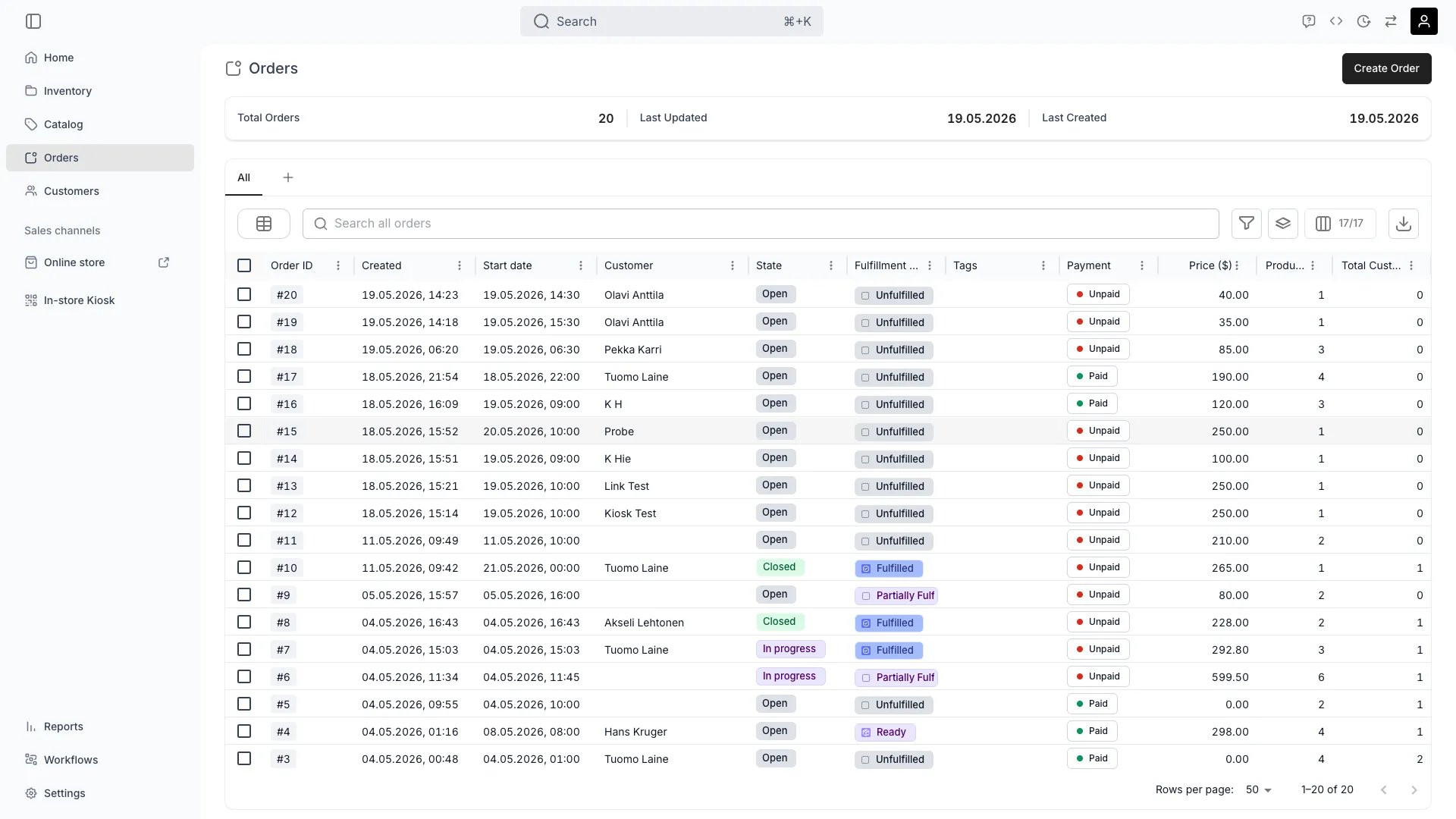
The Orders view provides a unified interface for managing all types of orders across your business, from sales and rentals to buybacks and services.
View All Orders
Browse and manage all in one place, regardless of type or channel.Read more: Order Lifecycle
Filter by purchase type
The Purchase Types column shows which types of line items each order contains — Booking, Subscription, Sale, or Buyback — displayed as chips. Filter the column to find all orders that include a specific purchase type.Read more: Order Types
Calendar view
The Layout control to the left of the search box opens a menu of layouts — the grid, and a calendar of pickups and returns. It is disabled while the table is grouped, so clear the grouping to switch layouts.The calendar plots the orders currently loaded in the table, which means your filters and the page you are on decide what appears on it. It opens on Grid Week; Grid Month, Grid Day, List Day, List Week and List Month are the other views, and Today with the arrows beside it moves the range.Each event groups the pickups or returns falling in the same slot, and its title counts the orders and stock items behind it. Pickups carry a purple up arrow, returns a blue down arrow.Clicking an event opens a popup that lists one row per order and time:
Order reference · customer name on the top line. An order with no customer shows the reference alone.
Pickup or Return, the time, and the number of stock items on the second line.
A chevron marks the row as a link. Click it, or press Enter or Space, to open that order.
Scrolling the calendar or clicking outside the popup closes it.
Orders > calendar layout — an event popup
An order’s own Fulfillment & Return tab carries a second calendar, scoped to that one order.
Create Manual Orders
Create orders directly in the admin for in-person sales, phone orders, or special cases. The order is saved the moment you press Create Order — there is no draft form to submit.Read more: Take an order in admin
Manage Fulfillment
Track and manage order fulfillment, including item preparation, pickup, delivery, and returns.
Process Payments
Handle payment processing, refunds, and manage checkout links for customers.
Archive Orders
Archiving takes an order out of the table without deleting it, and is separate from closing.Archiving an open order closes it first, so the confirmation asks you to acknowledge that:
Checkout links stop working.
Scheduled payment collections stop.
Subscriptions are cancelled.
The order becomes read-only.
A selection mixing open and closed orders lets you archive only the closed ones instead.Archiving also revokes the order’s still-active checkout links: they move to Revoked on the Payment tab and tell the customer the link has been cancelled. A link that had already expired or been used keeps that state. Unarchiving returns an order to closed, but does not restore its links — issue a new one to collect again.Nothing is archived automatically. Review and restore archived orders in Settings → Archived assets.Read more: Archiving and Deletion
The Orders table includes the following columns. All columns support standard table features such as column visibility, pinning, and reordering.
Column
Filter
Sort
Description
Reference
Text
Yes
The order reference, formatted by your order numbering settings. Filtering matches the reference as text; sorting groups by prefix and then orders numerically, so A9 sorts before A10
Created
Date
Yes
When the order was created
Start date
Date
Yes
Start of the booked period
End date
Date
Yes
End of the booked period
Customer
Text
Yes
Customer name
Stage
Select
Yes
The lifecycle state the order sits in. A fresh account carries Open, In progress and Completed
Fulfillment state
Select
Yes
Fulfillment state: Unfulfilled, Partially fulfilled, Fulfilled, Partially returned, or Returned
Purchase types
Select
No
Purchase types on the order: Booking, Sale, Subscription, or Buyback
Tags
Select
Yes
Tags assigned to the order. The filter offers two rules, Has and Has not, and reads the order’s whole tag set when the tag picker is left empty. See Tables
Payment
Select
Yes
Payment status: Paid or Unpaid
Price
Numeric
Yes
Order total in the selected currency
Listings
Select
No
Distinct listing names from the order’s catalog-backed line items, displayed as a comma-separated list. Filter by selecting one or more listings from the dropdown.
Line items
Numeric
Yes
Total number of line items on the order
Total Customers
Numeric
Yes
Number of customers on the order
Sales Channel
Select
Yes
Channel the order was placed through. The filter offers Admin and API; online orders cannot be filtered by channel.
Location
Select
No
Service location associated with the order
Has conflicts
Select
Yes
Whether the order has stock item conflicts
The Date filter on Created, Start date, and End date offers the operators described in Tables, including the relative-day operators that need no date picker.Orders with custom attributes display additional columns — one per attribute — with filter and sort support matching the attribute type (text, number, date, or select).
This view is gated by orders:order, in the four operations — , , and .All four system roles — Owner, Admin, Manager and Member — hold every operation on this.For what each operation means and the full role matrix, see Users & Roles.