

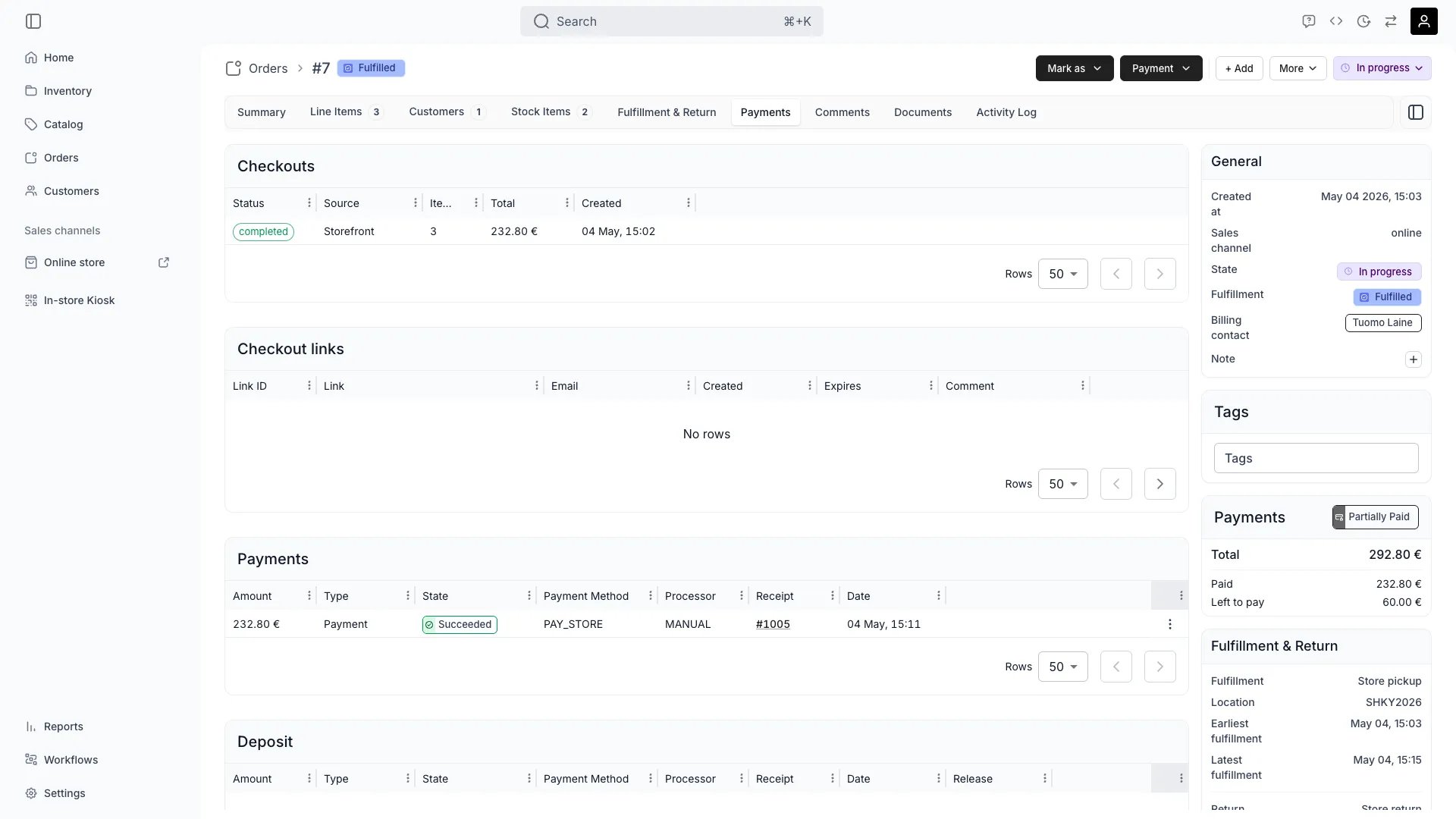
Orders > [order] > Payments
Open in TWICE Admin
orders
Prerequisites
Before you start, know:
- Which payment you are refunding. Refunds are issued against a payment row rather than the order as a whole, so an order paid in two goes has two possible sources.
- How much is still refundable. Earlier partial refunds reduce it, and the dialog shows the figure.
- Whether the money is TWICE’s to move. A connected provider sends a card payment back. A manual payment is a record, so TWICE records the reversal and handing the cash back is yours to do.
The walkthrough
1
Find the payment you are reversing
Work from the Payments table on the Payments tab. Each row carries its Receipt, Amount, Type and State.Pick a row of type Payment in state Succeeded or Captured. Skip a Pending payment, which has not settled, and a row already Refunded, which has nothing left.Refund a closed order the same way. Closing locks editing rather than money: see Order lifecycle.
2
Open Refund payment and read the ceiling
Open Refund payment on that row and read the three figures it leads with. The third governs:
Stay under Remaining refundable. Attempting more is refused with Refund amount cannot exceed and the figure it will accept.
3
Choose how to express the refund
Pick the mode that matches the conversation:
Aim a line refund at items, shipping, fees, deposits or rounding, each shown with its own type, so a refund can cover the shipping charge alone.
4
Confirm and check the row
Confirm the refund, then find it in the Payments table as a new row of type Refund with its own receipt number. Expect the original row to keep its own amount and to gain a Refunded or partially-refunded state.Watch for a Refund Reversed state, which means the provider undid the refund and the money came back to you. Investigate that rather than ignoring it, because it is usually a chargeback-adjacent event.
5
Deal with what the refund does not do
Treat a refund as a movement of money and nothing else:
Release the stock as a second step where the customer is not taking the goods. Edit the order to remove the line, or stand the whole order down. Otherwise the stock stays committed to an order nobody is coming for.
How do I know it worked?
- A Refund row is in the Payments table for the amount, with its own receipt number.
- The original payment shows as refunded or partially refunded, still carrying its original amount.
- The order’s Payment chip reflects the new position, and an order refunded in full no longer reads Paid.
- The customer has the money, on the provider’s timeline rather than instantly. Card refunds commonly take several working days to appear.
Troubleshooting / common pitfalls
"Refund amount cannot exceed…"
"Refund amount cannot exceed…"
Cause: you asked for more than Remaining refundable on that payment.What to do: check whether the order was paid across several payments. Each is refunded separately against its own ceiling, so issue a refund larger than any single payment as more than one refund.
The refund succeeded but the customer says the money has not arrived
The refund succeeded but the customer says the money has not arrived
Cause: usually only time. TWICE initiates a card refund and the provider and the customer’s bank settle it, which commonly takes several working days.What to do: confirm the row reads Succeeded rather than Pending, then point the customer at the receipt. Go to the provider if the row is Failed or later shows Refund Reversed, because the money genuinely did not go back.
I refunded a manual payment and nothing moved
I refunded a manual payment and nothing moved
Expect that. A manual payment records money handled outside TWICE, such as cash or a terminal that is not connected, so TWICE records the reversal for your books and has no way to hand the cash back.What to do: return the money by the same route you took it. Treat the refund row as the record rather than the mechanism.
The stock is still reserved after a full refund
The stock is still reserved after a full refund
Expect that, because refunding is a money operation only.What to do: remove the line or cancel the order as well if the customer is not coming. See Edit an order. A refunded order that still holds its units will quietly block those dates for everyone else.
I need to refund a deposit
I need to refund a deposit
Cause: deposits are tracked on a separate balance from the order total, so they have their own path.What to do: release a deposit by not capturing it, or capture part and release the rest, rather than refunding the order. See Take payment and deposits for the round trip and Security deposits for the states.
A Refund Reversed row appeared
A Refund Reversed row appeared
Cause: the refund failed to complete at the provider and the money came back to you.What to do: treat the customer as not refunded, because they are not. Find out why at the provider before issuing another one, or you risk refunding twice.
Related articles
Take payment and deposits
Collecting, splitting a total, and the deposit round trip.
How payments work
Why a refund is a payment of its own.
Edit an order
Removing the line the refund was for.
Order Payment tab
The tab refunds are issued from.