

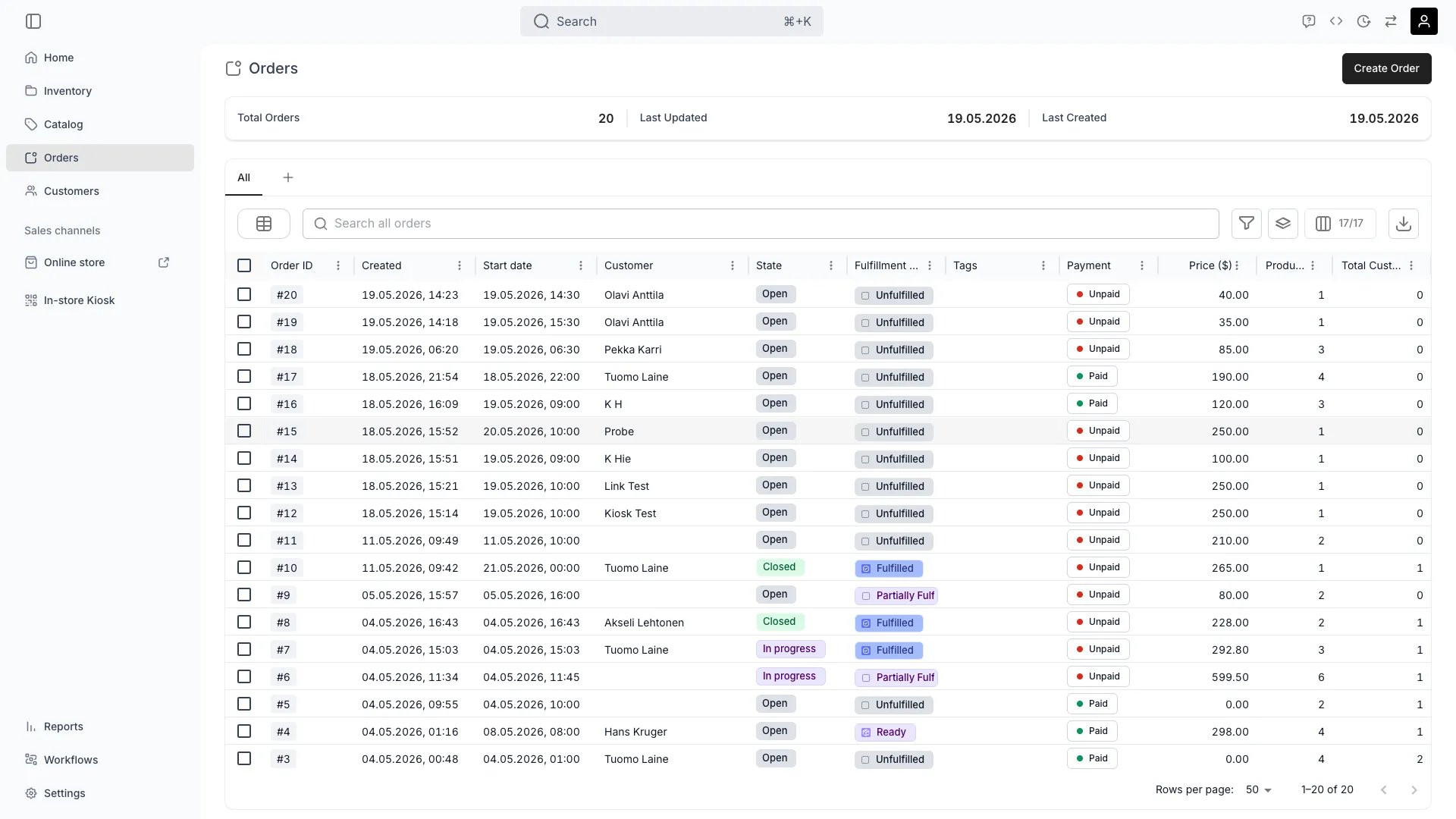
Orders
Definition
The Order Lifecycle describes the journey of an Order from creation through fulfillment, completion, and post-order activity. Every order moves through three independent dimensions — Order Status, Payment State, and Fulfillment State — and the combination of all three determines what you can do with the order at any given moment.Where do I use it?
- Filtering and grouping orders in the Orders table
- Triggering Workflows when an order enters a specific status
- Deciding whether an order can still be edited, cancelled, or refunded
- Reporting on revenue, fulfillment performance, and orders in progress
- Driving API integrations that need to react to order state changes
Order Status, Payment, and Fulfillment
Orders are tracked along three independent dimensions in the admin:- Order Status — overall progress of the order (Open / In progress / Completed)
- Payment State — whether the order is fully paid (Paid / Unpaid)
- Fulfillment State — physical fulfillment of line items (Unfulfilled / Partially fulfilled / Fulfilled / Partially returned / Returned)
Key Properties
Order Status
The user-facing status shown on every order:
These four are the platform’s and cannot be renamed or added to. What your staff see is the state you have named inside a status, and a fresh account starts with one state per status carrying these names.
Empty a status of its states and orders walk past it, so an account with no Open state creates its orders in progress.
Payment State
Payment progress is tracked separately from order status. At the order level the rollup is binary:
In the API this is
paymentStatus, with values PAID and UNPAID. The individual Payments and Invoices behind the order carry finer-grained states — pending, succeeded, partially refunded, refunded, cancelled, expired, and more. See Payments for how payment progress is represented.
Fulfillment State
The fulfillment chip on an order summarises how far its items have got. Every item state belongs to one of four fulfillment groups, and the chip reads the groups alone, never a state’s name. So the chip means the same thing whatever states your account defines.
The order is as far along as its least-advanced item, and “partially” says the rest have moved past it. Returns do move the chip forward: hand three items over and take one back and the order reads Partially returned, not Fulfilled.
Items in a Removed state are not on the line at all, so an order holding only removed items reads like an empty one.
The four groups, and the states you put inside them, are set under Item fulfillment states.
Relationships
- Order Status is one of four fixed statuses. The named state your staff see inside it is defined per account.
- Payment State is derived from the linked Payments and Transactions and tracked on each line item.
- Fulfillment State is aggregated from the fulfillment group of each item, and from nothing else.
- A Workflow can be configured to fire on transitions of any of the three dimensions — see Auto-Fulfillment.
Lifecycle
Status Transitions
- Open → In progress
- In progress → Completed
- Open → Completed
When: Items are picked up, shipped, or the booked period starts.What happens:
- Stock items are committed to the order and marked as out
- Fulfillment chip moves toward Fulfilled as items are handed over
- Payment is captured if the channel uses pre-authorisation (the authorised hold is then captured)
- Staff marks all line items as picked up in-store
- Shipping label is generated and the carrier confirms collection
- A Workflow on Pickup completed fires
Cancellation behaviour at each stage
Cancelling an order means archiving it: there is no separate cancel action and no cancelled status. Archiving closes the order, releases its future holds and revokes its live checkout links. What it does not do is the money — nothing refunds automatically, and no cancellation policy computes what to give back. How much else applies depends on how far the order has got:
Cancel or archive an order walks this through step by step, including archiving and what unarchiving does not restore.
Edit rules at each stage
Edit permissions also depend on the staff member’s role. See Users & Roles.
A worked example: a three-day equipment booking
Customer books 3 items for three days from Friday — a mountain bike, a helmet, and a lock. They pay a 30% deposit online at checkout. The remaining balance is collected on pickup.
Thursday is the row worth reading twice. Preparing the helmet and the lock moves those two items, but every item on the order is still at your premises, so the order’s own chip does not move. The chip tracks the least-advanced item.
FAQs
Can an order be Completed while still having an unpaid balance?
Can an order be Completed while still having an unpaid balance?
Yes. Order Status and Payment State are independent, so a staff member can complete an order after writing a balance off. Set the Order is unpaid check to Warn or Block under Order lifecycle if you want that move questioned or refused.
What happened to the Ready state?
What happened to the Ready state?
Ready was a fixed platform value that conflated a staff milestone with the order’s rollup, and it is gone from the chip. Build it yourself instead: add an item state for prepared goods, add an order state named Ready inside Open, and point an automation from one at the other. See Order lifecycle.
Does the chip move as items come back?
Does the chip move as items come back?
Yes. Once nothing is left at your premises, returning items one at a time moves the order to Partially returned, and the last one moves it to Returned. The chip only ever moves forward.
Can I reopen a completed order?
Can I reopen a completed order?
Yes. A completed order is read-only until you reopen it, and reopening is a backward move, so none of your checks or automations fire on it.
How do I find every order currently in progress?
How do I find every order currently in progress?
Filter the Orders table by Stage, which holds the state names your account defines. In the API the status behind that state is
active. See the Orders API.Developer Reference
Orders are exposed asorders in the API.
API: Orders
Open the endpoint in the API reference.
Related articles
Payments
Payment hierarchy, transactions, and refunds.
Order Types
Rentals, sales, subscriptions, and buybacks.
Stock Item State
How orders commit and release stock items.
Auto-Fulfillment
Automatic stock-item assignment on incoming orders.