

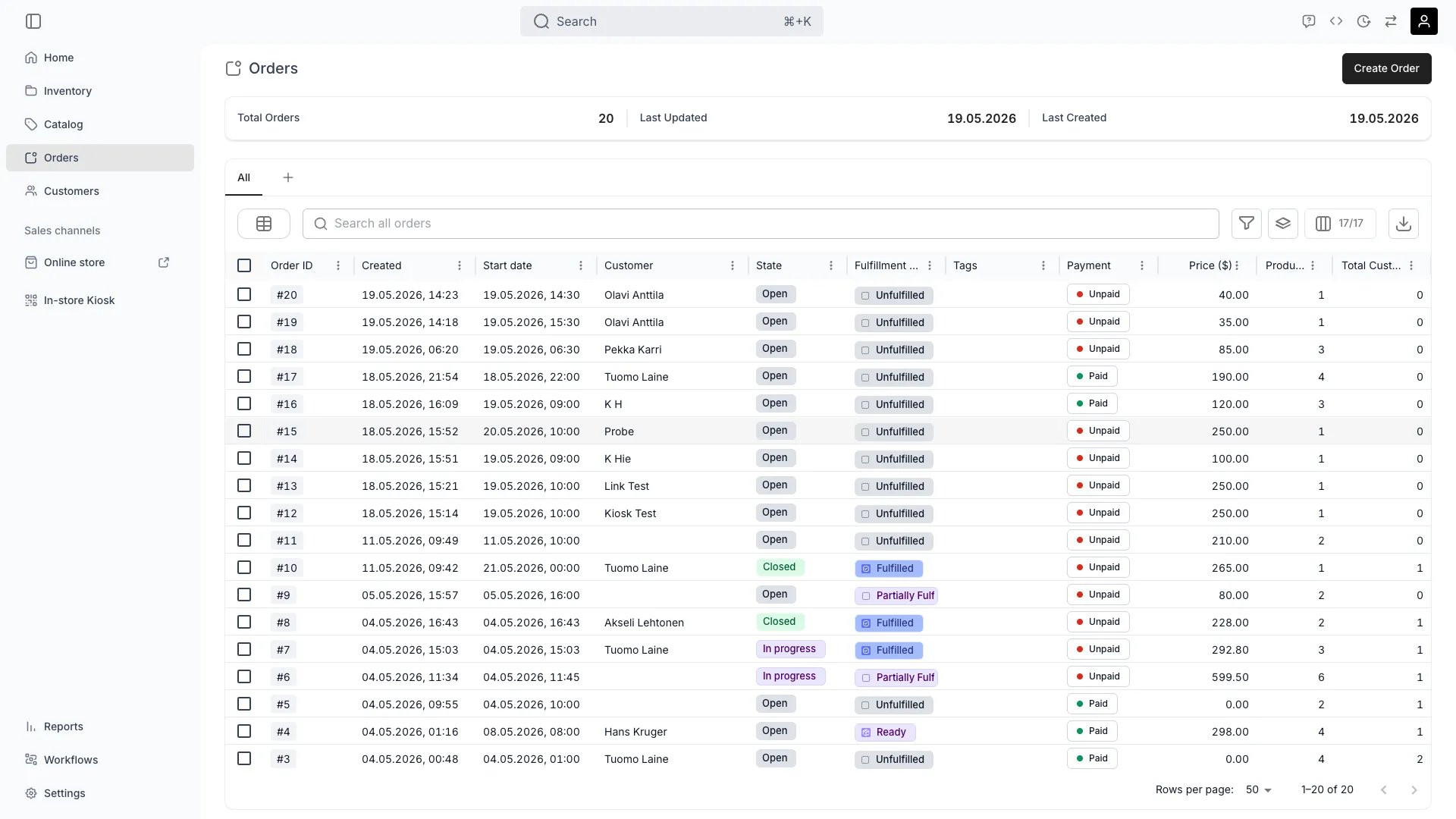
Orders
Definition
An Order’s type is determined by the purchase type of its line items. Every Order Item carries apurchaseType field, and the same Order can mix line items of different types — for example, a rental bike with an accessory sold outright. The purchase type controls how pricing is calculated, what fulfillment rules apply, and which lifecycle transitions are valid.
Where do I use it?
- Configuring Auto-Fulfillment rules per purchase type
- Setting up Listings so they can be booked, purchased, or both
- Filtering reports by purchase type
- Building Workflows that branch on order type
- API integrations that need to drive different behaviour for rentals vs sales
Key Properties
The supported purchase types are defined inOrderItem.purchaseType:
Every line item has:
startDateandendDate— define the rental period for rentals; optional for salesdurationanddurationLabel— the rental period length and its display labelpricing— calculated from the Price Table that matches the line item’spurchaseTypeand datescapturedTotalandrefundedTotal— per-line payment aggregationdepositAuthorisedTotal,depositCapturedTotal,depositRefundedTotal,depositCancelledTotal— per-line deposit totals, common for rentalsfulfillmentState— the line’s own fulfillment state; the Stock Items committed to the line each carry their own
Relationships
- Each Order Item references a Listing and inherits its eligible purchase types.
- The matched Price Table determines how the line item is priced (per-day, flat, depreciation-aware for buybacks, etc.).
- Service Locations define separate fulfillment and return rules per purchase type — see Auto-Fulfillment.
- Stock Items committed to a rental line item move out at pickup and return at the end of the rental period; sales lines do not return.
Lifecycle
Rental orders
The default circular-commerce use case. The customer takes possession of items for a defined period, then returns them.- Pricing: per-period rates from the Listing’s rental Price Table (per-hour, per-day, per-week, custom).
- Fulfillment: pickup (in-store, shipped, or local delivery) at
startDate, return atendDate. - Deposits: commonly required. Held as a separate authorisation or capture and released or refunded on return.
- Lifecycle: Open → In progress → Closed.
- Cancellation: governed by the order’s Cancellation Policy.
- Edits: rental dates can usually be extended while In progress.
Sale orders
A permanent transfer of ownership — typical for accessories, used-product resale, or new product sales alongside a rental catalog.- Pricing: flat sale price from the Listing’s sale Price Table.
- Fulfillment: single delivery event. No return expected.
- Deposits: not applicable.
- Lifecycle: Open → In progress (handed over / shipped) → Closed. There is no rental hand-out/return step.
- Cancellation: must follow a refund flow once fulfilled — see Payments.
- Edits: items can be added or removed while Open, not after fulfillment.
Subscription orders
Recurring billing for ongoing access to a product or service — used for memberships, leasing-style rentals, and gear-as-a-service.- Pricing: per-cycle rate from the Listing’s subscription Price Table. Each plan defines a payment cycle (e.g. monthly), commitment length, and optional renewal price.
- Fulfillment: typically a single initial delivery, with the subscription period tracked on the order.
- Billing: requires a recurring-capable payment provider (Stripe or Adyen card payments).
- Lifecycle: stays In progress for the duration of the subscription. Closes when the subscription ends or is cancelled.
- Cancellation: ends the subscription and stops future billing. Items may need to be returned depending on the agreement.
- Customer portal: customers manage their subscriptions through a self-service Subscription Portal — accessible via a secure link in subscription emails.
Buyback orders
The merchant acquires an item from a customer — a key part of circular commerce. Used when customers trade in or sell back used items.- Pricing: the merchant pays the customer. Often calculated from a depreciation rate or condition-based formula.
- Fulfillment: the customer hands over the item; the merchant receives it into inventory as a new Stock Item.
- Payment direction: reversed — the merchant owes the customer. Payouts are made via the configured payment method.
- Lifecycle: Open (offer pending) → In progress (item received) → Closed (payout complete).
- Where it shows up: Service Locations have a dedicated Buyback tab in their fulfillment and return rules.
Mixed orders
A single order can include line items of different purchase types — for example, a one-week ski rental (booking) plus a pair of socks (sale). Each line item carries its own purchaseType, dates, and pricing, and is fulfilled according to that type’s rules.
FAQs
How does TWICE decide whether a Listing can be rented or sold?
How does TWICE decide whether a Listing can be rented or sold?
Each Listing has one or more Price Tables. The set of
purchaseType values across those tables determines what the Listing supports. Adding a sale Price Table to a rental Listing makes it buyable; removing all rental tables makes it sale-only.Can the same Stock Item be both rented and sold?
Can the same Stock Item be both rented and sold?
Yes — that’s the core of circular commerce. A Stock Item moves through rental cycles, and at some point the merchant can convert it into a sale (or a buyback offer to the customer). The Stock Item history records every order it participated in.
Do subscriptions and rentals work together?
Do subscriptions and rentals work together?
Subscriptions are best for ongoing access without a fixed return date. Rentals are best for defined-period bookings with explicit return events. Use whichever matches the customer agreement — the data model supports both, on the same Listing if needed.
Is the rental purchase type called rental or booking?
Is the rental purchase type called rental or booking?
booking. The internal enum value on Order Items is booking — there is no rental value. The admin labels the same concept Booking or Rental depending on context; Service Location fulfillment rules use Booking. Treat the labels as equivalent, but always send booking in the API.How are buybacks priced?
How are buybacks priced?
Pricing is typically driven by a depreciation rule on the Listing or a manual offer entered by staff. The result is stored on the Order Item like any other purchase type.
Developer Reference
Order type is set viapurchaseType on the orders endpoints.
API: Orders
Open the endpoint in the API reference.
Related articles
Order Lifecycle
Order, Payment, and Fulfillment states.
Payments
Hierarchy, deposits, refunds, and payout flows.
Price Tables
Per-type pricing per Listing.
Auto-Fulfillment
Type-specific fulfillment rules.
Subscription Portal
Customer self-service for subscriptions.