

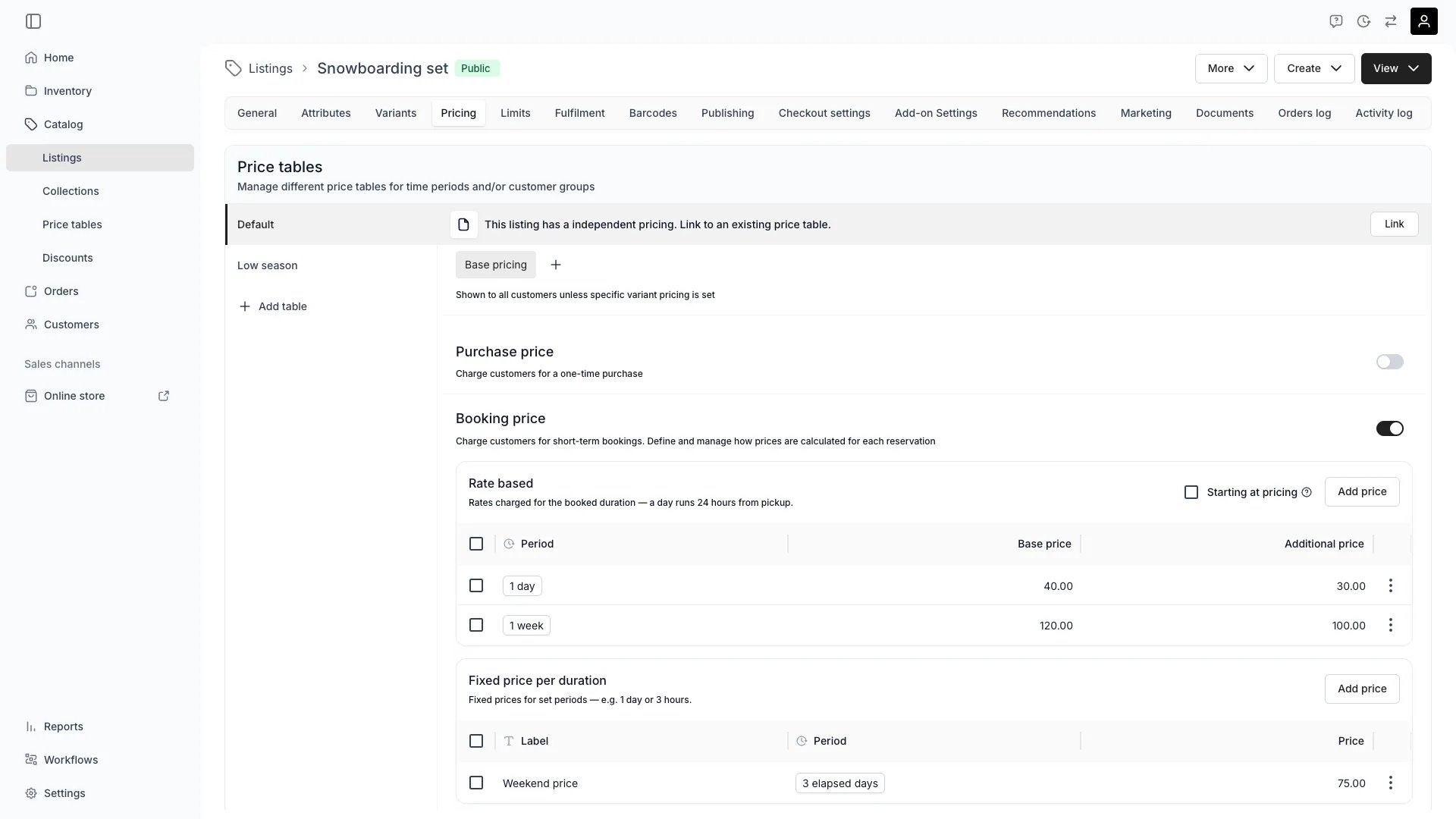
Catalog > Listings > [Listing] > Pricing
Price Tables
A Price Table defines what the price is and when it applies. You can either:- Define price tables directly in the listing, or
- Connect the listing to a predefined table created under Catalog → Price Tables for reuse across multiple listings.
- Date ranges — set seasonal, promotional, or time-based pricing. A date range controls when a table’s rows are candidates, not which table wins.
Variant pricing
When a listing includes variants, each variant can have its own pricing structure. By default, variants inherit the base price from the listing. You can override this by linking or defining new Price Tables for specific variant combinations.Note: If you need one variant to be bookable while others are not (for example, one for sale and another for rent), you’ll need to create a separate listingExamples:
- Variant Size of “XL” costs €5 more
- The booking price of Variant Class of “Premium” has a different rate than “Standard”
Purchase price
For listings sold outright, you can define:- Price — the active selling price.
- Compare-at price — typically the price as new or original retail value, shown for reference for the end-customer.
Booking price
For rental or booking-based listings, you can choose between rate-based or fixed pricing models.Rate-based pricing
Rate-based pricing defines prices per time increment (e.g. day, week, or month). Each rate period includes two values:- Base rate price — applied for the first increment of the defined period.
- Additional rate price — applied for every following increment of that period.
- Finds the longest rate period that fits inside the booking duration.
- Applies the base rate for the first period.
- Then fills the remaining duration with additional rates, again taking the longest available periods.
For a 16-day booking, the system applies:
2 × 1-week (first 50) + 2 × 1-day additional rate (10) = $170
Booking duration increment
When using rate-based pricing, you can set a booking duration increment on the Limits tab to restrict selectable durations to whole multiples of a chosen unit — for example, 1-week increments so customers book in full weeks only. The storefront booking widget only offers return dates and times that align to the increment. Durations that are not a whole multiple are rejected. This setting has no effect on fixed-duration pricing rows, which derive their duration from the row itself.Starting at pricing
Both rate-based and fixed pricing support a Starting at billing mode. When enabled, duration is counted by calendar periods touched instead of elapsed time. With a day rate of €20:
For rate-based pricing, enable Starting at with the ”Starting at pricing” checkbox in the rate-based booking section header. All rate-based rows on the table share the same setting. When rates span multiple durations (day + week), the engine picks the cheapest calendar-aligned composition.
For fixed pricing, each row has its own setting via the duration unit dropdown. Select “Day (Started)” instead of “Day (Elapsed)” to anchor the return date to the calendar rather than the pickup time.
Sub-hour units (seconds, minutes) always use elapsed duration regardless of this setting.
Fixed pricing
Fixed pricing sets a single price for a defined booking duration (e.g. “€100 for 3 days”). This model works best for package-style bookings, like “Weekend bundle” or “7-day rental.” Each fixed row carries a Duration label — the name customers see for that option, like “Weekend price” or “Full-day pass”. Once the row is saved, a translate icon appears next to the label so you can localize it per language; see Multi-Language Content. Rate-based rows have no such label, so there is nothing to translate on them.The label is also part of what identifies the row: two fixed rows that share the same duration terms and the same label merge into one storefront option. Renaming the label in your default language changes that grouping — translating it does not.
Booking deposit
The Pricing tab also holds the listing’s booking deposit (bookingDeposit) — a single fixed amount, entered in your store currency, requested as a refundable security hold when the listing is booked.
- One amount per listing. There is no percentage-based deposit and no separate prepayment deposit — the field is a fixed amount. Leave it empty (or 0) for no deposit.
- Refundable hold, not a charge. When the customer pays by card, the deposit is reserved on the card as an authorization. It is released after the items are returned in good condition, or captured (partially or fully) to cover damage or late returns.
- The deposit sits alongside the rental payment as its own Payment object on the order.
Advanced price controls
Under Advanced options, you can control when specific price rows are available or applied. With rate-based pricing:- Define weekday-specific rates (e.g. weekends cost more than weekdays).
- Restrict when a pricing package can be purchased. For example, you might create a “Weekender” package — a 3-day duration (Fri–Sun) that’s only purchasable on Fridays.
Subscription pricing
For listings with recurring billing, subscription pricing defines plans that charge customers on a regular cycle. Each subscription plan on a Price Table includes:- Plan title — customer-facing name (e.g. “Monthly”, “Annual”). Saved plans show a translate icon next to the title for per-language versions; see Multi-Language Content. As with fixed booking rows, the title in your default language is part of what identifies the plan, so plans matching on both their terms and their title merge into one storefront option
- Price — per-cycle amount
- Payment cycle — billing frequency (e.g. every 1 month, every 3 months)
- Commitment — minimum number of billing cycles the customer commits to (up to 24)
- Renewal — auto-renew after commitment (continues billing until cancelled) or no renewal (ends after commitment)
- Cancellation lead time — how far in advance a cancellation request must be made
- Initial charge type — charge at order creation (default) or defer to the subscription start date
- Collection method — charge automatically via the stored card (default) or send an invoice for manual payment
- Renewal price — a different per-cycle price after the commitment period ends (auto-renew only)