

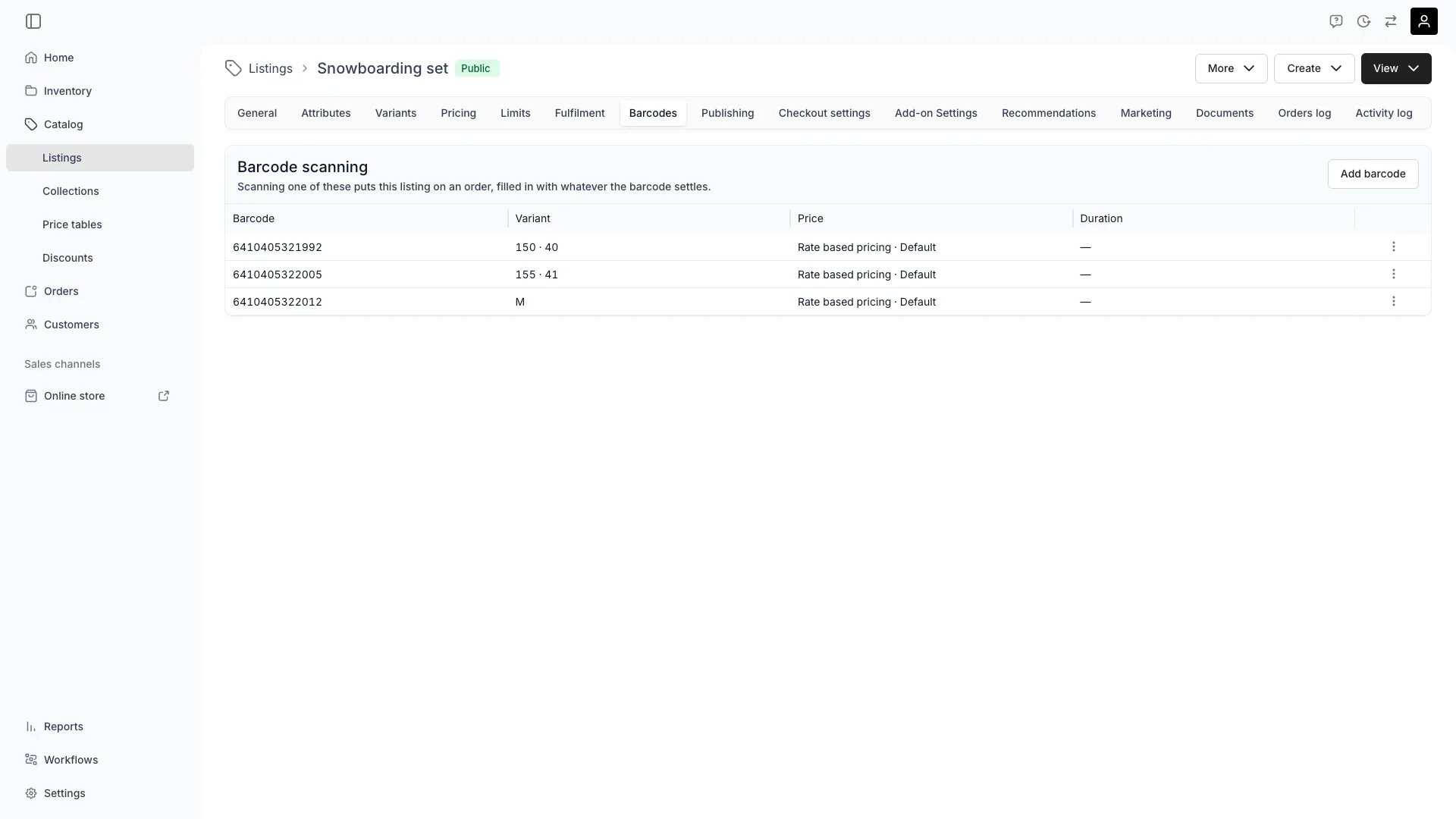
Catalog > Listings > [Listing] > Barcodes
Catalog > Listings > [Listing] > Barcodes
This view can look different dependent on your user role.
See Visibility and permissions for details.
See Visibility and permissions for details.
Primary purpose
Give this listing the barcodes staff scan to put it on an order. Under Barcode scanning the tab lists one row per code, with what each code settles about the line it adds: Barcode, Variant, Price and Duration.Add as many barcodes as you have labels
Add as many barcodes as you have labels
A listing holds any number of barcodes. Each is a separate row, so one listing can carry a shelf code, a supplier EAN and a till label for “day pass, adult” at the same time.Codes are matched exactly and must be unique within the listing. The tab refuses a code the listing already carries, and a code already in use elsewhere.
What each column settles
What each column settles
A barcode names the listing. The three columns after it answer one question each about the line a scan creates.
A fixed price row already carries a period, so it needs no duration. Only a rate-based row, shown as Rate based pricing, asks for one.
Leave a column blank to be asked at scan time
Leave a column blank to be asked at scan time
An empty column reads Ask when scanned. Whatever a code leaves blank is what the Add drawer prompts for when that code is scanned on an order.A code that answers every variant axis, a price and a length adds the line outright. A code that answers none opens the Add drawer on the right listing with the rest to fill in. That is the trade to make per label: fewer questions at the counter against a label per combination.
Map one code or several in one go
Map one code or several in one go
Add barcode takes more than one code at a time, and gives all of them the same variant, price and duration. Use it for labels that mean the same thing: a reprint, or an EAN alongside a shelf code.Edit barcode works on a single row. Removing a row stops that code adding this listing to an order and changes nothing already ordered.
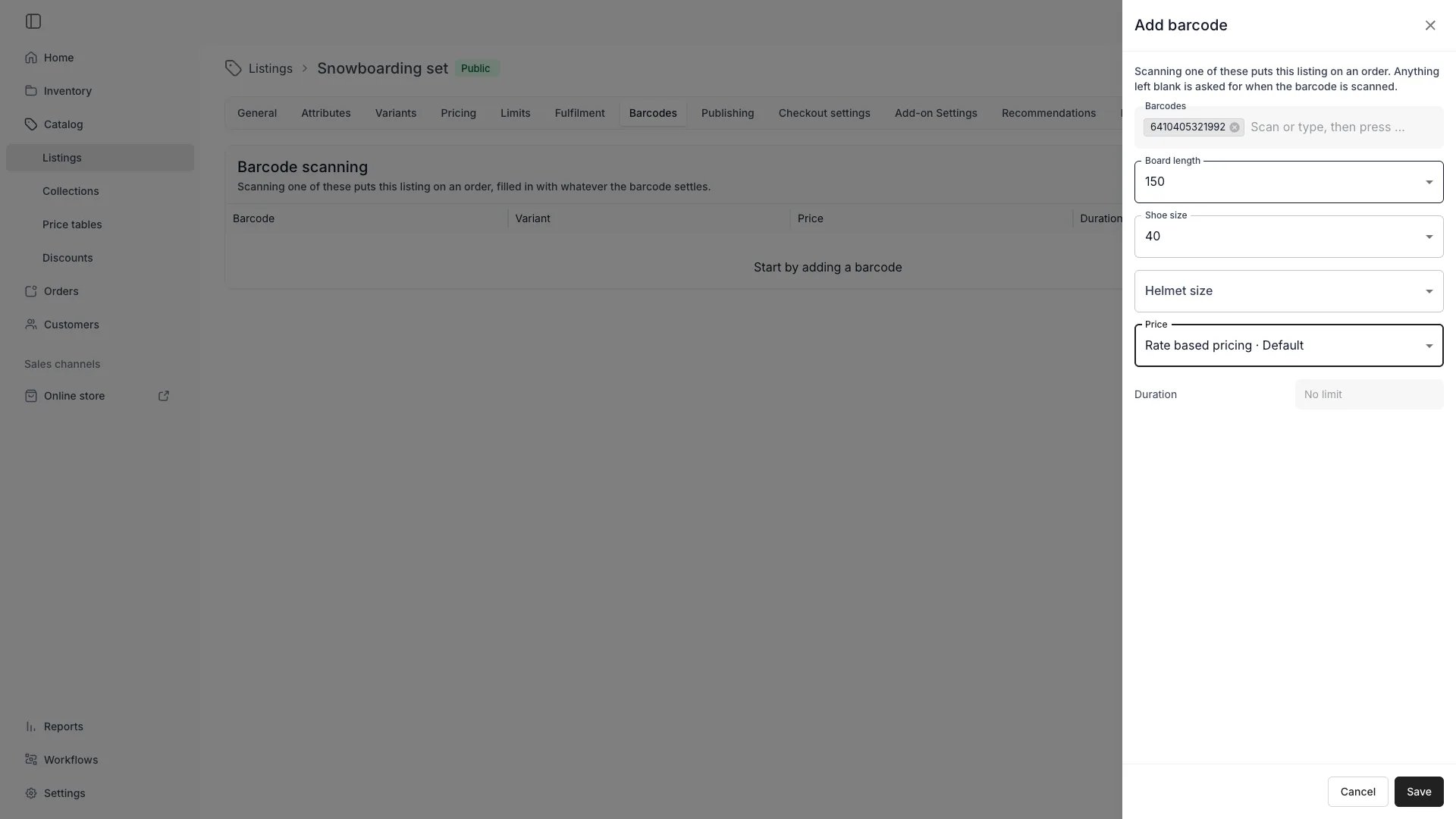
Catalog > Listings > [Listing] > Barcodes > Add barcode
Related concepts
Stock codes
Stock codes
A listing barcode names what is sold. A stock code names one physical unit of it. They live on different objects and answer different questions.Read more: Stock codes
What a scan resolves to
What a scan resolves to
One string can be a listing barcode, a stock code, a SKU code and an order reference at once, because each is unique only within its own kind. A scan that matches more than one reports it and asks which you meant rather than picking one.Read more: Stock codes and barcodes
Archived listings
Archived listings
An archived listing still matches its barcodes, so staff scanning an old label find out what it was. The code cannot go on an order until the listing is restored.Read more: Listings
Visibility and permissions
This tab is gated bycatalog:listing_barcodes, in the four operations: , , and .
All four system roles (Owner, Admin, Manager and Member) hold every operation on this.
Scanning a code anywhere in the admin is a separate permission, account_settings:barcode_search:view, and each kind of match is returned only to a role that may view it. A role without catalog:listing:view never resolves a listing barcode.
For what each operation means and the full role matrix, see Users & Roles.