

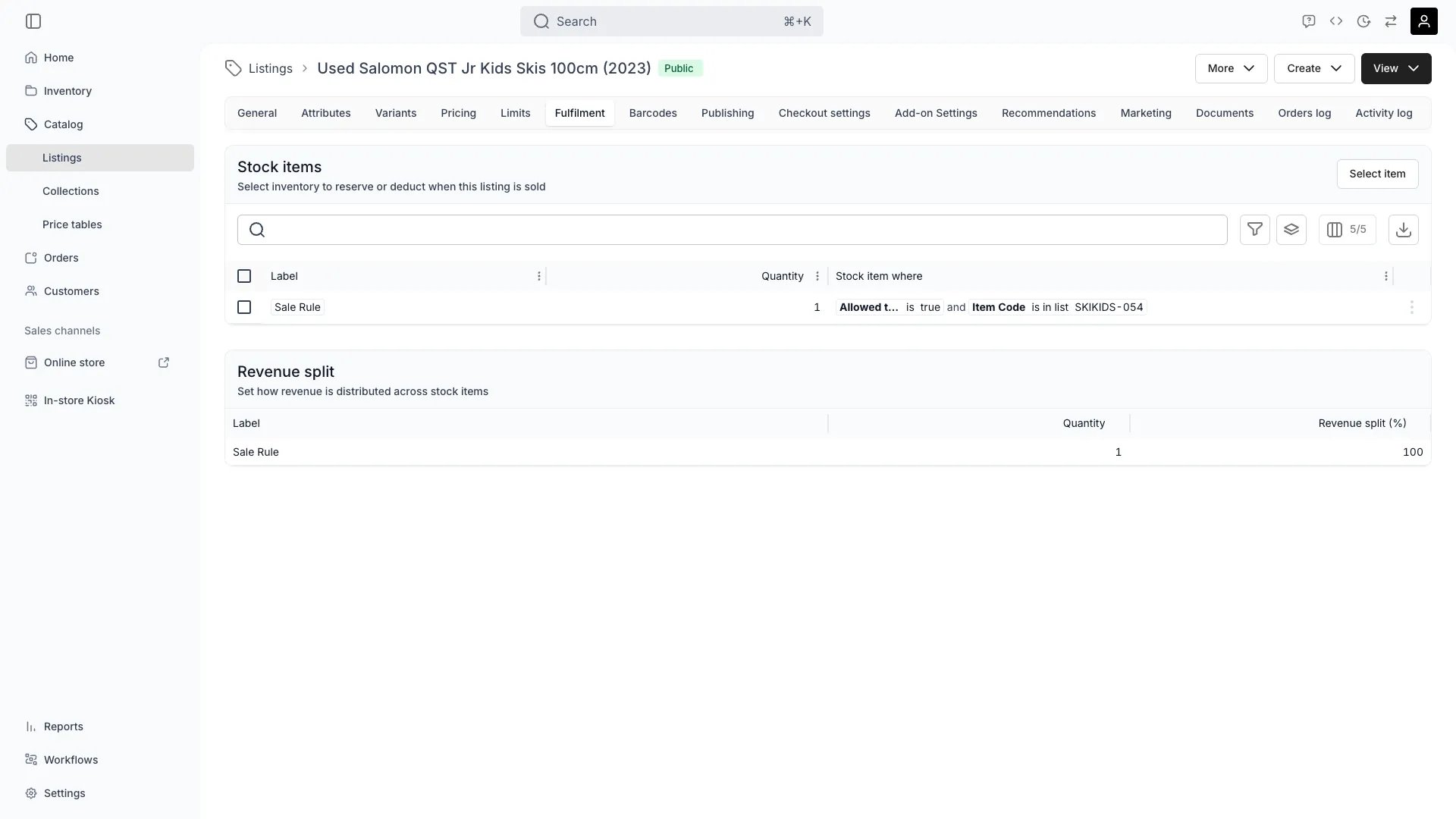
Catalog > Listings > [Listing] > Fulfilment
This view can look different dependent on your user role.
See Visibility and permissions for details.
See Visibility and permissions for details.
Primary purpose
Connect this listing to the physical stock one sale of it consumes. The tab carries three cards: Stock items, Variant specific rules on a listing that has variants, and Revenue split.Name what one sale reserves
Name what one sale reserves
Add one rule per distinct thing the listing needs. Select item opens Select stock item(s), where you search by item or SKU name, set a Label and a Quantity needed, and narrow the match with conditions.Every rule is satisfied on every sale, so the whole set is what one unit of the listing costs you in stock. Six chairs and a table is two rules: the chair rule at a quantity of 6, the table rule at 1.A rule you leave unnamed is labelled Item 1, Item 2 and so on, in the order you added it. Those labels are what the Revenue split card lists, so name the rules as you add them.
Match the units by code, name or attribute
Match the units by code, name or attribute
A condition reads one key, picked from Item Code, SKU Code, Item Name, SKU Name and Attribute, which offers your inventory attributes. Choose an operator and the values. Add further conditions to narrow the match.
A rule with no condition matches nothing, and the drawer refuses to save it.Formula attributes are the exception: no single column holds a computed result, so a formula attribute cannot be used as a condition. Build the rule on the date, number or option the formula reads instead.
Add rules per variant
Add rules per variant
Variant specific rules appears once the listing has variants, and it takes an extra condition per variant value. Each variant starts from the base rules above, so a rule here narrows what that one value matches rather than replacing the set.Size M picking one SKU and Size L another is the usual shape. It keeps variant-level stock on one listing.Read more: Listing variants
Set how the sale's revenue splits across the rules
Set how the sale's revenue splits across the rules
Under Revenue split, set what share of the sale each rule earns. One row per rule, with its Label, Quantity and Revenue split (%).The share belongs to the rule, not to a unit. Edit opens Edit revenue split, one percentage field per rule, and the fields must total 100%. Any other total reports “Revenue split must equal 100%. Currently 90%.” and leaves Save disabled. Shares are held to four decimal places, so thirds come out as 33.34, 33.33 and 33.33.Edit appears only on a listing with more than one rule. A single rule earns the whole sale and there is nothing to divide.
Read the split back as income on the stock item
Read the split back as income on the stock item
The split decides what each unit earns, not what the customer pays. When an order is created, every unit picked for the line carries its rule’s share, and that share of the line total lands on the unit’s Income & Expenses tab as an Order revenue entry.From there it feeds the item’s income total, which the stock items table filters and sorts on, and which an attribute condition on this tab can read back. No report reads the split.Read more: Stock item income and expenses
Know what a changed split does and does not reach
Know what a changed split does and does not reach
An order copies each unit’s share at the moment it is created. Editing a split changes what later orders record and leaves income already recorded as it stands.Changing the rules moves the shares too:
The last row is the one to check. The card lists the shares as they are, and the next Edit reports the total and refuses to save until it reaches 100% again.A rule with a quantity above 1 gives each unit it reserves the rule’s full share. A rule at 50% reserving six chairs records 50% of the line against each of the six, so read a bundled listing’s per-item income with that in mind.
Leave the tab empty for a listing with no stock
Leave the tab empty for a listing with no stock
A listing with no rules has unlimited availability. Nothing is reserved, nothing is deducted, and no order revenue reaches any stock item. That is the setting for a service, a tour or a digital product.A rule saved before this card existed can still have no share stored. It then reads 100% on a single-rule listing or 0% where there are several, and a unit picked from it records no Order revenue. Saving the rules once, or saving the split, stores the shares and starts the recording.
Related concepts
Listings and stock items
Listings and stock items
A listing is what you sell. A stock item is one physical unit you own. This tab is the only place the two meet, which is why what a customer can book or buy follows from the rules here.Read more: Stock items
Stock item vs SKU
Stock item vs SKU
A rule can match a named unit or a whole SKU. Matching the SKU keeps the rule working as units are retired and replaced; matching codes pins the listing to those units.Read more: Stock item vs SKU
Revenue split against pricing
Revenue split against pricing
Pricing sets what the customer pays. The revenue split sets how that amount is attributed across the units behind it. Neither reads the other, and changing a price does not change a share.Read more: Listing pricing
Item-level profitability
Item-level profitability
Order revenue on one side and purchase price, maintenance and manual costs on the other give a unit its lifecycle profitability. A listing fulfilled from several units needs a split for that figure to mean anything.Read more: Track item costs and income
Visibility and permissions
This tab is gated bycatalog:listing_fulfilment, in the four operations: , , and . All four system roles (Owner, Admin, Manager and Member) hold every operation on it.
What the cards on it hold is narrower, and the two editing capabilities sit in different areas:
A revenue split is a pricing capability rather than a listing one, so a role that may edit the rules does not necessarily hold it, and the reverse holds too. Both come with Manager out of the box.
For what each operation means and the full role matrix, see Users & Roles.