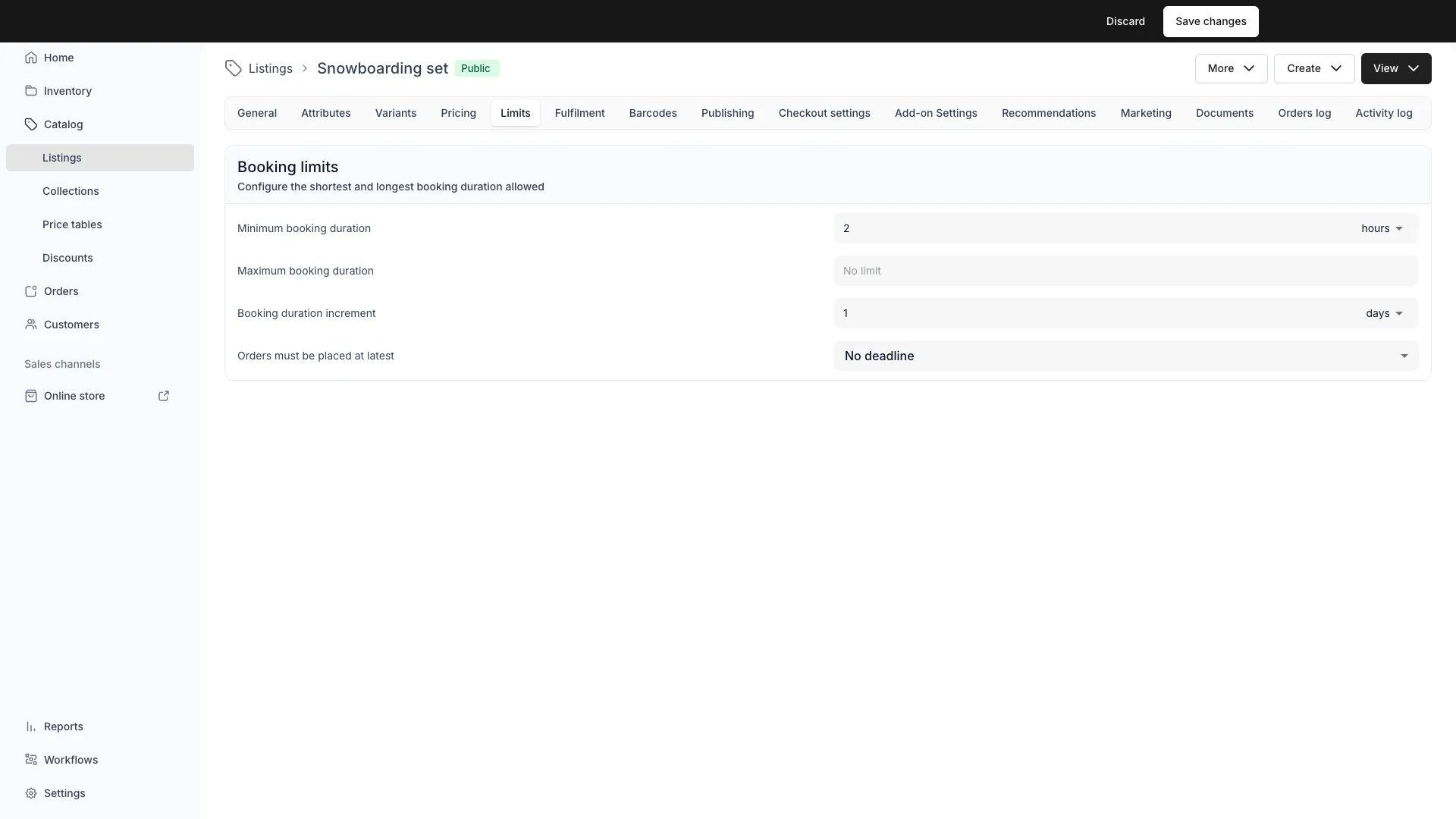
The Limits tab decides what a customer may book of this listing. It holds three cards, and each one answers a different question.
Card
The question it answers
What it holds
Booking limits
How long, and how late?
Minimum booking duration, maximum booking duration, booking duration increment, order deadline
Availability
Which calendar dates?
Date ranges, and whether a booking must end inside one
Start and end times
How often, and at exactly which times?
Booking interval, start times, end times
Read the three as separate layers when a listing does not offer the times you expect. Availability decides which calendar days are open at all, the booking interval decides how often a booking may start on an ordinary day, and start and end times replace that grid on the weekdays you name.
Duration limits (rentals)
Restrict how short or long a rental can be, for example 1 day minimum and 30 days maximum.On the storefront, duration options outside the configured minimum or maximum are hidden, so customers only see durations they can book. The displayed “from” price reflects the cheapest bookable duration within the allowed range, not the cheapest duration on the price table overall.
Duration limits apply to fixed booking durations (e.g. “1 day”, “1 week”). Rate-based (dynamic) pricing rows are unaffected by duration limits: they price any span the customer selects, and the checkout enforces the min/max at the time of purchase.
Booking duration increment
Constrain selectable booking durations to whole multiples of a chosen unit. A 1-week increment with a weekly rate means customers can book 1, 2 or 3 whole weeks, never a partial week.Applies to rate-based (dynamic) bookings only. Fixed-duration pricing rows derive their duration from the row itself, so the increment has no effect on them.The increment composes independently with min/max duration. Selectable durations are those that are both a whole multiple of the increment and within the configured min/max range.On the storefront, the return-date and return-time pickers only offer increment-aligned options. On the server, the selected duration is validated at both cart-add and order creation, and a duration that is not a whole multiple of the increment returns a 400 error.
Order deadline
Set a cutoff for when customers must place an order, read against the booking start time.
Orders must be placed at latest is the field on the card, and it offers two modes.
A set time before is a fixed offset before the booking starts. “2 hours before start” means a booking starting at 14:00 must be ordered by 12:00. Configure a value and unit (minutes, hours, or days).
By time of day is a wall-clock cutoff on an earlier day. “1 day before, by 18:00” means a booking starting on Wednesday must be ordered by 18:00 on Tuesday. The cutoff resolves in the service location’s timezone.
After the deadline passes, the storefront marks those start times as unavailable. Customers with the item already in their cart see a notice that the order deadline has passed. Admin users are exempt, so staff can create orders past the deadline.
Order deadlines apply to bookings and subscriptions only. Sale purchases have no start time, so the deadline does not apply.
A stock item’s buffer time does not do this. A preparation buffer set in Inventory rejects a too-soon start, but it does not remove those times from the storefront calendar, so the customer picks one and fails at checkout. If you need the storefront to stop offering them, the order deadline here is the setting that does it. See Buffer times and fulfillment fields.
Availability: which dates the listing can be booked
The Availability card holds calendar-date ranges, described on screen as dates when this listing can be booked. A listing with no ranges reads Available on all dates and is bookable whenever everything else allows it. Add a season with Add date range, and give a summer hire, a winter course or a touring exhibition the dates it actually runs.
Catalog > Listings > [Listing] > Limits
Each range is an inclusive pair of calendar days, read on the pickup location’s clock. Ranges that overlap or touch merge into one block, so June plus July behaves as a single June to July season rather than two.A row whose end date has passed carries an Ended chip and stays on the card as a record. Its dots menu offers Duplicate, which copies the range one year forward, and Delete.Once a range exists, a checkbox appears, ticked:
Bookings must also end within the date range keeps the whole booking inside one merged block, so a booking may not run past the end of the season it starts in. A return at the midnight closing the block’s last day counts as inside.
Untick it to let a booking start in a range and finish after the range ends, which is what a long rental taken in the last week of a season needs.On the storefront, a listing whose ranges are all in the future shows the next one as Available for booking with the dates, and further ranges behind a disclosure. A listing whose every range has passed reads Not available for booking.A customer who picks dates outside a range sees the cart line flagged “Not available - this listing can’t be booked for the selected dates.”
Booking interval
Set how often a booking of this listing can start: 2, 3, 4, 5, 6, 10, 12, 15, 20, 30 or 60 minutes, which is every divisor of an hour except one minute. The field sits at the top of the Start and end times card.Pickers offer start times on that grid, counted from local midnight at the service location, so a 60-minute interval means on the hour and a 30-minute one on the hour or half past.A listing nobody has set here follows the account-wide interval from Settings → Operations → Bookings, later changes to it included. The select always shows a concrete value, and picking one pins this listing to it. There is no “follow the account” option, so a pinned listing cannot be returned to the account setting from this tab.The storefront cart and checkout reject an off-grid start. Admin order creation does not, so staff can still take a booking at any minute. A cart holding listings on different intervals is checked line by line.
The interval is the grid for any weekday you have not overridden below. On a weekday that carries start times or end times of its own, those answer instead and the grid does not veto them.
Start times
Name the exact times a booking of this listing may start, per weekday. Open the Start times row on the Start and end times card and set each weekday to one of four states.The capture on the Availability accordion above shows this card too, with Monday on a time range and the other six weekdays left on Any start time.
State
What that weekday offers
Any start time
The booking-interval grid, which is the default for every weekday
Specific times
Only the times you list, for example 09:00 and 13:30
Specific time ranges
The grid inside the ranges you list, both ends included
No start times allowed
Nothing. No booking may start that weekday
Specific times are authored freely and are not held to the grid, so 10:07 is a legal start time.Specific time ranges work like an opening-hours day: several ranges per weekday, each offering the same grid instants an ordinary weekday would, minus those outside the range. 09:00 to 17:00 on a 15-minute interval offers 09:00, 09:15 and so on up to 17:00. The grid keeps its anchor at local midnight, so a range starting at 09:07 first offers 09:15.A weekday set to No start times allowed still lets a multi-day booking run through it. It only closes starts.Set every weekday to No start times allowed and the card warns “No weekday allows a booking to start, so this listing can’t be booked.” rather than failing at checkout. The cart flags a start the weekday does not allow with “Not available - this listing cannot start at the selected time.”
End times
Name the times a booking may end, per weekday, in the End times row of the same card. The four states mirror the start ones: Any end time, Specific times, Specific time ranges and No end times allowed.Use it where the return itself needs staff, a wash cycle or a check-in slot. Before this existed, nothing on the listing could constrain when a booking ended.One difference from start times: there is no grid to fall back on. A weekday with no end-time override keeps the earlier behaviour, where the picker generates returns on the booking interval and the server never rejects an end for falling between two grid points. Only the weekdays you override are enforced.An end at exactly 00:00 belongs to the day that begins then, so it is judged by that day’s state.Set every weekday to No end times allowed and the card warns “No weekday allows a booking to end, so this listing can’t be booked.” The cart flags a rejected return with “Not available - this listing cannot end at the selected time.”
Limits interact with Pricing. Duration limits and the increment constrain which price-table durations customers can select.
Checkout Settings
See Checkout Settings for what is enforced at the moment of purchase.
Bookings settings
The account-wide default for the booking interval lives in Settings → Operations → Bookings. This tab overrides it for one listing.
Availability
Date ranges, start times, end times and the order deadline all feed the availability evaluation. Dates outside a range close on the storefront calendar, and a time no weekday allows is never offered.
Opening hours
A location’s fulfillment hours close pickup and return times for every listing it serves. The settings here narrow that further for this one listing, and the tighter of the two wins.
This tab is gated by catalog:listing_limits, in the four operations: , , and .All four system roles, Owner, Admin, Manager and Member, hold every operation on this. The same gate covers every field on the tab, the date ranges and the time overrides included.For what each operation means and the full role matrix, see Users & Roles.