

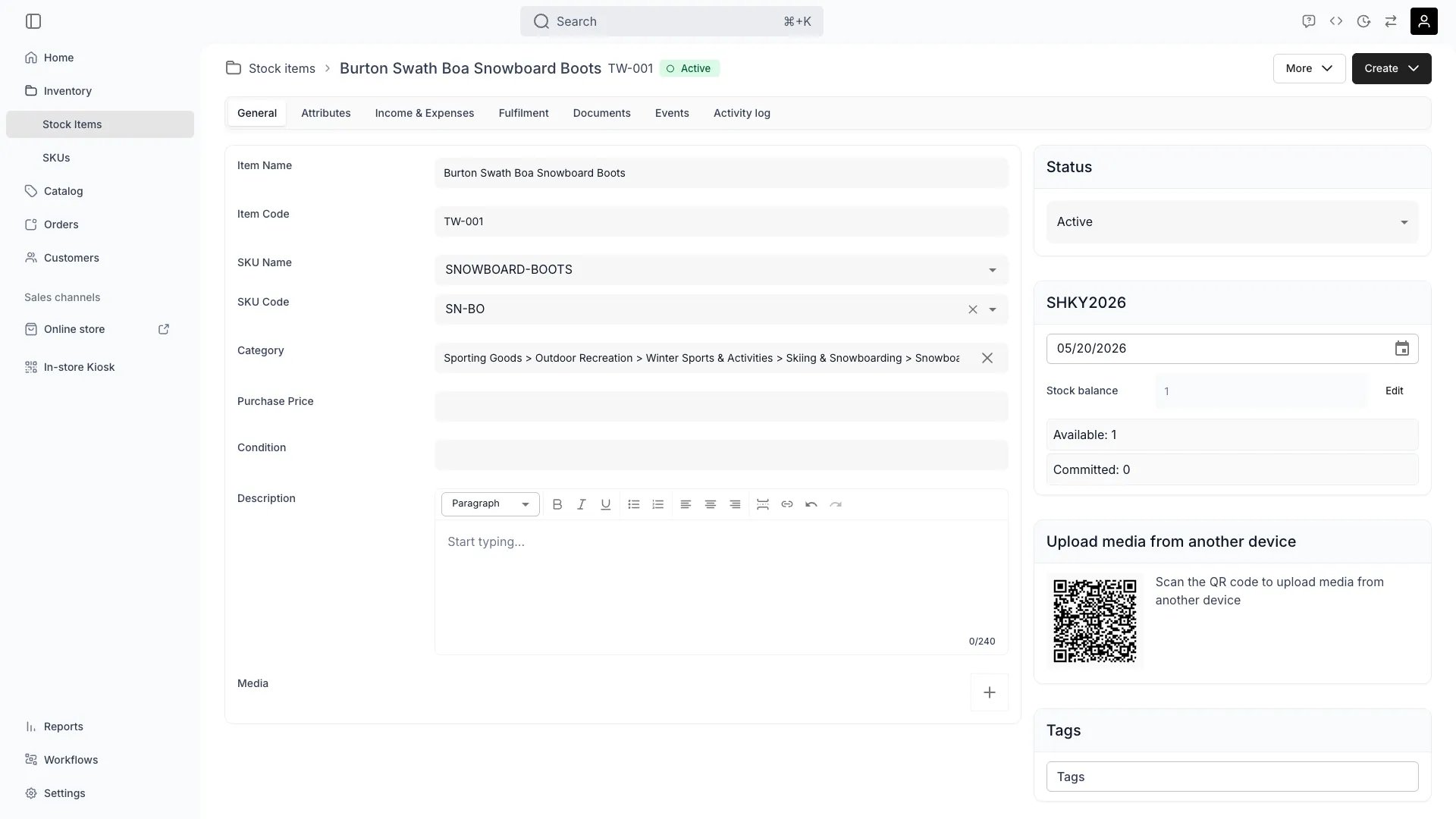
Inventory > Stock Items > [Item] > General
Definition
A stock code (also called an item code) is a tenant-unique string that identifies a single Stock Item. A Stock Item carries acodes array — it can have one or many codes attached, which is how a single physical item supports multiple scanning workflows (an internal asset code, a printed barcode, a manufacturer serial number) at the same time.
The Analogy: A stock code is like a Social Security Number for an item — it follows the physical object through its entire lifecycle and is how every other record in TWICE refers back to it.
Stock code vs SKU code
These are different identifiers at different levels.
A bike
B-1 (stock code) is one specific unit of the BIK-S (SKU code) product. Twenty bikes of the same model = twenty stock codes pointing to one SKU code.
Where do I use it?
Stock codes are used throughout TWICE for:- Unique identification — referencing specific items in orders, reports, and operations.
- Barcode and QR scanning — physical labels link directly to the digital record.
- Bulk fulfillment workflows — scan items in and out at pickup and return.
- Data integrity — the uniqueness constraint prevents duplicate records.
- API operations — programmatically interact with specific Stock Items.
- Audit trails — order history and event logs reference the codes used at the time.
Key Properties
System-generated vs custom codes
You have three ways to set codes:Auto-generated
Omitcodes when creating the article. TWICE generates an 8-character random ID (e.g. LF93HXB1). Good for quick onboarding when you do not care about specific values.
Manual entry
Providecodes on create or update. Use any string format that fits your operation — short asset tags (B-1), serial numbers (SN-2024-00123), or location-prefixed codes (HEL-BIK-001). Validate before save with POST /articles/validate-code or batch with POST /articles/validate-codes.
Bulk register with pattern
In the admin Register stock items dialog you can auto-generate a sequence (B-1, B-2, …, B-N) when creating multiple units at once. This is the most common workflow for receiving a new shipment of identical units.
Multiple codes per item
A single Stock Item can have multiple values in itscodes array. This is intentional and supports real-world scanning workflows:
SKI-001— internal asset tag printed on a sticker.SN240501234— manufacturer serial number printed on the ski.9783161484100— barcode on the original packaging.
Code format rules
- Type: string. No length limit enforced beyond the auto-generated default of 8.
- Characters: any printable characters. Most operators stick to alphanumerics, hyphens, and underscores so codes survive label printers and barcode scanners.
- Uniqueness: per tenant. Validated on create and update.
- Case sensitivity: codes are stored case-sensitively but most scanning workflows treat them as case-insensitive — pick one casing convention and stick to it.
- Whitespace: trim leading and trailing whitespace before saving. Embedded spaces work but make scanning fragile.
QR codes and barcode scanning
Stock codes are designed to be encoded onto physical labels. Common workflows:- Print on receive. When new inventory arrives, register Stock Items with auto-generated or manual codes, then print labels straight from the admin.
- Scan on pickup. Operators scan an item’s code when assigning it to a rental order — TWICE validates the code, finds the item, and attaches it to the order line.
- Scan on return. The same scan flow runs in reverse to mark items as returned and flip state from Out to In.
- Scan for lookup. Quick search via the admin: scan a code and jump straight to the item detail.
codes is an array, an item that has both an internal asset tag and a manufacturer barcode can be scanned on either label. Operators do not need to know which one they are looking at.
Uniqueness scope
The uniqueness constraint is per tenant (your TWICE Commerce account). Two different tenants can both have aB-1 Stock Item. Within a tenant:
- Each code in any article’s
codesarray must be unique across all Stock Items. - Validation happens server-side on create and update via the
articleCodestable. - Use
POST /articles/validate-code(single) orPOST /articles/validate-codes(batch) before submitting to fail fast with a clear error.
Relationships
Lifecycle
1
Creation
Codes are assigned on Stock Item creation.
How are codes generated?
How are codes generated?
If you submit
codes: ["..."] they are used as-is. If you omit codes, TWICE generates an 8-character random code. The Register stock items bulk dialog can also generate a sequence.Can I validate before creating?
Can I validate before creating?
Yes.
POST /articles/validate-code with { code } returns { isUnique }. POST /articles/validate-codes with { codes: [...] } returns the list of invalid codes and their reason (existing).2
Usage
Codes are the everyday handle on a Stock Item.
Where do codes appear?
Where do codes appear?
On the Stock Item detail, in the table column, in orders that include the item, on labels you print, in scanning workflows, and in every API response that includes the Article.
Can I search by code?
Can I search by code?
Yes. The Stock Items table search and the global admin search resolve codes to their Stock Item. The API supports
filters.code for exact and partial matching.3
Modification
Codes can be added, removed, or replaced.
How do I add a code?
How do I add a code?
Edit the item and append to the
codes array, or PUT /articles/:id with the new full array. The change is logged as an identifiers_changed event with the previous and new arrays.Can I change a code?
Can I change a code?
Yes — replace the array with the new value. The old code is detached and immediately becomes available for use on another item.
What happens to historical references?
What happens to historical references?
Order line items and ledger entries reference the Stock Item by its
id, not by its code. Changing or removing a code does not break historical links.FAQs
Can I change a stock code after creation?
Can I change a stock code after creation?
Yes. Codes are not immutable — you can add, remove, or replace them at any time. The change is recorded in the activity log as
identifiers_changed. Historical orders and ledger entries link by item id, not by code, so they remain valid.What's the difference between stock code and item code?
What's the difference between stock code and item code?
They are the same thing. “Stock code” emphasises the inventory tracking angle; “item code” emphasises that it identifies a specific physical item. In the API, the field is
codes on the Article resource.Can two items have the same code?
Can two items have the same code?
No — codes are unique across all Stock Items in a tenant. If you try to create or update with a duplicate code, the operation fails with an
existing validation reason.Can one item have multiple codes?
Can one item have multiple codes?
Yes. The
codes field is an array. You can attach an internal code, a manufacturer serial number, and a packaging barcode to the same Stock Item — scanning any of them resolves to that item.What format should I use?
What format should I use?
Whatever fits your operation. Most operators use alphanumerics with hyphens or underscores so codes survive label printers and barcode scanners. The system generates 8-character random codes when you omit a value.
Is the uniqueness global or per location?
Is the uniqueness global or per location?
Per tenant. A code is unique across your whole account, not just within one service location. Two locations in the same TWICE tenant cannot both have
B-1.Developer Reference
Stock codes are managed via thearticles endpoints. Use validate-code to check uniqueness before creating.
API: Articles
Open the endpoint in the API reference.
Related articles
Stock Items
The records that codes identify
SKUs
SKU code vs item code
Inventory Tracking
Codes behave differently for serialized vs pooled inventory