

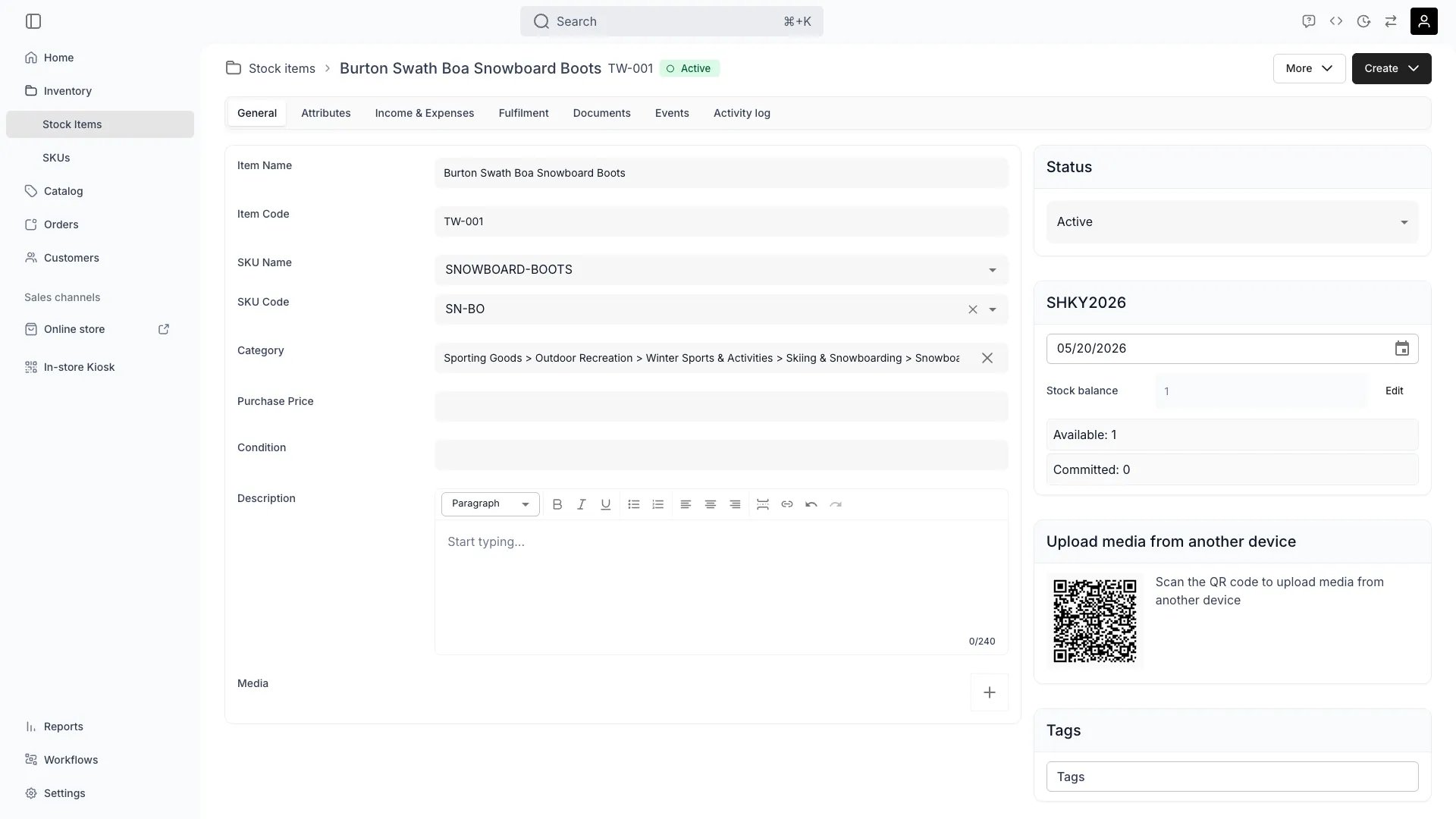
Inventory > Stock Items > [Item] > General
This view can look different dependent on your user role.
See Visibility and permissions for details.
See Visibility and permissions for details.
New to Stock Items? Understand how Stock Items differ from SKUs - Stock Item vs SKU.
Primary purpose
The General tab contains the core information that defines a stock item — what it is, where it is, and how it’s categorized.When you view a stock item, you’re seeing its current state — where it is right now, its current status, and its present attributes. Some of this data is temporal, meaning it changes over time as the item moves through different locations, statuses, and lifecycle stages. For historical and forecasted actions and states, see the Events and Activity Log tabs.
Define Item Identity
Define Item Identity
- Set the item name (often a human-understandable descriptive name).
- Assign unique .
- Optionally link it to a to keep data unified across similar stock items.
Manage Quantity
Manage Quantity
Define whether this record represents a or a .Read more: Inventory Tracking
Set Category & Attributes
Set Category & Attributes
Organize items using and enhance records with custom for better organization and reporting.Read more: Category Taxonomy • Attributes
Track Location, Status & State
Track Location, Status & State
- : See the stock item’s current and most recent warehouse or facility — this is where it is expected to be found now. This may update automatically as the item moves through your operations.
- : Instantly view if the item is IN stock (physically present and available) or OUT (currently checked out with an open order, reservation, or transfer). This is useful for tracking utilization and ongoing operations.
- : Set whether the item is active (available for operations) or inactive (indefinitely excluded from operations). For temporary unavailability, use a instead.
Add Media
Add Media
Upload photos or videos to visually document the stock item, or scan the QR code to upload from a mobile device.
Related concepts
Here are a few key concepts of TWICE Commerce that relate to the General tab.Item Code vs SKU Code
Item Code vs SKU Code
The is unique to each stock item, while the groups similar items together at the product level.SKUs act as templates—define attributes once, and all linked stock items inherit them automatically.Read more: SKU Concept
Serialized vs Pooled Items
Serialized vs Pooled Items
By default, each stock item is unique ().For items that don’t require individual tracking, you can use the quantity field to represent a group of items that such as usage under a single .Read more: Inventory Tracking • Stock Codes
Custom Attributes
Custom Attributes
Your stock item can have like brand, color, condition, or any data field relevant to your business. Attributes can be added individually or inherited automatically from the item’s SKU.Read more: Attributes • How SKUs Apply Attributes
Visibility and permissions
Inventory is a visible area for every system role, so the sidebar entry and this view appear for all of them. What the data itself is gated by is on theinventory resource, in four operations: , , , and .
A ✓ means all four operations. Cost data is the only inventory distinction between the system roles — a Member can register, edit, and delete stock items, but cannot see what they cost. Everything else here is open to all four roles, and a custom role can add cost access to any of them.
Read more: Users & Roles