

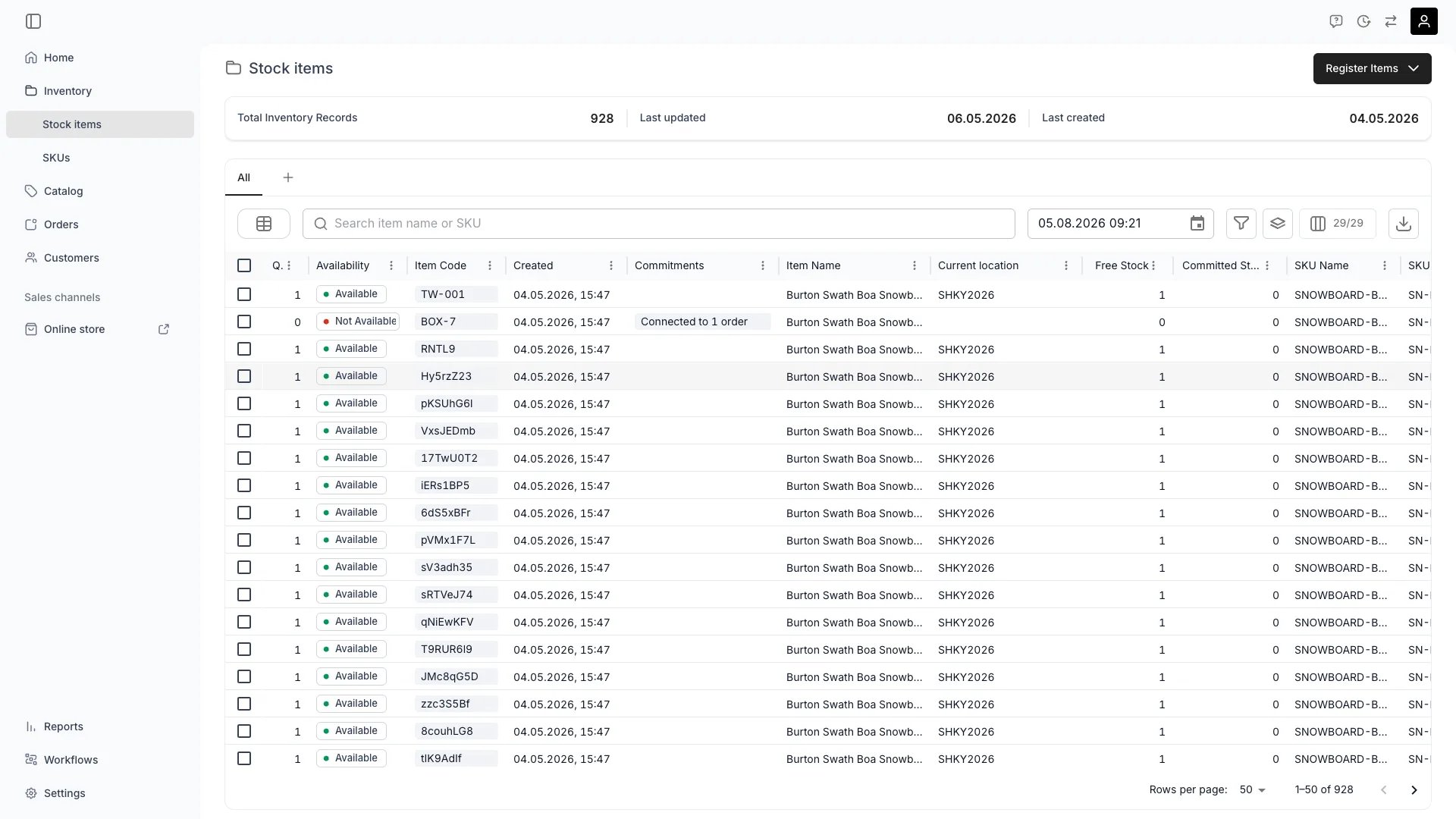
Inventory > Stock Items vs SKUs
Quick Comparison
Stock Items
are the foundation of TWICE’s serialized inventory approach. Each stock item represents an individual physical unit that you track through its entire lifecycle.When to use stock items
High-Value Items
High-Value Items
Track items individually when you need to know the specific history, condition, income, and expenses of each unit—essential for rental equipment, luxury goods, or assets.
Unique Items
Unique Items
When every unit is different (e.g., vintage clothing, used electronics, consignment items), each should be its own stock item.
Detailed Lifecycle Tracking
Detailed Lifecycle Tracking
Stock items maintain complete timelines, activity logs, and financial records for accountability and compliance.
Stock item views
Navigate to Inventory → Stock Items to access:General
Define identity, quantity, category, attributes, location, status, and media
Income & Expenses
Track individual item profitability with detailed income and expense records
Fulfillment
Configure checkout questions, service requirements, and preparation rules
Documents
Attach manuals, warranties, inspection reports, and certificates
Events
View past, present, and future events (orders, maintenance, transfers)
Activity Log
Complete audit trail of all changes and actions
SKUs (Stock Keeping Units)
act as templates or wrappers that group similar stock items under a shared product definition. Define the information once on the SKU and every item linked to it inherits the same values.When to Use SKUs
Grouping Similar Items
Grouping Similar Items
When you have multiple identical or similar items (e.g., 20 mountain bikes of the same model), create one SKU and link all items to it.
Entering Data Once
Entering Data Once
Define attributes, categories, and settings at the SKU level—all linked stock items inherit them automatically, eliminating repetitive data entry.Read more: SKU Concept
Product-Level Reporting
Product-Level Reporting
View aggregated financial data, timelines, and documents across all items of a product type for performance analysis.
Catalog Integration
Catalog Integration
Link SKUs to catalog listings to ensure inventory availability flows correctly to your storefront.
SKU Views
Navigate to Inventory → SKUs to access:General
Define SKU identity, default settings, and basic product information
Attributes
Shared attributes inherited by all linked stock items
Stock Items
View and manage every stock item linked to this SKU
Documents
Manage shared documents that apply to all items (manuals, specifications)
Activity Log
Audit trail of SKU changes and aggregated item activities
The Relationship
How they work together
Attribute Inheritance
Attribute Inheritance
Define attributes on the SKU (e.g., “Brand: Atomic”, “Type: Ski”, “Size: Large”), and all linked stock items automatically inherit them. Update the SKU once, and all items reflect the change.
Individual Tracking
Individual Tracking
Even though stock items share a SKU, each maintains its own:
- Unique item code and identity
- Individual usage history and timeline
- Separate income and expense records
- Distinct condition and status
- Own location and availability
Aggregated Views
Aggregated Views
The SKU provides consolidated views:
- Total income and expenses across all items
- Combined timeline of all events
- Aggregated documents and activity logs
- Product-level performance metrics
One-to-One Relationship
One-to-One Relationship
Each stock item can belong to one SKU at a time, maintaining a clear and traceable data structure.
Common Scenarios
Rental Equipment Fleet
Rental Equipment Fleet
Scenario: You rent out 50 identical tents.Approach: Create one SKU “2-Person Tent” with shared attributes (brand, capacity, weight). Create 50 stock items, each representing a physical tent with its own serial number. Each tent’s rental history, maintenance, and condition are tracked individually, while the SKU provides fleet-level insights.
Vintage/Consignment Store
Vintage/Consignment Store
Scenario: Every item is unique with different brands, conditions, and prices.Approach: Use stock items for individual tracking. SKUs are optional but can still be useful for grouping (e.g., “Men’s Jackets” SKU with each jacket as a unique stock item having different sizes, brands, and conditions).
Mixed Inventory
Mixed Inventory
Scenario: Some items are serialized (high-value bikes), others are pooled (bike helmets).Approach: High-value bikes get individual stock items linked to a “Mountain Bike” SKU. For helmets, create one stock item with quantity > 1 for pooled tracking, linked to a “Bike Helmet” SKU.Read more: Inventory Tracking
Catalog Integration
Catalog Integration
Scenario: You want to display products on your online store with real-time availability.Approach: Create SKUs for each product type and link them to catalog listings. As stock items get booked or sold, availability automatically updates on your storefront.
Key Takeaways
1
Stock Items are for tracking
Use stock items for individual, serialized tracking of physical units—each with its own lifecycle, financial records, and history.
2
SKUs are for grouping
Use SKUs as templates to group similar items, enter shared data once, and get product-level insights.
3
They work together
SKUs define shared information; stock items inherit it while maintaining individual tracking. This combination provides both efficiency and granularity.
4
Start with stock items
You can always create SKUs later to group items. Start by registering individual stock items, then organize them with SKUs as your inventory grows.
Visibility and permissions
This page is gated byinventory:stock_item, inventory:sku, in the four operations — , , and .
All four system roles — Owner, Admin, Manager and Member — hold every operation on this.
For what each operation means and the full role matrix, see Users & Roles.
Related articles
Inventory Tracking
Learn about serialized vs. pooled inventory tracking methods
Stock Codes
Understand unique identifiers for stock items and their aggregation
Stock Item Status
Understand how to control operational availability of stock items
Stock Item State
Learn about automatic IN/OUT tracking for physical availability