

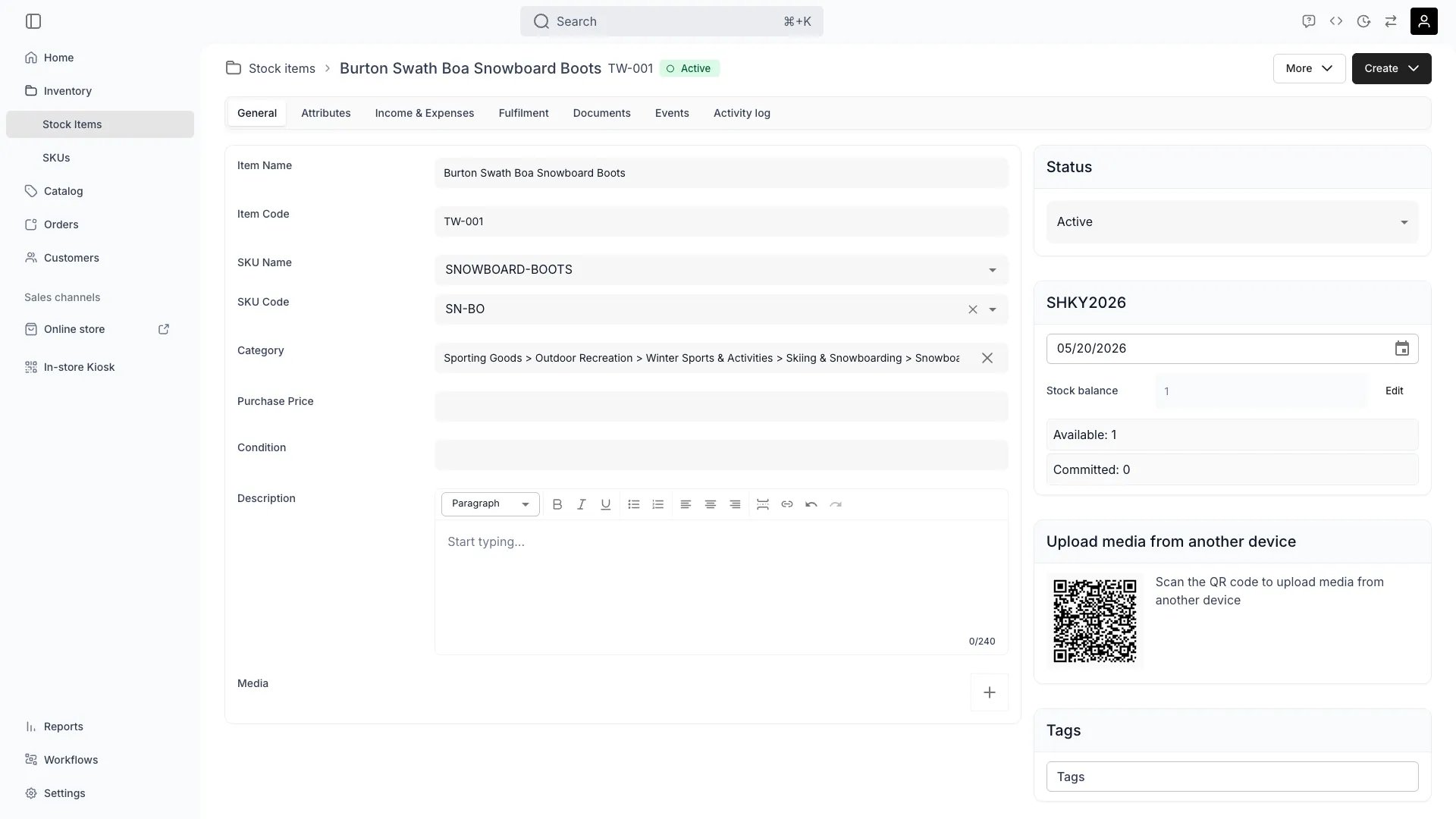
Inventory > Stock Items > [Item] > General
Definition
tracks where a stock item physically is — at hand in your inventory, or out with a customer. State is automatic: TWICE updates it based on fulfillment events on the orders the item participates in. Two State Values:- In — Item is at hand in your inventory. It may still be committed to an upcoming order, but it is physically with you.
- Out — Item is with the customer (rented or sold) or otherwise away.
State vs Status
These are two independent dimensions. You will see both on the same item.
A perfectly healthy bike that is currently on a rental shows Active / Out. The same bike under repair after the rental shows Inactive / In. Read more: Stock Item Status.
Where do I use it?
You view state on each Stock Item in Inventory → Stock Items and on the item’s General tab. State is also a filter column on the stock items table. State affects:- Available To Sell (ATS) — only items that are In and not committed to overlapping bookings count toward availability.
- Returns workflow — items that are Out are expected back; this drives return reminders and overdue reporting.
- Calendar views — see when items are expected to come back In.
- Conflict detection — moving an item that is Out is flagged because the customer still has it.
Key Properties
How state changes
State transitions are driven by fulfillment events on orders that include the Stock Item. The relevant events are recorded in the item’s activity log.In → Out
Triggered when an item is handed out on an order. Recorded events:handed_out— pickup / dispatch on a rental or sale.assigned_to_orderfollowed by handout — the item was reserved and then physically went out.
unavailability range driven by the order. ATS for any range overlapping that unavailability drops by one.
Out → In
Triggered when:returned— the item is returned on a rental order.- Order is cancelled or the line item is removed before pickup (item never actually left).
- Fulfillment is reversed (operator undoes a handout in the admin).
How fulfillment drives state
What moves a stock item is the fulfillment group of the item state its order line sits in, never the state’s name. An item in a Preparing or Handed out state claims the unit; a Returned or Removed one releases it. So the phases below hold whatever states your account defines under Item fulfillment states. Order line items go through pickup and return phases:- Reservation — order is created; item is In, but now linked to the reserving order. ATS drops for the booked range.
- Handout — operator marks the line as picked up. Activity log records
handed_out. State becomes Out. - Customer holds the item — state stays Out. Late return reports surface items overdue.
- Return — operator marks the line as returned. Activity log records
returned. State becomes In. Item is freed for re-rental. - Order completion / cancellation — closes the order side. If a line is removed before handout,
freed_from_orderis recorded.
ATS calculation
Available To Sell answers: for the requested date range, how many units of this SKU can I commit to a new booking? For a SKU’s ATS over a range[start, end]:
- Start from the total count of linked Stock Items where
status = activeand the requested service location matches. - Subtract units that are Out with a return date later than
start. - Subtract units that are In but committed to overlapping bookings (
scheduledEvents.type = reservationand unavailability ranges from other orders). - The remainder is ATS for the range.
temporalStock on the article availability response — four series of { range, value } pairs:
Worked example. A SKU has 10 active Stock Items at one location:
- 3 are Out on rentals running until Jan 15.
- 5 are In but committed to an order covering Jan 10–13.
- The other 2 are In and uncommitted.
stockBalance stays at 10 throughout — rentals commit units, they do not remove them from the books. Only sales reduce the balance. stockUtilisation for Jan 10–13 is 80%.
Edge cases
Item is lost while Out
Item is lost while Out
Change the item’s status to Inactive on the General tab and record the reason as a note. The state stays Out until the related order is closed or cancelled — the item is still recorded as in the customer’s possession until you close that loop. Ledger and event history are preserved.
Multi-day rental crossing a calendar boundary
Multi-day rental crossing a calendar boundary
State is set on physical handout, not on the booking start date. An item booked Jan 5–12 but not yet picked up is In on Jan 5. Once handed out, it stays Out for the entire rental — across days, weeks, or months — until returned.
Customer returns one of two items on a multi-item line
Customer returns one of two items on a multi-item line
Partial returns are handled per-unit on pooled lines, per-item on serialized lines. The returned units flip back to In; the rest stay Out until their own return.
Item returned to a different location than it left from
Item returned to a different location than it left from
The return updates state to In and a
location_changed event is recorded. The article’s articleLocations gets a new range starting at the return timestamp at the new service location.Fulfillment was reversed by mistake
Fulfillment was reversed by mistake
Re-fulfill the line. The item flips back to Out and the activity log records a new
handed_out event. The earlier reversal stays in the log for audit.Item booked but never picked up
Item booked but never picked up
Until the order is cancelled, the item stays In but the booking still counts toward ATS for the booked range. Cancel the order to release ATS.
Querying items by state
State is exposed indirectly throughunavailability ranges and the articleLocations array. To find items currently Out, list articles with a date range covering “now” and filter to those with an active unavailability of type order whose handout has fired and whose return has not.
In the admin: open Inventory → Stock Items and filter the State column to Out.
In the API: pass a dateRange covering the moment of interest. Stock Items that are currently out have an unavailability range overlapping that point, originating from an order line that is in the handed-out phase.
FAQs
Can I manually change state?
Can I manually change state?
No. State is set automatically by fulfillment and returns on orders. To change it, fulfill or return the order line for that item.
What if an item is lost while Out?
What if an item is lost while Out?
Update the item’s status to Inactive on the General tab and record the reason as a note. State remains Out until the related order is closed or cancelled.
How do I find all items currently Out?
How do I find all items currently Out?
Open Inventory → Stock Items and filter the State column to Out. You will see all items in customer possession along with their associated orders.
Does state affect my online store availability?
Does state affect my online store availability?
Yes. ATS calculations only count items that are In and not committed to overlapping bookings for the requested period. Items that are Out with a return after the requested start date are subtracted from ATS.
An item shows In but the customer still has it. What happened?
An item shows In but the customer still has it. What happened?
Most likely the order line was marked as returned in the admin without the physical return. Re-open the order line or use the activity log to investigate; you can re-fulfill if needed.
Developer Reference
Stock item state is read from thearticles endpoints — filter by dateRange to see items currently Out.
API: Articles
Open the endpoint in the API reference.
Related articles
Stock Items
Full Stock Item model and lifecycle
Stock Item Status
Operational lifecycle (Active / Inactive / Draft)
Stock Item Events
How orders and reservations record events
Order Lifecycle
How fulfillment and returns drive state changes
Item fulfillment states
Name the states your staff move order items through
Order lifecycle settings
What an order move does to its items