

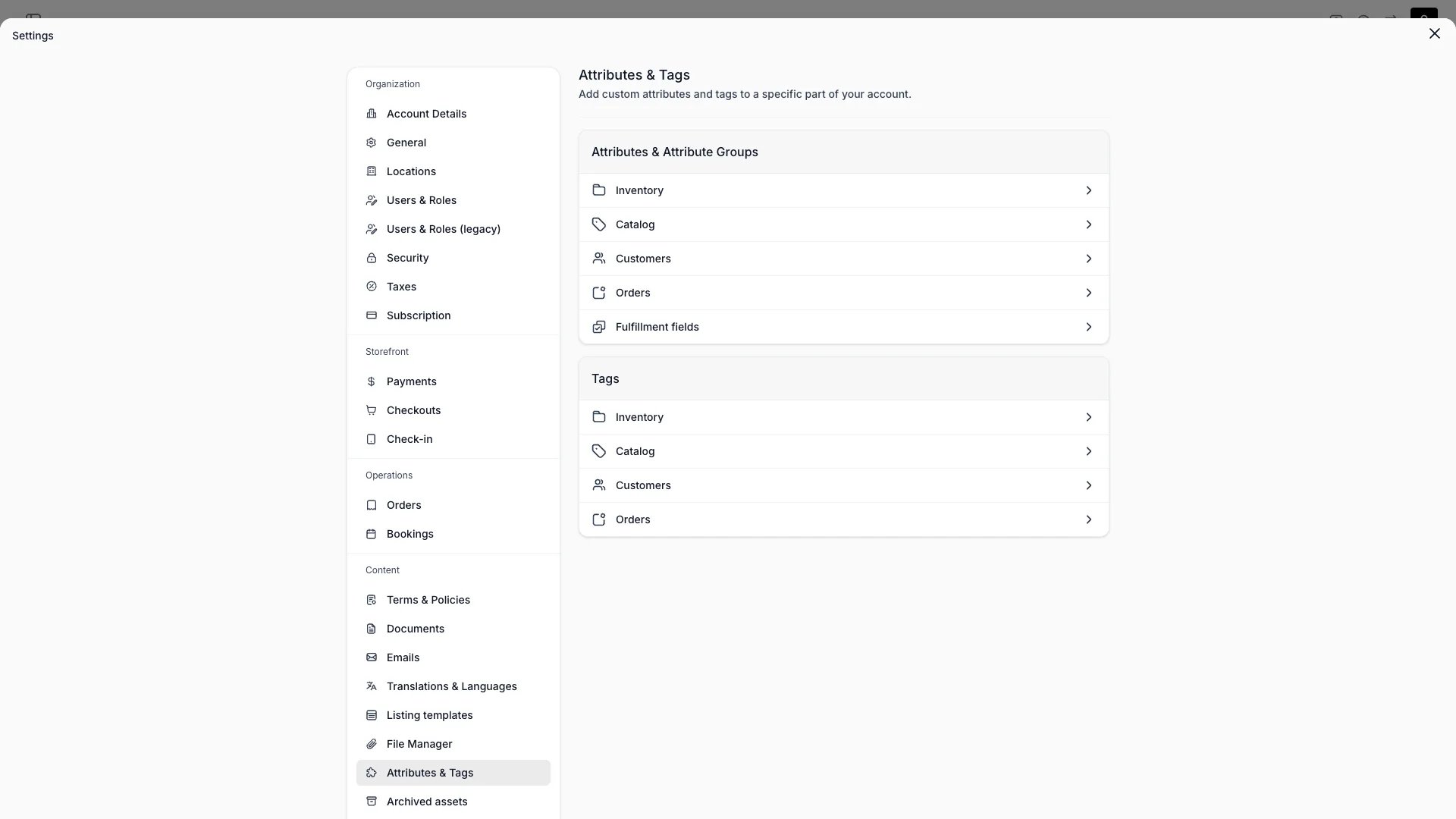
Settings > Attributes & Tags
Definition
Attributes are the configurable column system underlying every table and detail view in TWICE. Whatever your business needs to track that isn’t in the core data model — condition grade, serial number, warranty start date, custom delivery instructions — you express as Attributes.The analogy: Attributes behave like custom columns in a spreadsheet — you define them once and they appear in tables, forms, filters, and exports.
Where Attributes apply
Every Attribute is scoped to exactly one resource:
You cannot reuse the same Attribute across resources — if you need similar fields on both Customers and Orders, you define them separately. This keeps each resource’s schema clean and avoids cross-resource leakage.
Inventory Attributes can have one of two origins:
sku— the attribute is defined at the SKU level and inherited by every Stock Item under that SKUarticle— the attribute is defined at the Stock Item level only (Stock Items are also called Articles internally)
Attribute formats
TWICE supports nine Attribute formats:
Format also decides where an Attribute can be collected. A listing’s checkout field of type Customer attribute and the checkout’s own Contact step both accept
text, number, boolean, date, datetime and select. The other three, multiselect, formula and smart_field, render no input at checkout and are left out of both pickers.
There is no separate currency, percent, email, url, phone, file, relation, or external format — use number for currency and percent values, text for emails and URLs, and Documents for file attachments. A text Attribute can constrain what it accepts with input masks, which describe a fixed shape such as a card or licence number. Masks do not express open-ended formats like email addresses.
Select and Multiselect options
Each option in a select or multiselect Attribute is a{ key, label } pair:
key is the immutable identifier stored on records. The label is what users see and can be edited freely without breaking historical data. Both have a 255-character cap.
Formula attributes
Formula Attributes compute their value from other fields on the same resource. Each resource exposes a different set of system fields formulas can reference:
A typical formula uses these system fields plus other Attributes — for example, a Stock Item formula
item_income - item_costs yields the running profit. The formula re-evaluates whenever its inputs change.
Read more: Formulas
Smart field attributes
A smart field is worked out like a formula, from somewhere else. It reads one value already on the record, or calls your own API through a connector and stores what comes back. Set its Output type to Text, Number, Yes / No or Date. The field is stored, filtered, sorted and grouped as that type, and the type is fixed once any record holds a value for the field. A format cannot be changed to or from Smart field either, so both changes mean a new Attribute. Read more: Smart fieldsInput masks
Atext Attribute can carry input masks — template strings describing the exact shape a value may take, such as 123456 #### ######[#] for a member card number. A value that matches none of the Attribute’s masks is rejected.
Each mask drives three things at once: the validation rule the server applies, the placeholder the customer sees, and the formatting the input applies as they type. They are derived from the same mask, so they cannot disagree.
Masks apply to the text format only. You edit them in the attribute drawer under Settings → Attributes & Tags, where the section is labelled Accepted formats and Read how formats work opens the syntax reference. Each row shows a filled example and the accepted value length, so an off-by-one in an optional block is visible before you save.
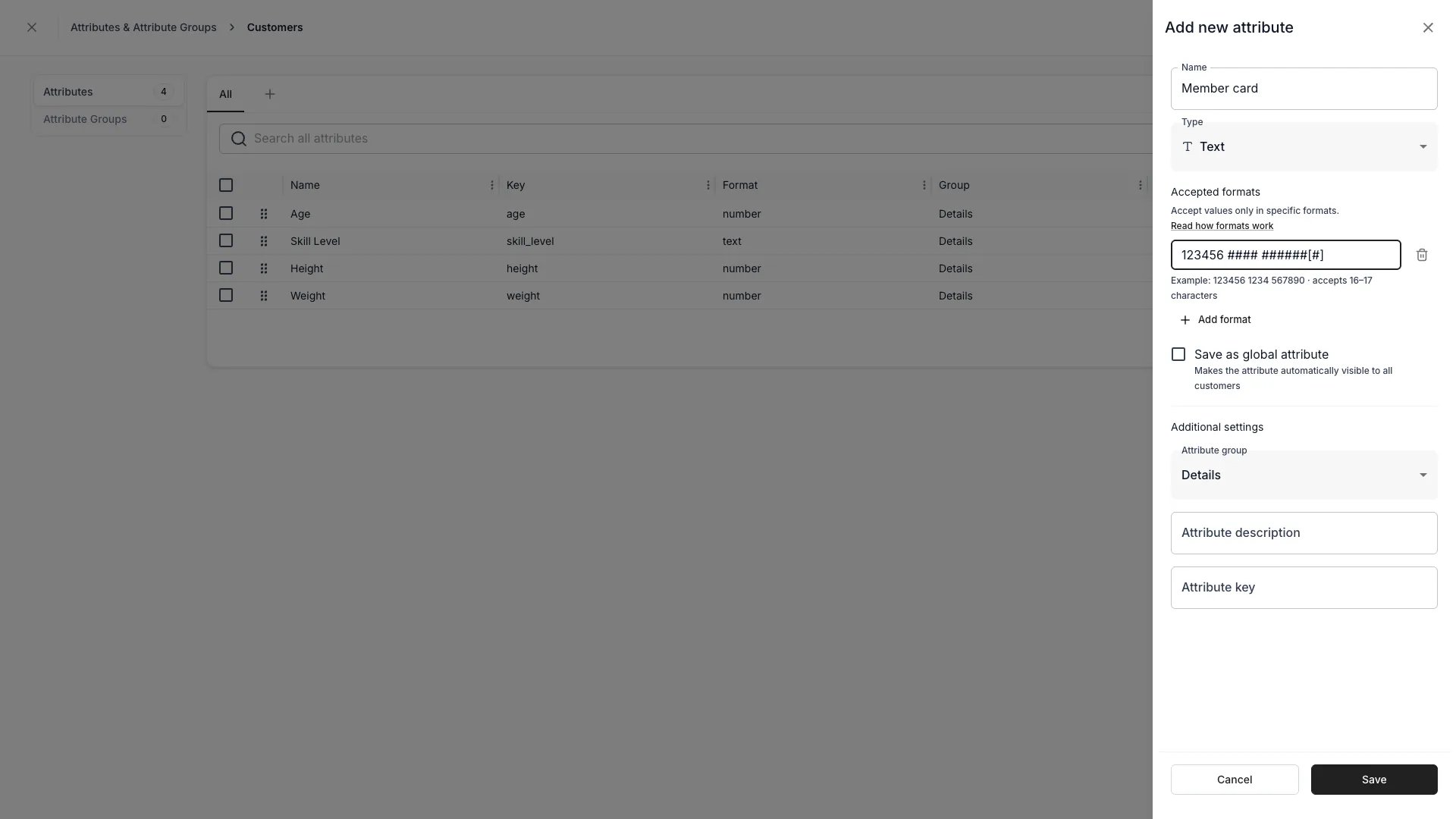
Settings > Attributes & tags — the Accepted formats editor
Mask syntax
Everything in a mask is fixed text unless it is one of these symbols:
Fixed text is matched and rendered exactly as you typed it, spaces and dashes included.
123456 #### is six fixed digits, a space, then four digit positions — the leading digits are never read as positions to fill.
The editor enforces a few more rules:
{…}lists its members literally. There are no ranges:{1-3}accepts1,-, or3, not1through3. Membership is case-exact, so{AB}rejectsa.- A mask may contain at most one optional block, and it must sit at the end.
- A mask needs at least one input position —
#,@,*, or{…}. - A character set cannot be empty, nested, or repeat a character.
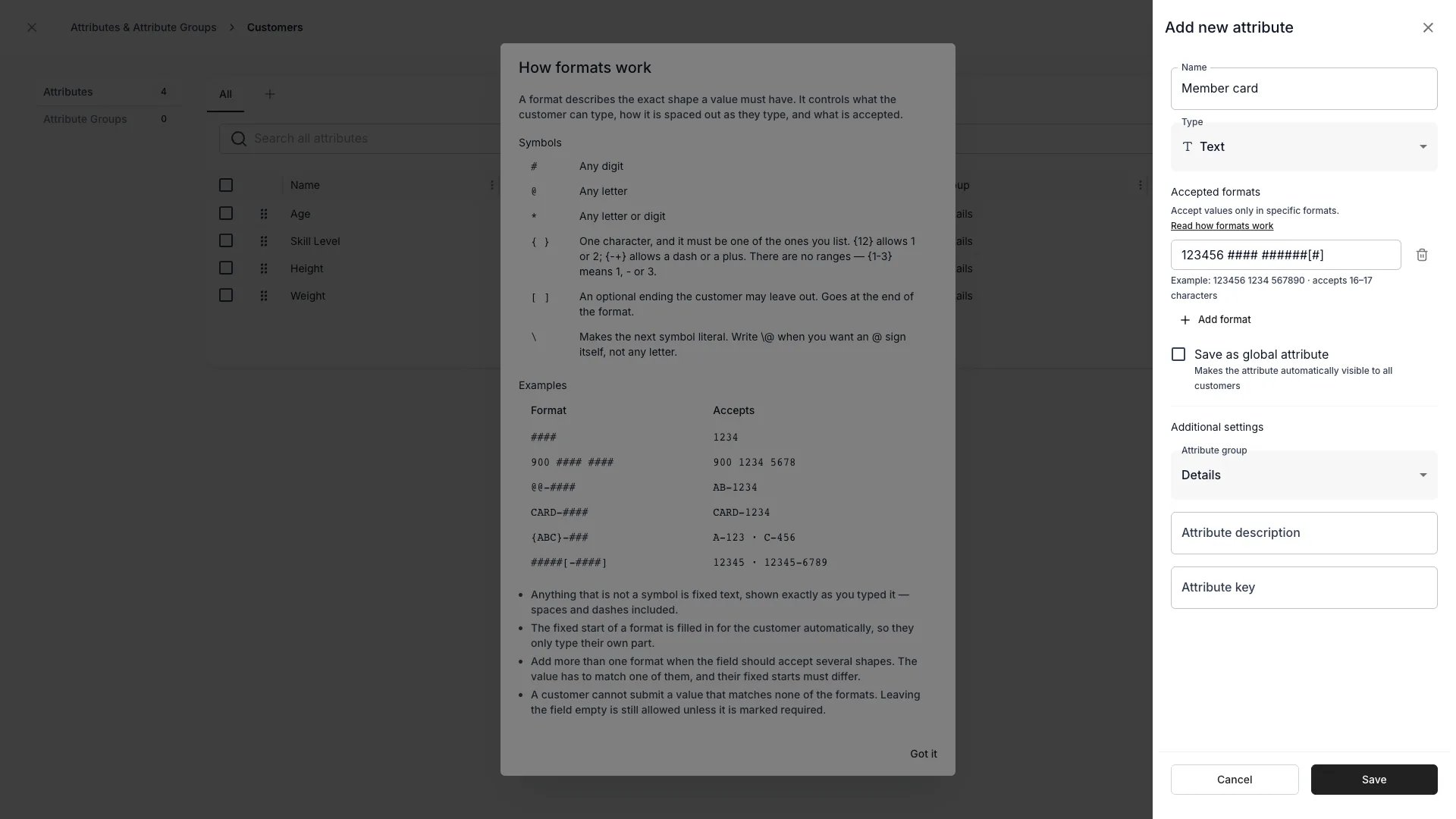
Read how formats work — the in-app syntax reference
The length counts the value the way you read it off the card — fixed characters included, separators excluded — not the number of characters the customer types.
Multiple accepted formats
An Attribute can accept several shapes. Add one mask per shape, up to 10 masks, each at most 100 characters. The masks in a list must be tellable apart by their fixed starts, compared with separators removed. TWICE rejects a list where one mask’s fixed start is a prefix of another’s:123456 #### and 998877 #### are fine, @@@-### and @@@### are not, since neither has a fixed start to distinguish it. The error names the two masks that clash.
How the field behaves depends on how many masks the Attribute has:
A value that matches no mask is left as free text while the customer types, rather than being coerced into the nearest shape, and is rejected on submit.
Where masks are enforced
Masks never make a field required. An empty value always passes — presence is controlled separately by the field’s Required setting.
- Storefront checkout — attribute-backed fields on the Contact step and the Additional details step format as the customer types, fill in the fixed start, and normalise a value pasted without its separators. A malformed value blocks the step.
- Admin — the same masked input applies wherever staff enter attribute values, including the customer drawer and the checkout fields on a new order.
- API and server — every write of a
textattribute value is validated. The response is a400naming the Attribute and a filled example of each accepted mask:Member card: must match the format 123456 1234 567890. At checkout confirmation the server re-checks contact attributes and reports malformed values separately from missing required ones.
"123456 1140 411905", not "1234561140411905" — the storefront input normalises pasted values, the API does not.
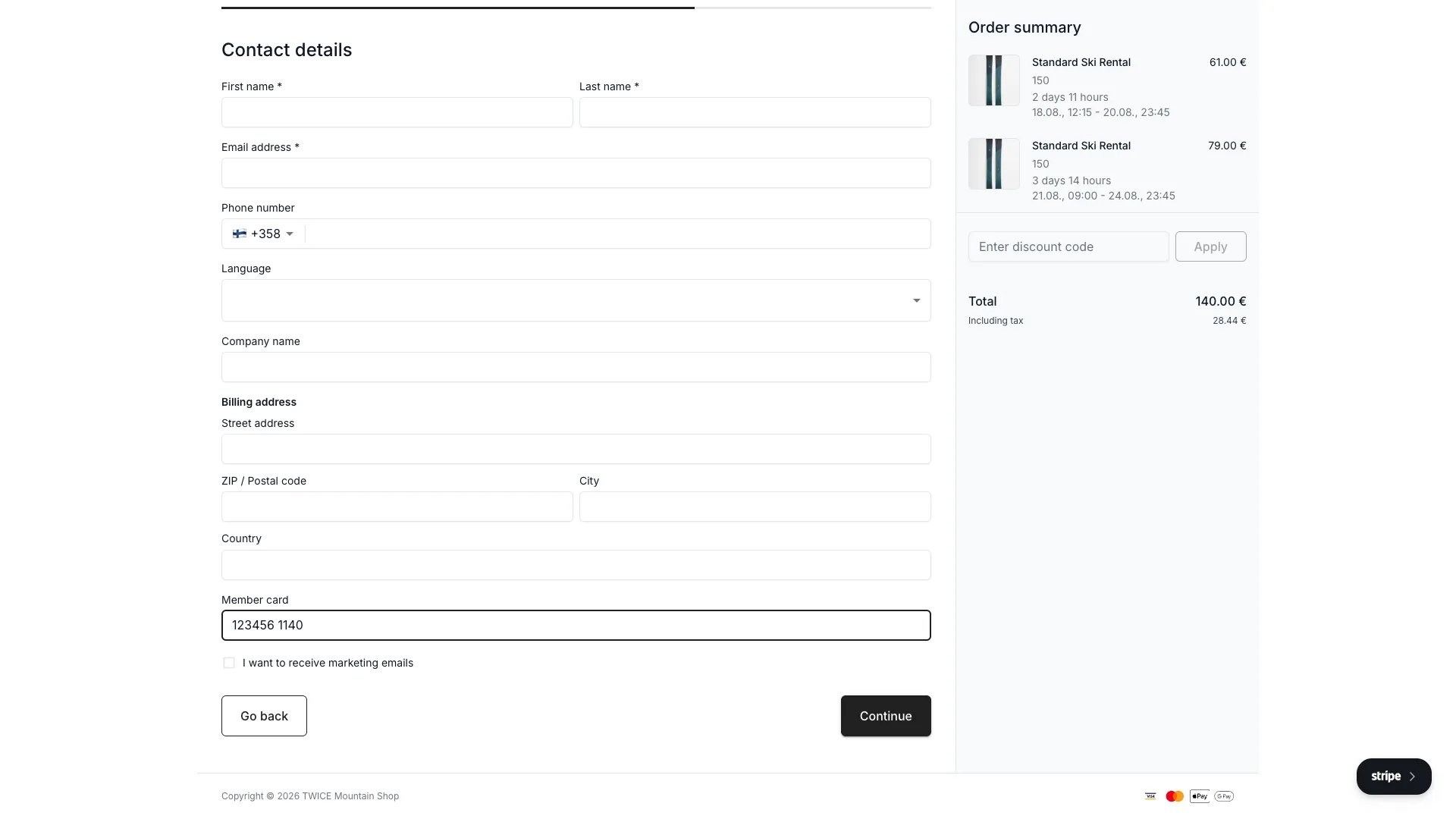
A masked attribute field at checkout, part-way through entry
Changing masks
- Masks belong to the
textformat. Changing an Attribute’s format to anything else clears them. - Adding or editing a mask validates values written from then on. Values already stored are left untouched and are not re-checked.
- Removing every mask leaves the field unconstrained again.
Key properties
An Attribute definition carries:
System groups are reserved categories —
system for customer — that hold attributes TWICE manages on your behalf.
How a key is stored
A storedkey contains lowercase letters, digits, _ and -, and nothing else. TWICE Commerce corrects what you type instead of rejecting it: the Attribute key field in the add/edit Attribute panel rewrites your input as you type, so the field always shows the value that will be stored.
Its helper text says the same — “Lowercase letters, numbers, - and _. Anything else is converted automatically.”
The correction runs in this order:
- Uppercase letters are lowercased.
- Spaces become
_. - Every remaining character outside
a-z,0-9,_and-is dropped. - A leading
attributes_is stripped.
Leave the key empty, or type something that leaves nothing usable, and TWICE Commerce derives the key from the Attribute’s
name by the same rules. A derived key that is already taken picks up a numeric suffix — condition, then condition_1, condition_2.
A key you typed yourself is never renamed for you. If it collides with an Attribute that already exists, the save fails with Attribute key "condition" is already in use. and you choose another one.
Renaming a key later goes through the same correction. A rename that leaves nothing usable is treated as no rename at all: the stored key stays as it was rather than being blanked.
The API accepts any string as
key and corrects it on write, so the value you read back can differ from the value you posted — POST a key of list-CutStyle and the Attribute is created with list-cutstyle. Take the stored key from the response rather than assuming the value you sent.Inheritance: SKU > Stock Item
For inventory Attributes specifically:- An attribute with
origin: skuis defined on the SKU and read on each Stock Item that rolls up to that SKU - An attribute with
origin: articleis defined directly on the Stock Item and not shared with siblings - Editing a SKU-origin attribute on one Stock Item is not allowed — you edit it on the SKU and the change propagates
Order attributes
Attributes scoped toorders attach custom data to individual orders rather than to inventory, catalog, or customer records. Common examples: cost centre, gift message, PO number, or special delivery instructions.
Checkout capture
Add an attribute field to your checkout contact form and bind it to an attribute. At checkout, the system routes the captured value by the attribute’s resource:orders— saved to the order’s attribute valuescustomers— saved to the customer profile
Confirmation email
Captured order attribute values render automatically in the order confirmation email:- Global order attributes always appear — with a dash (—) placeholder when no value was captured
- Non-global order attributes appear only when a value exists
Admin
Order attribute values appear on the order detail page under a dedicated attributes card. You can add, edit, and remove values directly. Order attributes also surface as filterable, sortable columns in the orders table.Filtering and search
Once an Attribute exists, it surfaces automatically in the table for its resource:
Search is full-text and runs against all string-castable Attribute values — so the toolbar search finds matches even in hidden columns.
API access
Attributes appear on every API response for the resource they apply to. They’re keyed byid and surfaced as a typed value record.
A typical inventory response includes:
key, not the user-facing label.
Lifecycle
Creating
- Open Settings → Attributes & Tags
- Pick the resource the Attribute applies to (Inventory, Catalog, Customer, Order)
- Set name, description, and format
- For
select/multiselect, define the option list - For
text, optionally add one or more accepted formats — see Input masks - For
formula, write the expression and pick the result format - For
smart_field, pick the source, define the request, and set the output type - Optionally assign to a Group and a sort order
Updating
- Name, description, sort order, and group can change freely
- Adding more options to a select/multiselect is safe
- Renaming option
labelsis safe — the underlyingkeyis what’s stored - Removing an option breaks any record that referenced it — TWICE warns before allowing this
- Adding or editing an input mask applies to values written from then on; values already stored are not re-checked
- Changing format is restricted because conversion may lose data; the safer pattern is to create a new Attribute and migrate values. Moving a
textAttribute to another format clears its input masks - A format cannot change to or from
smart_fieldat all, and a smart field’s output type is fixed once any record holds a value for it
Archiving and deletion
- Archiving hides the Attribute from new entry but preserves historical values
- Deletion removes the Attribute definition and all stored values for it across every record; this can’t be undone
- Use archive in nearly all cases; reserve delete for cleanup of mistakenly-created Attributes
Relationships
FAQs
Can I use the same Attribute on Stock Items and Listings?
Can I use the same Attribute on Stock Items and Listings?
No — each Attribute is scoped to one resource. Create matching Attributes on each resource if you need parallel fields.
What's the difference between SKU-origin and Stock Item-origin attributes?
What's the difference between SKU-origin and Stock Item-origin attributes?
SKU-origin attributes are defined once on the SKU and read on every Stock Item under it (think: Brand). Stock Item-origin attributes are unique to a single physical unit (think: Serial number). Choose origin based on whether the value varies unit-to-unit.
Can I change a select Attribute's options after rollout?
Can I change a select Attribute's options after rollout?
Adding options is safe. Renaming an option’s user-facing
label is safe — the underlying key stays put. Deleting an option breaks any record that referenced it, so TWICE warns before allowing this.Can I restrict what a text Attribute accepts?
Can I restrict what a text Attribute accepts?
Yes — give it one or more input masks. A mask describes a fixed shape (
123456 #### ######[#]), and a value has to match one of the masks the Attribute carries. Masks fit identifiers such as card, licence, or membership numbers; they do not express open-ended formats like email addresses.How do formula Attributes update?
How do formula Attributes update?
Formulas re-evaluate whenever their input fields change — no manual refresh needed. The result is read-only.
What is the difference between a formula and a smart field?
What is the difference between a formula and a smart field?
A formula computes from other fields on the same record, inside TWICE Commerce. A smart field reads a value from elsewhere: data on the order, the customer, or the units sold together, or a reply from your own API through a connector.
Are Attributes visible to customers?
Are Attributes visible to customers?
By default no. Whether an Attribute appears on the storefront depends on your storefront theme configuration — themes opt in to which Attributes they render on Listing pages.
Can I bulk-edit Attributes?
Can I bulk-edit Attributes?
Yes. Select rows in any table and choose Edit — the button counts your selection, so it reads Edit (3) for three rows — then set new values for any visible attribute column.
Developer Reference
Attributes are exposed asattributes in the API.
API: Attributes
Open the endpoint in the API reference.
Related articles
Attribute Groups
Group related Attributes for cleaner forms
Formulas
Write expressions for calculated Attributes
Smart fields
Values read from order data or fetched from your own API
Category Taxonomy
Categories suggest attributes — they work together
Tables
Where Attributes surface as filterable columns