

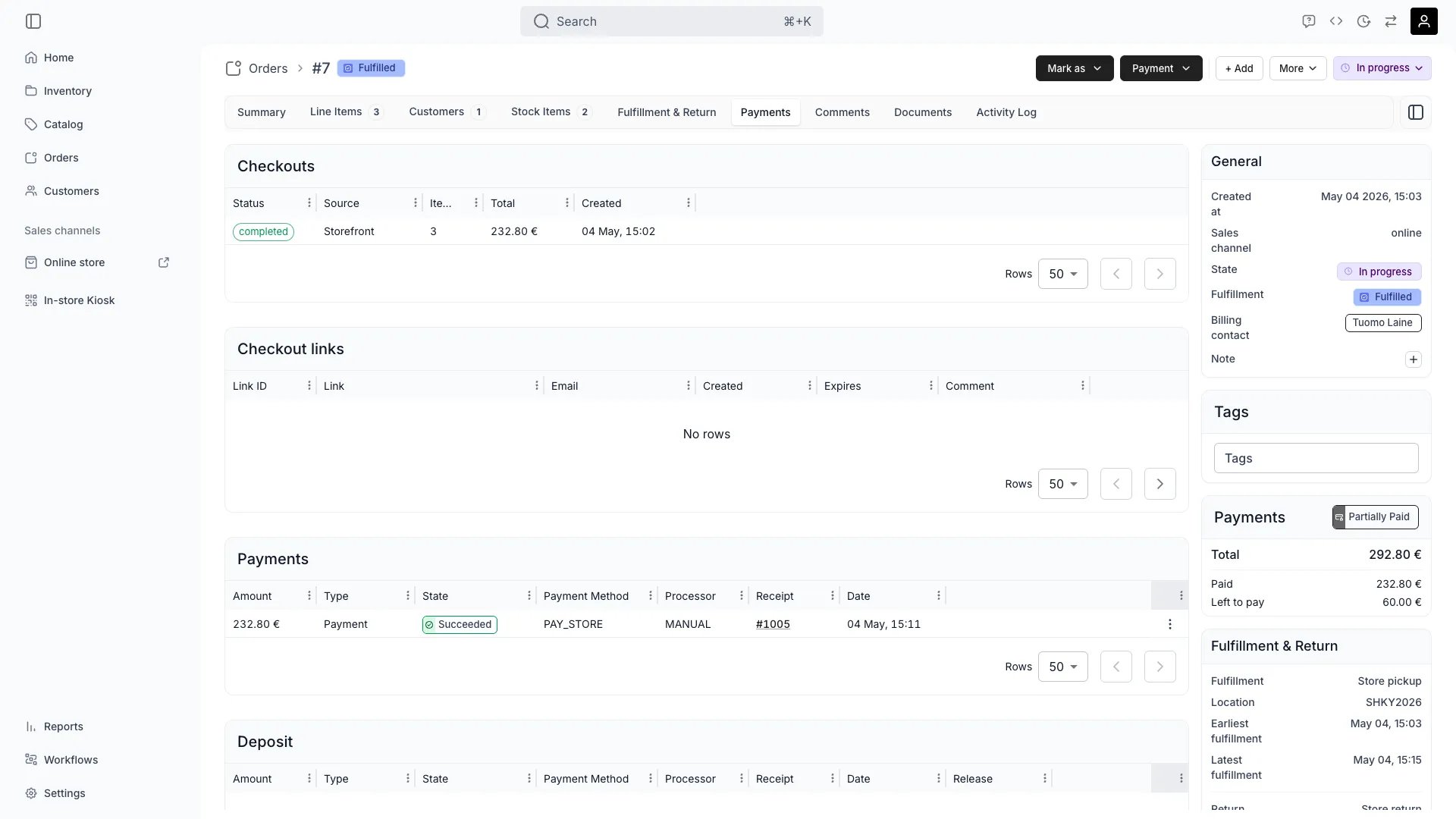
Orders > [Order] > Payment
Definition
TWICE separates money movement into a four-level hierarchy: Order → Checkout → Payment → Transaction.
Alongside Payments sit Invoices — the settlement documents that bill the money being moved. Refunds, deposits, partial payments, and split payment methods all map cleanly onto this hierarchy.
Where do I use it?
- Configuring payment providers under Settings → Payments
- Charging customers at checkout (online or in admin)
- Handling deposits on rental orders
- Issuing full or partial refunds against captured transactions
- Reconciling reports against your payment provider’s payouts
- Building API integrations that need to record manual payments or issue refunds
Key Properties
The payment hierarchy
Order
Order
The Order contains all the line items (what the customer is buying or renting). Every payment flow starts with an Order.Read more: Order Lifecycle
Line Items
Line Items
represent what the customer is purchasing or renting. Each line item references:
- A Listing (or a one-off line item)
- Quantity
- Price information
- Associated stock items (for fulfillment)
Checkout
Checkout
is created when an order is ready for payment. A checkout can be created:
- Manually from an Order (by staff)
- Via self-service online (by the customer)
Payment
Payment
is connected to a Checkout and produces the VAT receipt. Key characteristics:
- Always points to Line Items on the Order
- Can include multiple Transactions
- A Checkout can have multiple Payments (e.g., deposit + balance)
Transaction
Transaction
is comparable to a receipt from a payment terminal. One Payment can include multiple Transactions.Examples:
- Split payment: Half with a gift card, half with cash → 2 Transactions, 1 Payment
- Refund: Original capture Transaction on the original Payment, refund Transaction on a linked refund Payment
Payment types and methods
Every Payment has a type and a method describing how it was paid:- Types:
sale(charge),deposit_auth,deposit_capture,refund,refund_reverse(a refund clawed back to you),cancel, andexpire(an authorisation that lapsed unclaimed). - Manual methods: Pay in store (
PAY_STORE) and merchant-named custom methods (CUSTOM) for in-person and offline payments. - Online methods: card, Apple Pay and Google Pay via Stripe; card, Apple Pay and Google Pay via Adyen. MobilePay and Pay by Bank are Stripe methods enabled for selected merchants only.
paymentStatus: PAID / UNPAID).
Hierarchy visualization
Invoices
Alongside Payments, TWICE issues Invoices — the settlement documents in the money model. A payment line without an invoice reference is unbilled money: when the sale succeeds, TWICE mints an Invoice from those lines and stamps the minted invoice ids back onto them. A payment line that already references an invoice settles that invoice line instead and never mints anything. An Invoice’sstatus tracks the document lifecycle only: draft, open, cancelled, uncollectible (a manual write-off), or scheduled (an upcoming subscription cycle, computed on demand — never stored). Paid-ness is derived separately from the invoice’s capturedTotal and refundedTotal, mirroring the payment vocabulary: unpaid, partially paid, paid, partially refunded, refunded.
Subscription revenue sources from invoice lines: each billing cycle adds a line carrying the subscription id and billing period, so one Invoice can bill several subscriptions. See Subscriptions.
Relationships
- A Payment always references the Line Items it charges for — never the whole Order in the abstract.
- A refund Payment links back to the original Payment via
originalPaymentId. Refund lines trace to the original payment lines internally (originalPaymentLineId); this per-line link is not exposed on the API. - A Deposit is a separate Payment Object on the Order (with its own
authorised,captured,refunded, andcancelledtotals) so deposit movements never mix with charge movements. - The Payment Provider (Adyen, Stripe, manual) determines which methods are available and whether authorise/capture is supported.
Lifecycle
From Order to Payment
1
Order created
An Order is created containing . Orders can be created manually in admin or automatically from a customer’s online checkout.Read more: Order Lifecycle
2
Checkout created
A Checkout is created either from the storefront cart — in which case completing it creates the Order — or manually from the admin against an Order that already exists.A Checkout need not cover the whole Order. A checkout link carries the lines you selected, each with its own amount to collect, and the customer sees only those lines. That amount is a ceiling: the Checkout never charges more than the line still owes at the moment of payment.Read more: Order - Payment
3
Payment(s) created
One or more Payments are created within the Checkout:
- Each Payment points to specific line items
- Each Payment produces its own VAT receipt
- Multiple Payments enable partial-payment scenarios (deposit + balance, installments)
4
Transaction(s) processed
Each Payment can include multiple Transactions — split payment methods, refunds, etc.
Authorize and capture
For providers that support it (Adyen and Stripe with cards), TWICE uses a two-step authorise/capture flow:- Authorise: hold funds on the card without taking them. Used for rental pickups so the merchant can adjust the final amount.
- Capture: take the authorised funds. Can be a full capture or a partial capture for less than the authorised amount.
- Void: release an authorisation without capturing. Used when an order is cancelled before pickup.
- Expired: the provider auto-cancelled the hold because it was not captured within the authorization window (typically ~7 days for Stripe).
Deposits
Deposits are a separate Payment object alongside the main charge. On the Order they show as their own block with their ownauthorised, captured, refunded, and cancelled totals.
Deposit method availability is constrained per payment method —
PAY_STORE and custom manual methods support manual deposits, while card methods support automatic card-based deposits.
Manual payment methods (Pay on pickup, custom methods) are allowed at checkout even when the order includes a security deposit. In this case the deposit is handled as a manual deposit. Only orders with auto-charged subscriptions require a card payment method — deposits alone do not.
If a card-based deposit hold is not captured within the provider’s authorization window (typically ~7 days for Stripe), the provider cancels it automatically. The Payments tab shows these as Expired, distinct from a manual release which shows as Cancelled. See Security Deposits.
Partial captures and partial refunds
A captured Transaction can be partially refunded multiple times until fully refunded. Each refund creates a new Payment record of typerefund linked to the original Payment via originalPaymentId. A refund can itself be reversed by the provider (refund_reverse) — for example when a bank refund fails and the money comes back to you — and an uncaptured authorisation that lapses produces an expire record.
When you issue a refund:
- You specify the Transaction to refund and the total amount.
- Optionally, you specify which payment lines to refund and how much per line.
- TWICE creates the refund Payment and updates the original Transaction’s
modificationSummary.
Per-line (explicit)
Per-line (explicit)
Specify exactly which payment lines to refund and how much for each. The per-line amounts must sum to the total refund amount. Setting a line’s amount to
null refunds that line’s full remaining refundable amount.Use case: Refund one product in a multi-product order without affecting the others.Proportional (automatic)
Proportional (automatic)
Omit payment lines entirely. The refund amount is distributed proportionally across all refundable lines based on their remaining refundable amounts. Rounding remainder goes to the largest line.Use case: Issue a flat goodwill refund spread evenly.
modificationSummary tracks twelve fields:
Reconciliation
Automatic matching
Automatic matching
For integrated providers, TWICE automatically matches Transactions to Payments, links Payments to Checkouts and Orders, and updates the Order’s Payment State as Transactions complete.
Manual reconciliation
Manual reconciliation
For manual payments (cash, bank transfer, third-party platforms), record the Payment and Transaction directly. Use the payment date, method, and external reference fields to map back to your accounting.
VAT receipts
VAT receipts
Receipts are generated per Payment, not per Transaction. One Payment with two Transactions (gift card + cash) still produces a single receipt covering both methods.
Supported Providers
TWICE supports two online payment providers and a manual flow for everything else.Online providers
Stripe and manual/offline payments are available to every store. Adyen is enabled for selected merchants only (as is SumUp for in-person terminal payments) — see Payments settings.
Apple Pay and Google Pay on Stripe
Apple Pay and Google Pay activate automatically when you connect Stripe and enable card payments. There is no admin toggle — wallets are derived from the card method at runtime. TWICE registers your storefront domains (subdomain and any custom domains) with Stripe for Apple Pay domain verification. Registration happens automatically when you:- Connect your Stripe account
- Change your store subdomain
- Activate a custom domain
Apple Pay does not appear when the checkout is embedded in an iframe. Google Pay is unaffected by this restriction.
Manual / offline payments
Two manual methods exist:- Pay in store (
PAY_STORE) — the built-in method for payment collected at pickup. - Custom methods (
CUSTOM) — methods you name yourself, each with its own label and optional description. Create as many as you need — “Bank transfer”, “Gift card”, “External POS”.
FAQs
When is the VAT receipt generated?
When is the VAT receipt generated?
At the Payment level. One Payment = one receipt, regardless of how many Transactions make up that Payment. If a customer pays €120 split across gift card and cash in one Payment, the receipt shows €120 with both methods detailed.
Why are refunds separate Payments rather than negative Transactions?
Why are refunds separate Payments rather than negative Transactions?
Refunds need their own VAT receipts and audit trail. By creating a linked refund Payment (
originalPaymentId → original Payment), TWICE keeps the original Transaction immutable while still tracking the refund chain.Which providers support subscriptions?
Which providers support subscriptions?
Stripe and Adyen card payments. Apple Pay and Google Pay on Stripe also support subscriptions — Stripe saves the underlying card for recurring off-session charges. Redirect-based methods (MobilePay, Pay by Bank) and manual methods are one-off only.
What's the difference between Payment State and the chip on the Order?
What's the difference between Payment State and the chip on the Order?
The chip is a rollup. Each Payment has a finer-grained state behind the scenes — pending, succeeded, partially refunded, refunded, refund reversed, cancelled, expired; the chip reduces all Payments on the Order to a binary Paid / Unpaid (
paymentStatus: PAID / UNPAID).Developer Reference
Transactions are tied to orders. Refunds and captures live under thepayments endpoints; provider configuration under paymentAccounts.
API: Payments
Open the endpoint in the API reference.
Related articles
Order Lifecycle
Order, Payment, and Fulfillment states.
Order Types
How purchase type shapes the payment flow.
Integrations
Connect Stripe and manage payment providers.
Reports
Financial reports and reconciliation.