

Definition
A stock item conflict occurs when a stock item is assigned to fulfill an order but no longer holds a valid reservation in the inventory system. The item is committed to the order on paper, but the underlying unavailability record that blocks other bookings from claiming it is missing. Conflicts require attention because the conflicted item may have been double-booked or its reservation was cleared by another operation. Until resolved, the order’s fulfillment is at risk.When does a conflict occur?
A stock item on an order is flagged as conflicting when all five conditions are true:- The item is assigned to an inventory article (it references a specific physical item)
- The item has no resolved unavailability reservation (the hold that blocks competing bookings is missing)
- The rental period has not ended (the return date is in the future or not set)
- The item is not in a terminal state (not returned or cancelled)
- The parent order is live (not archived and not deleted)
- A scheduled event or maintenance window cleared the item’s unavailability
- The item was manually unassigned from its inventory article and reassigned
- A capacity reallocation moved the reservation to a different slot
- The stock item was archived, which releases its future holds — the archive confirmation counts the affected bookings before you confirm, and each one needs a replacement unit
Archiving an order clears its conflicts
Archiving an order releases its future holds: the order will not be fulfilled, so the capacity goes back into the pool. That leaves the order’s stock items without a reservation — the same shape as a conflict, but expected cleanup rather than something to resolve. The fifth condition is what keeps the archive’s own cleanup from surfacing as a conflict. An archived or deleted order’s stock items are suppressed everywhere conflicts appear:- The Orders table banner and Has conflicts column
- The order detail banner
- The Stock Items tab badge
Where conflicts appear
TWICE Commerce surfaces conflicts in two places in the admin.Orders table
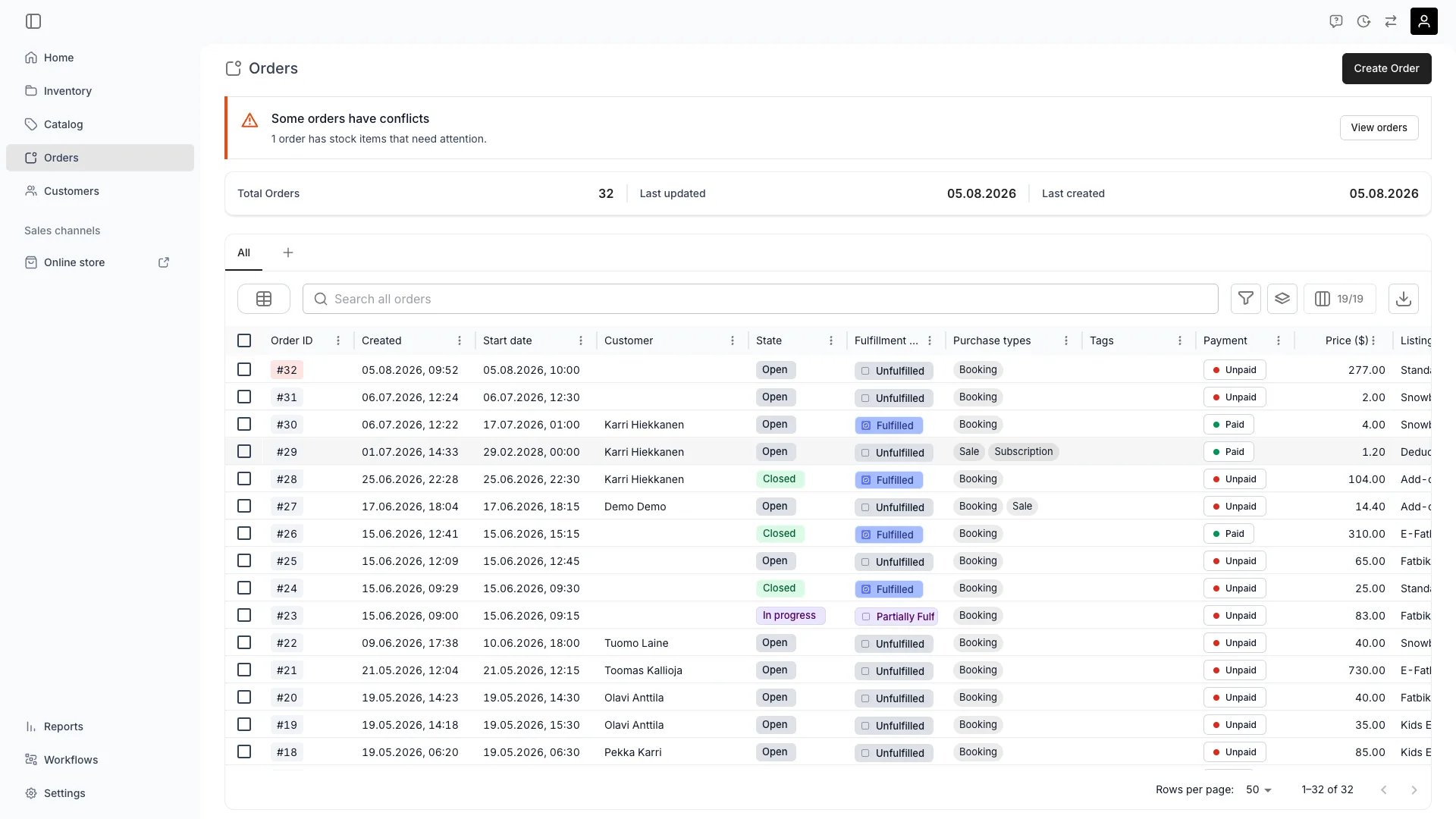
Conflict warning banner on the Orders table
Some orders have conflicts — N orders have stock items that need attention.Click View orders on the banner to filter the table to only orders with conflicts. You can also:
- Filter the Has conflicts column to Yes to find affected orders
- Group by the Has conflicts column to separate clean orders from those needing attention
- Spot conflicted orders by their highlighted order number (error-colored background on the order number chip)
Order detail page
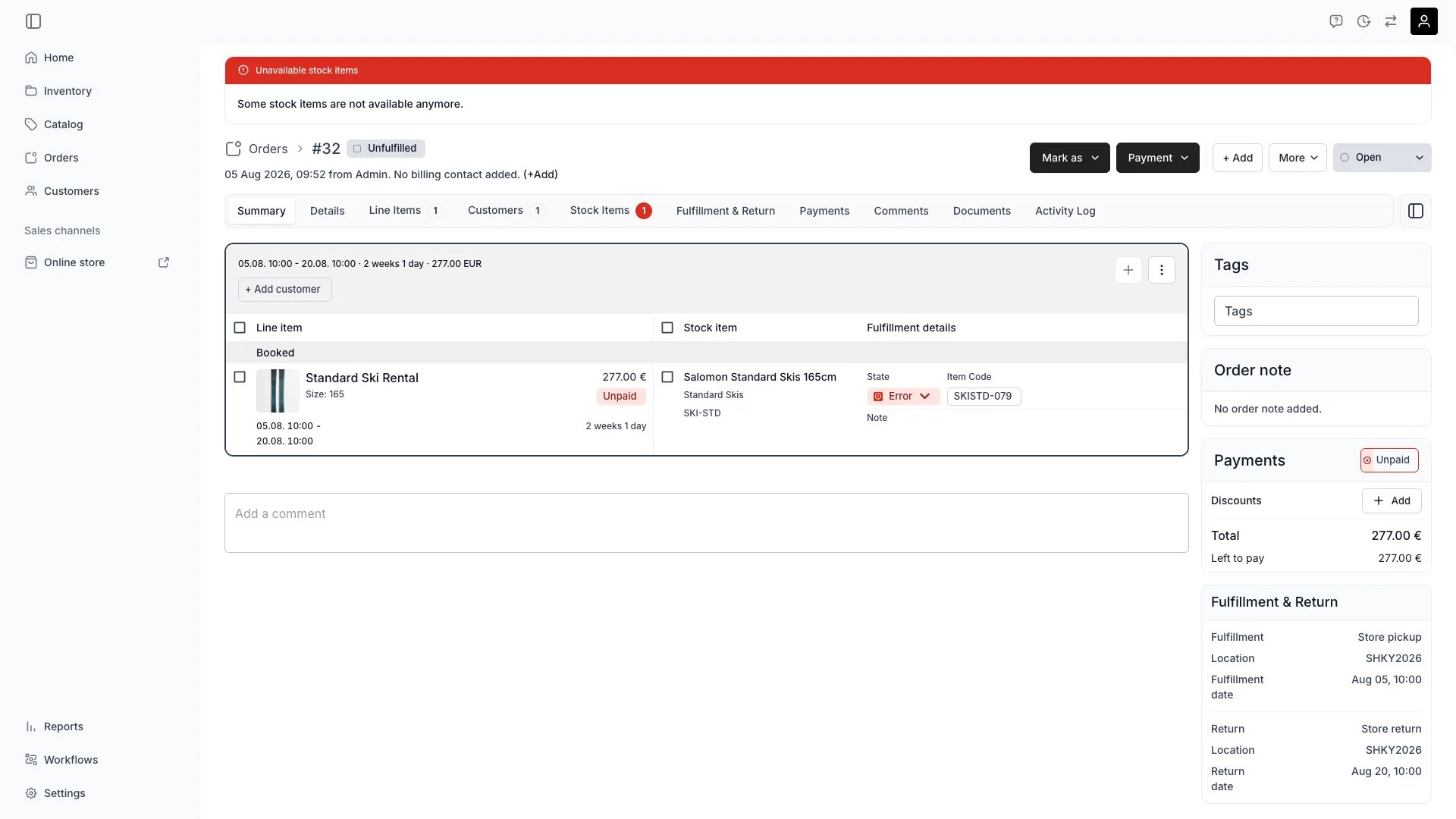
Conflict banner on the order detail page
Unavailable stock items — Some stock items are not available anymore.The Stock Items tab highlights the affected items with a red badge. Open the tab to see which specific items need reassignment.
Resolving conflicts
To resolve a stock item conflict:- Open the affected order
- Go to the Stock Items tab — items with conflicts are highlighted
- Open the stock item drawer for a conflicted item
- Use the Change stock item section to swap the item for an available alternative
- TWICE Commerce shows availability status for each candidate item, so you can pick one that does not conflict with other orders
Capacity-aware resolution
When resolving conflicts that involve capacity-constrained inventory, TWICE Commerce uses a capacity-aware approach:- If a slot is already free for the requested period, the new reservation is created without disturbing other bookings
- If reallocation can free a slot (moving another booking to a different physical item), the swap is performed automatically
- Only when no slot can be freed does TWICE Commerce flag overlapping reservations that need manual intervention
FAQs
What causes a stock item to lose its reservation?
What causes a stock item to lose its reservation?
The most common cause is a scheduled event or maintenance operation that cleared the unavailability record. Capacity reallocations and manual inventory changes can also remove reservations.
Does a conflict mean the item is double-booked?
Does a conflict mean the item is double-booked?
Not necessarily. A conflict means the reservation hold is missing — the item could be claimed by another booking. Check the item’s availability calendar to see if an actual overlap exists.
Can I ignore conflicts?
Can I ignore conflicts?
Conflicts do not block order processing, but they indicate that the assigned item may not be available when the customer arrives. Resolving them promptly prevents fulfillment surprises.
Do conflicts resolve automatically?
Do conflicts resolve automatically?
No. A conflict clears when you reassign the stock item, when the order reaches a terminal state (returned or cancelled), or when the order is archived. The system detects conflicts but requires manual resolution.
Related articles
Stock Item State
How In and Out state tracks physical item location.
Order Lifecycle
Order status, payment, and fulfillment dimensions.
Stock Items Tab
Managing assigned stock items on an individual order.
Resolve a stock item conflict
The step-by-step routine for clearing conflicts.
Auto-Fulfillment
Automatic stock item assignment and reservation.