

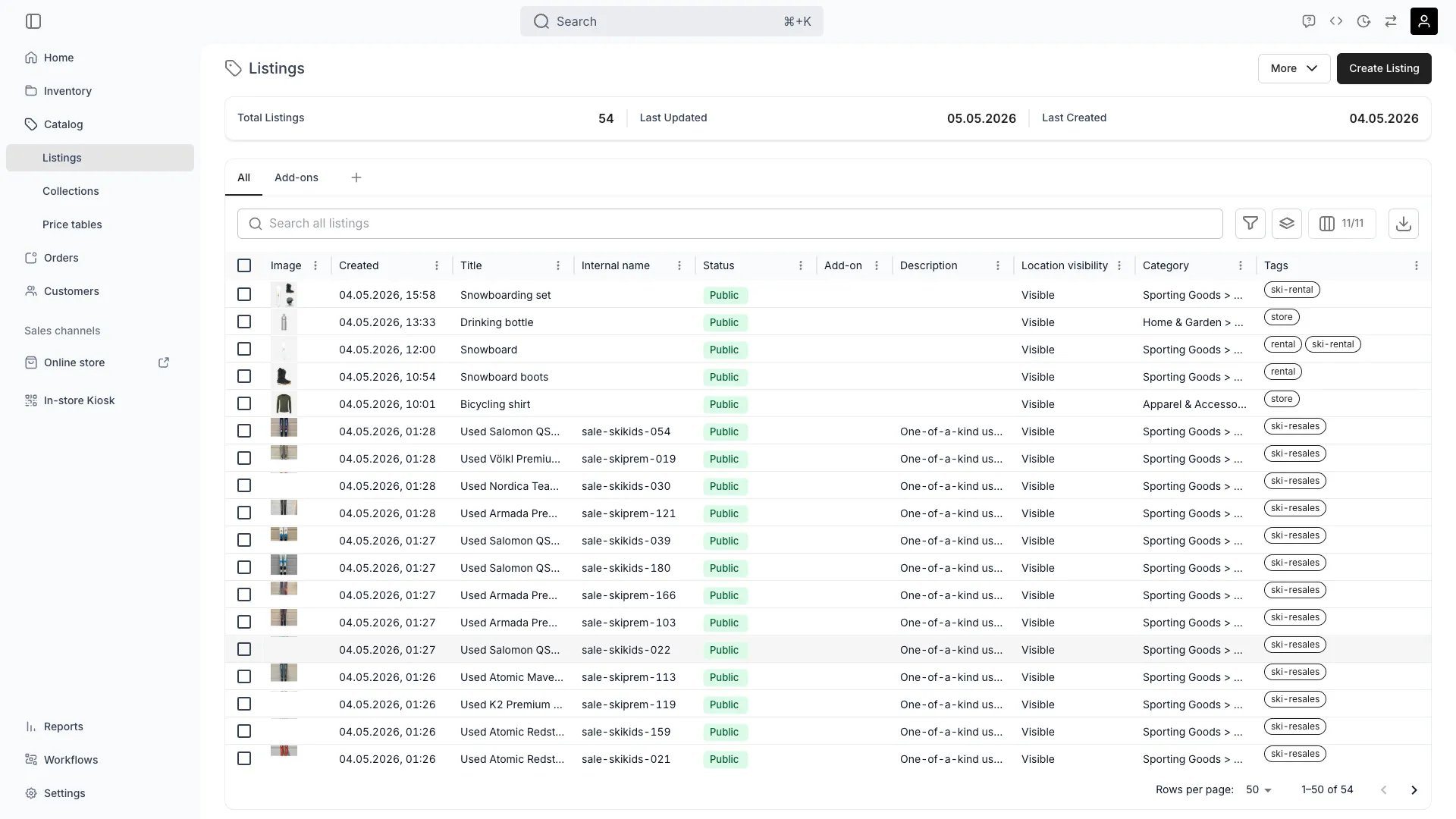
Catalog > Listings
Definition
The Analogy: A Listing is the store-window version of your product. SKUs and Stock Items describe what you own; the Listing describes what you sell — its name, photos, prices, durations, and where it appears.
Listing vs. SKU vs. stock item
A Listing reaches inventory through fulfilment rules, not direct foreign keys. A rule says “to fulfil this Listing, reserve 1 unit matching
attribute:bike_size = M”. The rule resolves to matching Stock Items at order time, which is why one Listing can pull from many SKUs and many SKUs can power many Listings.
See also: SKU, Stock Item.
Where do I use it?
- Catalog management — Create, organise and publish the products customers can order
- Online Store — Anything published to the online channel renders from a Listing
- Order creation — Admin order draft and storefront checkout start from a Listing
- Pricing — Attach one or more Price Tables to control rental, sale and subscription rates
- Variants — Offer size, colour, or other axes within a single Listing
- Availability — Compute real-time ATS by intersecting fulfilment rules with Stock Items
- Collections — Group Listings for storefront navigation and merchandising
- Sales channels — Control whether a Listing is visible in Admin and the Online Store
- Add-ons — Mark a Listing as add-on only or attach add-ons to other Listings
- SEO and marketing — URL handle, page title, meta description, OpenGraph image,
noindex
Key Properties
Identity and content
Status and visibility
The admin status selector exposes only Public (
active) and Draft (draft). The template value is reserved for system templates and is not a user-facing publishing state.Archiving is a separate axis from publishing status. Set a Listing to Draft to keep it in your catalog but off the storefront; archive it to take it out of use entirely. See Archiving and Deletion.Pricing and tax
Price is never stored directly on the Listing. All pricing lives in attached Price Tables (booking, sales, subscription rows). See the Price Table concept.
Limits and booking behaviour
unit is one of seconds, minutes, hours, days, weeks, months.
Inventory and fulfilment
Variants
A Listing with no variants is treated as a single SKU offering. See the Variant concept.
Media, documents, and SEO
Add-ons and related listings
Checkout requirements
Relationships
Belongs to a Catalog
Belongs to a Catalog
A Listing is one row in your Catalog. It is the unit of merchandising and is what gets ordered. Listings are listed, filtered and grouped in Catalog → Listings.
Resolves to SKUs and Stock Items via fulfilment rules
Resolves to SKUs and Stock Items via fulfilment rules
A Listing does not point to a single SKU. Each fulfilment rule on the Listing matches one or more Stock Items by attribute, SKU code or other filters. Availability for the Listing is the intersection of those matches with calendar reservations.
Appears in Collections
Appears in Collections
A Listing can appear in any number of Collections — either added manually (Manual collection) or matched by tag (Smart collection). See the Collection concept.
Published to Sales Channels
Published to Sales Channels
Two boolean flags control where the Listing is offered: Admin and Online Store. Disabling both keeps the Listing in the Catalog but offline. See the Online Store concept.
Linked to Service Locations
Linked to Service Locations
Each
CatalogItemServiceLocationLink declares a location from which the Listing can be fulfilled. Used by storefront availability filters and by the order router.Priced through Price Tables
Priced through Price Tables
All prices live on attached Price Tables. A Listing usually has a default (always-valid) Price Table and optional date-bound tables for promotions or seasonal pricing.
Listing detail tabs
When you open a Listing in the admin, the resource page exposes the following tabs:Availability calculation
Availability (ATS, Available-To-Sell) is never stored on the Listing. It is computed on demand by the catalog availability endpoints:GET /catalog/:id/quantity— total units available for the Listing across a date range and selected service locationsGET /catalog/:id/available-by-variant-value-groups— breakdown by variant value combinations
conditions against Stock Items, and subtracts existing reservations in the requested window. A Listing with inventoryTrackingEnabled = false is treated as infinitely available.
Lifecycle
1
Create
Create a Listing from scratch, from a template, by duplicating an existing Listing, or directly from a SKU (
POST /catalog/from-article/:articleId).What information is required at minimum?
What information is required at minimum?
Only
name is strictly required. To make a Listing buyable you also need at least one fulfilment rule (or inventoryTrackingEnabled = false), one Price Table, and at least one enabled sales channel.What is the initial state?
What is the initial state?
New Listings are created with
status = 'draft'. They are invisible to customers until you switch to Public.Can creation be automated?
Can creation be automated?
Yes. Use
POST /catalog/ for direct creation, POST /catalog/many for bulk import, or POST /catalog/from-article/:articleId to seed a Listing from an existing SKU.2
Publish
Switch
status to active and enable the sales channels you want the Listing to appear on.Where does a Public Listing appear?
Where does a Public Listing appear?
In the Online Store if
salesChannelOnline = true, and in admin order draft if salesChannelAdmin = true.What blocks publishing in practice?
What blocks publishing in practice?
Nothing in the API. But a Listing with no fulfilment rule and
inventoryTrackingEnabled = true will show 0 availability. A Listing with no Price Table cannot be priced at checkout.3
Update
Most fields can be patched with
PUT /catalog/:id. Rules, variants, pricing tables and barcodes have dedicated nested endpoints.What changes are safe on a Public Listing?
What changes are safe on a Public Listing?
Content fields (name, description, media, SEO) are safe. Rule changes affect future availability calculations only — existing orders preserve the Listing data they captured.
What about price changes?
What about price changes?
Add a new dated Price Table instead of editing the default one if you need pricing to apply only from a future date. Existing orders are not retro-priced.
4
Retire
Set
status = 'draft' to take the Listing offline while keeping its history, or DELETE /catalog/:id to remove it. Listings referenced by orders are kept for historical reporting even after deletion.Frequently asked questions
What's the difference between a Listing and a SKU?
What's the difference between a Listing and a SKU?
A SKU is an inventory definition — a code that identifies a type of unit you own. A Listing is a sellable offer in your Catalog. One SKU can power many Listings (for example, daily rental, weekly rental, and outright sale of the same bike). One Listing can resolve to many SKUs through fulfilment rules.
Can I sell the same physical item at different prices?
Can I sell the same physical item at different prices?
Yes. Create one Listing per offer and attach a different Price Table to each, or attach multiple Price Tables to one Listing with non-overlapping
availabilityRange windows.How does availability work with serialized inventory?
How does availability work with serialized inventory?
Each fulfilment rule resolves to a set of candidate Stock Items by attribute or code match. ATS for a Listing at a given time window equals the count of candidate Stock Items minus units already reserved for that window.
What does template status mean?
What does template status mean?
template is an internal status used by the system templates feature. It is not exposed in the admin status selector and is not a user-facing publishing state.Can a Listing be both a rental and a sale?
Can a Listing be both a rental and a sale?
Yes. The Price Table model includes separate
bookingPricingRows, salesPricingRows and subscriptionPricingRows. Toggle bookingsEnabled, salesEnabled and subscriptionsEnabled on the table to control which purchase modes are offered.Why doesn't a Listing have a price field?
Why doesn't a Listing have a price field?
All price logic lives on Price Tables so multiple rate cards, date-bound promotions and per-variant multipliers can coexist for one Listing. A Listing with no Price Table is unpriced.
Developer Reference
Listings are exposed ascatalog items in the API.
API: Catalog
Open the endpoint in the API reference.
Related articles
Variants
Size, colour and other axes within a Listing
Price Tables
Reusable pricing structures attached to Listings
Collections
Manual and Smart groupings of Listings
SKU
The inventory definition a Listing fulfils from
Stock Item
Physical units reserved when a Listing is ordered
Online Store
Where Public Listings appear to customers