

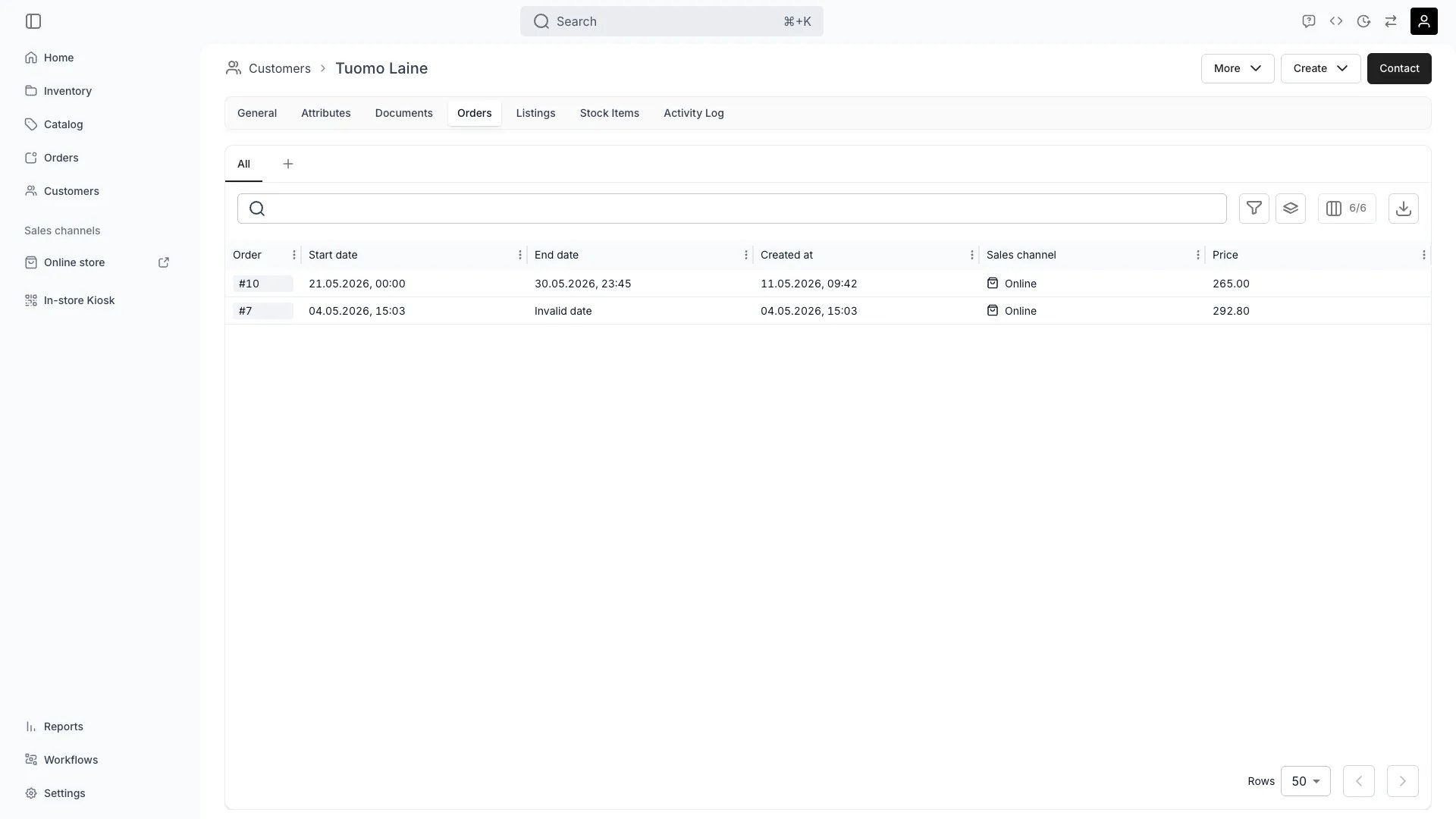
Customers > [customer] > Orders
Open in TWICE Admin
customers
Prerequisites
Know before you read:
- Everything is order-derived. A customer with no orders has three empty tabs, however long they have existed as a record.
- History follows the record, not the person. Two profiles for the same human split their history. See the pitfalls.
The walkthrough
1
Start with Orders for the shape of the relationship
Read the Orders tab first. It lists every order this customer is on, with its dates, state and value, and it is the only one of the three that shows the arc: how often they come back, whether orders grow or shrink, whether anything is still open.Open the order from its row for the detail of what was on it, what was paid and what came back. The tab is an index rather than a substitute for the order.Read the gaps on a repeat customer. Someone who ordered monthly and then stopped six months ago is a different conversation from someone who orders every spring.
2
Use Listings for what they choose
Open the Listings tab for the “same as last time” answer. It shows the listings this customer has ordered, each row carrying the date and the order reference it came from, and the reference takes you to the exact configuration.
This is a record of what they ordered, derived from their orders, rather than a wishlist, a saved-items list, or anything they browsed. TWICE tracks transactions, not interest. A listing appears here because they took it.
3
Use Stock Items for which physical units they had
Open the Stock Items tab for the specific units, with the pickup date and the order they belonged to. This is the tab for disputes and for patterns, where a question about a unit and a question about a person meet.Follow the row to the order, or to the unit’s own history for everything that ever happened to it. Check it for a suspicion too: the same unit going out to the same customer repeatedly, or a customer who has had three of the four units you own.
4
Read the three together
Combine the tabs, because they answer different halves of one question:
Read condition and damage on the unit rather than on the customer record, because that is where they stay true after the order closes. See Handle a return.
5
Check the Activity Log for the record's own history
Open the Activity Log for what was done to the record: fields changed, documents added, consent flipped, and by which member of staff. The three history tabs cover what the customer did.Use it for “who gave them that discount” or “when did this address change”, which is the internal question rather than the customer-facing one.
How do I know it worked?
You have the answer when you can state it with a reference attached:- The order reference for the order in question, rather than “last summer”.
- The specific unit, where the question is about condition or damage.
- A date for anything the customer disputes.
Troubleshooting / common pitfalls
The customer swears they ordered from us and the tabs are empty
The customer swears they ordered from us and the tabs are empty
Almost always a duplicate profile. The order is attached to a different record for the same person: a second email, a name typo, or a profile created at a counter while another already existed.Check the customers table by surname, by phone, and by partial email rather than by the exact address you were given. Emails are unique per profile, so a second address is a second record with its own separate history.
An order they were on is not listed
An order they were on is not listed
Check whether they were the billing contact rather than the order customer, or the reverse. Both roles put a record on an order, and someone who only paid may not be who you were looking for.Open the order and read its Customers tab, which shows every record attached and in which role. See Create a customer profile.
I expected to see what they browsed or wishlisted
I expected to see what they browsed or wishlisted
TWICE does not track it. The Listings tab is what they ordered, derived from orders, and no browsing, saving or wishlisting is recorded anywhere.Treat listing history as a purchase record. Use your storefront analytics for anything about intent.
I want to stop this customer ordering a particular item
I want to stop this customer ordering a particular item
There is no per-customer item restriction. Nothing on the profile blocks a customer from a listing or a unit.Use the broader levers instead: customer tags with tag-restricted listings, or not assigning the unit at all. See Segment customers.
An archived order is missing from the history
An archived order is missing from the history
Archiving takes an order out of the table, so check whether it was archived rather than assuming it never existed.Look in Settings → Archived assets. See Cancel or archive an order.
Related articles
Segment customers
Turning what you learn into a group you can act on.
Read a stock item's history
The other end of a damage question.
Customer Profile
Every field and tab the record carries.
Create a customer profile
Order customer versus billing contact.