

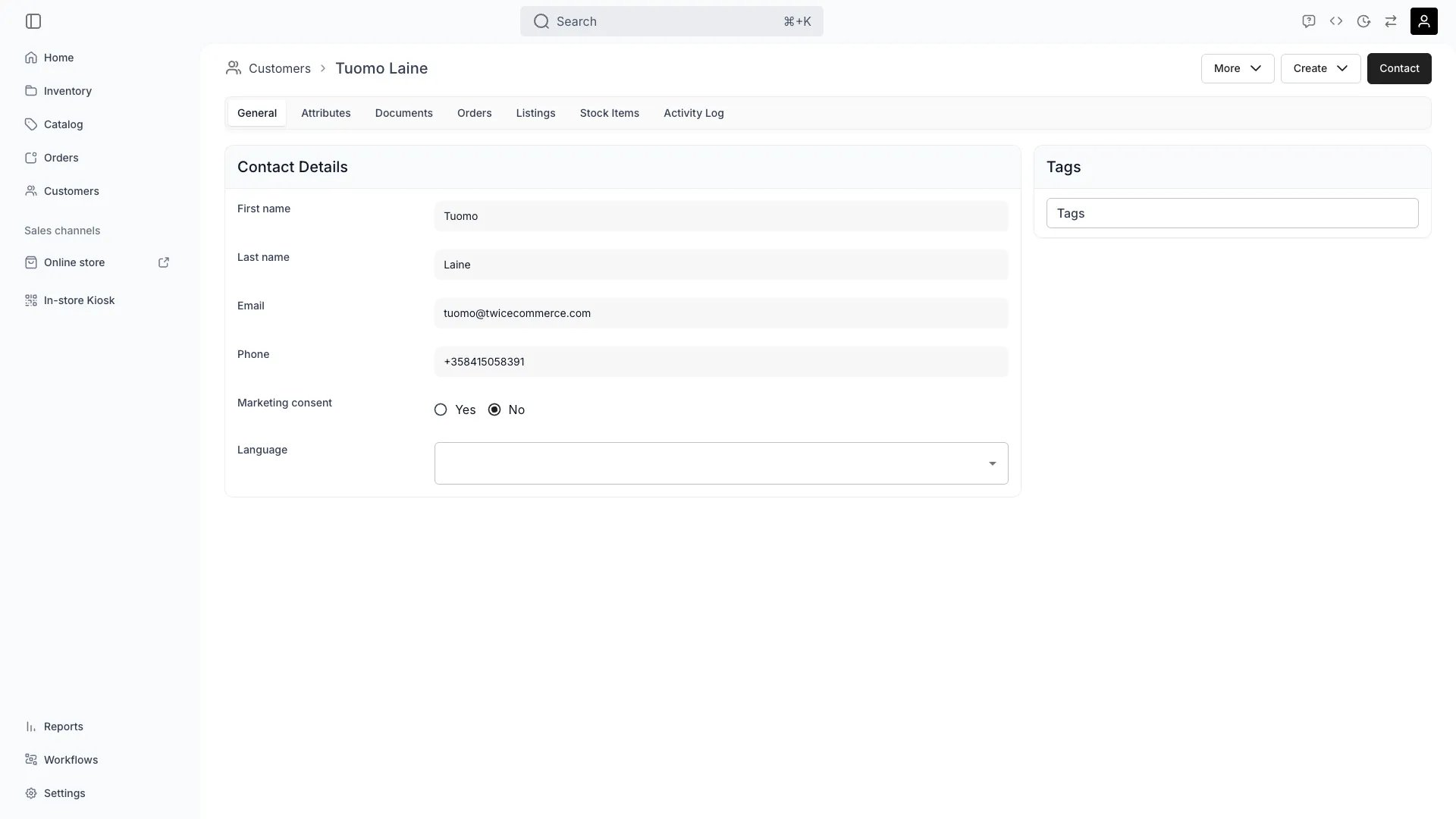
Customers > [Customer] > General
Definition
A Customer Profile is the single record TWICE uses to identify the person or business on the other side of every transaction. Each profile is referenced by Orders, Reservations, attached documents, the Stock Items currently in the customer’s possession, and the tags that drive segmentation across pricing, publishing, and reporting.Where do I use it?
- Looking up a customer when creating an Order in admin
- Tracking lifetime value, repeat-rental frequency, and last purchase date
- Attaching signed contracts, ID copies, and insurance certificates to a person
- Granting tag-driven access to staff-only or member-only listings
- Filtering customer reports and exports
- Responding to GDPR access or deletion requests
- Building API integrations that need to look up or create customers
Key Properties
Identity and contact
Most of these built-in fields can also be collected from the customer at online checkout. Add them to the Contact step as customer profile fields and the submitted values land on the customer record with the order.
An order placed with an email that already has a profile merges into that profile rather than creating a second record. A field the checkout collected overwrites the stored value. A field it did not collect keeps what is already there, so clearing a value is an explicit edit in the admin or through the API.
Three fields fall outside that rule, because every submission carries them:
firstName, marketingConsent and customerType always take the checkout’s value. A checkout with no customer type field submits individual, which turns a business customer into an individual on their next order. See collect customer data at checkout.
A checkout link built from an existing order carries the same profile fields, so the recipient opens it with their stored date of birth, addresses and company details already filled in.
Address and locale
Each customer can have a separate billing address and shipping address. Used for fulfillment, invoicing, and locale-specific email/document rendering.Aggregate data
Customer API responses carry anaggregateData object describing the customer collection the record was fetched from:
Order history is not cached on the profile. The Orders tab and reports read it live from the customer’s Orders.
Attributes
Custom merchant-defined fields beyond the built-in profile fields above. Attributes are grouped into Attribute groups configured under Settings → Attributes & Tags. Use them to capture loyalty tier, certification status, dietary requirements, a driver’s license number, or any other domain-specific data. Each attribute has a format (text, number, boolean, date, select, or multiselect) and stores a typed value on the customer.Attributes are separate from profile fields. Built-in fields like
companyName, taxId, and dateOfBirth are profile fields — they appear on the General tab. Attributes appear on the Attributes tab and are defined under Settings.Tags
A flat list of labels (vip, wholesale, staff, corporate-account-acme) that drives segmentation throughout the platform. Each tag is a { value, scope } pair — customer tags carry scope: "customers". Tags are applied manually in admin or via the API. See Customer Groups for the full segmentation model.
Documents
Files attached to the customer — signed contracts, ID copies, insurance certificates, waivers. Each document carries an order index and an optional comment, and is referenced byfileId so it can also be linked from a specific Order. Useful for KYC, liability waivers, and audit trails.
Profile tabs
The Customer detail page is organized into tabs that mirror the data attached to the customer record:General
General
Built-in profile fields — name, email, phone, date of birth, customer type (individual or business), company name, tax ID, communication language, marketing consent, billing address, and shipping address. Account status (active / archived) is also set here. Tags live in a sidebar card on this tab.
Attributes
Attributes
Merchant-defined custom fields beyond the built-in profile fields. Grouped by Attribute group, configured under Settings.
Documents
Documents
Files attached to the customer. Documents can also be scoped to a specific Order.
Orders
Orders
Every Order this customer has placed, regardless of order type. Click an order number to jump to the order detail page.
Listings
Listings
Listings the customer has interacted with, with the related Order and start date. Useful for spotting repeat-rental patterns per item.
Stock Items
Stock Items
Stock Items currently associated with the customer — typically items that are out on a rental. Each row shows the pickup date and the order number that committed the item.
Activity Log
Activity Log
A scoped audit trail of writes against this customer record. Same columns as the global Activity Log — Timestamp, Action, Resource type, Actor, Endpoint, Status.
Relationships
- Orders — every Order has a
customerId. The customer’s profile aggregates totals from these. - Stock Items — items currently rented out track the renting customer for the duration of the rental.
- Documents — files can be scoped to a customer or to a specific Order.
- Tags — drive publishing visibility, targeted discount codes, and segment reporting. See Customer Groups.
- Attributes — custom merchant-defined fields that extend the customer record beyond built-in profile fields.
- Channel — every Order records the channel it came through (
admin,api, oronline), useful for analysing acquisition source.
Lifecycle
Creation
Customers can be created in several ways:
If an existing customer matches by email or phone, TWICE links the new order to the existing profile instead of creating a duplicate.
Updates and merges
- Profile fields can be edited in admin or via API. Edits are written to the Activity Log.
- Order history on the profile reads live from the customer’s Orders — there is no per-customer cache to refresh.
- Duplicate profiles can be merged from the Customers table — order history, documents, and tags from both records combine into the surviving profile.
GDPR and data retention
- Access: every field on the customer record is exposed via the API for subject-access requests.
- Erasure: customers can be deleted from the admin or via the API. TWICE retains Order-level records (required for accounting and VAT) but strips personally identifiable fields from the deleted customer’s profile.
- Marketing consent: tracked explicitly as
marketingConsentand respected by all built-in email flows. Storefront forms surface a consent checkbox tied to this field. - Activity Log: provides an audit trail of who accessed or modified the record.
FAQs
Can a Customer have multiple addresses?
Can a Customer have multiple addresses?
Yes. The address structure supports separate billing and shipping addresses, and additional addresses can be stored as Attributes for business-specific cases.
How do I avoid duplicate customers?
How do I avoid duplicate customers?
TWICE matches by email and phone at order creation. If both fields are empty for a new walk-in, you can end up with a duplicate. Use the merge tool on the Customers table to combine records.
Are deleted customers really gone?
Are deleted customers really gone?
Their PII is erased, but the Orders, Payments, and accounting records remain. The link from those Orders to the customer profile is broken.
Is order history cached on the profile?
Is order history cached on the profile?
No. The Orders tab and lifetime metrics read live from the customer’s Orders. The
aggregateData object on API responses describes the customer collection itself (totalCount, lastCreated, lastUpdated), not order history.Developer Reference
Customers are exposed ascustomers in the API.
API: Customers
Open the endpoint in the API reference.
Related articles
Customer Groups
Segment customers with tags.
Order Lifecycle
The Orders this customer is referenced from.
Price Tables
Reusable pricing structures applied to listings (not customer-specific).
Activity Log
Audit trail for customer record edits.
Checkout steps & sections
Collect profile fields from the customer at checkout.