

Open in TWICE Admin
settings/connect/integrations
order.created webhook, and TWICE posts every new order to your CRM, or to Make or Zapier on its way there, with the customer and the answers they gave at checkout. Webhooks explains the payload, the retries and the signature.
Keep your leads in the CRM itself. TWICE has no sign-up step ahead of an order and its webhooks carry order events only, so a customer created any other way, such as through the email signup in the storefront footer, sends nothing. A person’s first order is the first thing your CRM hears about them.
Prerequisites
Have ready before you start:
- An HTTPS address that receives the events, such as the address of a webhook trigger in Make or Zapier. TWICE posts only to
https://addresses. - A CRM rule that matches contacts on email. TWICE keeps one customer per email address, so the same key keeps one contact per person in your CRM.
The walkthrough
1
Open Webhooks
Open Settings in the main menu and choose Integrations & API under Connect in the settings menu on the left. Scroll past API keys to the Webhooks section.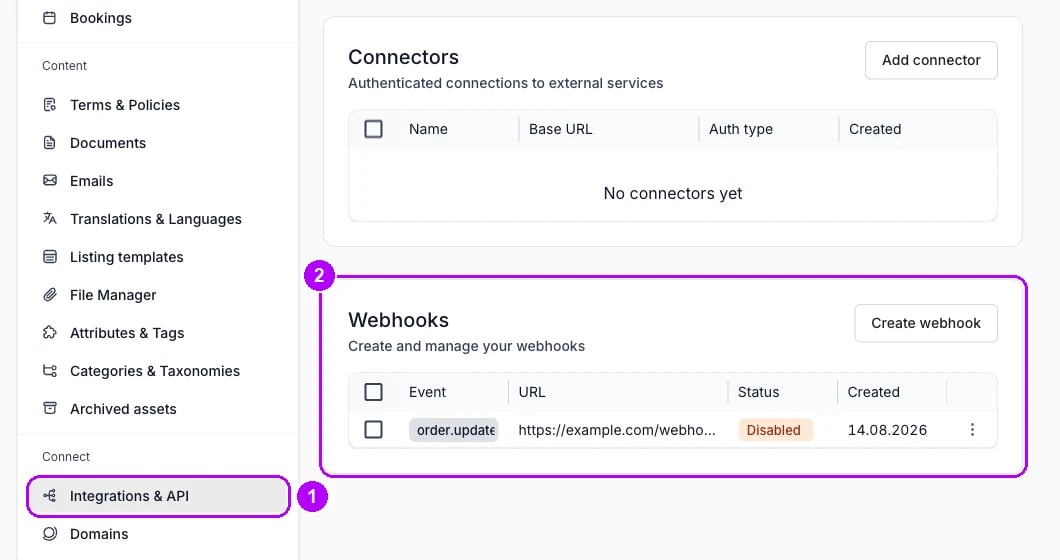
2
Start a new webhook
Click Create webhook in the top-right corner of the Webhooks section. The Create webhook dialog opens on its first step, Choose event.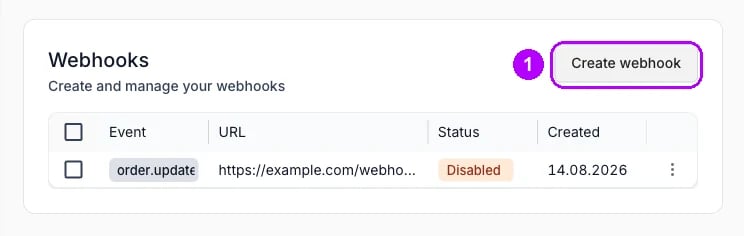
3
Choose order.created
Open the Choose event list and pick 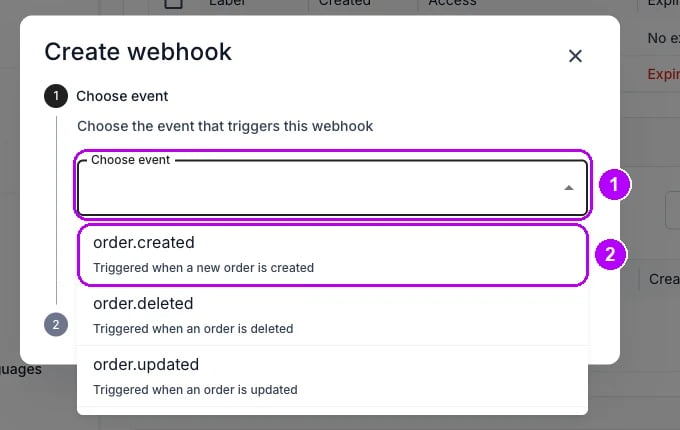
order.created, the event triggered when a new order is created. Click Next. The dialog moves on to its second step, Endpoint URL.4
Enter the receiving address
Paste your HTTPS address into Enter URL. An address that does not start with 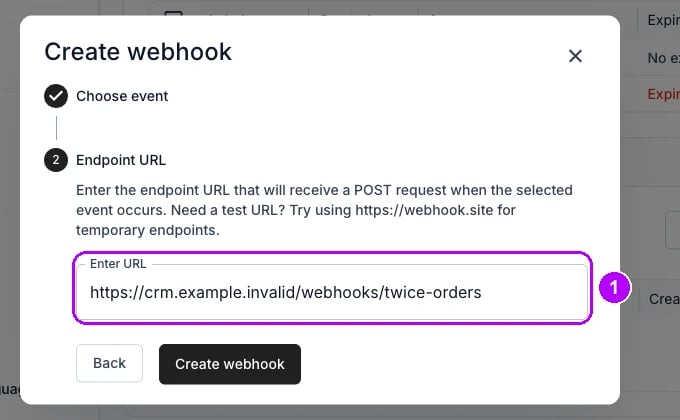
https:// shows an error under the field, and Create webhook stays greyed out.5
Create the webhook
Click Create webhook at the bottom of the dialog. Webhook created confirms it, and the table under Webhooks lists the new webhook with 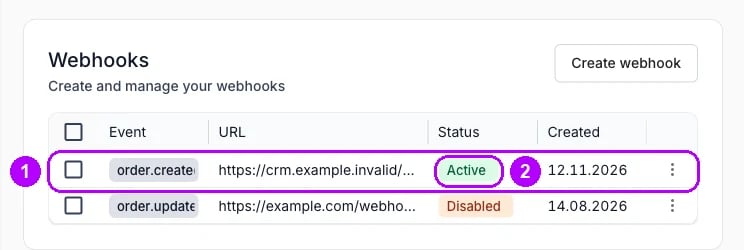
order.created under Event and Active under Status.6
Copy the signing secret
Open the menu at the right end of the webhook’s row and choose View signing secret. Click the copy button beside the secret and give it to whoever builds the receiving side, which checks each delivery’s 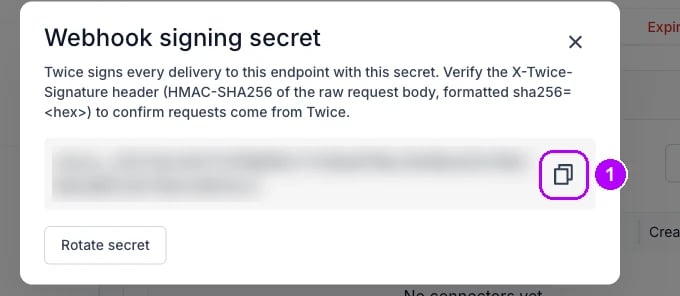
X-Twice-Signature header with it.7
Check the first delivery
After the next order is placed, click the webhook’s row. Its page lists the
order.created event, with Delivered under Result once your endpoint has answered. Click the delivery to read the Payload it carried.How do I know it worked?
- The webhook is listed under Webhooks, with
order.createdunder Event and Active under Status. - Each new order adds a delivery on the webhook’s page, with Delivered under Result.
- The payload carries the customer. Each entry in
data.customershas the customer’s email, name, phone, marketing consent and the built-in fields your checkout asked for, andattributesholds their customer attribute answers. Answers to a listing’s own questions sit on its line indata.lineItems. - Your CRM shows one contact per email, updated by each order.
Troubleshooting / common pitfalls
Create webhook stays greyed out
Create webhook stays greyed out
Use the HTTPS address your receiving side gives you. The address you entered does not start with
https://, and TWICE posts only to HTTPS addresses. See Webhooks.Deliveries read Failed, or the webhook reads Disabled
Deliveries read Failed, or the webhook reads Disabled
Your endpoint did not answer with a 2xx status. After three events in a row fail every attempt, TWICE disables the webhook. Fix the endpoint, choose Enable in the row’s menu, and Redeliver a failed delivery from its detail. See Webhooks.
Your CRM has two contacts for one person
Your CRM has two contacts for one person
Match contacts on email in the CRM, the key TWICE matches a returning customer on. A CRM that matches on anything else creates a second contact, and so does a person who orders with a second address. See Collect customer data at checkout.
Related articles
Webhooks
Events, payload, retries, the delivery log and signature checks.
Integrations & API
API keys, webhooks and connectors, section by section.
Collect customer data at checkout
Decide what the checkout asks, and where each answer lands.
API keys
Give the integration that reads TWICE its own key and scopes.
Custom scripts
Why purchase tracking runs from this webhook rather than the browser.
Export customers
Move a customer segment to an email tool as a file.