> ## Documentation Index
> Fetch the complete documentation index at: https://www.twicecommerce.com/docs/llms.txt
> Use this file to discover all available pages before exploring further.
# Theme Editor - Theme settings
> Overview of all theme settings categories — design tokens that control the visual appearance of your storefront.
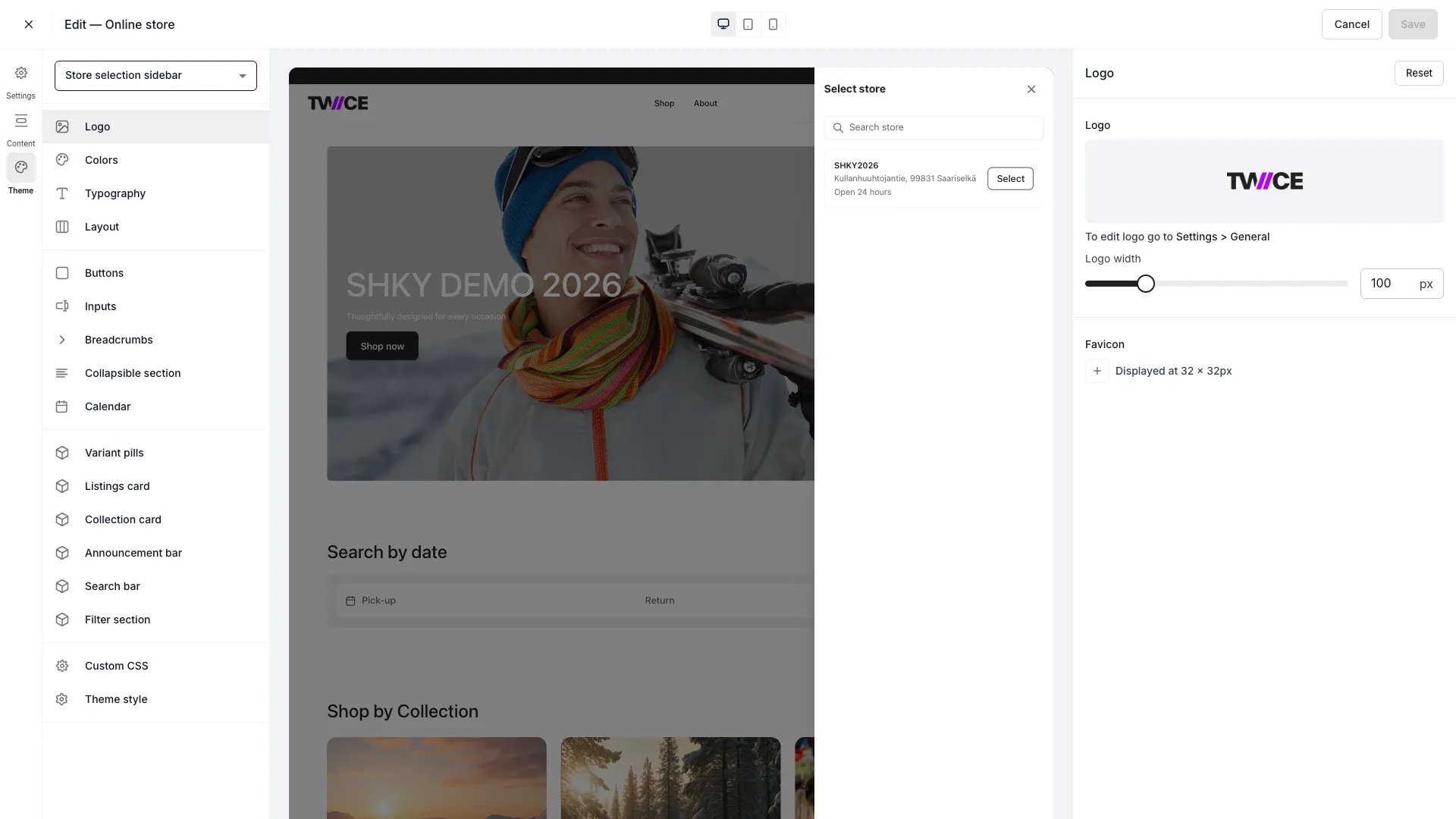 The Theme settings panel is the entry point for all global design tokens — colours, typography, layout, component styles, and custom CSS. Select a category to open its settings panel. Changes apply across every page of your storefront and take effect in the preview immediately.
## Categories
Theme settings are organised into four sections:
### Header
Global design tokens that affect the overall storefront appearance.
| Category | Description |
| --------------------------------------------------------------------------- | --------------------------------------------------- |
| [Logo](/docs/sales-channels/online-store/theme-editor/settings/logo) | Logo width in the storefront header. |
| [Colors](/docs/sales-channels/online-store/theme-editor/settings/colors) | Background, text, border, and status colours. |
| [Typography](/docs/sales-channels/online-store/theme-editor/settings/typography) | Font families and scale for headings and body text. |
| [Layout](/docs/sales-channels/online-store/theme-editor/settings/layout) | Maximum page width and horizontal margins. |
### Components
Styles for interactive UI elements.
| Category | Description |
| --------------------------------------------------------------------------------------------- | ---------------------------------------------------------- |
| [Buttons](/docs/sales-channels/online-store/theme-editor/settings/buttons) | Button colours, border thickness, and corner radius. |
| [Inputs](/docs/sales-channels/online-store/theme-editor/settings/inputs) | Form field colours, border thickness, and corner radius. |
| [Breadcrumbs](/docs/sales-channels/online-store/theme-editor/settings/breadcrumbs) | Breadcrumb trail text and active-item colours. |
| [Collapsible section](/docs/sales-channels/online-store/theme-editor/settings/collapsible-section) | Expandable section colours, border, and corner radius. |
| [Calendar](/docs/sales-channels/online-store/theme-editor/settings/calendar) | Availability calendar stock colours, borders, and padding. |
### Cards
Styles for card-like UI surfaces and other visual blocks.
| Category | Description |
| --------------------------------------------------------------------------------------------------- | -------------------------------------------------------------- |
| [Variant pills](/docs/sales-channels/online-store/theme-editor/settings/variant-pills) | Variant option selector colours, border, and corner radius. |
| [Listings card](/docs/sales-channels/online-store/theme-editor/settings/listings-card) | Product card colours, borders, spacing, and image settings. |
| [Collection card](/docs/sales-channels/online-store/theme-editor/settings/collection-card) | Collection card colours, borders, spacing, and image settings. |
| [Pickup availability](/docs/sales-channels/online-store/theme-editor/settings/pickup-availability) | The pickup availability card on the listing page. |
| [Cart store selector](/docs/sales-channels/online-store/theme-editor/settings/cart-store-selector) | The store selector on the bag page. |
| [Availability indicator](/docs/sales-channels/online-store/theme-editor/settings/availability-indicator) | The availability status dot and its text. |
| [Header bar](/docs/sales-channels/online-store/theme-editor/settings/header-bar) | Header background, text, icon, and border colours. |
| [Announcement bar](/docs/sales-channels/online-store/theme-editor/settings/announcement-bar) | Announcement bar background and text colours. |
| [Search bar](/docs/sales-channels/online-store/theme-editor/settings/search-bar) | Search bar background colour. |
| [Filter section](/docs/sales-channels/online-store/theme-editor/settings/filter-section) | Collection page filter section border colour. |
### Settings
Advanced theme tools.
| Category | Description |
| ----------------------------------------------------------------------------- | -------------------------------------------------------------------------- |
| [Custom CSS](/docs/sales-channels/online-store/theme-editor/settings/custom-css) | Add arbitrary CSS rules to the storefront. |
| [Theme style](/docs/sales-channels/online-store/theme-editor/settings/theme-style) | View, copy, and bulk-edit all theme CSS variables. Reset the entire theme. |
## How it works
Each category panel has a **Reset** button that reverts only that category's settings to the defaults. To reset everything at once, use the **Reset entire theme** button in the [Theme style](/docs/sales-channels/online-store/theme-editor/settings/theme-style) panel.
Changes preview in real time but are not stored until you save. **Save** in the editor top bar writes them directly to the live storefront — there is no separate draft or publish step. Closing the editor with unsaved changes opens a dialog where you save or discard them.
```text Default workflow theme={null}
1. Open Theme Editor
2. Select a settings category
3. Adjust values — preview updates in real time
4. Save — changes go live immediately
```
## Related
Learn about the full Theme Editor.
View and edit all theme CSS variables.
The Theme settings panel is the entry point for all global design tokens — colours, typography, layout, component styles, and custom CSS. Select a category to open its settings panel. Changes apply across every page of your storefront and take effect in the preview immediately.
## Categories
Theme settings are organised into four sections:
### Header
Global design tokens that affect the overall storefront appearance.
| Category | Description |
| --------------------------------------------------------------------------- | --------------------------------------------------- |
| [Logo](/docs/sales-channels/online-store/theme-editor/settings/logo) | Logo width in the storefront header. |
| [Colors](/docs/sales-channels/online-store/theme-editor/settings/colors) | Background, text, border, and status colours. |
| [Typography](/docs/sales-channels/online-store/theme-editor/settings/typography) | Font families and scale for headings and body text. |
| [Layout](/docs/sales-channels/online-store/theme-editor/settings/layout) | Maximum page width and horizontal margins. |
### Components
Styles for interactive UI elements.
| Category | Description |
| --------------------------------------------------------------------------------------------- | ---------------------------------------------------------- |
| [Buttons](/docs/sales-channels/online-store/theme-editor/settings/buttons) | Button colours, border thickness, and corner radius. |
| [Inputs](/docs/sales-channels/online-store/theme-editor/settings/inputs) | Form field colours, border thickness, and corner radius. |
| [Breadcrumbs](/docs/sales-channels/online-store/theme-editor/settings/breadcrumbs) | Breadcrumb trail text and active-item colours. |
| [Collapsible section](/docs/sales-channels/online-store/theme-editor/settings/collapsible-section) | Expandable section colours, border, and corner radius. |
| [Calendar](/docs/sales-channels/online-store/theme-editor/settings/calendar) | Availability calendar stock colours, borders, and padding. |
### Cards
Styles for card-like UI surfaces and other visual blocks.
| Category | Description |
| --------------------------------------------------------------------------------------------------- | -------------------------------------------------------------- |
| [Variant pills](/docs/sales-channels/online-store/theme-editor/settings/variant-pills) | Variant option selector colours, border, and corner radius. |
| [Listings card](/docs/sales-channels/online-store/theme-editor/settings/listings-card) | Product card colours, borders, spacing, and image settings. |
| [Collection card](/docs/sales-channels/online-store/theme-editor/settings/collection-card) | Collection card colours, borders, spacing, and image settings. |
| [Pickup availability](/docs/sales-channels/online-store/theme-editor/settings/pickup-availability) | The pickup availability card on the listing page. |
| [Cart store selector](/docs/sales-channels/online-store/theme-editor/settings/cart-store-selector) | The store selector on the bag page. |
| [Availability indicator](/docs/sales-channels/online-store/theme-editor/settings/availability-indicator) | The availability status dot and its text. |
| [Header bar](/docs/sales-channels/online-store/theme-editor/settings/header-bar) | Header background, text, icon, and border colours. |
| [Announcement bar](/docs/sales-channels/online-store/theme-editor/settings/announcement-bar) | Announcement bar background and text colours. |
| [Search bar](/docs/sales-channels/online-store/theme-editor/settings/search-bar) | Search bar background colour. |
| [Filter section](/docs/sales-channels/online-store/theme-editor/settings/filter-section) | Collection page filter section border colour. |
### Settings
Advanced theme tools.
| Category | Description |
| ----------------------------------------------------------------------------- | -------------------------------------------------------------------------- |
| [Custom CSS](/docs/sales-channels/online-store/theme-editor/settings/custom-css) | Add arbitrary CSS rules to the storefront. |
| [Theme style](/docs/sales-channels/online-store/theme-editor/settings/theme-style) | View, copy, and bulk-edit all theme CSS variables. Reset the entire theme. |
## How it works
Each category panel has a **Reset** button that reverts only that category's settings to the defaults. To reset everything at once, use the **Reset entire theme** button in the [Theme style](/docs/sales-channels/online-store/theme-editor/settings/theme-style) panel.
Changes preview in real time but are not stored until you save. **Save** in the editor top bar writes them directly to the live storefront — there is no separate draft or publish step. Closing the editor with unsaved changes opens a dialog where you save or discard them.
```text Default workflow theme={null}
1. Open Theme Editor
2. Select a settings category
3. Adjust values — preview updates in real time
4. Save — changes go live immediately
```
## Related
Learn about the full Theme Editor.
View and edit all theme CSS variables.