> ## Documentation Index
> Fetch the complete documentation index at: https://www.twicecommerce.com/docs/llms.txt
> Use this file to discover all available pages before exploring further.
# Theme Editor - Bag page
> Configure the shopping bag — upselling line-items and recommended listings.
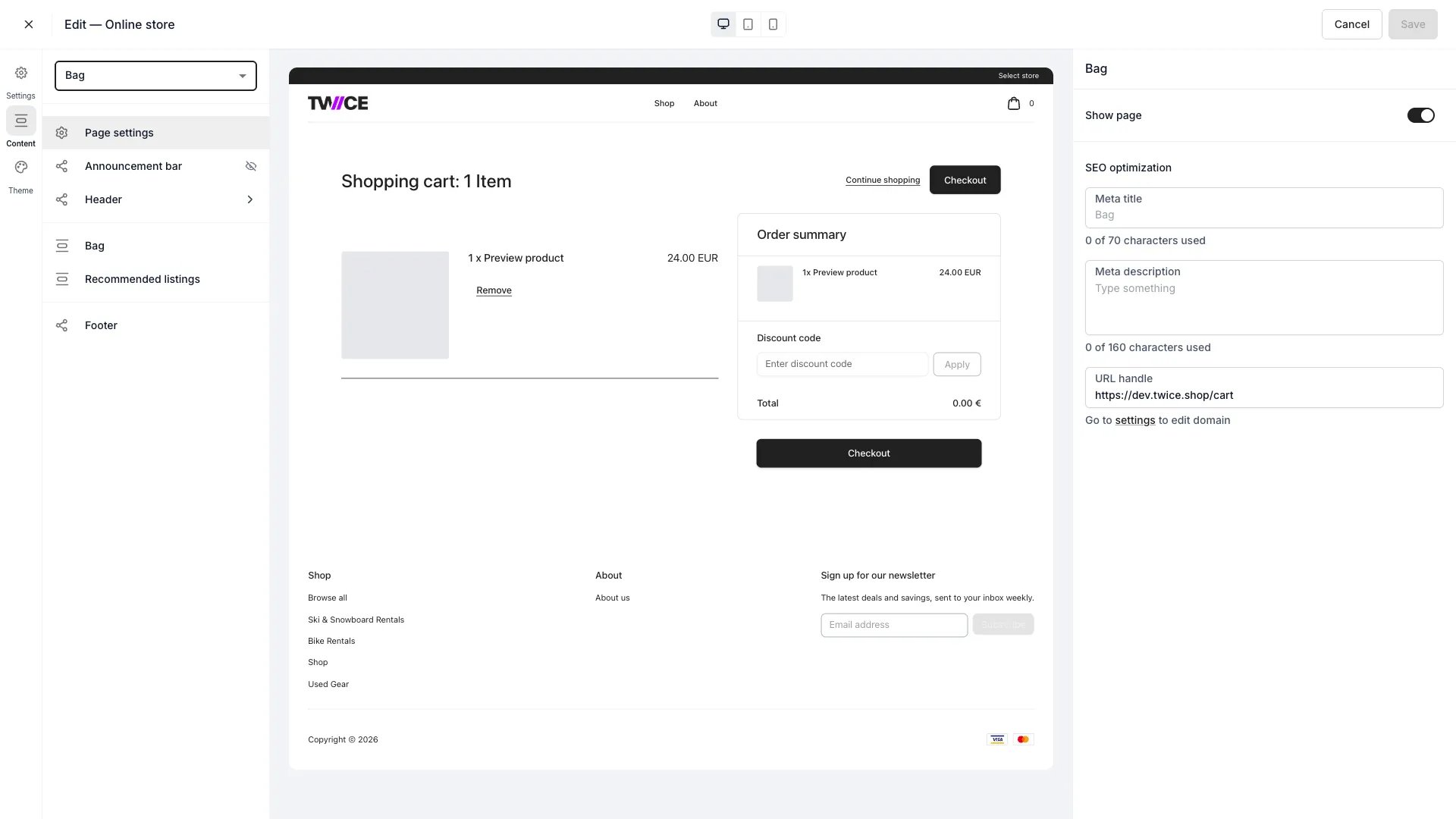 The Bag is the shopping cart. Customers review their items here before moving to [checkout](/docs/settings/checkouts).
## Sections
| Section | What it does |
| ------------------------ | -------------------------------------------------------------------------------------------- |
| **Bag layout** | Toggle **Show upselling line-items** — whether upsell items appear as line items in the bag. |
| **Recommended listings** | Show or hide recommended listings while the customer reviews their bag. |
The line items, quantities, and totals are driven by the cart itself and are not separately configured here. The store selector on this page is styled in the [Cart store selector](/docs/sales-channels/online-store/theme-editor/settings/cart-store-selector) theme panel.
## Shared blocks
The announcement bar, header, footer, and page settings apply across the store — see the [Theme Editor overview](/docs/sales-channels/online-store/theme-editor/overview#blocks-on-most-pages).
## Related
Configure the flow after the bag.
Offer add-ons that surface in the bag.
The Bag is the shopping cart. Customers review their items here before moving to [checkout](/docs/settings/checkouts).
## Sections
| Section | What it does |
| ------------------------ | -------------------------------------------------------------------------------------------- |
| **Bag layout** | Toggle **Show upselling line-items** — whether upsell items appear as line items in the bag. |
| **Recommended listings** | Show or hide recommended listings while the customer reviews their bag. |
The line items, quantities, and totals are driven by the cart itself and are not separately configured here. The store selector on this page is styled in the [Cart store selector](/docs/sales-channels/online-store/theme-editor/settings/cart-store-selector) theme panel.
## Shared blocks
The announcement bar, header, footer, and page settings apply across the store — see the [Theme Editor overview](/docs/sales-channels/online-store/theme-editor/overview#blocks-on-most-pages).
## Related
Configure the flow after the bag.
Offer add-ons that surface in the bag.