> ## Documentation Index
> Fetch the complete documentation index at: https://www.twicecommerce.com/docs/llms.txt
> Use this file to discover all available pages before exploring further.
# Orders Overview
> Manage all order types including sales, rentals, buybacks, and service orders in one unified view
export const viewAccessDefinition = "Read-only access without ability to make changes.";
export const editAccessDefinition = "Update and read data, but cannot create or delete.";
export const manageAccessDefinition = "Create, update, read, and delete data.";
export const permissionsDefinition = "The actions you are authorized to perform.";
export const visibilityDefinition = "Which features, sections, or data tables are visible to you.";
export const userRoleDefinition = "What a user can see and do. Each user has one built-in system role — Owner, Admin, Manager, or Member — and can also be assigned any number of custom roles you create with specific permissions. Effective access is the combination of all their roles.";
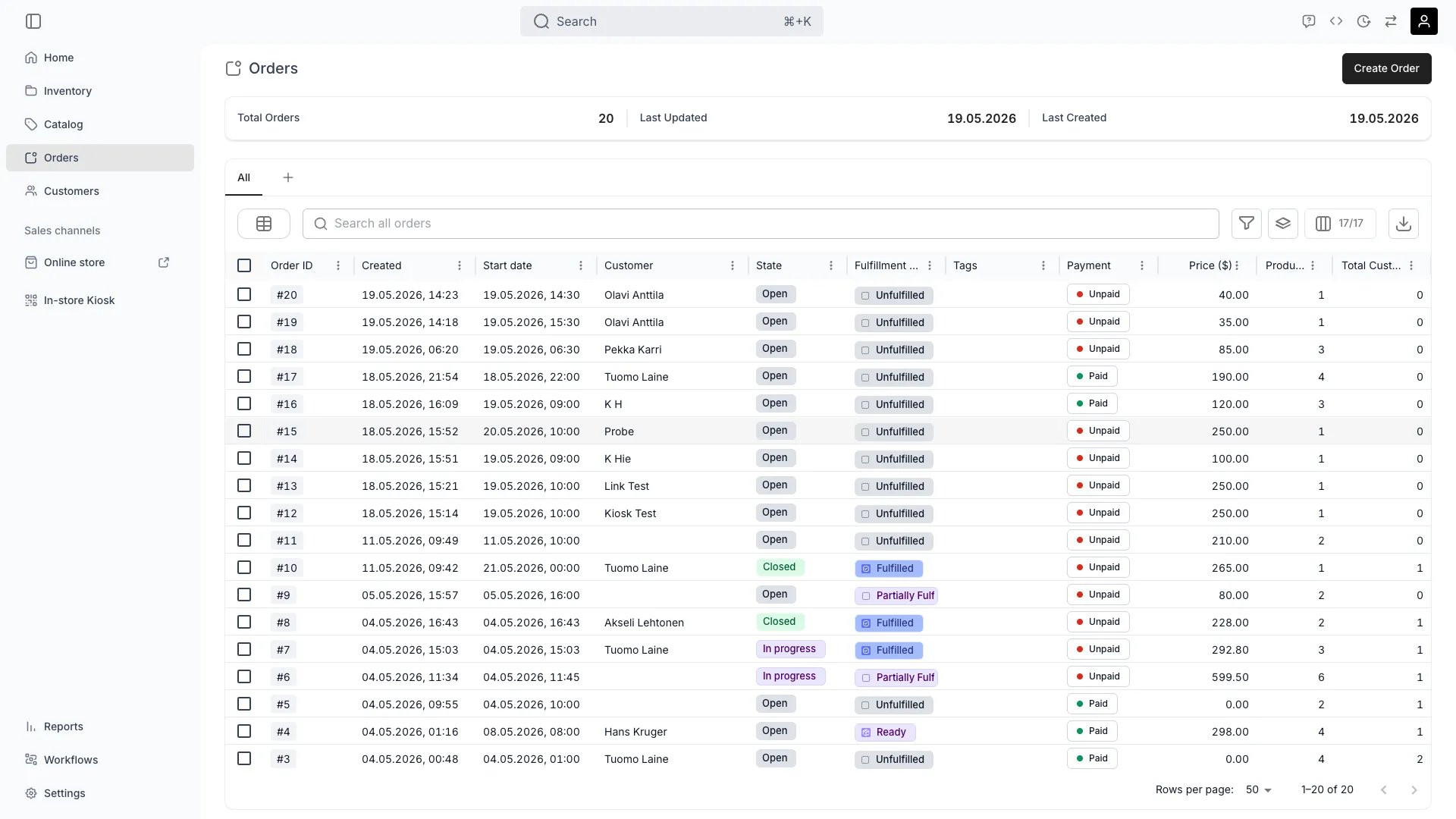 This view can look different dependent on your user role.
See [Visibility & Permissions](#visibility-and-permissions) for details.
orders
## Primary Purpose
The Orders view provides a unified interface for managing all types of orders across your business, from sales and rentals to buybacks and services.
Browse and manage all orders in one place, regardless of type or channel.
Read more: [Order Lifecycle](/docs/concepts/orders/order-lifecycle)
The **Purchase Types** column shows which types of line items each order contains — Booking, Subscription, Sale, or Buyback — displayed as chips. Filter the column to find all orders that include a specific purchase type.
Read more: [Order Types](/docs/concepts/orders/order-types)
Create orders directly in the admin for in-person sales, phone orders, or special cases.
Track and manage order fulfillment, including item preparation, pickup, delivery, and returns.
Handle payment processing, refunds, and manage checkout links for customers.
## Table Columns
The Orders table includes the following columns. All columns support [standard table features](/docs/admin/tables) such as column visibility, pinning, and reordering.
| Column | Filter | Sort | Description |
| ----------------- | ------- | ---- | ------------------------------------------------------------------------------------------------------------------------------------------------------------------- |
| Order ID | Text | Yes | The order number |
| Created | Date | Yes | When the order was created |
| Start date | Date | Yes | Booking or rental start date |
| End date | Date | Yes | Booking or rental end date |
| Customer | Text | Yes | Customer name |
| State | Select | Yes | Order state: Open, In progress, or Closed |
| Fulfillment state | Select | Yes | Fulfillment state: Unfulfilled, Ready, Partially fulfilled, or Fulfilled |
| Purchase types | Select | No | Purchase types on the order: Booking, Sale, Subscription, or Buyback |
| Tags | Select | Yes | Tags assigned to the order |
| Payment | Select | Yes | Payment status: Paid or Unpaid |
| Price | Numeric | Yes | Order total in the selected currency |
| Listings | Select | No | Distinct listing names from the order's catalog-backed line items, displayed as a comma-separated list. Filter by selecting one or more listings from the dropdown. |
| Line items | Numeric | Yes | Total number of line items on the order |
| Total Customers | Numeric | Yes | Number of customers on the order |
| Sales Channel | Select | Yes | Channel the order was placed through. The filter offers Admin and API; online orders cannot be filtered by channel. |
| Location | Select | No | Service location associated with the order |
| Has conflicts | Select | Yes | Whether the order has stock item conflicts |
Orders with [custom attributes](/docs/orders/order-tabs/attributes) display additional columns — one per attribute — with filter and sort support matching the attribute type (text, number, date, or select).
## Related Concepts
Here are a few key concepts of TWICE Commerce that relate to order management.
TWICE supports multiple order types including sales, rentals, resales, buybacks, and service orders.
Read more: [Order Types](/docs/concepts/orders/order-types)
Orders move through various stages from creation to fulfillment, with automated income tracking per inventory record.
Read more: [Order Lifecycle](/docs/concepts/orders/order-lifecycle)
Manage collective bookings while maintaining clear fulfillment responsibilities for each participant.
The orders table supports all standard table features for efficient order management.
Read more: [Data Tables](/docs/admin/tables)
## Visibility and Permissions
Access to this view is controlled by your user role. Your user role determines both
visibility and
permissions for
manage,
edit, and
view access levels.
| Feature | Admin | Manager | Member |
| ------------------ | ----- | ------- | ------ |
| Orders Table | ✓ | ✓ | ✓ |
| Create Orders | ✓ | ✓ | ✗ |
| Payment Processing | ✓ | ✓ | ✗ |
| Fulfillment | ✓ | ✓ | ✓ |
| Resource | Admin | Manager | Member |
| ------------------ | ------ | ------- | ------ |
| Orders | Manage | Edit | View |
| Payments | Manage | Edit | View |
| Fulfillment Status | Manage | Edit | Edit |
| Customer Data | Manage | Edit | View |