> ## Documentation Index
> Fetch the complete documentation index at: https://www.twicecommerce.com/docs/llms.txt
> Use this file to discover all available pages before exploring further.
# Order - Details
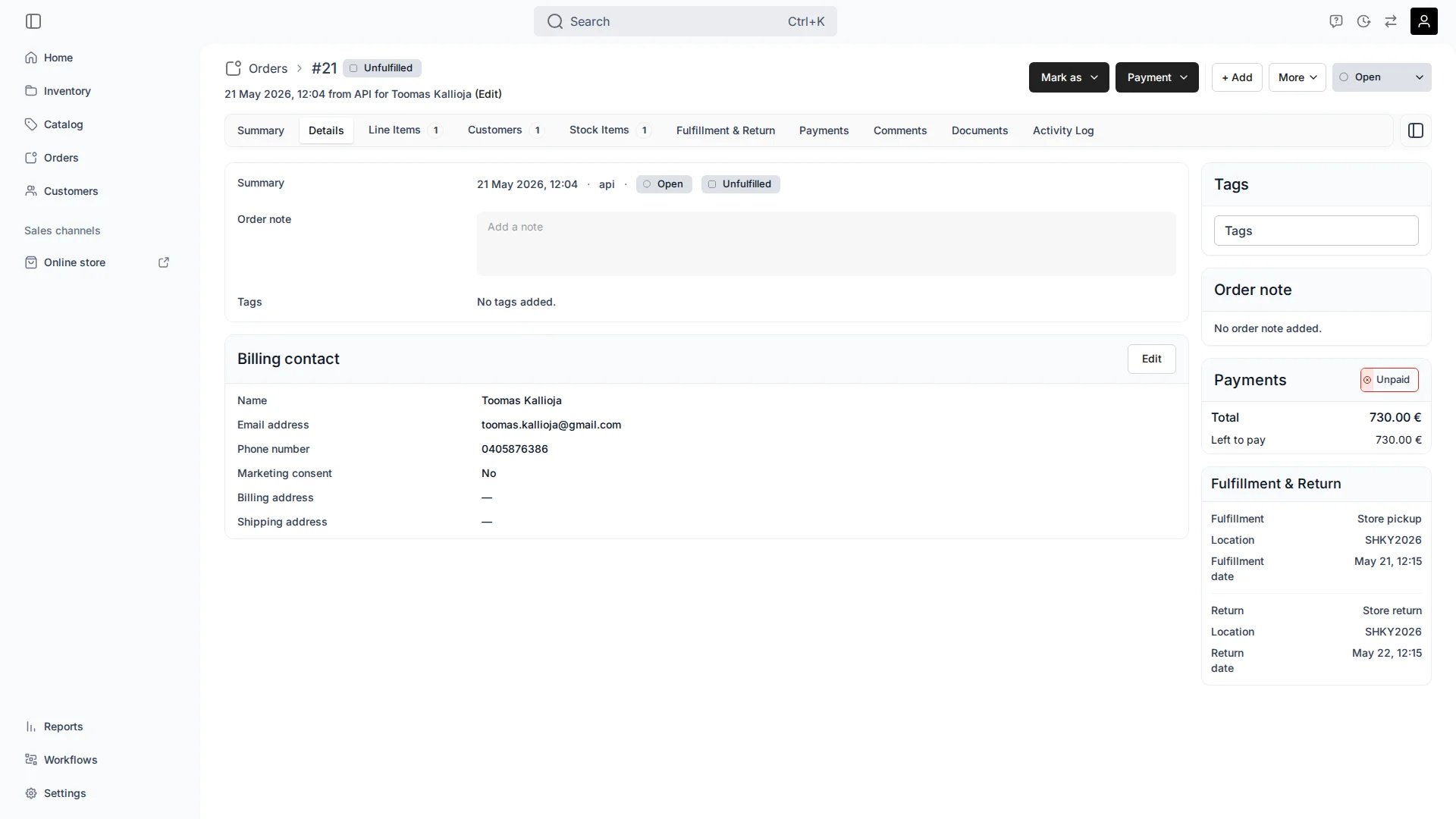
> View and edit order-level information: status, fulfillment state, note, tags, and billing contact.
export const viewAccessDefinition = "Read-only access without ability to make changes.";
export const editAccessDefinition = "Update and read data, but cannot create or delete.";
export const manageAccessDefinition = "Create, update, read, and delete data.";
export const permissionsDefinition = "The actions you are authorized to perform.";
export const visibilityDefinition = "Which features, sections, or data tables are visible to you.";
export const userRoleDefinition = "What a user can see and do. Each user has one built-in system role — Owner, Admin, Manager, or Member — and can also be assigned any number of custom roles you create with specific permissions. Effective access is the combination of all their roles.";
 This view can look different dependent on your user role.
See [Visibility & Permissions](#visibility-and-permissions) for details.
## Primary Purpose
The Details tab is where you read and edit order-level information. The [Summary](/docs/orders/order-tabs/summary) tab focuses on the layout of customers and their line items; the Details tab holds the order's own fields and its billing contact.
See the order's created date, sales channel, [order status](/docs/concepts/orders/order-lifecycle), and fulfillment state at a glance.
Add or edit an internal note on the order. Notes are for your team and are not shown to the customer.
View and manage the tags applied to the order for filtering and reporting.
Review the billing contact — name, email, phone, language, marketing consent, billing and shipping addresses, and customer tags.
## Related Concepts
Order status and fulfillment state are tracked independently. See the [Order Lifecycle](/docs/concepts/orders/order-lifecycle) for how the two relate.
The billing contact is drawn from the order's main customer. Manage full customer records under [Customers](/docs/customers/overview).
## Visibility and Permissions
Access to this view is controlled by your user role. Your user role determines both
visibility and
permissions for
manage,
edit, and
view access levels.
| Feature | Admin | Manager | Member |
| --------------- | ----- | ------- | ------ |
| Order fields | ✓ | ✓ | ✓ |
| Order note | ✓ | ✓ | ✓ |
| Tags | ✓ | ✓ | ✓ |
| Billing contact | ✓ | ✓ | ✓ |
| Resource | Admin | Manager | Member |
| ------------- | ------ | ------- | ------ |
| Order details | Manage | Edit | View |
| Order note | Manage | Edit | View |
| Tags | Manage | Edit | View |