> ## Documentation Index
> Fetch the complete documentation index at: https://www.twicecommerce.com/docs/llms.txt
> Use this file to discover all available pages before exploring further.
# SKU - Fulfillment
> Set default buffer time and other fulfillment rules that apply to all stock items under a SKU.
export const viewAccessDefinition = "Read-only access without ability to make changes.";
export const editAccessDefinition = "Update and read data, but cannot create or delete.";
export const manageAccessDefinition = "Create, update, read, and delete data.";
export const permissionsDefinition = "The actions you are authorized to perform.";
export const visibilityDefinition = "Which features, sections, or data tables are visible to you.";
export const userRoleDefinition = "What a user can see and do. Each user has one built-in system role — Owner, Admin, Manager, or Member — and can also be assigned any number of custom roles you create with specific permissions. Effective access is the combination of all their roles.";
 This view can look different dependent on your user role.
See [Visibility & Permissions](#visibility-and-permissions) for details.
## Primary Purpose
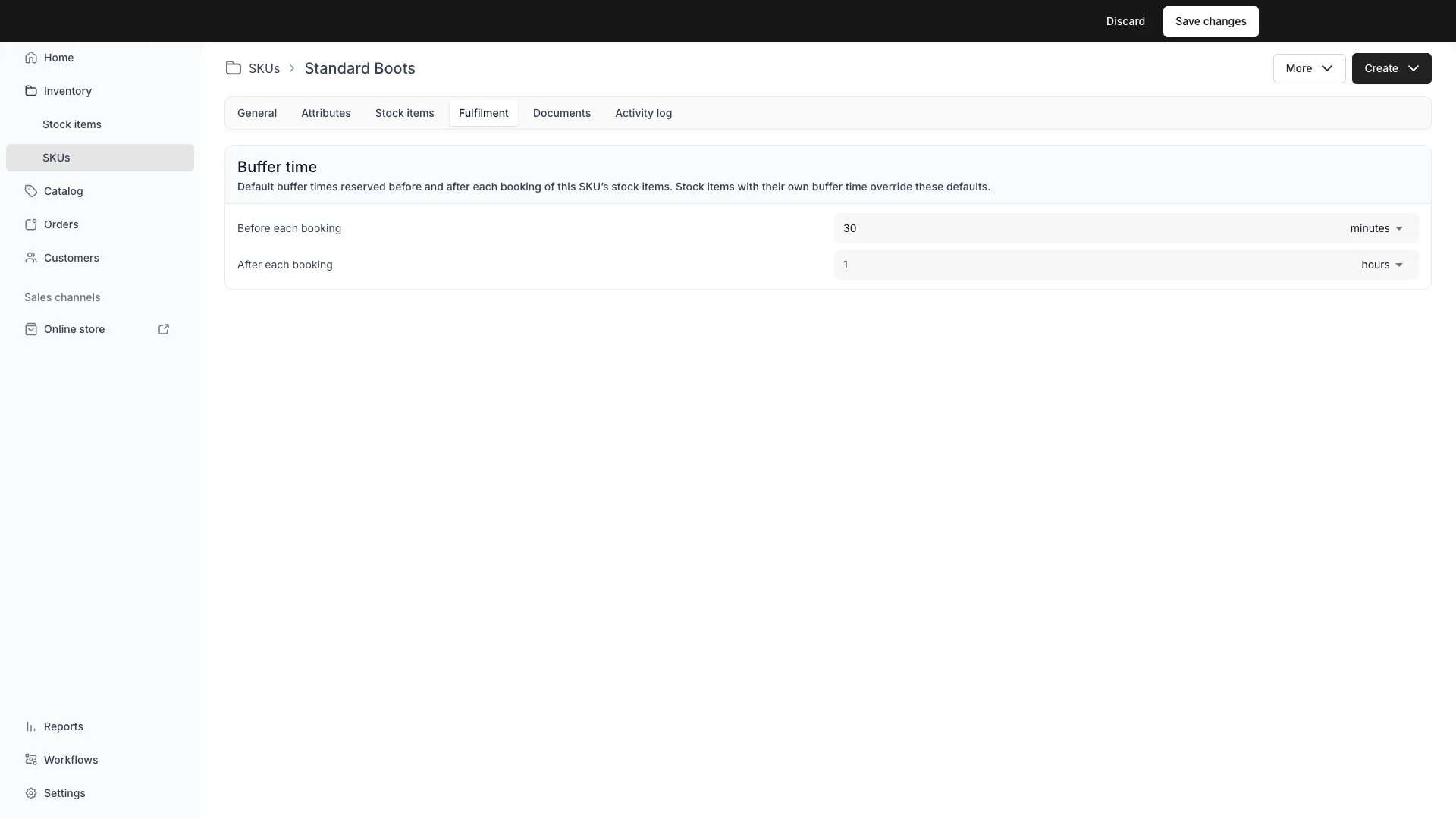
The Fulfillment tab on a SKU defines default fulfillment rules that all linked stock items inherit.
Define default buffer times that apply to every stock item under this SKU. Buffer time blocks availability around each booking in two independent directions:
* **Before each booking** — a preparation window before the customer's booking starts. On the storefront, this also acts as a minimum lead time: a booking starting sooner than the buffer allows is rejected. Admin staff can bypass this.
* **After each booking** — a servicing window after the booking ends, for cleaning, inspection, maintenance, or transit time between orders.
Set the duration for each direction (e.g. 30 minutes, 2 hours, 1 day) and all linked stock items inherit it by default. Individual stock items can override or disable either direction independently on their own [Fulfillment tab](/docs/inventory/stock-items/fulfillment).
Changing the SKU buffer time triggers a conflict check across all inheriting stock items. If upcoming bookings overlap with the new buffer window, you can choose to skip conflicting bookings or cancel the change.
## Related Concepts
Each direction (before and after) follows a three-state inheritance model independently on each stock item:
* **Inherit from SKU** (default) — uses the SKU's buffer for that direction. If the SKU has no buffer (amount is 0), the item has none.
* **No buffer** — explicitly disables the buffer for that direction, overriding the SKU.
* **Custom override** — sets a different duration for this specific item.
A stock item can inherit the before-buffer from the SKU while overriding the after-buffer, or vice versa. The stock item API response reports the origin per direction: `bufferTimeOriginBefore` for the before-buffer and `bufferTimeOrigin` for the after-buffer. Each is `article` when the item sets its own value (including an explicit no-buffer), `sku` when it inherits the SKU default, and `null` when neither defines one.
Both buffer directions extend the stock item's unavailability on the [calendar](/docs/concepts/catalog/availability) without changing the order's dates. The before-buffer blocks availability before the booking starts; the after-buffer blocks it after the booking ends. Customers see both buffered periods as unavailable when browsing the storefront.
The before-buffer also acts as a minimum lead time on the storefront — a customer cannot book a start time sooner than the buffer allows. Admin staff are exempt from this restriction.
## Visibility and Permissions
Access to this view is controlled by your user role. Your user role determines both
visibility and
permissions for
manage,
edit, and
view access levels.
| Feature | Admin | Manager | Member |
| ----------- | ----- | ------- | ------ |
| Buffer Time | ✓ | ✓ | ✓ |
| Resource | Admin | Manager | Member |
| -------------------- | ------ | ------- | ------ |
| Buffer Time Settings | Manage | Edit | View |