> ## Documentation Index
> Fetch the complete documentation index at: https://www.twicecommerce.com/docs/llms.txt
> Use this file to discover all available pages before exploring further.
# How to handle a late, damaged, or partial return
> Take goods back when the return is not clean — some items missing, something broken, or the customer days overdue — and charge for it without losing the record of what happened.
 orders
A clean return is one click: everything comes back, on time, undamaged, and you close the order. This guide is the other kind.
Returns are recorded per item, not per order, which is what makes partial returns possible at all. The three awkward cases — some items back, something broken, somebody late — are all handled by the same small set of actions, plus a decision about money that TWICE will not make for you.
## Prerequisites
**Required permissions:** `orders:order_stock_items` and `orders:order` in manage, to mark items and close the order. **Charging for the return additionally needs `orders:order_payments`, which the Member role does not hold** — a Member can record the return but cannot take money for it. See [Users & Roles](/docs/settings/users-roles).
**Before you start, know:**
* **What actually came back**, item by item. This is recorded per unit, so a vague "most of it" cannot be entered.
* **Whether a deposit is being held**, and whether it was a real card authorisation or only recorded. See [Take payment and deposits](/docs/guides/orders/take-payment).
* **What you intend to charge**, if anything. Damage and late fees are a decision, not a calculation TWICE performs.
## The Walkthrough
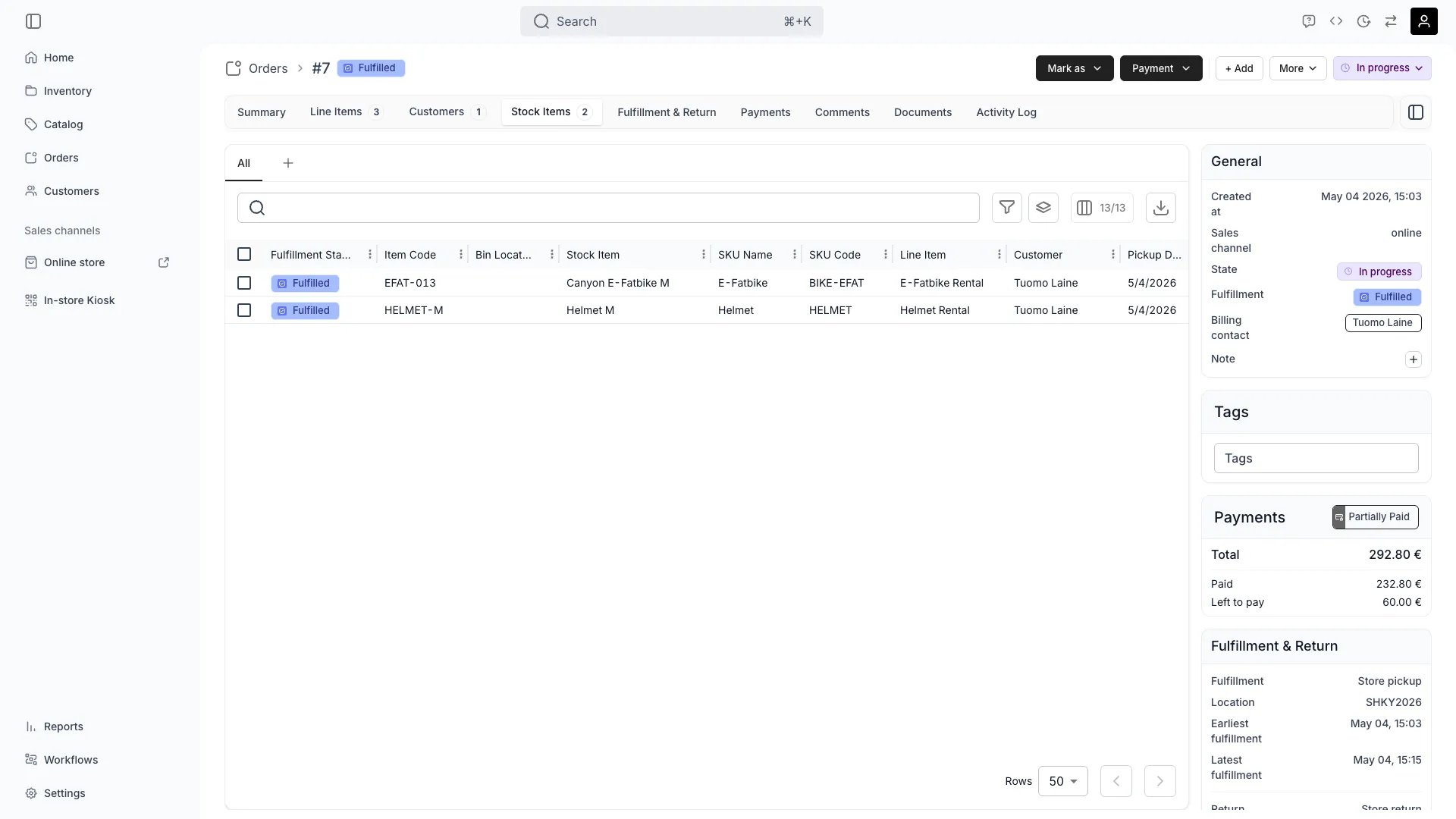
On the **Stock Items** tab, select the units the customer returned and use **Mark as → Returned**.
Leave the rest alone. Items still with the customer stay **Fulfilled**, and that is what a partial return looks like in the record: two states on one order, which is exactly right until the rest turns up.
Do not close the order yet. Closing is the last step, and doing it early makes the order read-only while you still have work to do on it.
The order-level fulfilment chip does **not** move backwards when items return. An order with some items back and some still out stays **Fulfilled**. Read per-item states on the Stock Items tab, not the rollup chip, when you need to know what is physically where.
**There is no condition or damage field on the return itself.** Nothing in the return step asks you to grade the item, so the damage has to be recorded where it will still be true tomorrow: on the unit.
* **Write it on the stock item.** The unit's own record carries its history, and its [activity log](/docs/guides/inventory/read-stock-item-history) is what a later dispute is settled from.
* **Take it out of service** so it is not booked again while broken — [reserve it](/docs/guides/inventory/reserve-a-stock-item) for maintenance, or [archive it](/docs/guides/inventory/archive-stock-items) if it is finished. Archiving releases its future holds, so check what that flags before you confirm.
* **Return it on the order regardless.** The unit came back; the order should say so. Its condition is the unit's business, not the order's.
**How thoroughly you inspect, and when, is an operational choice rather than a fixed flow.** Merchants differ — a resale shop grades every garment before it goes back on sale, a venue counts chairs and moves on. TWICE gives you the pieces to shape that (attributes on the unit, maintenance reservations, buffer time between bookings), but every one of them ends in a person looking at the item. Nothing inspects for you, so the routine is yours to design and to hold your staff to.
Late and damaged returns cost money, and this is the part TWICE does not compute. There is no late fee rule, no damage schedule, and nothing that prices an overdue day. You decide the figure, then choose how to collect it:
| Route | Use when |
| ------------------------------- | ------------------------------------------------------------------------------------------------------------------------------------------------------------ |
| **Capture the deposit** | A deposit is held and covers it. **Capture deposit** takes part or all of it, and the **Reason** field is the only place the reason is recorded — fill it in |
| **Add a line item and collect** | There is no deposit, or the cost exceeds it. Add a custom item for the charge, then collect it like any other balance |
A deposit that was only *recorded* rather than authorised has no money behind it — see the deposit steps in [Take payment and deposits](/docs/guides/orders/take-payment). Capturing it is bookkeeping, and getting the money is a conversation.
**Nothing flags a late order for you**, but the table finds them reliably once you ask it the right question. Combine two filters on the **Orders** table:
* **State** is **Open** or **In progress** — the order has not been closed out.
* **End date** is before today — its return date has passed. The relative-day operators need no date picker, so this is one click and keeps meaning "before today" next week.
An order matching both is one nobody has brought back. Narrow it with **Fulfillment state** if you want only the items still recorded as out.
Make that a saved view rather than a rebuild each time — [Work the day's pickups and returns](/docs/guides/orders/daily-pickups-and-returns) covers it, and it is the closest thing to an overdue report you will get.
When everything is settled — items marked, money taken or written off — set the status chip to **Closed**.
The dialog offers **Also mark booked items as Returned**, off by default, which sweeps up anything still unmarked. On a return you have already worked item by item, leave it off: you have done it deliberately and this would flatten the distinction. On an order you are closing out in bulk, tick it.
Closing makes the order read-only. Refunds still work afterwards — see [Refund an order](/docs/guides/orders/refund-an-order) — but nothing else does, so anything you meant to change should be changed first.
## How do I know it worked?
* **Each returned unit reads Returned** on the [Stock Items](/docs/orders/order-tabs/stock-items) tab, and anything still out reads **Fulfilled**.
* **Returned units are available again** for their dates; a damaged one is reserved or archived so it is not.
* **The charge is on the order** — a captured deposit with a reason, or a paid line item — rather than in somebody's memory.
* **The order is Closed**, and its [activity log](/docs/orders/order-tabs/activity-log) carries who did what.
## Troubleshooting / Common Pitfalls
**Working as designed.** Returns do not move the order-level chip backwards, so an order with returns against it stays **Fulfilled**.
**What to do:** read the per-item states on the Stock Items tab. The rollup answers "did this go out", not "is it back".
**There isn't one on the return.** The return marks a state change on the unit; it does not capture a grade or a note about damage.
**What to do:** record it on the stock item itself and take the unit out of service. Grading as a workflow belongs to inventory intake — see [Take used stock in and grade it](/docs/guides/inventory/intake-and-grading) — not to the order.
**Expected — there is no overdue flag, notification or automatic late fee.** What there is instead is a filter combination that finds them exactly: **State** of **Open** or **In progress**, plus **End date** before today.
**What to do:** build that once and save it as a view, so it is one click each morning rather than a rebuild. See [Tables](/docs/admin/tables) and [Work the day's pickups and returns](/docs/guides/orders/daily-pickups-and-returns).
**Capture what is there and charge the rest separately.** A capture cannot exceed the authorisation — **Available to capture** is a hard ceiling.
**What to do:** capture the deposit in full, then add a line item for the remainder and collect it. Two movements, both on the record, which is also easier to explain to the customer than one unexplained figure.
**Cause:** usually a swap that happened physically but not in the admin — they went home with a different unit than the one on the order.
**What to do:** fix the assignment first, then return it. [Assign and swap stock items](/docs/guides/orders/assign-stock-items) covers swapping the assigned unit; marking the wrong unit returned leaves both units wrong.
**Reopen it.** Set the status back to **Open** or **In progress**, mark the item **Returned**, and close it again.
Closing is reversible and leaves the record intact, so this costs nothing but a moment. What you should not do is leave it closed with an item recorded as still out — the unit stays committed and the dates stay blocked.
## Next Steps
Finding today's returns, and the late ones nobody flagged.
When the goods are not coming back at all.
Capturing a deposit against damage.
Where a damaged unit's record lives.
orders
A clean return is one click: everything comes back, on time, undamaged, and you close the order. This guide is the other kind.
Returns are recorded per item, not per order, which is what makes partial returns possible at all. The three awkward cases — some items back, something broken, somebody late — are all handled by the same small set of actions, plus a decision about money that TWICE will not make for you.
## Prerequisites
**Required permissions:** `orders:order_stock_items` and `orders:order` in manage, to mark items and close the order. **Charging for the return additionally needs `orders:order_payments`, which the Member role does not hold** — a Member can record the return but cannot take money for it. See [Users & Roles](/docs/settings/users-roles).
**Before you start, know:**
* **What actually came back**, item by item. This is recorded per unit, so a vague "most of it" cannot be entered.
* **Whether a deposit is being held**, and whether it was a real card authorisation or only recorded. See [Take payment and deposits](/docs/guides/orders/take-payment).
* **What you intend to charge**, if anything. Damage and late fees are a decision, not a calculation TWICE performs.
## The Walkthrough
On the **Stock Items** tab, select the units the customer returned and use **Mark as → Returned**.
Leave the rest alone. Items still with the customer stay **Fulfilled**, and that is what a partial return looks like in the record: two states on one order, which is exactly right until the rest turns up.
Do not close the order yet. Closing is the last step, and doing it early makes the order read-only while you still have work to do on it.
The order-level fulfilment chip does **not** move backwards when items return. An order with some items back and some still out stays **Fulfilled**. Read per-item states on the Stock Items tab, not the rollup chip, when you need to know what is physically where.
**There is no condition or damage field on the return itself.** Nothing in the return step asks you to grade the item, so the damage has to be recorded where it will still be true tomorrow: on the unit.
* **Write it on the stock item.** The unit's own record carries its history, and its [activity log](/docs/guides/inventory/read-stock-item-history) is what a later dispute is settled from.
* **Take it out of service** so it is not booked again while broken — [reserve it](/docs/guides/inventory/reserve-a-stock-item) for maintenance, or [archive it](/docs/guides/inventory/archive-stock-items) if it is finished. Archiving releases its future holds, so check what that flags before you confirm.
* **Return it on the order regardless.** The unit came back; the order should say so. Its condition is the unit's business, not the order's.
**How thoroughly you inspect, and when, is an operational choice rather than a fixed flow.** Merchants differ — a resale shop grades every garment before it goes back on sale, a venue counts chairs and moves on. TWICE gives you the pieces to shape that (attributes on the unit, maintenance reservations, buffer time between bookings), but every one of them ends in a person looking at the item. Nothing inspects for you, so the routine is yours to design and to hold your staff to.
Late and damaged returns cost money, and this is the part TWICE does not compute. There is no late fee rule, no damage schedule, and nothing that prices an overdue day. You decide the figure, then choose how to collect it:
| Route | Use when |
| ------------------------------- | ------------------------------------------------------------------------------------------------------------------------------------------------------------ |
| **Capture the deposit** | A deposit is held and covers it. **Capture deposit** takes part or all of it, and the **Reason** field is the only place the reason is recorded — fill it in |
| **Add a line item and collect** | There is no deposit, or the cost exceeds it. Add a custom item for the charge, then collect it like any other balance |
A deposit that was only *recorded* rather than authorised has no money behind it — see the deposit steps in [Take payment and deposits](/docs/guides/orders/take-payment). Capturing it is bookkeeping, and getting the money is a conversation.
**Nothing flags a late order for you**, but the table finds them reliably once you ask it the right question. Combine two filters on the **Orders** table:
* **State** is **Open** or **In progress** — the order has not been closed out.
* **End date** is before today — its return date has passed. The relative-day operators need no date picker, so this is one click and keeps meaning "before today" next week.
An order matching both is one nobody has brought back. Narrow it with **Fulfillment state** if you want only the items still recorded as out.
Make that a saved view rather than a rebuild each time — [Work the day's pickups and returns](/docs/guides/orders/daily-pickups-and-returns) covers it, and it is the closest thing to an overdue report you will get.
When everything is settled — items marked, money taken or written off — set the status chip to **Closed**.
The dialog offers **Also mark booked items as Returned**, off by default, which sweeps up anything still unmarked. On a return you have already worked item by item, leave it off: you have done it deliberately and this would flatten the distinction. On an order you are closing out in bulk, tick it.
Closing makes the order read-only. Refunds still work afterwards — see [Refund an order](/docs/guides/orders/refund-an-order) — but nothing else does, so anything you meant to change should be changed first.
## How do I know it worked?
* **Each returned unit reads Returned** on the [Stock Items](/docs/orders/order-tabs/stock-items) tab, and anything still out reads **Fulfilled**.
* **Returned units are available again** for their dates; a damaged one is reserved or archived so it is not.
* **The charge is on the order** — a captured deposit with a reason, or a paid line item — rather than in somebody's memory.
* **The order is Closed**, and its [activity log](/docs/orders/order-tabs/activity-log) carries who did what.
## Troubleshooting / Common Pitfalls
**Working as designed.** Returns do not move the order-level chip backwards, so an order with returns against it stays **Fulfilled**.
**What to do:** read the per-item states on the Stock Items tab. The rollup answers "did this go out", not "is it back".
**There isn't one on the return.** The return marks a state change on the unit; it does not capture a grade or a note about damage.
**What to do:** record it on the stock item itself and take the unit out of service. Grading as a workflow belongs to inventory intake — see [Take used stock in and grade it](/docs/guides/inventory/intake-and-grading) — not to the order.
**Expected — there is no overdue flag, notification or automatic late fee.** What there is instead is a filter combination that finds them exactly: **State** of **Open** or **In progress**, plus **End date** before today.
**What to do:** build that once and save it as a view, so it is one click each morning rather than a rebuild. See [Tables](/docs/admin/tables) and [Work the day's pickups and returns](/docs/guides/orders/daily-pickups-and-returns).
**Capture what is there and charge the rest separately.** A capture cannot exceed the authorisation — **Available to capture** is a hard ceiling.
**What to do:** capture the deposit in full, then add a line item for the remainder and collect it. Two movements, both on the record, which is also easier to explain to the customer than one unexplained figure.
**Cause:** usually a swap that happened physically but not in the admin — they went home with a different unit than the one on the order.
**What to do:** fix the assignment first, then return it. [Assign and swap stock items](/docs/guides/orders/assign-stock-items) covers swapping the assigned unit; marking the wrong unit returned leaves both units wrong.
**Reopen it.** Set the status back to **Open** or **In progress**, mark the item **Returned**, and close it again.
Closing is reversible and leaves the record intact, so this costs nothing but a moment. What you should not do is leave it closed with an item recorded as still out — the unit stays committed and the dates stay blocked.
## Next Steps
Finding today's returns, and the late ones nobody flagged.
When the goods are not coming back at all.
Capturing a deposit against damage.
Where a damaged unit's record lives.