> ## Documentation Index
> Fetch the complete documentation index at: https://www.twicecommerce.com/docs/llms.txt
> Use this file to discover all available pages before exploring further.
# How to export or erase a customer's data
> Respond to an access or erasure request — what you can hand over, what archiving and deleting actually do, and what stays on the financial record whatever you do to the profile.
 customers
A customer asks for a copy of what you hold, or asks you to delete it. Both are answerable in TWICE, and both have an edge you need to know about before you promise anything: **the customer profile is not the only place their details live.**
This guide is the practical routine — gather, then archive or delete — and an honest account of what remains afterwards.
This describes what the product does. It is not legal advice, and what your obligations actually are depends on your jurisdiction and your basis for holding the data. Decide the policy with someone qualified; use this for the mechanics.
## Prerequisites
**Required permissions:** `customers:customer` in view for the export, manage to archive, and delete to delete. `customers:customer_documents` for any files. All four system roles hold these. See [Users & Roles](/docs/settings/users-roles).
**Establish before you act:**
* **That the requester is the customer.** Handing a profile to whoever asks is itself a breach.
* **Which request it is.** Access is a copy; erasure is removal. They have different answers, and a customer may want both.
* **Whether they have open orders.** An erasure request from someone who currently has your goods is a conversation, not a task.
## The Walkthrough
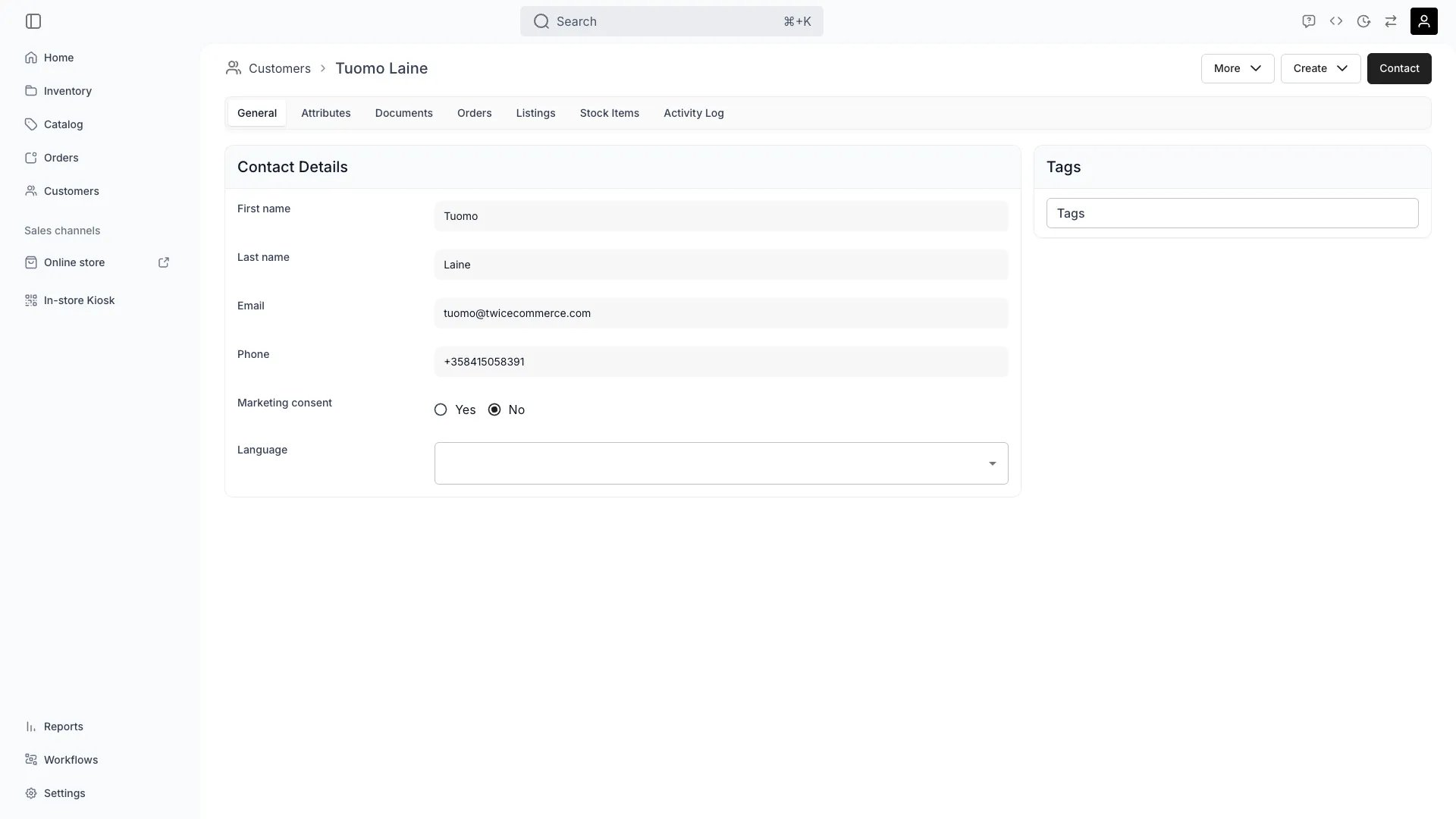
There is no single "download everything" button, so an access request is assembled:
| Where | What it holds | How to get it |
| ---------------- | ----------------------------------------------------------------- | ---------------------------------------------------------------------------------- |
| **The profile** | Identity, contact, addresses, consent, language, tags, attributes | Filter the customers table to that customer, show the columns you need, and export |
| **Orders** | What they ordered, when, for how much | The customer's **Orders** tab lists them; each order carries its own detail |
| **Documents** | Anything you uploaded — contracts, ID copies | Download per file from the **Documents** tab |
| **Activity Log** | Changes made to the record and by whom | The customer's **Activity Log** tab |
The table export is the efficient route for the profile itself: filter to the one customer, make the columns you need visible, and export — the file mirrors the view. See [Export customers](/docs/guides/customers/export-customers).
Two different actions with genuinely different consequences:
| | **Archive** | **Delete** |
| ---------------------------------- | ------------------------------------------------------- | ------------------------------------- |
| Effect | Record is hidden from the CRM; status becomes archived | Record becomes unreachable in TWICE |
| Reversible | Yes — unarchive | No route back in the admin |
| On a new order with the same email | **The profile is revived** and the order attaches to it | Not matched; a new profile is created |
That third row is the one that catches people. **Archiving is not erasure.** A customer you archived who checks out again is brought back to active automatically, because the checkout matches on email — deliberately, so their new orders do not pile up on a hidden record. If your intent was to remove them, archiving does not do it.
Use **archive** for tidying a CRM. Use **delete** for an erasure request.
Delete the customer for an erasure request. Then check the **Documents** tab has nothing left you meant to remove — files are the most sensitive thing you are likely to hold, and they deserve an explicit look rather than an assumption.
Deletion in TWICE is a **soft delete**: the record is marked deleted and becomes unreachable through the admin and the API rather than being physically destroyed in the database. For most purposes that is what "deleted" means operationally. If your obligation requires confirmed physical erasure from storage and backups, that is a question for TWICE support rather than something to assume from the admin — ask, and get the answer in writing.
Deleting a profile does not reach into the financial record, and it should not — you are required to keep those.
* **Invoices carry their own customer snapshot**, captured when the invoice was minted. The name and details on a historical invoice are stored on the invoice, not read live from the profile, so they survive the profile's deletion.
* **Orders and payments remain.** The transaction history is accounting data.
* **Receipts already issued** are unchanged.
This is normal and defensible — tax and accounting retention generally overrides an erasure request for the transaction record. But it means **"we deleted everything" is not accurate**, and you should not tell a customer that it is. What you can say is that their CRM profile is removed and their transaction records are retained for the period the law requires.
The customer's **Activity Log** carries changes to the record, which is your trail for actions taken while the profile existed.
A deleted profile is not somewhere you can go and read afterwards, so keep the request and your response where you keep such things — a ticket, a case file, whatever your process uses. The evidence that you honoured a request needs to outlive the record it concerned.
## How do I know it worked?
* **An access request** — you have handed over profile fields, order history, documents and the activity trail, and can say what each covers.
* **An erasure request** — the customer no longer appears in the customers table or in search, and their documents are gone.
* **Nothing revived them.** Check a week later: an archived-not-deleted record comes back if they order again.
* **You can state what was retained and why** — the invoice and payment records, for the retention period.
## Troubleshooting / Common Pitfalls
**That is what archiving does.** A checkout matching their email revives an archived profile and attaches the new order to it.
**What to do:** for an erasure request, delete rather than archive. Archiving is for CRM tidiness, not removal.
**Expected, and correct.** Invoices store a snapshot of the customer taken when the invoice was issued, so the document remains accurate as a historical record. It does not read from the live profile.
**What to do:** explain the retention basis rather than trying to alter the invoice. Financial documents are meant to be immutable.
**Do not delete yet.** You need the record to get your equipment back, and to charge for it if it does not come.
**What to do:** close the loan first — see [Handle a return](/docs/guides/orders/handle-a-return) — and tell the customer why there is a delay. A request does not oblige you to abandon an open contract.
**No.** An access request is assembled from the profile export, the order history, the documents and the activity log.
**What to do:** work the four places in the first step. For anything at volume, the API is the route — see [API keys](/docs/concepts/integrations/api-keys).
**Then this is not an erasure request at all** — it is a consent change, and much cheaper.
**What to do:** clear **Marketing consent** on the profile. Remember it also has to be removed from any email tool you exported to, or your next export re-adds them. See [Export customers](/docs/guides/customers/export-customers).
**Deletion supports a selection**, so a batch is possible from the table.
**What to do:** be careful with it. Deletion has no undo in the admin, and a mis-set filter on a bulk delete is not a recoverable mistake. Check the selection twice.
## Next Steps
Retention decisions before you store documents.
The table export, and consent withdrawal.
How archiving behaves across every asset.
Every field the record holds.
customers
A customer asks for a copy of what you hold, or asks you to delete it. Both are answerable in TWICE, and both have an edge you need to know about before you promise anything: **the customer profile is not the only place their details live.**
This guide is the practical routine — gather, then archive or delete — and an honest account of what remains afterwards.
This describes what the product does. It is not legal advice, and what your obligations actually are depends on your jurisdiction and your basis for holding the data. Decide the policy with someone qualified; use this for the mechanics.
## Prerequisites
**Required permissions:** `customers:customer` in view for the export, manage to archive, and delete to delete. `customers:customer_documents` for any files. All four system roles hold these. See [Users & Roles](/docs/settings/users-roles).
**Establish before you act:**
* **That the requester is the customer.** Handing a profile to whoever asks is itself a breach.
* **Which request it is.** Access is a copy; erasure is removal. They have different answers, and a customer may want both.
* **Whether they have open orders.** An erasure request from someone who currently has your goods is a conversation, not a task.
## The Walkthrough
There is no single "download everything" button, so an access request is assembled:
| Where | What it holds | How to get it |
| ---------------- | ----------------------------------------------------------------- | ---------------------------------------------------------------------------------- |
| **The profile** | Identity, contact, addresses, consent, language, tags, attributes | Filter the customers table to that customer, show the columns you need, and export |
| **Orders** | What they ordered, when, for how much | The customer's **Orders** tab lists them; each order carries its own detail |
| **Documents** | Anything you uploaded — contracts, ID copies | Download per file from the **Documents** tab |
| **Activity Log** | Changes made to the record and by whom | The customer's **Activity Log** tab |
The table export is the efficient route for the profile itself: filter to the one customer, make the columns you need visible, and export — the file mirrors the view. See [Export customers](/docs/guides/customers/export-customers).
Two different actions with genuinely different consequences:
| | **Archive** | **Delete** |
| ---------------------------------- | ------------------------------------------------------- | ------------------------------------- |
| Effect | Record is hidden from the CRM; status becomes archived | Record becomes unreachable in TWICE |
| Reversible | Yes — unarchive | No route back in the admin |
| On a new order with the same email | **The profile is revived** and the order attaches to it | Not matched; a new profile is created |
That third row is the one that catches people. **Archiving is not erasure.** A customer you archived who checks out again is brought back to active automatically, because the checkout matches on email — deliberately, so their new orders do not pile up on a hidden record. If your intent was to remove them, archiving does not do it.
Use **archive** for tidying a CRM. Use **delete** for an erasure request.
Delete the customer for an erasure request. Then check the **Documents** tab has nothing left you meant to remove — files are the most sensitive thing you are likely to hold, and they deserve an explicit look rather than an assumption.
Deletion in TWICE is a **soft delete**: the record is marked deleted and becomes unreachable through the admin and the API rather than being physically destroyed in the database. For most purposes that is what "deleted" means operationally. If your obligation requires confirmed physical erasure from storage and backups, that is a question for TWICE support rather than something to assume from the admin — ask, and get the answer in writing.
Deleting a profile does not reach into the financial record, and it should not — you are required to keep those.
* **Invoices carry their own customer snapshot**, captured when the invoice was minted. The name and details on a historical invoice are stored on the invoice, not read live from the profile, so they survive the profile's deletion.
* **Orders and payments remain.** The transaction history is accounting data.
* **Receipts already issued** are unchanged.
This is normal and defensible — tax and accounting retention generally overrides an erasure request for the transaction record. But it means **"we deleted everything" is not accurate**, and you should not tell a customer that it is. What you can say is that their CRM profile is removed and their transaction records are retained for the period the law requires.
The customer's **Activity Log** carries changes to the record, which is your trail for actions taken while the profile existed.
A deleted profile is not somewhere you can go and read afterwards, so keep the request and your response where you keep such things — a ticket, a case file, whatever your process uses. The evidence that you honoured a request needs to outlive the record it concerned.
## How do I know it worked?
* **An access request** — you have handed over profile fields, order history, documents and the activity trail, and can say what each covers.
* **An erasure request** — the customer no longer appears in the customers table or in search, and their documents are gone.
* **Nothing revived them.** Check a week later: an archived-not-deleted record comes back if they order again.
* **You can state what was retained and why** — the invoice and payment records, for the retention period.
## Troubleshooting / Common Pitfalls
**That is what archiving does.** A checkout matching their email revives an archived profile and attaches the new order to it.
**What to do:** for an erasure request, delete rather than archive. Archiving is for CRM tidiness, not removal.
**Expected, and correct.** Invoices store a snapshot of the customer taken when the invoice was issued, so the document remains accurate as a historical record. It does not read from the live profile.
**What to do:** explain the retention basis rather than trying to alter the invoice. Financial documents are meant to be immutable.
**Do not delete yet.** You need the record to get your equipment back, and to charge for it if it does not come.
**What to do:** close the loan first — see [Handle a return](/docs/guides/orders/handle-a-return) — and tell the customer why there is a delay. A request does not oblige you to abandon an open contract.
**No.** An access request is assembled from the profile export, the order history, the documents and the activity log.
**What to do:** work the four places in the first step. For anything at volume, the API is the route — see [API keys](/docs/concepts/integrations/api-keys).
**Then this is not an erasure request at all** — it is a consent change, and much cheaper.
**What to do:** clear **Marketing consent** on the profile. Remember it also has to be removed from any email tool you exported to, or your next export re-adds them. See [Export customers](/docs/guides/customers/export-customers).
**Deletion supports a selection**, so a batch is possible from the table.
**What to do:** be careful with it. Deletion has no undo in the admin, and a mis-set filter on a bulk delete is not a recoverable mistake. Check the selection twice.
## Next Steps
Retention decisions before you store documents.
The table export, and consent withdrawal.
How archiving behaves across every asset.
Every field the record holds.