> ## Documentation Index
> Fetch the complete documentation index at: https://www.twicecommerce.com/docs/llms.txt
> Use this file to discover all available pages before exploring further.
# Order Lifecycle
> The complete journey of an order from creation through fulfillment, completion, and post-order processes.
export const orderLifecycleDefinition = "The Order Lifecycle describes the complete journey of an order from creation through fulfillment, completion, and post-order processes. Understanding order lifecycle stages helps manage operations, automate workflows, and track performance across different order types and statuses.";
 ## Definition
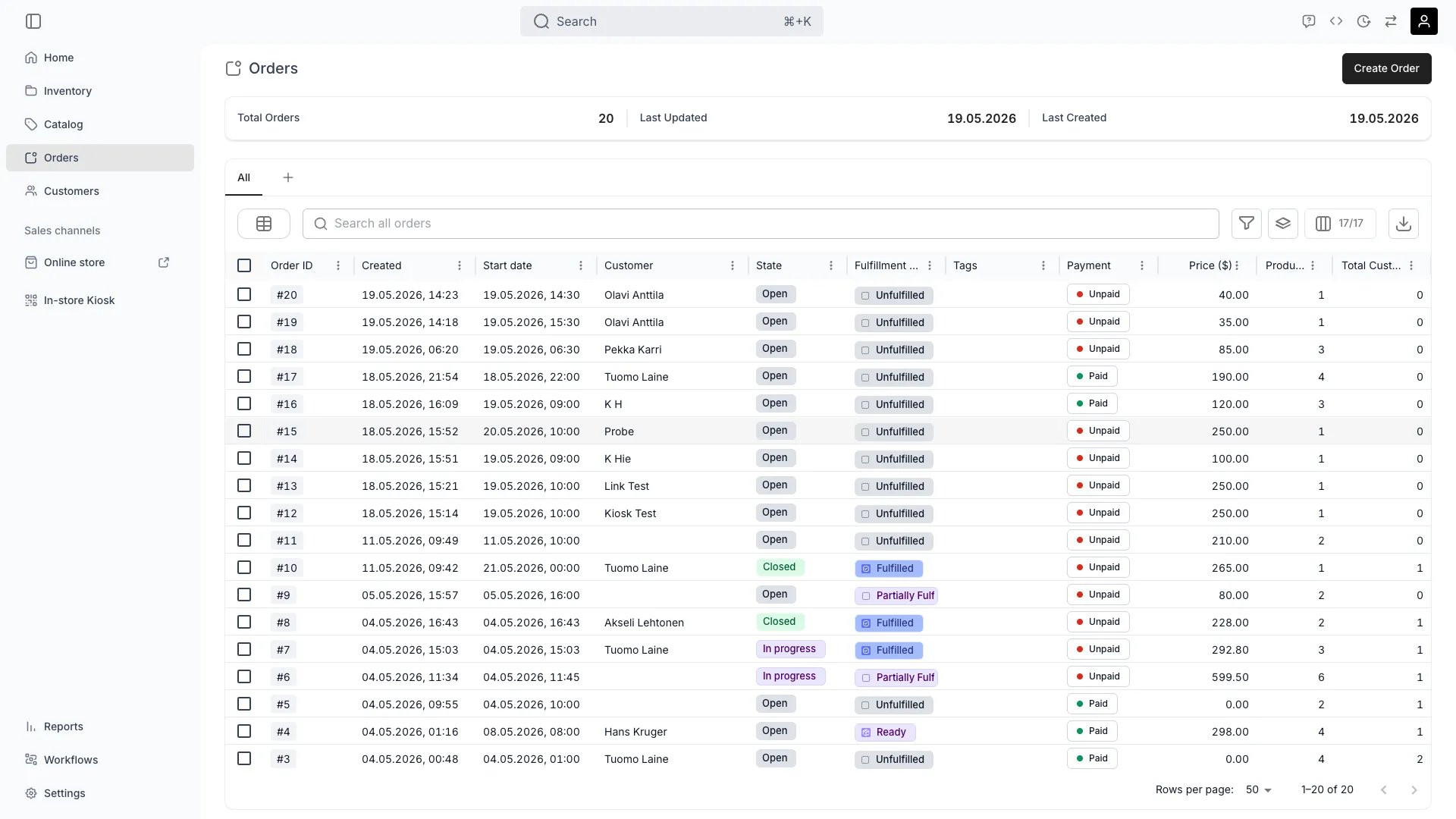
The Order Lifecycle describes the journey of an Order from creation through fulfillment, completion, and post-order activity. Every order moves through three independent dimensions — Order Status, Payment State, and Fulfillment State — and the combination of all three determines what you can do with the order at any given moment.
## Where do I use it?
* Filtering and grouping orders in the Orders table
* Triggering Workflows when an order enters a specific status
* Deciding whether an order can still be edited, cancelled, or refunded
* Reporting on revenue, fulfillment performance, and active rentals
* Driving API integrations that need to react to order state changes
## Order Status, Payment, and Fulfillment
Orders are tracked along three independent dimensions in the admin:
* **Order Status** — overall progress of the order (Open / In progress / Closed)
* **Payment State** — whether the order is fully paid (Paid / Unpaid)
* **Fulfillment State** — physical fulfillment of line items (Unfulfilled / Ready / Partially Fulfilled / Fulfilled)
Each is shown as its own chip in the orders table and on the order detail page. The three dimensions are independent: an order can be **Closed** even if some line items were refunded, and **Open** orders may already be **Partially Fulfilled**.
## Key Properties
### Order Status
The user-facing status shown on every order:
| Status | Description |
| :-------------- | :---------------------------------------------------------------------------- |
| **Open** | Order is created and awaiting action — confirmation, payment, or preparation. |
| **In progress** | Items are out with the customer, or the rental period is active. |
| **Closed** | All items returned (rental) or delivered (sale). No further action required. |
TWICE tracks finer internal states for booking, payment-link, and rental transitions, but you rarely need to interact with them directly — the user-facing **Open / In progress / Closed** status is a projection of those states.
### Payment State
Payment progress is tracked separately from order status. At the order level the rollup is binary:
| Payment State | Description |
| :------------ | :-------------------------------------------------------------------------------------- |
| **Unpaid** | The order has an outstanding balance — nothing captured yet, or only part of the total. |
| **Paid** | Payment captured in full. |
In the API this is `paymentStatus`, with values `PAID` and `UNPAID`. The individual Payments and Invoices behind the order carry finer-grained states — pending, succeeded, partially refunded, refunded, cancelled, expired, and more. See [Payments](/docs/concepts/orders/payments) for how payment progress is represented.
### Fulfillment State
The fulfillment chip on an order summarises the state of its line items:
| Fulfillment State | Description |
| :---------------------- | :--------------------------------------------------- |
| **Unfulfilled** | No items have been picked up, shipped, or delivered. |
| **Ready** | Items are prepared and ready to hand over. |
| **Partially Fulfilled** | Some items have been delivered, others have not. |
| **Fulfilled** | All items have been delivered to the customer. |
For rentals, returns do not move the chip backwards. A returned item counts as fulfilled in the rollup, so an order with some items returned and some still out stays **Fulfilled**.
## Relationships
* **Order Status** is a projection of finer internal states maintained by the backend.
* **Payment State** is derived from the linked [Payments and Transactions](/docs/concepts/orders/payments) and tracked on each line item.
* **Fulfillment State** is aggregated from each line item's [Stock Item](/docs/concepts/inventory/stock-item-state) commitments.
* A Workflow can be configured to fire on transitions of any of the three dimensions — see [Auto-Fulfillment](/docs/concepts/orders/auto-fulfillment).
## Lifecycle
### Status Transitions
**When**: Items are picked up, shipped, or the rental period starts.
**What happens**:
* Stock items are committed to the order and marked as out
* Fulfillment chip moves toward **Ready** or **Fulfilled**
* Payment is captured if the channel uses pre-authorisation (the authorised hold is then captured)
**Trigger examples**:
* Staff marks all line items as picked up in-store
* Shipping label is generated and the carrier confirms collection
* A Workflow on **Pickup completed** fires
**When**: All items are returned (rental) or delivery is complete (sale).
**What happens**:
* Stock items are released back to inventory
* Order moves out of active operations and into history
* Deposits, if any, are released or refunded
* Records remain available for reporting and search
**When**: Order is cancelled before any fulfillment occurs.
**What happens**:
* No stock commitments are made
* Authorised payments are voided; captured payments are refunded
* Order is shown as cancelled in history
### Cancellation behaviour at each stage
| Stage | What cancelling does |
| :----------------------------------- | :------------------------------------------------------------------------------------------------------------------------------------ |
| **Open, Unfulfilled** | Voids authorisation (if any), releases stock reservation, no refund needed. |
| **Open, Ready** | Releases prepared stock items. If a payment was captured, it is refunded. |
| **In progress, Partially Fulfilled** | Outstanding items are released; delivered items must be returned manually. Partial refund typically required. |
| **In progress, Fulfilled** | Cancellation is effectively the same as returning all items early. The cancellation policy on the order determines the refund amount. |
| **Closed** | Cancellation is no longer possible. Use a refund instead — see [Payments](/docs/concepts/orders/payments). |
### Edit rules at each stage
| Stage | Editable | Notes |
| :-------------------- | :--------- | :--------------------------------------------------------------------------------------------- |
| **Open, Unfulfilled** | Yes | Add/remove items, change dates, change pricing. |
| **Open, Ready** | Limited | Items can change but stock commitments may need to be re-assigned. |
| **In progress** | Restricted | You can extend rental dates and add extras, but not remove fulfilled items. |
| **Closed** | No | Edit access is locked. Refunds are still possible — see [Payments](/docs/concepts/orders/payments). |
Edit permissions also depend on the staff member's role. See [Users & Roles](/docs/settings/users-roles).
### A real-world rental scenario
Customer books 3 items for a 3-day rental on Friday — a mountain bike, a helmet, and a lock. They pay a 30% deposit online at checkout. The remaining balance is collected on pickup.
| Time | Event | Order Status | Payment | Fulfillment |
| :------------ | :--------------------------------- | :-------------- | :-------------------- | :------------------ |
| **Wed** | Online checkout submits | Open | Unpaid | Unfulfilled |
| **Wed** | Deposit transaction captured | Open | Unpaid (balance owed) | Unfulfilled |
| **Thu** | Staff marks helmet + lock as Ready | Open | Unpaid | Partially Fulfilled |
| **Fri 09:00** | Customer arrives, pays balance | Open | Paid | Partially Fulfilled |
| **Fri 09:05** | Bike handed over | **In progress** | Paid | **Fulfilled** |
| **Sun 18:00** | All items returned | **Closed** | Paid | Fulfilled |
## FAQs
Yes. Order Status and Payment State are independent. A staff member can close an order manually (for example, after writing off a balance). Use the Payment chip to check outstanding amounts before closing.
**Ready** means stock items have been prepared and assigned but not yet handed to the customer. **Fulfilled** means the customer has them. Skipping the Ready step is fine — many merchants only use **Unfulfilled** → **Fulfilled**.
No. Fulfilled, returned, and cancelled all count as terminal states in the fulfillment rollup. Once every item is out, returning items one by one keeps the order at **Fulfilled** — the chip never reverts to **Partially Fulfilled**.
No. Closed orders are immutable. If you need to re-rent the same items to the same customer, create a new order.
Filter the Orders table by **Order Status = In progress**. For an API integration, query orders by `state=active` — see the example below.
## Developer Reference
Orders are exposed as `orders` in the API.
Open the endpoint in the API reference.
## Related
Payment hierarchy, transactions, and refunds.
Rentals, sales, subscriptions, and buybacks.
How orders commit and release stock items.
Automatic stock-item assignment on incoming orders.
## Definition
The Order Lifecycle describes the journey of an Order from creation through fulfillment, completion, and post-order activity. Every order moves through three independent dimensions — Order Status, Payment State, and Fulfillment State — and the combination of all three determines what you can do with the order at any given moment.
## Where do I use it?
* Filtering and grouping orders in the Orders table
* Triggering Workflows when an order enters a specific status
* Deciding whether an order can still be edited, cancelled, or refunded
* Reporting on revenue, fulfillment performance, and active rentals
* Driving API integrations that need to react to order state changes
## Order Status, Payment, and Fulfillment
Orders are tracked along three independent dimensions in the admin:
* **Order Status** — overall progress of the order (Open / In progress / Closed)
* **Payment State** — whether the order is fully paid (Paid / Unpaid)
* **Fulfillment State** — physical fulfillment of line items (Unfulfilled / Ready / Partially Fulfilled / Fulfilled)
Each is shown as its own chip in the orders table and on the order detail page. The three dimensions are independent: an order can be **Closed** even if some line items were refunded, and **Open** orders may already be **Partially Fulfilled**.
## Key Properties
### Order Status
The user-facing status shown on every order:
| Status | Description |
| :-------------- | :---------------------------------------------------------------------------- |
| **Open** | Order is created and awaiting action — confirmation, payment, or preparation. |
| **In progress** | Items are out with the customer, or the rental period is active. |
| **Closed** | All items returned (rental) or delivered (sale). No further action required. |
TWICE tracks finer internal states for booking, payment-link, and rental transitions, but you rarely need to interact with them directly — the user-facing **Open / In progress / Closed** status is a projection of those states.
### Payment State
Payment progress is tracked separately from order status. At the order level the rollup is binary:
| Payment State | Description |
| :------------ | :-------------------------------------------------------------------------------------- |
| **Unpaid** | The order has an outstanding balance — nothing captured yet, or only part of the total. |
| **Paid** | Payment captured in full. |
In the API this is `paymentStatus`, with values `PAID` and `UNPAID`. The individual Payments and Invoices behind the order carry finer-grained states — pending, succeeded, partially refunded, refunded, cancelled, expired, and more. See [Payments](/docs/concepts/orders/payments) for how payment progress is represented.
### Fulfillment State
The fulfillment chip on an order summarises the state of its line items:
| Fulfillment State | Description |
| :---------------------- | :--------------------------------------------------- |
| **Unfulfilled** | No items have been picked up, shipped, or delivered. |
| **Ready** | Items are prepared and ready to hand over. |
| **Partially Fulfilled** | Some items have been delivered, others have not. |
| **Fulfilled** | All items have been delivered to the customer. |
For rentals, returns do not move the chip backwards. A returned item counts as fulfilled in the rollup, so an order with some items returned and some still out stays **Fulfilled**.
## Relationships
* **Order Status** is a projection of finer internal states maintained by the backend.
* **Payment State** is derived from the linked [Payments and Transactions](/docs/concepts/orders/payments) and tracked on each line item.
* **Fulfillment State** is aggregated from each line item's [Stock Item](/docs/concepts/inventory/stock-item-state) commitments.
* A Workflow can be configured to fire on transitions of any of the three dimensions — see [Auto-Fulfillment](/docs/concepts/orders/auto-fulfillment).
## Lifecycle
### Status Transitions
**When**: Items are picked up, shipped, or the rental period starts.
**What happens**:
* Stock items are committed to the order and marked as out
* Fulfillment chip moves toward **Ready** or **Fulfilled**
* Payment is captured if the channel uses pre-authorisation (the authorised hold is then captured)
**Trigger examples**:
* Staff marks all line items as picked up in-store
* Shipping label is generated and the carrier confirms collection
* A Workflow on **Pickup completed** fires
**When**: All items are returned (rental) or delivery is complete (sale).
**What happens**:
* Stock items are released back to inventory
* Order moves out of active operations and into history
* Deposits, if any, are released or refunded
* Records remain available for reporting and search
**When**: Order is cancelled before any fulfillment occurs.
**What happens**:
* No stock commitments are made
* Authorised payments are voided; captured payments are refunded
* Order is shown as cancelled in history
### Cancellation behaviour at each stage
| Stage | What cancelling does |
| :----------------------------------- | :------------------------------------------------------------------------------------------------------------------------------------ |
| **Open, Unfulfilled** | Voids authorisation (if any), releases stock reservation, no refund needed. |
| **Open, Ready** | Releases prepared stock items. If a payment was captured, it is refunded. |
| **In progress, Partially Fulfilled** | Outstanding items are released; delivered items must be returned manually. Partial refund typically required. |
| **In progress, Fulfilled** | Cancellation is effectively the same as returning all items early. The cancellation policy on the order determines the refund amount. |
| **Closed** | Cancellation is no longer possible. Use a refund instead — see [Payments](/docs/concepts/orders/payments). |
### Edit rules at each stage
| Stage | Editable | Notes |
| :-------------------- | :--------- | :--------------------------------------------------------------------------------------------- |
| **Open, Unfulfilled** | Yes | Add/remove items, change dates, change pricing. |
| **Open, Ready** | Limited | Items can change but stock commitments may need to be re-assigned. |
| **In progress** | Restricted | You can extend rental dates and add extras, but not remove fulfilled items. |
| **Closed** | No | Edit access is locked. Refunds are still possible — see [Payments](/docs/concepts/orders/payments). |
Edit permissions also depend on the staff member's role. See [Users & Roles](/docs/settings/users-roles).
### A real-world rental scenario
Customer books 3 items for a 3-day rental on Friday — a mountain bike, a helmet, and a lock. They pay a 30% deposit online at checkout. The remaining balance is collected on pickup.
| Time | Event | Order Status | Payment | Fulfillment |
| :------------ | :--------------------------------- | :-------------- | :-------------------- | :------------------ |
| **Wed** | Online checkout submits | Open | Unpaid | Unfulfilled |
| **Wed** | Deposit transaction captured | Open | Unpaid (balance owed) | Unfulfilled |
| **Thu** | Staff marks helmet + lock as Ready | Open | Unpaid | Partially Fulfilled |
| **Fri 09:00** | Customer arrives, pays balance | Open | Paid | Partially Fulfilled |
| **Fri 09:05** | Bike handed over | **In progress** | Paid | **Fulfilled** |
| **Sun 18:00** | All items returned | **Closed** | Paid | Fulfilled |
## FAQs
Yes. Order Status and Payment State are independent. A staff member can close an order manually (for example, after writing off a balance). Use the Payment chip to check outstanding amounts before closing.
**Ready** means stock items have been prepared and assigned but not yet handed to the customer. **Fulfilled** means the customer has them. Skipping the Ready step is fine — many merchants only use **Unfulfilled** → **Fulfilled**.
No. Fulfilled, returned, and cancelled all count as terminal states in the fulfillment rollup. Once every item is out, returning items one by one keeps the order at **Fulfilled** — the chip never reverts to **Partially Fulfilled**.
No. Closed orders are immutable. If you need to re-rent the same items to the same customer, create a new order.
Filter the Orders table by **Order Status = In progress**. For an API integration, query orders by `state=active` — see the example below.
## Developer Reference
Orders are exposed as `orders` in the API.
Open the endpoint in the API reference.
## Related
Payment hierarchy, transactions, and refunds.
Rentals, sales, subscriptions, and buybacks.
How orders commit and release stock items.
Automatic stock-item assignment on incoming orders.