> ## Documentation Index
> Fetch the complete documentation index at: https://www.twicecommerce.com/docs/llms.txt
> Use this file to discover all available pages before exploring further.
# Stock Item
> A unique, serialized inventory record that represents either a single physical item or a group of identical items tracked together.
 ## Definition
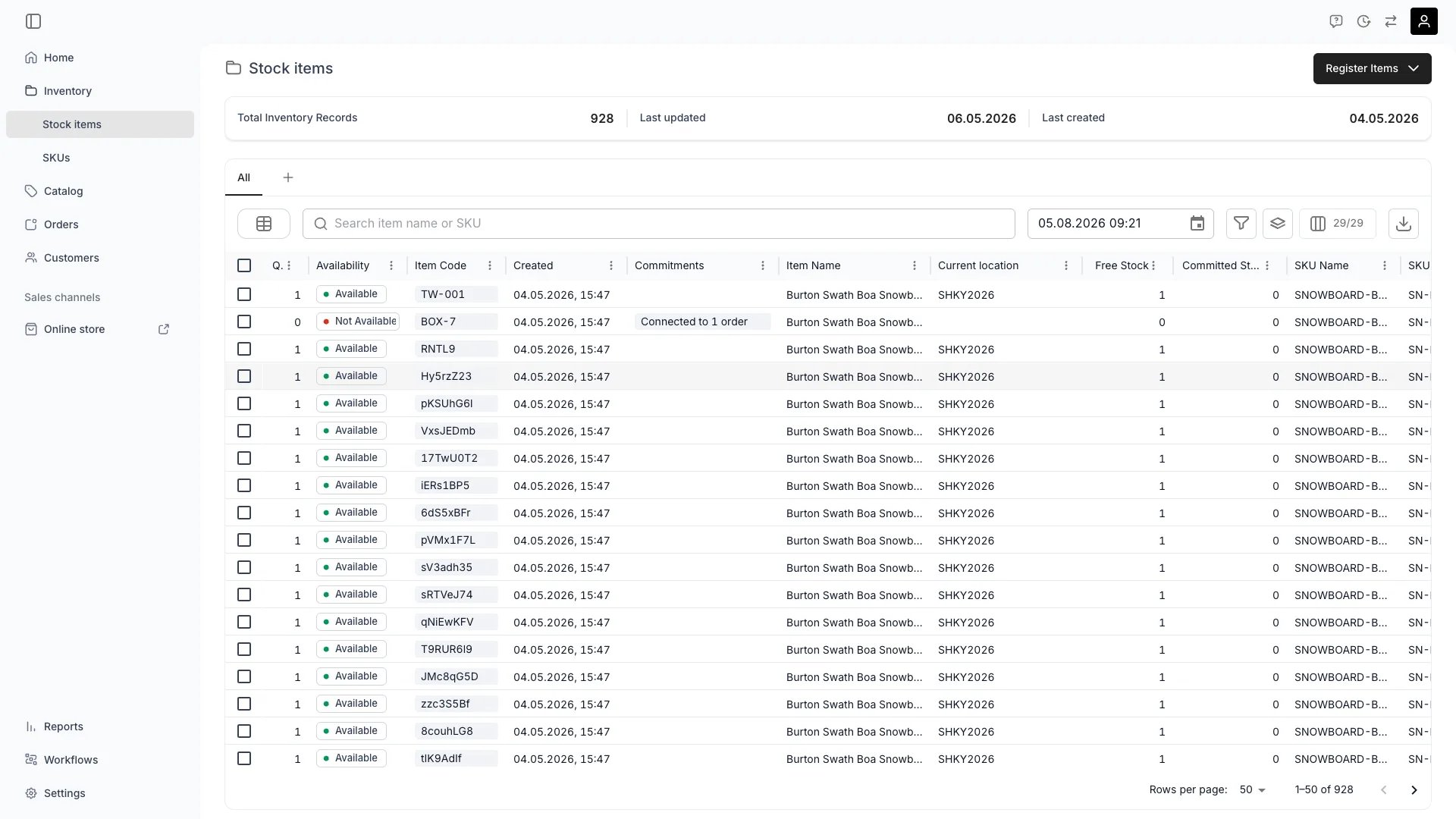
A Stock Item (called an `article` in the API) is the unit of inventory you actually own. It carries codes, location, condition, attributes, media, documents, a full event timeline, and an income/expense ledger. Every Stock Item belongs to a tenant and lives in a service location. It may also be linked to a [SKU](/docs/concepts/inventory/skus), from which it inherits product-level fields by default.
**The Analogy:** Think of a Stock Item as the passport for a physical product. Just as a passport tracks a person's journey with a unique ID, a Stock Item tracks a product's complete lifecycle with its own item code — where it has been, what has happened to it, and where it is now.
**Special in TWICE:** Stock Items are **serialized by default** — registration tracks each unit individually unless you turn **Track individually** off. One physical thing = one Stock Item. This is what makes per-item profitability, condition tracking, and maintenance history possible — and it is the foundation of the [article ledger](#the-article-ledger).
## Where do I use it?
Stock Items are the foundation of TWICE's inventory system. You work with Stock Items when:
* **Registering new inventory** — recording units that enter your fleet, store, or warehouse
* **Tracking item lifecycle** — usage, rentals, sales, maintenance, depreciation, disposal
* **Managing availability** — knowing what is at hand, out with a customer, or under repair
* **Analysing profitability** — reading income and costs per individual item via the ledger
* **Fulfilling orders** — assigning specific items to customer orders, scanning them in and out
The serialized nature of Stock Items is what enables precise tracking for rental operations, buyback programs, refurbishment workflows, and maintenance-heavy businesses.
## The article ledger
Every Stock Item has its own **ledger** — a chronological log of monetary entries grouped as either **income** or **cost**. Together they produce the item's **profitability**. In the admin this appears as the item's **Income & Expenses** tab; the API resource is `articleLedgers`.
| Field | What it captures |
| --------------- | --------------------------------------------------------------------------------- |
| `itemIncome` | Sum of all `group: 'income'` ledger entries (rentals, sales, late fees, addons) |
| `itemCosts` | Sum of all `group: 'cost'` ledger entries (purchase price, repairs, depreciation) |
| `profitability` | `itemIncome - itemCosts` for this specific Stock Item |
| `changeType` | `initial` (purchase entry), `update` (manual), or `depreciation` (system) |
Ledger entries can be tied to an `orderId` (auto-recorded when an item earns from an order), to a `scheduledEventId` (e.g. a maintenance reservation that incurred cost), or stand alone (manual adjustments).
Per-item profitability requires serialized tracking. On pooled stock items (one record covering several units), ledger totals apply to the pool as a whole — you cannot attribute them to a specific unit. See [Inventory tracking](/docs/concepts/inventory/inventory-tracking).
## Quantity handling: serialized vs pooled
How a Stock Item is tracked is decided at registration with the **Track individually** checkbox (`trackIndividually` in the create request, default `true`) and the **Quantity** field.
| Mode | Records created | Behaviour |
| ---------- | ---------------------- | --------------------------------------------------------------------------- |
| Serialized | One per physical unit | Full lifecycle history and individual ledger per unit |
| Pooled | One for the whole pool | N identical units tracked as a single record, aggregated history and ledger |
With Track individually on, registering quantity `N` creates one Stock Item per unit. With it off, you create a single record covering `N` units. `trackIndividually` is a create-time input only — it is not stored on the Article resource. On responses, the `quantity` object reports the record's `total` unit count and its `byLocation` breakdown.
When to choose each:
* **Serialized** — bikes, skis, cameras, lifts, kayaks, e-scooters, any rentable or high-value asset.
* **Pooled** — helmets, locks, lanyards, lift passes (when not RFID), small consumables you do not need to trace individually.
Mode is set on creation. To change it later you create a new record and migrate history; in-place conversion is not supported.
Read more: [Inventory tracking](/docs/concepts/inventory/inventory-tracking).
## Key Properties
A Stock Item is represented by the `Article` type. The most important fields:
| Property | Type | Description |
| --------------------- | ------------------------------- | -------------------------------------------------------------------------------------------------------------------------------------------------- |
| `id` | UUID | Unique identifier of the Stock Item. |
| `codes` | string\[] | One or more item codes. Each code is unique within a tenant. See [Stock codes](/docs/concepts/inventory/stock-codes). |
| `name` | string | Display name shown in the admin. |
| `status` | `active` / `inactive` / `draft` | Operational lifecycle. Shown in the UI as **Active**, **Inactive**, and **Draft**. See [Stock item status](/docs/concepts/inventory/stock-item-status). |
| `skuId` | UUID, nullable | Optional link to a parent [SKU](/docs/concepts/inventory/skus). When set, the item inherits SKU-level fields. |
| `sku` | object | Embedded SKU summary (`id`, `name`, `code`) when linked. |
| `binLocation` | string, nullable | Sub-location label such as `Rack 3 / Bay B`. |
| `binLocationOrigin` | `article` / `sku` | Whether the bin location comes from the item itself or is inherited from its SKU. |
| `taxonomyCategoryId` | string, nullable | Taxonomy category the item belongs to. |
| `purchasePrice` | number, nullable | Acquisition price (minor units). Feeds the ledger as an `initial` cost entry. |
| `purchasePriceOrigin` | `article` / `sku` | Source of the purchase price value. |
| `description` | rich text JSON, nullable | Long-form description. |
| `descriptionOrigin` | `article` / `sku` | Source of the description. |
| `condition` | string, nullable | Free-text condition label (e.g. `New`, `Good`, `Fair`). |
| `attributes` | array | Resource attributes attached to this item (inherited from SKU, overridable per item). |
| `tags` | array | Tag references. |
| `media` | array | Ordered list of image / video files. |
| `documents` | array | Ordered list of files with optional per-file comment. |
| `itemIncome` | number | Calculated ledger total of `income` entries. |
| `itemCosts` | number | Calculated ledger total of `cost` entries. |
| `profitability` | number | `itemIncome - itemCosts`. |
| `parentId` / `path` | string | Optional hierarchy support for grouped articles. |
| `createdAt` | ISO datetime | Creation timestamp. |
Per-item state is computed at query time and exposed on the article-with-availability response:
| Field | Description |
| --------------------------- | -------------------------------------------------------------------------------------------------------------------- |
| `unavailability` | Array of unavailability ranges (orders, scheduled events). Drives the **Out** physical state and ATS calculations. |
| `scheduledEvents` | Reservations and notes attached to this item. See [Stock item events](/docs/concepts/inventory/events). |
| `articleLocations` | Time-ranged location assignments. The current one defines the item's present location. |
| `quantity` / `availability` | Objects with a `total` count and a `byLocation` breakdown — total units on the record and units currently available. |
| `temporalStock` | Time-bucketed `stockBalance`, `stockAvailableToSell`, `stockCommitted`, `stockUtilisation`. |
| `conflicts` | Lookahead of fulfillment conflicts if you reduce quantity or change location. |
**Property inheritance from SKU.** `purchasePrice`, `description`, `binLocation`, attributes, and category can be defined on the SKU. The Stock Item reads from the SKU unless it has its own value. The `*Origin` fields in the API tell you which source supplied each value (`article` or `sku`). Setting a value on the item overrides the SKU default; clearing the value lets it re-inherit.
## Status
Status describes where the item sits in its operational lifecycle. Three values exist:
* **Active** — operational, available to be assigned to orders. (`status: 'active'` in the API.)
* **Inactive** — excluded from operations (e.g. under repair, retired, lost, or sold). Preserved in the system. (`status: 'inactive'`.)
* **Draft** — registration in progress. Not yet operational. (`status: 'draft'`.)
Only **Active** items count toward ATS and can be assigned to new orders. Inactive items keep their full history (ledger, events, attachments).
Read more: [Stock item status](/docs/concepts/inventory/stock-item-status).
## State (In / Out)
State describes the item's physical location relative to your operation. It is **automatic** — you cannot set it manually.
* **In** — at hand in your inventory. May still be committed to an upcoming order.
* **Out** — currently with a customer (rental in progress) or otherwise away.
State transitions happen on fulfillment events:
* Pickup / handout → **Out**
* Return → **In**
Read more: [Stock item state](/docs/concepts/inventory/stock-item-state).
## Location tracking
A Stock Item is always tied to a service location. The `articleLocations` array stores the assignment as **temporal ranges**:
```json theme={null}
{
"id": "loc_abc123",
"articleId": "art_xyz789",
"serviceLocationId": "loc_helsinki",
"slotId": "slot_42",
"range": { "start": "2025-01-01T00:00:00Z", "end": null }
}
```
* The current location is the assignment whose range covers `now`.
* You can schedule future transfers by adding a new range with a future start.
* All location changes are recorded in the activity log as `location_changed` events.
* Bin location (`binLocation`) is a free-text sub-location inside a service location — e.g. `Rack 3 / Bay B`.
When you change location via the API (`PUT /articles/:id` with a new `serviceLocationId`), TWICE checks for conflicts: orders or scheduled events that would be left stranded by the move. The `conflicts` field on the article response surfaces these proactively.
## Media and documents
Two ordered file collections per item:
* **Media** (`media`) — images and videos shown on the item detail. The first media item is used as the thumbnail in lists. Reorderable.
* **Documents** (`documents`) — arbitrary files (PDFs, spreadsheets, photos). Each document carries an `orderIndex` and an optional `comment`.
Documents can also be attached to specific scheduled events (e.g. inspection notes against a maintenance reservation) — see [Stock item events](/docs/concepts/inventory/events).
## Activity log and events
Each Stock Item has two streams of history:
1. **Activity log** — system-recorded changes to the item itself. Examples of recorded event types:
* `assigned_to_order` / `freed_from_order`
* `handed_out` / `returned`
* `status_changed`
* `allocation_changed`
* `sku_changed`
* `location_changed`
* `identifiers_changed`
* `specifications_changed`
2. **Scheduled events** — user-created reservations and notes that may block availability and may have documents attached. Types: `reservation`, `note`.
Both are visible from the item detail's **Timeline / Events** tab.
Read more: [Stock item events](/docs/concepts/inventory/events).
## Relationships
[Stock Items can link to a SKU](/docs/concepts/inventory/skus) via `skuId`. The SKU acts as the product-level template: `purchasePrice`, `description`, `binLocation`, attributes, and category cascade down unless overridden. A Stock Item without a SKU is fully self-contained.
Has many ArticleLedger entries that combine into `itemIncome`, `itemCosts`, and `profitability`.
Has many scheduled events and an activity log. See [Events](/docs/concepts/inventory/events).
Linked to the [Orders](/docs/concepts/orders/order-lifecycle) that reserve the item. State and unavailability are driven by orders that include the item. Lifecycle events such as `handed_out` and `returned` come from order fulfillment.
Belongs to a [service location](/docs/concepts/admin/locations). Location is time-ranged (`articleLocations`) so transfers and future moves are first-class.
```mermaid theme={null}
%%{init: {'flowchart': {'nodeSpacing': 20, 'rankSpacing': 30}}}%%
flowchart TB
subgraph InventoryBox[" "]
SKU["SKU (template)"]
StockItem["**Stock Item**"]
OtherItems["Other Stock Items"]
SKU ~~~ StockItem ~~~ OtherItems
end
Ledger["Article Ledger
## Definition
A Stock Item (called an `article` in the API) is the unit of inventory you actually own. It carries codes, location, condition, attributes, media, documents, a full event timeline, and an income/expense ledger. Every Stock Item belongs to a tenant and lives in a service location. It may also be linked to a [SKU](/docs/concepts/inventory/skus), from which it inherits product-level fields by default.
**The Analogy:** Think of a Stock Item as the passport for a physical product. Just as a passport tracks a person's journey with a unique ID, a Stock Item tracks a product's complete lifecycle with its own item code — where it has been, what has happened to it, and where it is now.
**Special in TWICE:** Stock Items are **serialized by default** — registration tracks each unit individually unless you turn **Track individually** off. One physical thing = one Stock Item. This is what makes per-item profitability, condition tracking, and maintenance history possible — and it is the foundation of the [article ledger](#the-article-ledger).
## Where do I use it?
Stock Items are the foundation of TWICE's inventory system. You work with Stock Items when:
* **Registering new inventory** — recording units that enter your fleet, store, or warehouse
* **Tracking item lifecycle** — usage, rentals, sales, maintenance, depreciation, disposal
* **Managing availability** — knowing what is at hand, out with a customer, or under repair
* **Analysing profitability** — reading income and costs per individual item via the ledger
* **Fulfilling orders** — assigning specific items to customer orders, scanning them in and out
The serialized nature of Stock Items is what enables precise tracking for rental operations, buyback programs, refurbishment workflows, and maintenance-heavy businesses.
## The article ledger
Every Stock Item has its own **ledger** — a chronological log of monetary entries grouped as either **income** or **cost**. Together they produce the item's **profitability**. In the admin this appears as the item's **Income & Expenses** tab; the API resource is `articleLedgers`.
| Field | What it captures |
| --------------- | --------------------------------------------------------------------------------- |
| `itemIncome` | Sum of all `group: 'income'` ledger entries (rentals, sales, late fees, addons) |
| `itemCosts` | Sum of all `group: 'cost'` ledger entries (purchase price, repairs, depreciation) |
| `profitability` | `itemIncome - itemCosts` for this specific Stock Item |
| `changeType` | `initial` (purchase entry), `update` (manual), or `depreciation` (system) |
Ledger entries can be tied to an `orderId` (auto-recorded when an item earns from an order), to a `scheduledEventId` (e.g. a maintenance reservation that incurred cost), or stand alone (manual adjustments).
Per-item profitability requires serialized tracking. On pooled stock items (one record covering several units), ledger totals apply to the pool as a whole — you cannot attribute them to a specific unit. See [Inventory tracking](/docs/concepts/inventory/inventory-tracking).
## Quantity handling: serialized vs pooled
How a Stock Item is tracked is decided at registration with the **Track individually** checkbox (`trackIndividually` in the create request, default `true`) and the **Quantity** field.
| Mode | Records created | Behaviour |
| ---------- | ---------------------- | --------------------------------------------------------------------------- |
| Serialized | One per physical unit | Full lifecycle history and individual ledger per unit |
| Pooled | One for the whole pool | N identical units tracked as a single record, aggregated history and ledger |
With Track individually on, registering quantity `N` creates one Stock Item per unit. With it off, you create a single record covering `N` units. `trackIndividually` is a create-time input only — it is not stored on the Article resource. On responses, the `quantity` object reports the record's `total` unit count and its `byLocation` breakdown.
When to choose each:
* **Serialized** — bikes, skis, cameras, lifts, kayaks, e-scooters, any rentable or high-value asset.
* **Pooled** — helmets, locks, lanyards, lift passes (when not RFID), small consumables you do not need to trace individually.
Mode is set on creation. To change it later you create a new record and migrate history; in-place conversion is not supported.
Read more: [Inventory tracking](/docs/concepts/inventory/inventory-tracking).
## Key Properties
A Stock Item is represented by the `Article` type. The most important fields:
| Property | Type | Description |
| --------------------- | ------------------------------- | -------------------------------------------------------------------------------------------------------------------------------------------------- |
| `id` | UUID | Unique identifier of the Stock Item. |
| `codes` | string\[] | One or more item codes. Each code is unique within a tenant. See [Stock codes](/docs/concepts/inventory/stock-codes). |
| `name` | string | Display name shown in the admin. |
| `status` | `active` / `inactive` / `draft` | Operational lifecycle. Shown in the UI as **Active**, **Inactive**, and **Draft**. See [Stock item status](/docs/concepts/inventory/stock-item-status). |
| `skuId` | UUID, nullable | Optional link to a parent [SKU](/docs/concepts/inventory/skus). When set, the item inherits SKU-level fields. |
| `sku` | object | Embedded SKU summary (`id`, `name`, `code`) when linked. |
| `binLocation` | string, nullable | Sub-location label such as `Rack 3 / Bay B`. |
| `binLocationOrigin` | `article` / `sku` | Whether the bin location comes from the item itself or is inherited from its SKU. |
| `taxonomyCategoryId` | string, nullable | Taxonomy category the item belongs to. |
| `purchasePrice` | number, nullable | Acquisition price (minor units). Feeds the ledger as an `initial` cost entry. |
| `purchasePriceOrigin` | `article` / `sku` | Source of the purchase price value. |
| `description` | rich text JSON, nullable | Long-form description. |
| `descriptionOrigin` | `article` / `sku` | Source of the description. |
| `condition` | string, nullable | Free-text condition label (e.g. `New`, `Good`, `Fair`). |
| `attributes` | array | Resource attributes attached to this item (inherited from SKU, overridable per item). |
| `tags` | array | Tag references. |
| `media` | array | Ordered list of image / video files. |
| `documents` | array | Ordered list of files with optional per-file comment. |
| `itemIncome` | number | Calculated ledger total of `income` entries. |
| `itemCosts` | number | Calculated ledger total of `cost` entries. |
| `profitability` | number | `itemIncome - itemCosts`. |
| `parentId` / `path` | string | Optional hierarchy support for grouped articles. |
| `createdAt` | ISO datetime | Creation timestamp. |
Per-item state is computed at query time and exposed on the article-with-availability response:
| Field | Description |
| --------------------------- | -------------------------------------------------------------------------------------------------------------------- |
| `unavailability` | Array of unavailability ranges (orders, scheduled events). Drives the **Out** physical state and ATS calculations. |
| `scheduledEvents` | Reservations and notes attached to this item. See [Stock item events](/docs/concepts/inventory/events). |
| `articleLocations` | Time-ranged location assignments. The current one defines the item's present location. |
| `quantity` / `availability` | Objects with a `total` count and a `byLocation` breakdown — total units on the record and units currently available. |
| `temporalStock` | Time-bucketed `stockBalance`, `stockAvailableToSell`, `stockCommitted`, `stockUtilisation`. |
| `conflicts` | Lookahead of fulfillment conflicts if you reduce quantity or change location. |
**Property inheritance from SKU.** `purchasePrice`, `description`, `binLocation`, attributes, and category can be defined on the SKU. The Stock Item reads from the SKU unless it has its own value. The `*Origin` fields in the API tell you which source supplied each value (`article` or `sku`). Setting a value on the item overrides the SKU default; clearing the value lets it re-inherit.
## Status
Status describes where the item sits in its operational lifecycle. Three values exist:
* **Active** — operational, available to be assigned to orders. (`status: 'active'` in the API.)
* **Inactive** — excluded from operations (e.g. under repair, retired, lost, or sold). Preserved in the system. (`status: 'inactive'`.)
* **Draft** — registration in progress. Not yet operational. (`status: 'draft'`.)
Only **Active** items count toward ATS and can be assigned to new orders. Inactive items keep their full history (ledger, events, attachments).
Read more: [Stock item status](/docs/concepts/inventory/stock-item-status).
## State (In / Out)
State describes the item's physical location relative to your operation. It is **automatic** — you cannot set it manually.
* **In** — at hand in your inventory. May still be committed to an upcoming order.
* **Out** — currently with a customer (rental in progress) or otherwise away.
State transitions happen on fulfillment events:
* Pickup / handout → **Out**
* Return → **In**
Read more: [Stock item state](/docs/concepts/inventory/stock-item-state).
## Location tracking
A Stock Item is always tied to a service location. The `articleLocations` array stores the assignment as **temporal ranges**:
```json theme={null}
{
"id": "loc_abc123",
"articleId": "art_xyz789",
"serviceLocationId": "loc_helsinki",
"slotId": "slot_42",
"range": { "start": "2025-01-01T00:00:00Z", "end": null }
}
```
* The current location is the assignment whose range covers `now`.
* You can schedule future transfers by adding a new range with a future start.
* All location changes are recorded in the activity log as `location_changed` events.
* Bin location (`binLocation`) is a free-text sub-location inside a service location — e.g. `Rack 3 / Bay B`.
When you change location via the API (`PUT /articles/:id` with a new `serviceLocationId`), TWICE checks for conflicts: orders or scheduled events that would be left stranded by the move. The `conflicts` field on the article response surfaces these proactively.
## Media and documents
Two ordered file collections per item:
* **Media** (`media`) — images and videos shown on the item detail. The first media item is used as the thumbnail in lists. Reorderable.
* **Documents** (`documents`) — arbitrary files (PDFs, spreadsheets, photos). Each document carries an `orderIndex` and an optional `comment`.
Documents can also be attached to specific scheduled events (e.g. inspection notes against a maintenance reservation) — see [Stock item events](/docs/concepts/inventory/events).
## Activity log and events
Each Stock Item has two streams of history:
1. **Activity log** — system-recorded changes to the item itself. Examples of recorded event types:
* `assigned_to_order` / `freed_from_order`
* `handed_out` / `returned`
* `status_changed`
* `allocation_changed`
* `sku_changed`
* `location_changed`
* `identifiers_changed`
* `specifications_changed`
2. **Scheduled events** — user-created reservations and notes that may block availability and may have documents attached. Types: `reservation`, `note`.
Both are visible from the item detail's **Timeline / Events** tab.
Read more: [Stock item events](/docs/concepts/inventory/events).
## Relationships
[Stock Items can link to a SKU](/docs/concepts/inventory/skus) via `skuId`. The SKU acts as the product-level template: `purchasePrice`, `description`, `binLocation`, attributes, and category cascade down unless overridden. A Stock Item without a SKU is fully self-contained.
Has many ArticleLedger entries that combine into `itemIncome`, `itemCosts`, and `profitability`.
Has many scheduled events and an activity log. See [Events](/docs/concepts/inventory/events).
Linked to the [Orders](/docs/concepts/orders/order-lifecycle) that reserve the item. State and unavailability are driven by orders that include the item. Lifecycle events such as `handed_out` and `returned` come from order fulfillment.
Belongs to a [service location](/docs/concepts/admin/locations). Location is time-ranged (`articleLocations`) so transfers and future moves are first-class.
```mermaid theme={null}
%%{init: {'flowchart': {'nodeSpacing': 20, 'rankSpacing': 30}}}%%
flowchart TB
subgraph InventoryBox[" "]
SKU["SKU (template)"]
StockItem["**Stock Item**"]
OtherItems["Other Stock Items"]
SKU ~~~ StockItem ~~~ OtherItems
end
Ledger["Article Ledger
(income + cost)"]
Events["Scheduled events
+ Activity log"]
subgraph RelatedBox[" "]
direction TB
Listing["Listing"]
Location["Service location"]
Order["Orders"]
Listing ~~~ Location ~~~ Order
end
SKU -->|inherits from| StockItem
StockItem -->|writes to| Ledger
StockItem -->|records| Events
StockItem -.->|references| RelatedBox
style InventoryBox fill:#0000000d,stroke:#888,stroke-width:2px
style StockItem fill:#3b82f633,stroke:#3b82f6,stroke-width:3px,font-weight:bold
style SKU fill:#0000000a,stroke:#999,stroke-width:1px
style OtherItems fill:#0000000a,stroke:#999,stroke-width:1px
style Ledger fill:#10b98133,stroke:#10b981,stroke-width:2px
style Events fill:#10b98133,stroke:#10b981,stroke-width:2px
style RelatedBox fill:#f59e0b1a,stroke:#f59e0b,stroke-width:2px
```
## Lifecycle
Stock Items enter your system when you register new inventory.
From **Inventory > Stock Items**, click **Register stock item**. Provide a name, choose whether to **Track individually**, set a quantity, pick an entry location, and optionally link to a SKU.
Minimum: `name` and `serviceLocationId`. Recommended: `skuId` (for inheritance), `taxonomyCategoryId`, `purchasePrice`, and one or more `codes` (auto-generated if omitted).
New items default to `status: 'active'` (**Active**) and the **In** state. They appear immediately in availability calculations. If items need inspection before going live, set status to `inactive` (**Inactive**) on creation.
Yes. Use **bulk register** in the admin (auto-generates codes for `N` items), the CSV import flow, or `POST /articles/create-many` for API import.
Active Stock Items participate in orders, listings, and reports.
**Inventory > Stock Items** table, the item detail page (General / Attributes / Income & Expenses / Fulfilment / Documents / Events / Activity log tabs), fulfillment screens, availability calendars, and SKU detail pages.
Edit any field, transfer location, change status, add media or documents, add scheduled events (reservations / notes), record income and expense entries, add tags, and link / unlink the SKU.
Only items with `status: active` and **In** state (and not committed to an overlapping booking) contribute to a listing's ATS. See [Stock item state](/docs/concepts/inventory/stock-item-state).
Update fields throughout the lifecycle.
Open the item detail and edit inline, or select multiple rows in the table and use bulk edit. The API endpoint is `PUT /articles/:id`.
Almost everything: name, SKU link, codes, status, location, attributes, condition, purchase price, description, media, documents, tags. The `id` itself is immutable. Codes can be added or removed but must remain unique within the tenant.
For pooled items, use `POST /articles/:id/increase-quantity` or `POST /articles/:id/decrease-quantity`. Before decreasing, call `GET /articles/:id/plan-quantity-change` to see what would be impacted (`blockingUnavailabilities`, `moves`, `removedSlotIds`).
Prefer status changes over deletion to preserve history.
Set status to **Inactive**. All history — ledger, events, attachments — is preserved and the item drops out of availability immediately. `POST /articles/:id/inactivate` also tries to reassign the item's upcoming bookings to another available Stock Item.
`DELETE /articles/:id`, or **Delete** from the row actions. Items currently assigned to active orders cannot be deleted until those orders are completed or cancelled.
Order history retains a reference to the deleted item id, but inline associations (ledger entries, events, media) are removed. Use a status change instead if you need the history.
## FAQs
Use pooled stock for **identical, low-value, interchangeable** items where individual tracking adds no value (helmets, locks, lanyards). Use serialized (qty = 1, Track individually) for anything you want to follow per unit: high-value gear, anything that depreciates differently, anything rented out.
Yes. Set `skuId` to a new value (or `null` to unlink). The change is recorded as a `sku_changed` event. Existing ledger and event history stay with the item.
`codes` belongs to the Stock Item — it identifies the physical thing. `code` on the SKU identifies the product type. One SKU can have many Stock Items, each with its own item code(s).
`purchasePrice`, `description`, `binLocation`, attributes, and `taxonomyCategoryId`. The API returns `*Origin` fields telling you whether the value came from the article or the SKU. Setting a value on the article overrides; clearing it re-inherits.
Status is your call (Active / Inactive / Draft). State is set by fulfillment (In / Out). They are independent — an **Active / Out** item is healthy inventory that is currently with a customer.
Set its status to **Inactive** — there is no separate Lost or Sold status. The change does not retroactively modify orders that include the item; handle those manually (refund, reassign). Record the reason as a note or ledger entry.
## Developer Reference
Stock Items are exposed as `articles` in the API.
Open the endpoint in the API reference.
## Related Concepts
Product-level template for Stock Items
Active / Inactive / Draft
In / Out — physical location vs your operation
Identifiers, barcodes, scanning workflows
Serialized vs pooled
Reservations, notes, activity log