> ## Documentation Index
> Fetch the complete documentation index at: https://www.twicecommerce.com/docs/llms.txt
> Use this file to discover all available pages before exploring further.
# SKU (Stock Keeping Unit)
> A product-level identifier that groups similar stock items under a shared definition for managing product information at scale.
 ## Definition
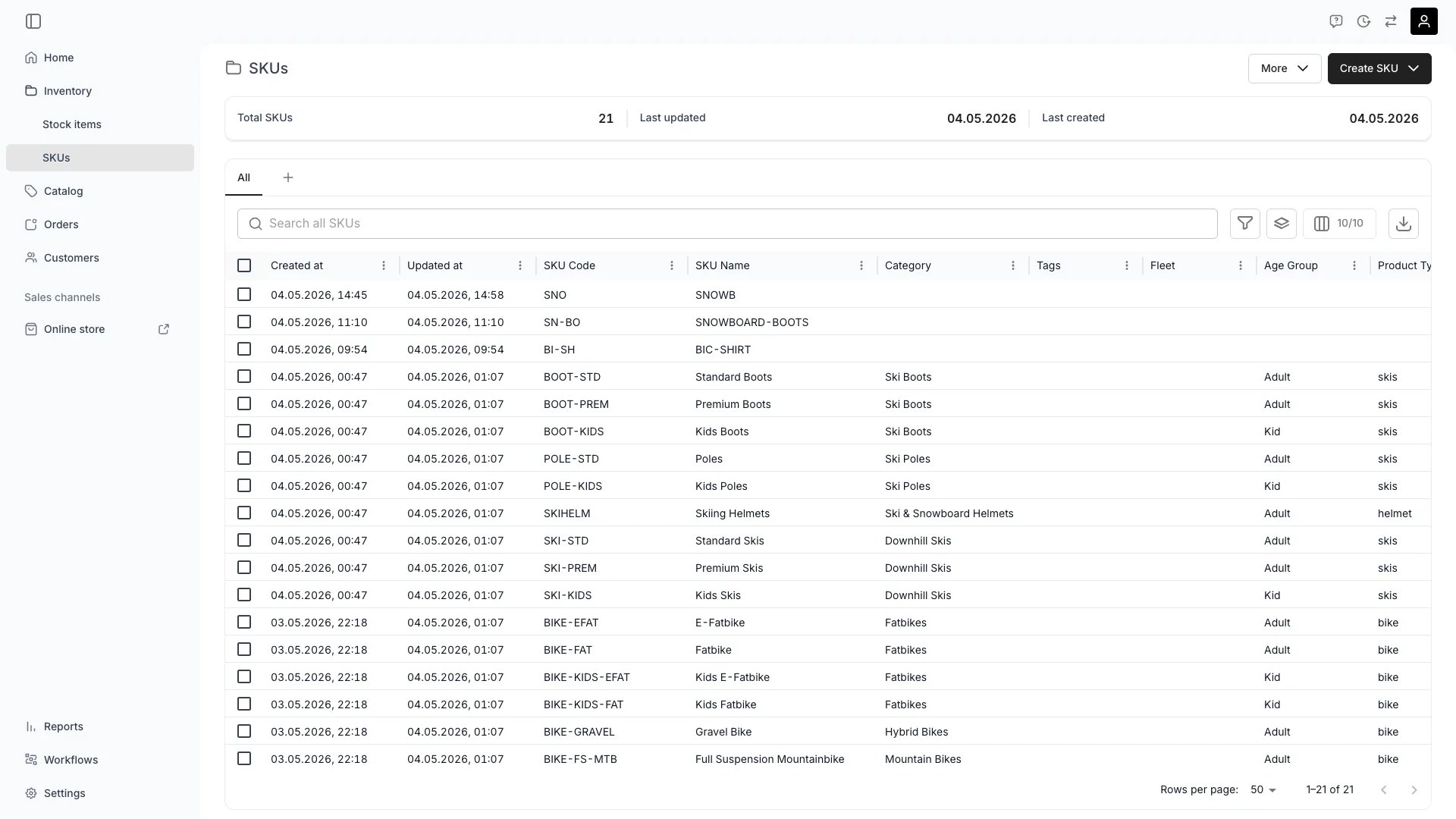
A SKU is a **template** for a product type. It holds product-level information — name, code, category, attributes, description, base purchase price, bin location — and acts as the parent definition for any number of [Stock Items](/docs/concepts/inventory/stock-items) that represent the actual physical units.
**SKUs are templates.** Define product information once on the SKU and every linked Stock Item inherits it. Stock Items can still override any inherited field individually — the SKU is a default, not a lock.
**Example.** Create a SKU `BIK-S` named **Bike S** with:
* Category: *Bicycles > City*
* Attributes: `Brand: Trek`, `Frame size: S`
* Purchase price: `€499`
Now register 20 Stock Items linked to this SKU. Each one inherits all four properties. One of them comes from a different supplier at `€520` — override the `purchasePrice` on just that item; the rest still read `€499` from the SKU.
**Special in TWICE:** SKUs separate **what something is** (product) from **which one** (physical instance). This is what lets you manage a product catalog while keeping per-item lifecycle, condition, and profitability.
## Where do I use it?
SKUs are central to product management and appear throughout TWICE:
* **Product catalog management** — define product templates that many Stock Items share
* **Listing creation** — Listings reference SKUs to define what is fulfillable
* **Bulk operations** — update pricing, description, or attributes once on the SKU and propagate to all linked items
* **Reporting and analytics** — analyse performance by product type rather than per item
* **Inventory planning** — track stock levels and demand patterns by SKU
* **AI suggestions** — `suggestSkuCode` proposes a code from the SKU name
## SKU vs Stock Item
| Concept | SKU | Stock Item |
| ----------------- | ----------------- | --------------------------------------- |
| What it describes | Product type | Physical unit |
| Cardinality | One per product | Many per SKU |
| Identifier | `code` (SKU code) | `codes` (item codes) |
| Holds inventory? | No | Yes — quantity, location, status, state |
| Has a ledger? | No | Yes — income, cost, profitability |
| Has events? | No | Yes — reservations, notes, activity log |
| Set on creation | Once | One per physical unit |
A Stock Item can also be **unlinked** (`skuId: null`) — useful for one-off items that do not fit a product template.
## Inherited fields
The following fields cascade from the SKU to every linked Stock Item:
| SKU field | Inherited by Stock Item | Origin field on the article |
| ----------------------------------------------- | ----------------------------------------------- | ------------------------------------------ |
| `purchasePrice` | `purchasePrice` | `purchasePriceOrigin` (`sku` or `article`) |
| `description` | `description` | `descriptionOrigin` (`sku` or `article`) |
| `binLocation` | `binLocation` | `binLocationOrigin` (`sku` or `article`) |
| `taxonomyCategoryId` | `taxonomyCategoryId` | — |
| `attributes` | `attributes` (merged with item-level) | — |
| `tags` | `tags` (visible on linked items) | — |
| `bufferTimeAmountAfter` + `bufferTimeUnitAfter` | `bufferTimeAmountAfter` + `bufferTimeUnitAfter` | `bufferTimeOrigin` (`sku` or `article`) |
**Override behaviour:**
* The Stock Item's own value takes priority over the SKU's value.
* The API exposes `*Origin` fields so you always know whether a value was inherited or set on the item.
* Clearing a value on the Stock Item (set to `null`) makes it re-inherit from the SKU.
* Updating a SKU field instantly changes the effective value on every linked item that does not have its own override.
* Buffer time uses a three-state model: `null` = inherit from SKU, `0` = explicit no buffer (overrides the SKU), `> 0` = custom override. See [Stock Item Fulfillment](/docs/inventory/stock-items/fulfillment) for details.
Changing a SKU's `purchasePrice` does **not** rewrite historical ledger entries — those keep the price they were recorded with. Inheritance applies to **current** reads only.
## SKU code
`code` is the user-facing identifier for the SKU. Rules:
* Required, minimum length 1.
* Must be unique within the tenant.
* Validate ahead of creation with `POST /skus/validate-codes`.
* Auto-suggest a code from a name with `POST /skus/suggest-code`.
* Editable after creation, but updates are checked against the same uniqueness rule.
Common patterns: `BIK-S`, `SKI-ATOM-170`, `HELM-MD-RED`. Choose something short, mnemonic, and stable.
## Key Properties
| Property | Type | Description |
| ------------------------- | ------------------------ | --------------------------------------------------------------- |
| `id` | UUID | Unique identifier. |
| `name` | string | Human-friendly product name. |
| `code` | string | Tenant-unique SKU code. |
| `taxonomyCategoryId` | string, nullable | Category in your taxonomy. |
| `purchasePrice` | number, nullable | Default purchase price inherited by linked items (minor units). |
| `description` | rich text JSON, nullable | Default description. |
| `binLocation` | string, nullable | Default bin location. |
| `attributes` | array | Resource attributes attached to the SKU. |
| `tags` | array | Tag references. |
| `createdAt` / `updatedAt` | ISO datetime | Timestamps. |
| `articles` | array (optional) | When requested, embedded Stock Items linked to this SKU. |
## Multi-listing per SKU
One SKU can power multiple Listings. The Listing layer adds rental terms, pricing tables, availability windows, channels — but the SKU underneath stays the same. This is how a single product can appear in different stores, packages, or pricing contexts without duplicating its identity.
```mermaid theme={null}
%%{init: {'flowchart': {'nodeSpacing': 20, 'rankSpacing': 30}}}%%
flowchart TB
SKU["**SKU: Bike S**"]
L1["Listing: Day Rental"]
L2["Listing: Weekly Package"]
L3["Listing: For Sale"]
A1["Stock Item #1"]
A2["Stock Item #2"]
A3["Stock Item #3"]
SKU --> L1
SKU --> L2
SKU --> L3
SKU --> A1
SKU --> A2
SKU --> A3
style SKU fill:#3b82f633,stroke:#3b82f6,stroke-width:3px,font-weight:bold
style A1 fill:#10b98133,stroke:#10b981,stroke-width:2px
style A2 fill:#10b98133,stroke:#10b981,stroke-width:2px
style A3 fill:#10b98133,stroke:#10b981,stroke-width:2px
style L1 fill:#f59e0b1a,stroke:#f59e0b,stroke-width:1px
style L2 fill:#f59e0b1a,stroke:#f59e0b,stroke-width:1px
style L3 fill:#f59e0b1a,stroke:#f59e0b,stroke-width:1px
```
## Relationships
Has many [Stock Items](/docs/concepts/inventory/stock-items) via `articles[].skuId`. Each Stock Item inherits SKU properties but maintains its own tracking, ledger, and event history.
[Listings](/docs/concepts/catalog/listings) reference SKUs as fulfillable stock sources. One SKU can power many Listings.
Belongs to a taxonomy category and has its own resource attributes. These cascade to linked Stock Items.
## Lifecycle
SKUs are created when defining new product types in your catalog.
From **Inventory > SKUs**, click **Create SKU**. Provide a name; the code can be auto-suggested. You can also create SKUs automatically while registering Stock Items by typing a new SKU name into the SKU picker.
Minimum: `name` and `code`. Recommended: `taxonomyCategoryId`, `purchasePrice`, `description`, and attributes — anything you want inherited by every Stock Item.
Yes. Use `POST /skus` (single) or `POST /skus/many` (bulk). Both are idempotent on `code` — duplicate codes are rejected up front by `validateCodes`.
Active SKUs act as templates across operations.
**Inventory > SKUs**, the SKU detail page (with embedded Stock Items), Stock Item registration, Listing configuration, and reporting.
Edit any field, link Stock Items by setting their `skuId`, attach tags, configure attributes, and manage taxonomy. SKU-level updates propagate immediately to linked Stock Items that have not overridden the field.
Not directly. Availability is determined by linked Stock Items. A SKU with no `active` Stock Items has zero ATS.
Use SKUs to make bulk changes.
Open the SKU detail and edit, or use `PATCH /skus/:skuId`. Changes propagate to linked Stock Items via inheritance.
Editable, but the new value must be unique within the tenant. Avoid changing codes that are printed on physical labels.
Yes. Updating attributes on the SKU updates the effective value on every linked Stock Item that has not overridden that attribute.
SKUs can be deleted when discontinued.
From the SKUs table or `DELETE /skus/:skuId`. To delete many at once: `POST /skus/delete` with either `{ ids }` or `{ deleteAllExcept }`.
Their `skuId` becomes `null` (they become unlinked). Inherited values are lost on next read — set them directly on the items if you need to keep them.
## FAQs
Either works. Create SKUs first when planning a catalog. For ad-hoc inventory, the Stock Item registration flow will create or link a SKU on the fly.
No. `skuId` is single-valued. You can switch the link any time (recorded as a `sku_changed` event), but only one is active at a time.
Same shape, different scope. SKU attributes describe the product type (e.g. `Brand: Trek`). Stock Item attributes can add or override per-unit values (e.g. a specific item with `Frame number: ABC123`). On the API, item-level values win.
No — `skuId` is nullable. For one-off items, register a Stock Item without a SKU. You lose inheritance and cross-item rollups, but the item still has its own ledger, events, and lifecycle.
Yes — update each Stock Item's `skuId` (single bulk update or scripted via the API). The SKU code on each item is rewritten to the new SKU; ledger and event history follow the item.
## Developer Reference
SKUs are exposed as `skus` in the API.
Open the endpoint in the API reference.
## Related Concepts
Individual physical units that link to a SKU
Serialized vs pooled — set on Stock Items, not on SKUs
Codes on Stock Items vs SKU code
## Definition
A SKU is a **template** for a product type. It holds product-level information — name, code, category, attributes, description, base purchase price, bin location — and acts as the parent definition for any number of [Stock Items](/docs/concepts/inventory/stock-items) that represent the actual physical units.
**SKUs are templates.** Define product information once on the SKU and every linked Stock Item inherits it. Stock Items can still override any inherited field individually — the SKU is a default, not a lock.
**Example.** Create a SKU `BIK-S` named **Bike S** with:
* Category: *Bicycles > City*
* Attributes: `Brand: Trek`, `Frame size: S`
* Purchase price: `€499`
Now register 20 Stock Items linked to this SKU. Each one inherits all four properties. One of them comes from a different supplier at `€520` — override the `purchasePrice` on just that item; the rest still read `€499` from the SKU.
**Special in TWICE:** SKUs separate **what something is** (product) from **which one** (physical instance). This is what lets you manage a product catalog while keeping per-item lifecycle, condition, and profitability.
## Where do I use it?
SKUs are central to product management and appear throughout TWICE:
* **Product catalog management** — define product templates that many Stock Items share
* **Listing creation** — Listings reference SKUs to define what is fulfillable
* **Bulk operations** — update pricing, description, or attributes once on the SKU and propagate to all linked items
* **Reporting and analytics** — analyse performance by product type rather than per item
* **Inventory planning** — track stock levels and demand patterns by SKU
* **AI suggestions** — `suggestSkuCode` proposes a code from the SKU name
## SKU vs Stock Item
| Concept | SKU | Stock Item |
| ----------------- | ----------------- | --------------------------------------- |
| What it describes | Product type | Physical unit |
| Cardinality | One per product | Many per SKU |
| Identifier | `code` (SKU code) | `codes` (item codes) |
| Holds inventory? | No | Yes — quantity, location, status, state |
| Has a ledger? | No | Yes — income, cost, profitability |
| Has events? | No | Yes — reservations, notes, activity log |
| Set on creation | Once | One per physical unit |
A Stock Item can also be **unlinked** (`skuId: null`) — useful for one-off items that do not fit a product template.
## Inherited fields
The following fields cascade from the SKU to every linked Stock Item:
| SKU field | Inherited by Stock Item | Origin field on the article |
| ----------------------------------------------- | ----------------------------------------------- | ------------------------------------------ |
| `purchasePrice` | `purchasePrice` | `purchasePriceOrigin` (`sku` or `article`) |
| `description` | `description` | `descriptionOrigin` (`sku` or `article`) |
| `binLocation` | `binLocation` | `binLocationOrigin` (`sku` or `article`) |
| `taxonomyCategoryId` | `taxonomyCategoryId` | — |
| `attributes` | `attributes` (merged with item-level) | — |
| `tags` | `tags` (visible on linked items) | — |
| `bufferTimeAmountAfter` + `bufferTimeUnitAfter` | `bufferTimeAmountAfter` + `bufferTimeUnitAfter` | `bufferTimeOrigin` (`sku` or `article`) |
**Override behaviour:**
* The Stock Item's own value takes priority over the SKU's value.
* The API exposes `*Origin` fields so you always know whether a value was inherited or set on the item.
* Clearing a value on the Stock Item (set to `null`) makes it re-inherit from the SKU.
* Updating a SKU field instantly changes the effective value on every linked item that does not have its own override.
* Buffer time uses a three-state model: `null` = inherit from SKU, `0` = explicit no buffer (overrides the SKU), `> 0` = custom override. See [Stock Item Fulfillment](/docs/inventory/stock-items/fulfillment) for details.
Changing a SKU's `purchasePrice` does **not** rewrite historical ledger entries — those keep the price they were recorded with. Inheritance applies to **current** reads only.
## SKU code
`code` is the user-facing identifier for the SKU. Rules:
* Required, minimum length 1.
* Must be unique within the tenant.
* Validate ahead of creation with `POST /skus/validate-codes`.
* Auto-suggest a code from a name with `POST /skus/suggest-code`.
* Editable after creation, but updates are checked against the same uniqueness rule.
Common patterns: `BIK-S`, `SKI-ATOM-170`, `HELM-MD-RED`. Choose something short, mnemonic, and stable.
## Key Properties
| Property | Type | Description |
| ------------------------- | ------------------------ | --------------------------------------------------------------- |
| `id` | UUID | Unique identifier. |
| `name` | string | Human-friendly product name. |
| `code` | string | Tenant-unique SKU code. |
| `taxonomyCategoryId` | string, nullable | Category in your taxonomy. |
| `purchasePrice` | number, nullable | Default purchase price inherited by linked items (minor units). |
| `description` | rich text JSON, nullable | Default description. |
| `binLocation` | string, nullable | Default bin location. |
| `attributes` | array | Resource attributes attached to the SKU. |
| `tags` | array | Tag references. |
| `createdAt` / `updatedAt` | ISO datetime | Timestamps. |
| `articles` | array (optional) | When requested, embedded Stock Items linked to this SKU. |
## Multi-listing per SKU
One SKU can power multiple Listings. The Listing layer adds rental terms, pricing tables, availability windows, channels — but the SKU underneath stays the same. This is how a single product can appear in different stores, packages, or pricing contexts without duplicating its identity.
```mermaid theme={null}
%%{init: {'flowchart': {'nodeSpacing': 20, 'rankSpacing': 30}}}%%
flowchart TB
SKU["**SKU: Bike S**"]
L1["Listing: Day Rental"]
L2["Listing: Weekly Package"]
L3["Listing: For Sale"]
A1["Stock Item #1"]
A2["Stock Item #2"]
A3["Stock Item #3"]
SKU --> L1
SKU --> L2
SKU --> L3
SKU --> A1
SKU --> A2
SKU --> A3
style SKU fill:#3b82f633,stroke:#3b82f6,stroke-width:3px,font-weight:bold
style A1 fill:#10b98133,stroke:#10b981,stroke-width:2px
style A2 fill:#10b98133,stroke:#10b981,stroke-width:2px
style A3 fill:#10b98133,stroke:#10b981,stroke-width:2px
style L1 fill:#f59e0b1a,stroke:#f59e0b,stroke-width:1px
style L2 fill:#f59e0b1a,stroke:#f59e0b,stroke-width:1px
style L3 fill:#f59e0b1a,stroke:#f59e0b,stroke-width:1px
```
## Relationships
Has many [Stock Items](/docs/concepts/inventory/stock-items) via `articles[].skuId`. Each Stock Item inherits SKU properties but maintains its own tracking, ledger, and event history.
[Listings](/docs/concepts/catalog/listings) reference SKUs as fulfillable stock sources. One SKU can power many Listings.
Belongs to a taxonomy category and has its own resource attributes. These cascade to linked Stock Items.
## Lifecycle
SKUs are created when defining new product types in your catalog.
From **Inventory > SKUs**, click **Create SKU**. Provide a name; the code can be auto-suggested. You can also create SKUs automatically while registering Stock Items by typing a new SKU name into the SKU picker.
Minimum: `name` and `code`. Recommended: `taxonomyCategoryId`, `purchasePrice`, `description`, and attributes — anything you want inherited by every Stock Item.
Yes. Use `POST /skus` (single) or `POST /skus/many` (bulk). Both are idempotent on `code` — duplicate codes are rejected up front by `validateCodes`.
Active SKUs act as templates across operations.
**Inventory > SKUs**, the SKU detail page (with embedded Stock Items), Stock Item registration, Listing configuration, and reporting.
Edit any field, link Stock Items by setting their `skuId`, attach tags, configure attributes, and manage taxonomy. SKU-level updates propagate immediately to linked Stock Items that have not overridden the field.
Not directly. Availability is determined by linked Stock Items. A SKU with no `active` Stock Items has zero ATS.
Use SKUs to make bulk changes.
Open the SKU detail and edit, or use `PATCH /skus/:skuId`. Changes propagate to linked Stock Items via inheritance.
Editable, but the new value must be unique within the tenant. Avoid changing codes that are printed on physical labels.
Yes. Updating attributes on the SKU updates the effective value on every linked Stock Item that has not overridden that attribute.
SKUs can be deleted when discontinued.
From the SKUs table or `DELETE /skus/:skuId`. To delete many at once: `POST /skus/delete` with either `{ ids }` or `{ deleteAllExcept }`.
Their `skuId` becomes `null` (they become unlinked). Inherited values are lost on next read — set them directly on the items if you need to keep them.
## FAQs
Either works. Create SKUs first when planning a catalog. For ad-hoc inventory, the Stock Item registration flow will create or link a SKU on the fly.
No. `skuId` is single-valued. You can switch the link any time (recorded as a `sku_changed` event), but only one is active at a time.
Same shape, different scope. SKU attributes describe the product type (e.g. `Brand: Trek`). Stock Item attributes can add or override per-unit values (e.g. a specific item with `Frame number: ABC123`). On the API, item-level values win.
No — `skuId` is nullable. For one-off items, register a Stock Item without a SKU. You lose inheritance and cross-item rollups, but the item still has its own ledger, events, and lifecycle.
Yes — update each Stock Item's `skuId` (single bulk update or scripted via the API). The SKU code on each item is rewritten to the new SKU; ledger and event history follow the item.
## Developer Reference
SKUs are exposed as `skus` in the API.
Open the endpoint in the API reference.
## Related Concepts
Individual physical units that link to a SKU
Serialized vs pooled — set on Stock Items, not on SKUs
Codes on Stock Items vs SKU code