> ## Documentation Index
> Fetch the complete documentation index at: https://www.twicecommerce.com/docs/llms.txt
> Use this file to discover all available pages before exploring further.
# Webhooks
> How TWICE Commerce delivers signed order event notifications to your endpoint via HTTP POST.
 Webhooks notify your system when an order changes in TWICE Commerce. When an event fires, TWICE sends an HTTP POST to a URL you register, so you can react without polling the API.
## Event types
TWICE emits three order events:
| Event | When it fires |
| :-------------- | :---------------------------------------- |
| `order.created` | A new order is created |
| `order.updated` | An order or any of its child data changes |
| `order.deleted` | An order is deleted |
The payload's `data` carries the affected Order. More resources and events may be added over time.
### What triggers `order.updated`
`order.updated` fires when the order itself changes **and** when any of its child data changes:
* Line items
* Stock items
* Customers
* Comments
* Tags
* Documents
* Discounts
* Attributes
* Checkout fields
Payment records are not in this set — a payment write does not itself trigger `order.updated`.
A single operation that touches multiple child rows (for example, a bulk edit that updates the order and several line items in one transaction) produces **one** delivery, not many. TWICE deduplicates burst changes per order so your endpoint receives a single consolidated event.
Suppression of pending orders (checkout drafts still in progress) applies to creation only: inserting a pending order emits nothing, and `order.created` fires when the order leaves pending status. Updates to a pending order still emit `order.updated`, and deleting one emits `order.deleted`.
## How it works
Each delivery is an HTTP `POST` whose JSON body is an envelope describing the event. The affected resource travels in `data`:
```json theme={null}
{
"eventId": "5f2eb3a6-6cbd-4a2e-9350-6e0d1e2f9a11",
"eventType": "order.created",
"eventTime": "2026-08-11T12:34:56.789Z",
"resource": "order",
"resourceId": "0d9e0a7c-3fd1-4c8f-9c0d-2b7c6f7f2a55",
"apiVersion": "2025-06",
"data": { "id": "0d9e0a7c-3fd1-4c8f-9c0d-2b7c6f7f2a55", "…": "the full Order object" }
}
```
Unique identifier of the event. Also sent in the `X-Twice-Event-Id` header. Deduplicate on this value.
The event that fired, for example `order.created`. One webhook receives one event type.
ISO 8601 timestamp of when the event occurred.
The resource the event concerns, for example `order`.
Identifier of the affected resource.
API version the payload is rendered in.
The resource in the same shape the REST API returns it. `null` for `order.deleted`.
For the Order schema carried in `data`, see the [API reference](https://server.twicecommerce.com/api/internal).
### API version pinning
Each webhook is pinned to the API version that was the latest when you created it, and that version is reported in `apiVersion`. A new API version never changes the payload shape you already receive — moving a webhook to a newer version is an explicit update.
## Managing webhooks
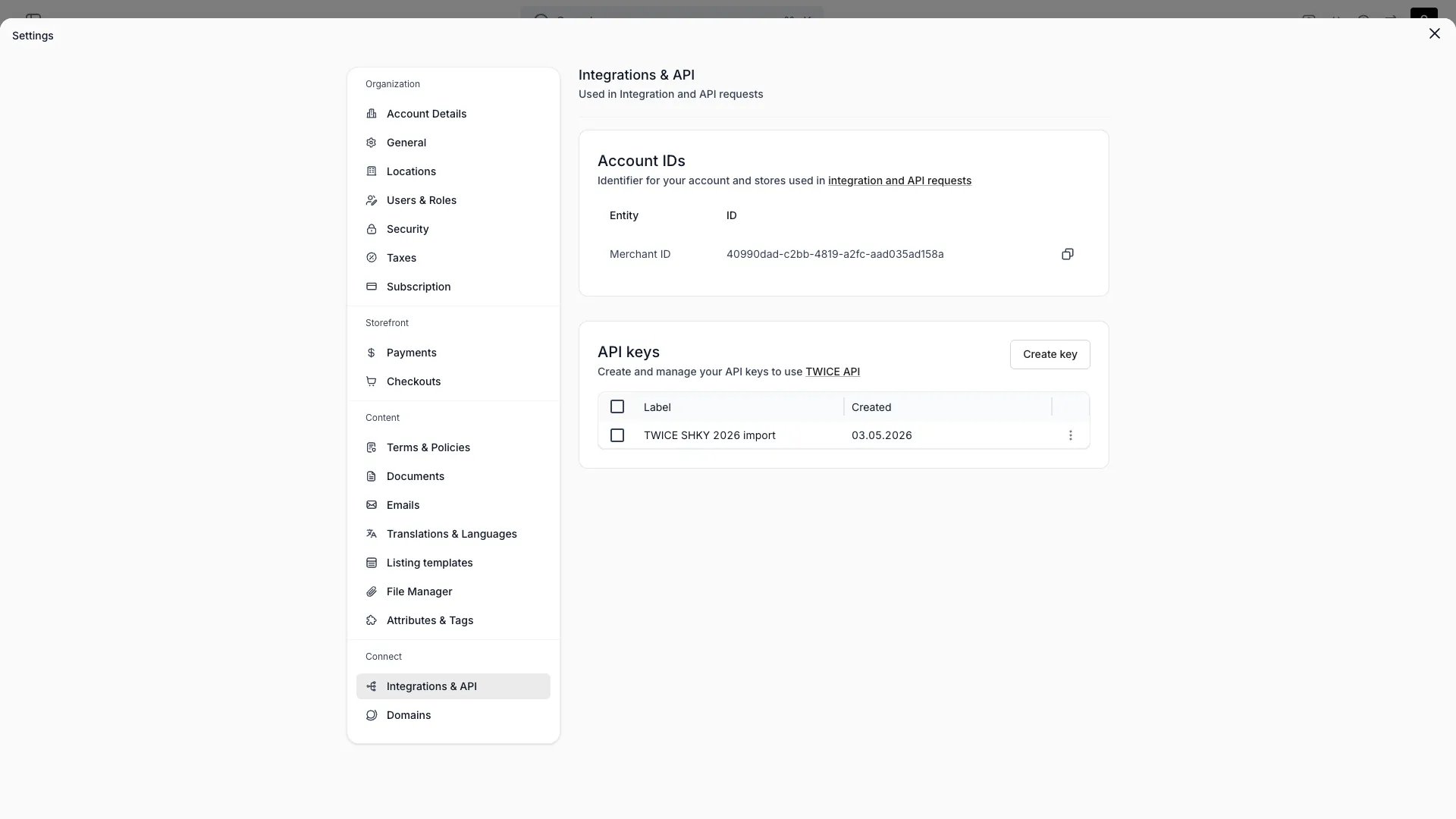
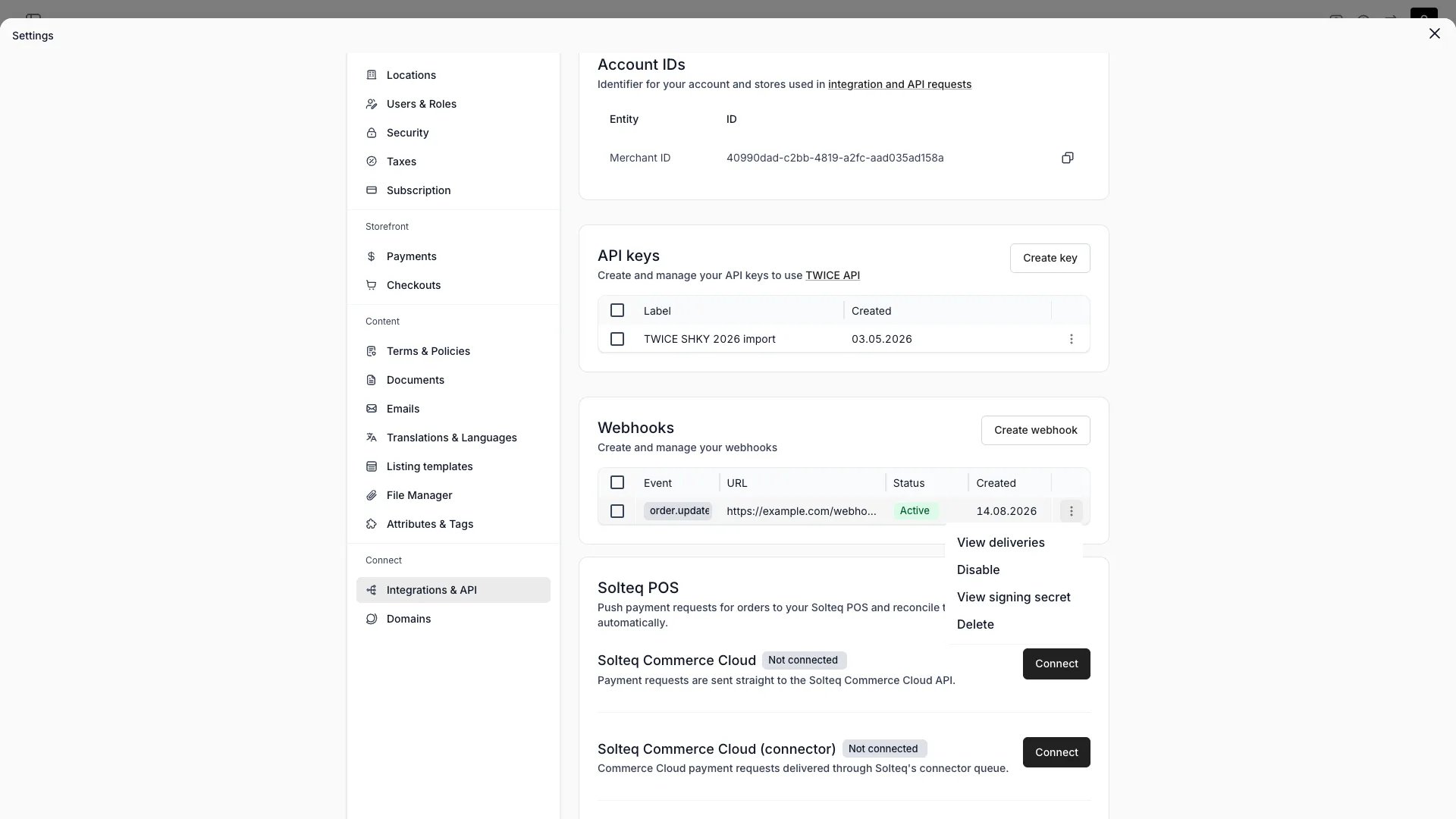
Manage webhooks under **Settings → Integrations & API → Webhooks**. Create one by choosing an event type, then entering the endpoint URL that receives the POST. Target URLs must be **HTTPS**.
The table lists each webhook with:
| Column | Description |
| :---------- | :-------------------------------------------------- |
| **Event** | The single event type this webhook receives |
| **URL** | The HTTPS endpoint the payload is POSTed to |
| **Status** | Active, or Disabled — hover the chip for the reason |
| **Created** | When the webhook was created |
Row actions cover the rest: **View deliveries**, **Enable** / **Disable**, **View signing secret**, and **Delete**.
A single event can be delivered to several webhooks — for example one `order.created` webhook to your CRM and another to your accounting system.
Webhooks require a plan that includes them — accounts without it see an upgrade prompt under Integrations. See [plans](/docs/twice-commerce-overview#pricing).
## Delivery and retries
TWICE delivers webhooks asynchronously through a Cloud Tasks queue. A delivery succeeds on any `2xx` response; any other status — or a timeout — counts as a failed attempt.
A failed delivery is retried up to 3 times (4 attempts in total), roughly 10 s, 20 s and 40 s after the preceding attempt, and retrying stops 10 minutes after the first attempt.
After **3 consecutive events** exhaust all their attempts, the webhook is disabled automatically with the reason `TOO_MANY_FAILED_DELIVERY_ATTEMPTS`, and you re-enable it manually once your endpoint is reachable. Re-enabling — or repointing the webhook at another URL — starts a fresh failure window.
Respond `2xx` quickly. If processing is slow, acknowledge first and queue the work.
## Delivery log
Every dispatched delivery is recorded. Open **View deliveries** on a webhook to see them at `/settings/connect/integrations/webhooks/{webhookId}`, filterable and sortable by result, event, event ID, trigger time, attempt count and last response.
Webhooks notify your system when an order changes in TWICE Commerce. When an event fires, TWICE sends an HTTP POST to a URL you register, so you can react without polling the API.
## Event types
TWICE emits three order events:
| Event | When it fires |
| :-------------- | :---------------------------------------- |
| `order.created` | A new order is created |
| `order.updated` | An order or any of its child data changes |
| `order.deleted` | An order is deleted |
The payload's `data` carries the affected Order. More resources and events may be added over time.
### What triggers `order.updated`
`order.updated` fires when the order itself changes **and** when any of its child data changes:
* Line items
* Stock items
* Customers
* Comments
* Tags
* Documents
* Discounts
* Attributes
* Checkout fields
Payment records are not in this set — a payment write does not itself trigger `order.updated`.
A single operation that touches multiple child rows (for example, a bulk edit that updates the order and several line items in one transaction) produces **one** delivery, not many. TWICE deduplicates burst changes per order so your endpoint receives a single consolidated event.
Suppression of pending orders (checkout drafts still in progress) applies to creation only: inserting a pending order emits nothing, and `order.created` fires when the order leaves pending status. Updates to a pending order still emit `order.updated`, and deleting one emits `order.deleted`.
## How it works
Each delivery is an HTTP `POST` whose JSON body is an envelope describing the event. The affected resource travels in `data`:
```json theme={null}
{
"eventId": "5f2eb3a6-6cbd-4a2e-9350-6e0d1e2f9a11",
"eventType": "order.created",
"eventTime": "2026-08-11T12:34:56.789Z",
"resource": "order",
"resourceId": "0d9e0a7c-3fd1-4c8f-9c0d-2b7c6f7f2a55",
"apiVersion": "2025-06",
"data": { "id": "0d9e0a7c-3fd1-4c8f-9c0d-2b7c6f7f2a55", "…": "the full Order object" }
}
```
Unique identifier of the event. Also sent in the `X-Twice-Event-Id` header. Deduplicate on this value.
The event that fired, for example `order.created`. One webhook receives one event type.
ISO 8601 timestamp of when the event occurred.
The resource the event concerns, for example `order`.
Identifier of the affected resource.
API version the payload is rendered in.
The resource in the same shape the REST API returns it. `null` for `order.deleted`.
For the Order schema carried in `data`, see the [API reference](https://server.twicecommerce.com/api/internal).
### API version pinning
Each webhook is pinned to the API version that was the latest when you created it, and that version is reported in `apiVersion`. A new API version never changes the payload shape you already receive — moving a webhook to a newer version is an explicit update.
## Managing webhooks
Manage webhooks under **Settings → Integrations & API → Webhooks**. Create one by choosing an event type, then entering the endpoint URL that receives the POST. Target URLs must be **HTTPS**.
The table lists each webhook with:
| Column | Description |
| :---------- | :-------------------------------------------------- |
| **Event** | The single event type this webhook receives |
| **URL** | The HTTPS endpoint the payload is POSTed to |
| **Status** | Active, or Disabled — hover the chip for the reason |
| **Created** | When the webhook was created |
Row actions cover the rest: **View deliveries**, **Enable** / **Disable**, **View signing secret**, and **Delete**.
A single event can be delivered to several webhooks — for example one `order.created` webhook to your CRM and another to your accounting system.
Webhooks require a plan that includes them — accounts without it see an upgrade prompt under Integrations. See [plans](/docs/twice-commerce-overview#pricing).
## Delivery and retries
TWICE delivers webhooks asynchronously through a Cloud Tasks queue. A delivery succeeds on any `2xx` response; any other status — or a timeout — counts as a failed attempt.
A failed delivery is retried up to 3 times (4 attempts in total), roughly 10 s, 20 s and 40 s after the preceding attempt, and retrying stops 10 minutes after the first attempt.
After **3 consecutive events** exhaust all their attempts, the webhook is disabled automatically with the reason `TOO_MANY_FAILED_DELIVERY_ATTEMPTS`, and you re-enable it manually once your endpoint is reachable. Re-enabling — or repointing the webhook at another URL — starts a fresh failure window.
Respond `2xx` quickly. If processing is slow, acknowledge first and queue the work.
## Delivery log
Every dispatched delivery is recorded. Open **View deliveries** on a webhook to see them at `/settings/connect/integrations/webhooks/{webhookId}`, filterable and sortable by result, event, event ID, trigger time, attempt count and last response.
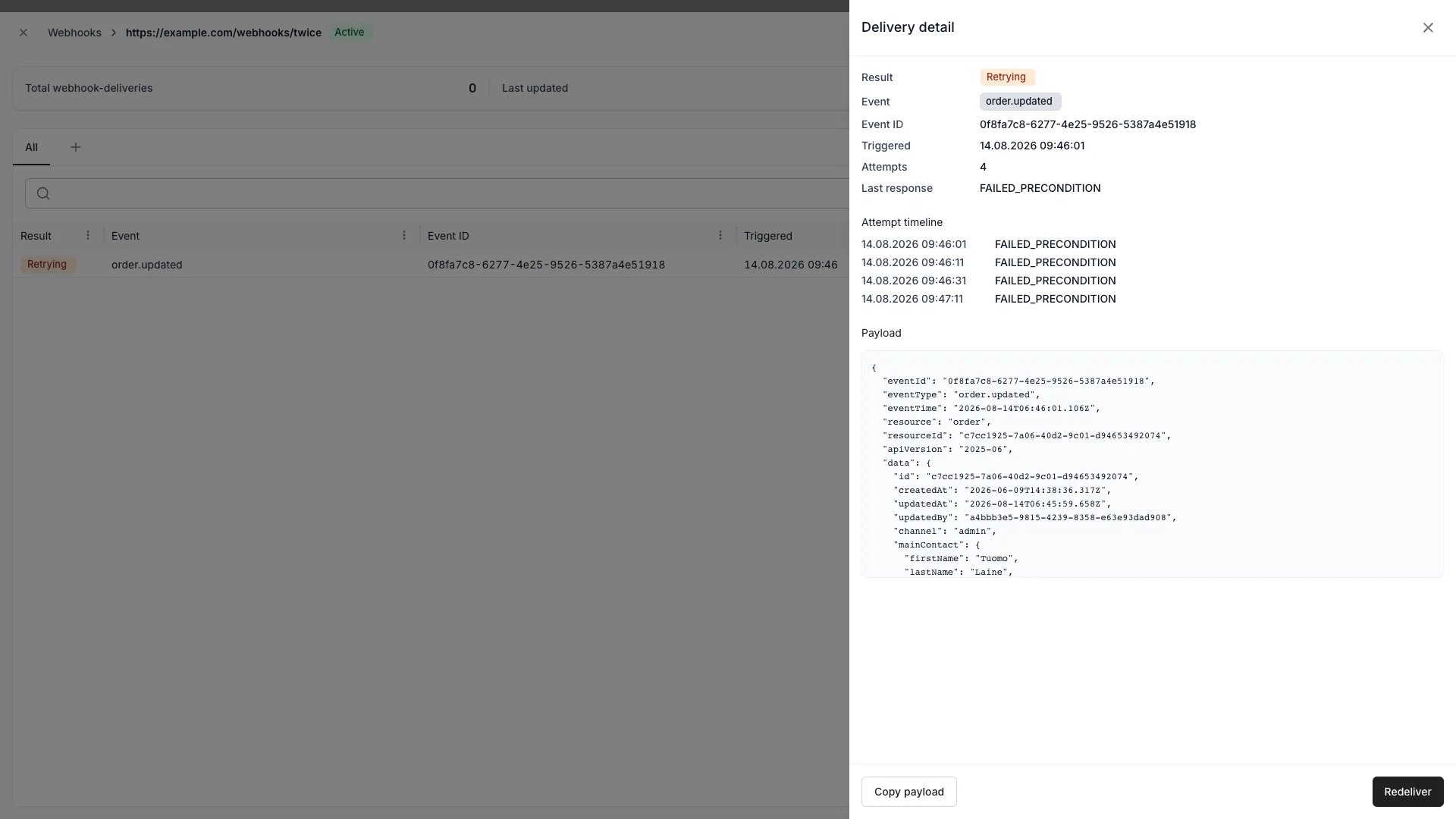 A delivery carries one of four statuses:
| Status | Meaning |
| :------------ | :--------------------------------------------- |
| **Pending** | Queued, no attempt outcome recorded yet |
| **Retrying** | An attempt failed and another one is scheduled |
| **Delivered** | An attempt returned `2xx` |
| **Failed** | Every attempt failed |
Open a row for the delivery detail: the event ID, trigger time, attempt count and last response, an attempt timeline with the outcome of each attempt, and the exact payload that was sent. From there you can **Copy payload**, or **Redeliver** to send the same recorded payload to the target URL again.
Deliveries recorded before the delivery log stored payloads show no payload and cannot be redelivered.
There is no test delivery. To try an endpoint before pointing production traffic at it, create a webhook against a temporary URL (the create dialog suggests [webhook.site](https://webhook.site)) and trigger the event.
## Deduplication
The same event can arrive more than once, so your endpoint must be **idempotent**. Deduplicate on `eventId` — sent both in the body and in the `X-Twice-Event-Id` header.
Ordering is not guaranteed either. When order matters, compare `eventTime` or re-fetch the current state of the resource through the API.
## Verifying signatures
Every webhook has a signing secret, prefixed `whsec_`. TWICE signs each delivery with it and sends the signature in the `X-Twice-Signature` header, formatted `sha256=` — an HMAC-SHA256 of the exact raw request body.
Verify against the raw body bytes, and parse the JSON only after the signature checks out:
```javascript Node.js (Express) theme={null}
import express from 'express';
import { createHmac, timingSafeEqual } from 'node:crypto';
const app = express();
const secret = process.env.TWICE_WEBHOOK_SECRET;
// Raw body — the signature covers the exact bytes TWICE sent
app.post('/webhooks/order-created', express.raw({ type: 'application/json' }), (req, res) => {
const expected = 'sha256=' + createHmac('sha256', secret).update(req.body).digest('hex');
const signature = req.get('X-Twice-Signature');
const isValid =
typeof signature === 'string' &&
signature.length === expected.length &&
timingSafeEqual(Buffer.from(signature), Buffer.from(expected));
if (!isValid) return res.status(401).send('Invalid signature');
const event = JSON.parse(req.body.toString('utf8'));
handleOrderCreated(event.eventId, event.data);
res.status(200).send('OK');
});
app.listen(3000);
```
```python Python (Flask) theme={null}
import hmac, hashlib, json, os
from flask import Flask, request
app = Flask(__name__)
secret = os.environ['TWICE_WEBHOOK_SECRET']
@app.post('/webhooks/order-created')
def order_created():
raw_body = request.get_data()
expected = 'sha256=' + hmac.new(secret.encode(), raw_body, hashlib.sha256).hexdigest()
signature = request.headers.get('X-Twice-Signature', '')
if not hmac.compare_digest(signature, expected):
return ('Invalid signature', 401)
event = json.loads(raw_body)
handle_order_created(event['eventId'], event['data'])
return ('OK', 200)
```
### Managing the secret
Open **View signing secret** on a webhook to reveal, copy or rotate it.
Rotating replaces the secret immediately — deliveries are signed with the new secret from that point on, so update your endpoint at the same time.
Webhooks created before signing existed have no secret and their deliveries stay **unsigned** until you generate one. The dialog offers **Generate secret** for those.
## Developer Reference
Webhooks are managed via the `hooks` endpoints.
Open the endpoint in the API reference.
## Related
Webhooks alongside API keys.
Authenticate against the API.
Audit trail you can reconcile against.
When order events fire.
A delivery carries one of four statuses:
| Status | Meaning |
| :------------ | :--------------------------------------------- |
| **Pending** | Queued, no attempt outcome recorded yet |
| **Retrying** | An attempt failed and another one is scheduled |
| **Delivered** | An attempt returned `2xx` |
| **Failed** | Every attempt failed |
Open a row for the delivery detail: the event ID, trigger time, attempt count and last response, an attempt timeline with the outcome of each attempt, and the exact payload that was sent. From there you can **Copy payload**, or **Redeliver** to send the same recorded payload to the target URL again.
Deliveries recorded before the delivery log stored payloads show no payload and cannot be redelivered.
There is no test delivery. To try an endpoint before pointing production traffic at it, create a webhook against a temporary URL (the create dialog suggests [webhook.site](https://webhook.site)) and trigger the event.
## Deduplication
The same event can arrive more than once, so your endpoint must be **idempotent**. Deduplicate on `eventId` — sent both in the body and in the `X-Twice-Event-Id` header.
Ordering is not guaranteed either. When order matters, compare `eventTime` or re-fetch the current state of the resource through the API.
## Verifying signatures
Every webhook has a signing secret, prefixed `whsec_`. TWICE signs each delivery with it and sends the signature in the `X-Twice-Signature` header, formatted `sha256=` — an HMAC-SHA256 of the exact raw request body.
Verify against the raw body bytes, and parse the JSON only after the signature checks out:
```javascript Node.js (Express) theme={null}
import express from 'express';
import { createHmac, timingSafeEqual } from 'node:crypto';
const app = express();
const secret = process.env.TWICE_WEBHOOK_SECRET;
// Raw body — the signature covers the exact bytes TWICE sent
app.post('/webhooks/order-created', express.raw({ type: 'application/json' }), (req, res) => {
const expected = 'sha256=' + createHmac('sha256', secret).update(req.body).digest('hex');
const signature = req.get('X-Twice-Signature');
const isValid =
typeof signature === 'string' &&
signature.length === expected.length &&
timingSafeEqual(Buffer.from(signature), Buffer.from(expected));
if (!isValid) return res.status(401).send('Invalid signature');
const event = JSON.parse(req.body.toString('utf8'));
handleOrderCreated(event.eventId, event.data);
res.status(200).send('OK');
});
app.listen(3000);
```
```python Python (Flask) theme={null}
import hmac, hashlib, json, os
from flask import Flask, request
app = Flask(__name__)
secret = os.environ['TWICE_WEBHOOK_SECRET']
@app.post('/webhooks/order-created')
def order_created():
raw_body = request.get_data()
expected = 'sha256=' + hmac.new(secret.encode(), raw_body, hashlib.sha256).hexdigest()
signature = request.headers.get('X-Twice-Signature', '')
if not hmac.compare_digest(signature, expected):
return ('Invalid signature', 401)
event = json.loads(raw_body)
handle_order_created(event['eventId'], event['data'])
return ('OK', 200)
```
### Managing the secret
Open **View signing secret** on a webhook to reveal, copy or rotate it.
Rotating replaces the secret immediately — deliveries are signed with the new secret from that point on, so update your endpoint at the same time.
Webhooks created before signing existed have no secret and their deliveries stay **unsigned** until you generate one. The dialog offers **Generate secret** for those.
## Developer Reference
Webhooks are managed via the `hooks` endpoints.
Open the endpoint in the API reference.
## Related
Webhooks alongside API keys.
Authenticate against the API.
Audit trail you can reconcile against.
When order events fire.