> ## Documentation Index
> Fetch the complete documentation index at: https://www.twicecommerce.com/docs/llms.txt
> Use this file to discover all available pages before exploring further.
# Variant
> A specific version of a listing that differs by attributes such as size, color, or rental period.
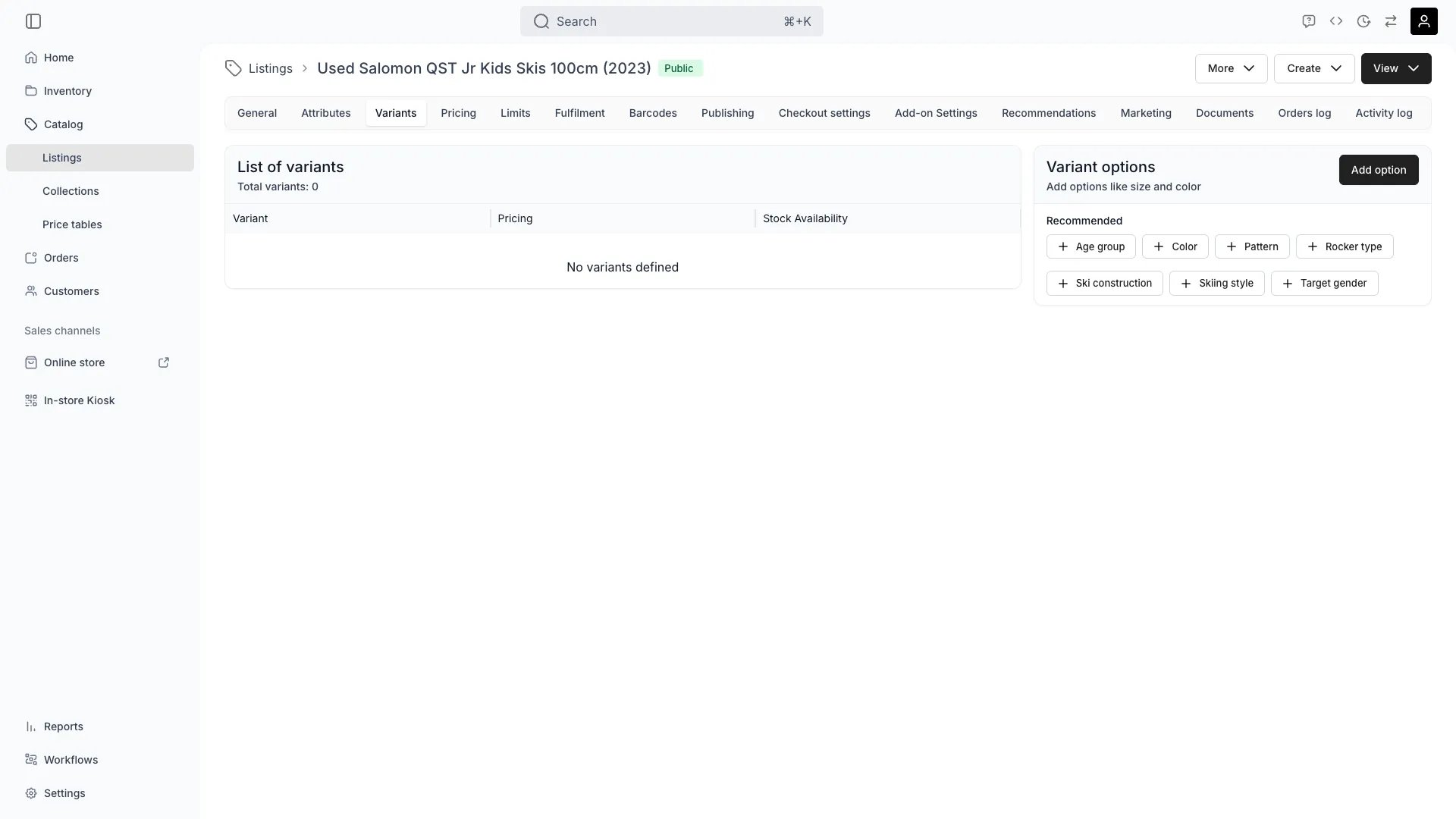 ## Definition
**The Analogy:** A variant axis is a menu option (Size: Small / Medium / Large), and a variant value is the specific choice. A Listing with two axes — Size × Colour — multiplies into a grid of buyable combinations.
**Special in TWICE:** Variants in TWICE are pure catalog options on a Listing. They do not own stock directly. Availability and fulfilment for a variant combination are resolved through **variant rules** that point each combination at matching Stock Items in inventory.
## Where do I use it?
* **Catalog merchandising** — Sell several sizes or colours under one Listing instead of duplicating it
* **Per-variant pricing** — Charge more for an XL or apply a rate multiplier to a specific colour
* **Per-variant fulfilment** — Direct each variant combination to a different SKU or attribute filter
* **Per-variant availability** — Compute ATS independently for each variant value combination
* **Storefront PDP** — Variant selectors appear inside the [booking widget](/docs/sales-channels/online-store/theme-editor/pages/listing#variant-selection) on the listing page, where customers pick their option alongside dates and quantity
## Anatomy of a variant
A Listing's variant configuration has three layers:
```
Listing
└── Variants[] ← axes (Size, Colour, Frame …)
├── name ← axis name shown on PDP
├── orderIndex ← order axes appear in
└── values[] ← axis values (S, M, L …)
├── value
└── orderIndex
```
A `CatalogItemVariant` is an axis; it nests its `CatalogItemVariantValue` rows. A single axis returned by the API looks like this:
```json theme={null}
{
"id": "f1a2b3c4-d5e6-4789-a012-3456789abcde",
"catalogItemId": "a9b8c7d6-e5f4-4321-b098-7654321fedcb",
"name": "Size",
"orderIndex": 0,
"values": [
{ "id": "11111111-1111-4111-8111-111111111111", "variantId": "f1a2b3c4-d5e6-4789-a012-3456789abcde", "value": "S", "orderIndex": 0 },
{ "id": "22222222-2222-4222-8222-222222222222", "variantId": "f1a2b3c4-d5e6-4789-a012-3456789abcde", "value": "M", "orderIndex": 1 },
{ "id": "33333333-3333-4333-8333-333333333333", "variantId": "f1a2b3c4-d5e6-4789-a012-3456789abcde", "value": "L", "orderIndex": 2 }
]
}
```
A specific buyable combination is the Cartesian product of one value per axis. A Listing with `Size = S | M | L` and `Colour = Red | Blue` yields six combinations.
## Variant axes (typical usage)
Variant axes are free-form — `name` is just a string — but a few conventions are widespread:
| Axis | Typical values |
| ---------- | ------------------------------------------------------------------------------------------------ |
| Size | `XS`, `S`, `M`, `L`, `XL` |
| Colour | `Black`, `White`, `Red`. The admin renders a colour swatch when the value parses as a CSS colour |
| Frame size | `48 cm`, `52 cm`, `56 cm` |
| Length | `170 cm`, `180 cm`, `190 cm` |
The admin uses the Listing's taxonomy category to surface **recommended attributes** as one-click axis suggestions, but the schema does not restrict you to those.
Rental duration is **not** modelled as a variant axis. Duration belongs on Price Tables (booking pricing rows with `timeUnit` and `timeUnitAmount`). Use variants for physical product options; use Price Tables for time-based pricing tiers.
## Per-variant pricing
Per-variant pricing lives on the Price Table, not on the variant itself. When you attach a Price Table to a Listing that has variants, you can optionally add a `CatalogItemVariantPricingTable` block. This block sets a `rateMultiplier` for a specific variant value or value combination, applied on top of the base pricing rows.
A few rules:
* Without a per-variant entry, every variant combination uses the base pricing rows.
* A `rateMultiplier` of `1.0` matches the base price; `1.2` adds 20 %; `0.8` discounts by 20 %.
* Per-variant overrides exist for `booking`, `sales` and `subscription` independently.
* The Variants tab labels a combination "Variant pricing" when an override exists and "Base" otherwise.
See the [Price Table concept](/docs/concepts/catalog/price-tables) for the full pricing model.
## Per-variant fulfilment (variant rules)
A Listing's fulfilment rules tell the order router which Stock Items can satisfy an order. Each base rule (`CatalogItemRule`) can have variant overrides (`CatalogItemVariantRule`) that swap the conditions for a specific variant value:
A `CatalogItemVariantRule` has the following fields:
| Field | Type | Description |
| ---------------- | --------- | -------------------------------------------------- |
| `id` | String | Server-generated identifier |
| `variantValueId` | String | The variant value this override applies to |
| `baseRuleId` | String | The base fulfilment rule being overridden |
| `conditions` | Array | Stock Item match conditions for this variant value |
| `quantity` | Number | Units to reserve |
| `createdAt` | Timestamp | When the rule was created |
In the admin this appears in the **Fulfilment** tab as a row per variant value, showing the base rule and any overriding conditions. Conditions match Stock Items by attribute, item code, SKU code, item name or SKU name.
Example: a Listing has a base rule "Reserve 1 unit matching `category = bike`". You add a variant axis `Frame size` with values `48`, `52`, `56`. You then add three variant rules — one per frame-size value — each adding the condition `attribute:frame_size = 48 cm` (and so on). The order router then reserves frame-size-correct units automatically.
## Variant availability
Availability per variant combination is computed by the catalog endpoint `GET /catalog/:id/available-by-variant-value-groups`. Each request takes a list of variant-value groups (one group per combination you care about) and returns the count of Stock Items available in the requested window for each group, optionally split by service location.
The admin batches these requests in groups of 50 combinations to avoid oversized queries.
## Variant SKU codes and barcodes
Variants do not have a dedicated SKU code column on the Listing. Mapping a variant to inventory identifiers happens through:
1. **Variant rules** that match `sku_code`, `item_code` or `attribute:*` filters against Stock Items.
2. **Barcodes** on the Listing (`CatalogItemBarcode`) that resolve a scanned code to this Listing. Barcodes today resolve at the Listing level, not at the variant-combination level.
If a single SKU code must always resolve to a specific variant combination, encode that intent with a variant rule whose condition is `sku_code = …` and `quantity = 1`.
## Key Properties
### Variant axis (`CatalogItemVariant`)
| Property | Type | Description |
| --------------- | --------------------------- | ---------------------------------------- |
| `id` | UUID | Server-generated |
| `catalogItemId` | UUID | Owning Listing |
| `name` | String | Axis label (Size, Colour, Frame size, …) |
| `orderIndex` | Number | Display order among axes |
| `values` | `CatalogItemVariantValue[]` | The values defined on this axis |
### Variant value (`CatalogItemVariantValue`)
| Property | Type | Description |
| ------------ | ------ | ---------------------------------- |
| `id` | UUID | Server-generated |
| `variantId` | UUID | Owning axis |
| `value` | String | The displayed value |
| `orderIndex` | Number | Display order of values on the PDP |
## Relationships
Variants exist only inside a [Listing](/docs/concepts/catalog/listings). Deleting the Listing removes all variants. Variants cannot be shared between Listings.
`CatalogItemVariantRule.variantValueId` points at a specific value, and `baseRuleId` at the base fulfilment rule it overrides. See the [Listing concept](/docs/concepts/catalog/listings) for the fulfilment rule model.
Per-variant pricing overrides reference variant values via `CatalogItemVariantPricingTable.values`. See the [Price Table concept](/docs/concepts/catalog/price-tables).
A variant combination does not point to a SKU directly. The path is: variant value → variant rule conditions → matched [Stock Items](/docs/concepts/inventory/stock-items) at order time.
## Lifecycle
`POST /variants/:catalogItemId` with `{ name, values? }`. Values can be created here or later via `POST /variants/:catalogItemId/values/:variantId`.
Yes. Existing variant rules and per-variant pricing remain attached to the value IDs they were created with — they don't automatically expand to the new combinations, which lets you onboard new axes without breaking existing setup.
In the Pricing tab, attach a Price Table. Optionally add `CatalogItemVariantPricingTable` entries to override the base rate for specific variant values.
In the Fulfilment tab, add a base rule. For each variant value that should fulfil differently, add a variant rule with adjusted conditions and quantity.
`POST /variants/:catalogItemId/reorder` with an array of `variantIds` to change axis order. Value order is updated via `PUT /variants/:catalogItemId/:variantId`.
`PUT /variants/:catalogItemId/:variantId` with `{ name, values }` to rename an axis and edit its values. Values omitted from the call are removed via the paired `deleteValues` endpoint in the admin form.
`DELETE /variants/:catalogItemId/:variantId` removes the axis. Any variant rules or per-variant pricing tied to its values are no longer applied.
## Frequently Asked Questions
A variant value (`Size = M`) is a catalog axis label. A SKU is an inventory definition. The same variant value can be served by many SKUs depending on which variant rules and conditions you configure.
No. Variants belong to a single Listing. If two Listings need the same axes, recreate them on each — but consider whether the Listings could be combined.
Make sure each variant value has a variant rule with `quantity = 1` (or more) and conditions that match the right Stock Items. ATS for that variant combination then reflects only the matching units.
Duration is encoded as booking pricing rows on a Price Table (for example, `1 day @ €40`, `3 days @ €100`, `1 week @ €180`). The customer picks duration in the [booking widget](/docs/sales-channels/online-store/theme-editor/pages/listing#date-and-time-selection); the variant selector handles physical options only.
Add a per-variant pricing entry on the Price Table for that colour value with `rateMultiplier = 1.2`.
## Developer Reference
Listing variants are exposed as `variants` in the API.
Open the endpoint in the API reference.
## Related
The Catalog row variants belong to
Where per-variant pricing overrides are configured
Inventory definitions a variant fulfils from
Physical units reserved per variant combination
## Definition
**The Analogy:** A variant axis is a menu option (Size: Small / Medium / Large), and a variant value is the specific choice. A Listing with two axes — Size × Colour — multiplies into a grid of buyable combinations.
**Special in TWICE:** Variants in TWICE are pure catalog options on a Listing. They do not own stock directly. Availability and fulfilment for a variant combination are resolved through **variant rules** that point each combination at matching Stock Items in inventory.
## Where do I use it?
* **Catalog merchandising** — Sell several sizes or colours under one Listing instead of duplicating it
* **Per-variant pricing** — Charge more for an XL or apply a rate multiplier to a specific colour
* **Per-variant fulfilment** — Direct each variant combination to a different SKU or attribute filter
* **Per-variant availability** — Compute ATS independently for each variant value combination
* **Storefront PDP** — Variant selectors appear inside the [booking widget](/docs/sales-channels/online-store/theme-editor/pages/listing#variant-selection) on the listing page, where customers pick their option alongside dates and quantity
## Anatomy of a variant
A Listing's variant configuration has three layers:
```
Listing
└── Variants[] ← axes (Size, Colour, Frame …)
├── name ← axis name shown on PDP
├── orderIndex ← order axes appear in
└── values[] ← axis values (S, M, L …)
├── value
└── orderIndex
```
A `CatalogItemVariant` is an axis; it nests its `CatalogItemVariantValue` rows. A single axis returned by the API looks like this:
```json theme={null}
{
"id": "f1a2b3c4-d5e6-4789-a012-3456789abcde",
"catalogItemId": "a9b8c7d6-e5f4-4321-b098-7654321fedcb",
"name": "Size",
"orderIndex": 0,
"values": [
{ "id": "11111111-1111-4111-8111-111111111111", "variantId": "f1a2b3c4-d5e6-4789-a012-3456789abcde", "value": "S", "orderIndex": 0 },
{ "id": "22222222-2222-4222-8222-222222222222", "variantId": "f1a2b3c4-d5e6-4789-a012-3456789abcde", "value": "M", "orderIndex": 1 },
{ "id": "33333333-3333-4333-8333-333333333333", "variantId": "f1a2b3c4-d5e6-4789-a012-3456789abcde", "value": "L", "orderIndex": 2 }
]
}
```
A specific buyable combination is the Cartesian product of one value per axis. A Listing with `Size = S | M | L` and `Colour = Red | Blue` yields six combinations.
## Variant axes (typical usage)
Variant axes are free-form — `name` is just a string — but a few conventions are widespread:
| Axis | Typical values |
| ---------- | ------------------------------------------------------------------------------------------------ |
| Size | `XS`, `S`, `M`, `L`, `XL` |
| Colour | `Black`, `White`, `Red`. The admin renders a colour swatch when the value parses as a CSS colour |
| Frame size | `48 cm`, `52 cm`, `56 cm` |
| Length | `170 cm`, `180 cm`, `190 cm` |
The admin uses the Listing's taxonomy category to surface **recommended attributes** as one-click axis suggestions, but the schema does not restrict you to those.
Rental duration is **not** modelled as a variant axis. Duration belongs on Price Tables (booking pricing rows with `timeUnit` and `timeUnitAmount`). Use variants for physical product options; use Price Tables for time-based pricing tiers.
## Per-variant pricing
Per-variant pricing lives on the Price Table, not on the variant itself. When you attach a Price Table to a Listing that has variants, you can optionally add a `CatalogItemVariantPricingTable` block. This block sets a `rateMultiplier` for a specific variant value or value combination, applied on top of the base pricing rows.
A few rules:
* Without a per-variant entry, every variant combination uses the base pricing rows.
* A `rateMultiplier` of `1.0` matches the base price; `1.2` adds 20 %; `0.8` discounts by 20 %.
* Per-variant overrides exist for `booking`, `sales` and `subscription` independently.
* The Variants tab labels a combination "Variant pricing" when an override exists and "Base" otherwise.
See the [Price Table concept](/docs/concepts/catalog/price-tables) for the full pricing model.
## Per-variant fulfilment (variant rules)
A Listing's fulfilment rules tell the order router which Stock Items can satisfy an order. Each base rule (`CatalogItemRule`) can have variant overrides (`CatalogItemVariantRule`) that swap the conditions for a specific variant value:
A `CatalogItemVariantRule` has the following fields:
| Field | Type | Description |
| ---------------- | --------- | -------------------------------------------------- |
| `id` | String | Server-generated identifier |
| `variantValueId` | String | The variant value this override applies to |
| `baseRuleId` | String | The base fulfilment rule being overridden |
| `conditions` | Array | Stock Item match conditions for this variant value |
| `quantity` | Number | Units to reserve |
| `createdAt` | Timestamp | When the rule was created |
In the admin this appears in the **Fulfilment** tab as a row per variant value, showing the base rule and any overriding conditions. Conditions match Stock Items by attribute, item code, SKU code, item name or SKU name.
Example: a Listing has a base rule "Reserve 1 unit matching `category = bike`". You add a variant axis `Frame size` with values `48`, `52`, `56`. You then add three variant rules — one per frame-size value — each adding the condition `attribute:frame_size = 48 cm` (and so on). The order router then reserves frame-size-correct units automatically.
## Variant availability
Availability per variant combination is computed by the catalog endpoint `GET /catalog/:id/available-by-variant-value-groups`. Each request takes a list of variant-value groups (one group per combination you care about) and returns the count of Stock Items available in the requested window for each group, optionally split by service location.
The admin batches these requests in groups of 50 combinations to avoid oversized queries.
## Variant SKU codes and barcodes
Variants do not have a dedicated SKU code column on the Listing. Mapping a variant to inventory identifiers happens through:
1. **Variant rules** that match `sku_code`, `item_code` or `attribute:*` filters against Stock Items.
2. **Barcodes** on the Listing (`CatalogItemBarcode`) that resolve a scanned code to this Listing. Barcodes today resolve at the Listing level, not at the variant-combination level.
If a single SKU code must always resolve to a specific variant combination, encode that intent with a variant rule whose condition is `sku_code = …` and `quantity = 1`.
## Key Properties
### Variant axis (`CatalogItemVariant`)
| Property | Type | Description |
| --------------- | --------------------------- | ---------------------------------------- |
| `id` | UUID | Server-generated |
| `catalogItemId` | UUID | Owning Listing |
| `name` | String | Axis label (Size, Colour, Frame size, …) |
| `orderIndex` | Number | Display order among axes |
| `values` | `CatalogItemVariantValue[]` | The values defined on this axis |
### Variant value (`CatalogItemVariantValue`)
| Property | Type | Description |
| ------------ | ------ | ---------------------------------- |
| `id` | UUID | Server-generated |
| `variantId` | UUID | Owning axis |
| `value` | String | The displayed value |
| `orderIndex` | Number | Display order of values on the PDP |
## Relationships
Variants exist only inside a [Listing](/docs/concepts/catalog/listings). Deleting the Listing removes all variants. Variants cannot be shared between Listings.
`CatalogItemVariantRule.variantValueId` points at a specific value, and `baseRuleId` at the base fulfilment rule it overrides. See the [Listing concept](/docs/concepts/catalog/listings) for the fulfilment rule model.
Per-variant pricing overrides reference variant values via `CatalogItemVariantPricingTable.values`. See the [Price Table concept](/docs/concepts/catalog/price-tables).
A variant combination does not point to a SKU directly. The path is: variant value → variant rule conditions → matched [Stock Items](/docs/concepts/inventory/stock-items) at order time.
## Lifecycle
`POST /variants/:catalogItemId` with `{ name, values? }`. Values can be created here or later via `POST /variants/:catalogItemId/values/:variantId`.
Yes. Existing variant rules and per-variant pricing remain attached to the value IDs they were created with — they don't automatically expand to the new combinations, which lets you onboard new axes without breaking existing setup.
In the Pricing tab, attach a Price Table. Optionally add `CatalogItemVariantPricingTable` entries to override the base rate for specific variant values.
In the Fulfilment tab, add a base rule. For each variant value that should fulfil differently, add a variant rule with adjusted conditions and quantity.
`POST /variants/:catalogItemId/reorder` with an array of `variantIds` to change axis order. Value order is updated via `PUT /variants/:catalogItemId/:variantId`.
`PUT /variants/:catalogItemId/:variantId` with `{ name, values }` to rename an axis and edit its values. Values omitted from the call are removed via the paired `deleteValues` endpoint in the admin form.
`DELETE /variants/:catalogItemId/:variantId` removes the axis. Any variant rules or per-variant pricing tied to its values are no longer applied.
## Frequently Asked Questions
A variant value (`Size = M`) is a catalog axis label. A SKU is an inventory definition. The same variant value can be served by many SKUs depending on which variant rules and conditions you configure.
No. Variants belong to a single Listing. If two Listings need the same axes, recreate them on each — but consider whether the Listings could be combined.
Make sure each variant value has a variant rule with `quantity = 1` (or more) and conditions that match the right Stock Items. ATS for that variant combination then reflects only the matching units.
Duration is encoded as booking pricing rows on a Price Table (for example, `1 day @ €40`, `3 days @ €100`, `1 week @ €180`). The customer picks duration in the [booking widget](/docs/sales-channels/online-store/theme-editor/pages/listing#date-and-time-selection); the variant selector handles physical options only.
Add a per-variant pricing entry on the Price Table for that colour value with `rateMultiplier = 1.2`.
## Developer Reference
Listing variants are exposed as `variants` in the API.
Open the endpoint in the API reference.
## Related
The Catalog row variants belong to
Where per-variant pricing overrides are configured
Inventory definitions a variant fulfils from
Physical units reserved per variant combination