> ## Documentation Index
> Fetch the complete documentation index at: https://www.twicecommerce.com/docs/llms.txt
> Use this file to discover all available pages before exploring further.
# Price Table
> A pricing structure that defines how a listing is priced — rental rates by duration, sale prices, and subscription plans — with optional date windows and per-variant overrides.
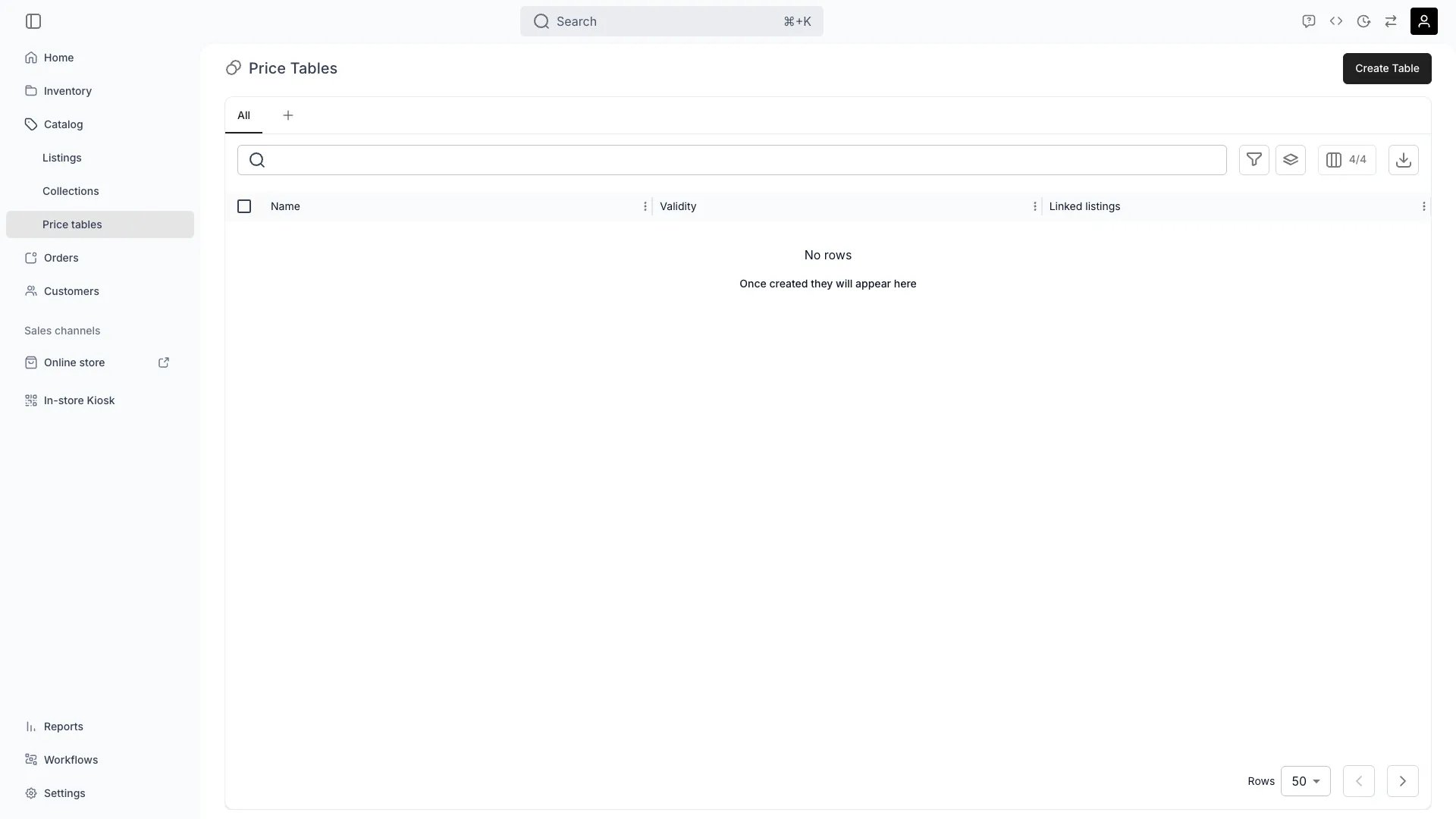 ## Definition
**The Analogy:** A Price Table is a rate card. It bundles all the prices for one selling mode — booking, sale or subscription — into a single, editable object that can be attached to one Listing or shared across many.
**Special in TWICE:** A Listing never stores a price field directly. All pricing lives on Price Tables. A Listing can have one default Price Table plus any number of date-bound tables for promotions, seasonal windows or campaign pricing. A table's `availabilityRange` controls **when its rows are candidates** — it does not give the table priority. At calculation time, rows from every table active for the booking are considered together (see [Price resolution](#price-resolution)).
## Where do I use it?
* **Rental rate cards** — Define `1 day @ €40`, `3 days @ €100`, `1 week @ €180`, etc.
* **Sales pricing** — Set the outright sale price for a Listing, optionally with a compare-at price
* **Subscription plans** — Configure commitment period, payment cycle and auto-renewal cadence
* **Promotional / seasonal pricing** — Attach an extra dated Price Table whose rows are considered inside its window (a **cheaper** promotional row is selected over the default — see [Price resolution](#price-resolution))
* **Per-variant overrides** — Adjust each pricing row by a `rateMultiplier` for specific variant values
* **Bulk re-pricing** — Maintain one shared table and link it to many Listings in a category
## Price Table model
A shared default Price Table returned by the API looks like this:
```json theme={null}
{
"id": "a1b2c3d4-e5f6-4789-a012-3456789abcde",
"catalogItemId": null,
"label": "Standard bike rates",
"availabilityRange": null,
"isDefault": true,
"bookingsEnabled": true,
"salesEnabled": true,
"subscriptionsEnabled": false,
"bookingPricingRows": [],
"salesPricingRows": [],
"subscriptionPricingRows": [],
"variants": [],
"isShared": true,
"linkedCatalogItemsCount": 12,
"createdAt": "2026-01-15T09:30:00Z"
}
```
`catalogItemId` is `null` on shared tables not bound to one Listing, and `availabilityRange` is `null` on a default table that is always valid.
A single Price Table holds three orthogonal sets of rows — booking, sales and subscription — gated by `bookingsEnabled`, `salesEnabled` and `subscriptionsEnabled`. Disable the modes you don't sell to keep the editing surface focused.
## Shared vs. standalone
| Field | Meaning |
| ------------------- | ---------------------------------------------------------------------------------------------------------------------------------------------------------------------------------------------------------------------------------------------------------------------------------------------------------- |
| `isShared = true` | The table lives in **Catalog > Price Tables** and can be linked from many Listings. `catalogItemId` is null |
| `isShared = false` | A standalone table that exists only on one Listing. `catalogItemId` is set |
| `isDefault = true` | Marks the always-valid table (no `availabilityRange`), so its rows are always in the candidate pool. `isDefault` also controls which table is pre-selected in the editor UI — it does **not** make the table win at calculation time. Only shared tables without an `availabilityRange` can be the default |
| `availabilityRange` | The window during which this table's rows are **candidates**. `null` means always a candidate (only allowed for the default table). It gates candidacy, not priority |
Linking is managed via dedicated endpoints (`link-catalog-item`, `unlink-catalog-items`) so a Listing keeps a clean record of which shared tables apply.
## Pricing row types
A Price Table contains three row types, each driving a different purchase mode.
### Booking pricing rows
Used when the order is a rental booking.
| Field | Type | Description |
| ----------------------------------- | ------------------------------ | -------------------------------------------------------------------------------------------------------------------------------------------------------------------------------------------------------------------------------------------------- |
| `label` | String | Customer-facing label (`Day`, `Weekend`, `Week`) |
| `timeUnit` | Enum | `seconds`, `minutes`, `hours`, `days`, `weeks`, `months`, `years` |
| `timeUnitAmount` | Int > 0 | Number of units this row prices |
| `timeUnitPrice` | Int | Price for the full block, in minor units (cents) |
| `timeCalculation` | `standard` \| `cap_to_closing` | How the row is applied across a date range. `cap_to_closing` stops billing at the close-of-day |
| `timeBasis` | `rolling` \| `capped` | How duration is counted. `rolling` (default): a "day" is 24 elapsed hours from pickup. `capped`: every calendar period the booking touches is one billable unit — see [Starting at pricing](#starting-at-pricing) |
| `counterTimeUnitPrice` | Int \| null | Fallback price for this row's block, used for segments of the booking that no row's weekday / time-of-day / date restrictions cover. When several rows offer a fallback, the cheapest applicable one wins. `null` means the row offers no fallback |
| `additionalTimeUnitPrice` | Int \| null | Price for time past the configured block |
| `additionalTimeUnitCalculationType` | `add` \| `multiply` | How the additional price stacks |
| `weekdays` | Int\[] (1–7) \| null | Restrict the row to specific weekdays |
| `timeOfDayRange` | `{ start, end }` \| null | Restrict to a window inside the day |
| `availabilityRange` | `{ start, end }` \| null | Restrict to a date range |
| `isDynamicPricing` | Boolean | Marks the row as driven by dynamic pricing rather than a fixed price |
| `isHidden` | Boolean | Keep the row in the table but hide it on the PDP |
| `isEnabled` | Boolean | Soft on/off for the row |
For rate-based pricing the engine picks the rows that best cover the booking duration (see [Price resolution](#price-resolution)). Hourly, daily and weekly rows let a single Price Table cover any duration with a sensible rate.
### Sales pricing rows
Used for outright sale orders.
| Field | Type | Description |
| ------------------- | ------------------------ | ---------------------------------------------- |
| `price` | Int ≥ 0 | Sale price in minor units |
| `compareAtPrice` | Int \| null | Strike-through "was" price used for promotions |
| `availabilityRange` | `{ start, end }` \| null | Date window the row applies in |
| `isEnabled` | Boolean | Soft on/off |
### Subscription pricing rows
Used for subscription-mode orders. See [Subscriptions](/docs/concepts/catalog/subscriptions) for the full billing lifecycle.
| Field | Type | Description |
| --------------------------------------------------------- | ---------------------------------------- | ---------------------------------------------------------------------------------------- |
| `label` | String | Customer-facing plan name (e.g. "Monthly", "Annual") |
| `price` | Int > 0 | Per-cycle price in minor units |
| `paymentCycleUnit` / `paymentCycleAmount` | Enum / Int | Billing cadence. Unit is `days`, `weeks`, `months`, or `years` |
| `commitmentCycles` | Int > 0 | Number of payment cycles the customer commits to (max 24) |
| `initialChargeType` | `order_creation` \| `subscription_start` | When the first invoice is due |
| `renewalType` | `none` \| `auto_renew` | Behaviour after commitment ends |
| `renewalPrice` | Int \| null | Per-cycle price after commitment (auto-renew only). Null means renew at original `price` |
| `collectionMethod` | `charge_automatically` \| `send_invoice` | How payment is collected. Default: `charge_automatically` |
| `cancellationLeadTimeUnit` / `cancellationLeadTimeAmount` | Enum / Int | How far in advance a cancellation must be requested |
| `availabilityRange` | `{ start, end }` \| null | Date window |
| `isEnabled` | Boolean | Soft on/off |
## Per-variant pricing
If a Listing has variants, a Price Table can carry an optional `variants` array of `CatalogItemVariantPricingTable` entries. Each entry binds a `variantName` plus one or more `values` to a `rateMultiplier` and per-row multipliers for booking, sales and subscription rows.
A `CatalogItemVariantPricingTable` entry has the following fields:
| Field | Type | Description |
| ---------------- | --------------------------- | ------------------------------------------------- |
| `id` | UUID | Server-generated identifier |
| `variantName` | String | The variant axis this override targets |
| `values` | `CatalogItemVariantValue[]` | The variant values the override applies to |
| `booking` | Array | Per-row booking multipliers |
| `sales` | Array | Per-row sales multipliers |
| `subscription` | Array | Per-row subscription multipliers |
| `rateMultiplier` | Number | Table-level multiplier applied to the combination |
| `pricingTableId` | UUID | The Price Table this override belongs to |
Each per-row override references the base pricing row it adjusts (`basePricingRowId`) and applies a `rateMultiplier` (and optional `additionalRateMultiplier`) on top of that base row's price. A multiplier of `1.0` matches base; `1.2` adds 20 %; `0.8` discounts by 20 %.
The admin marks any combination with a `CatalogItemVariantPricingTable` entry as "Variant pricing" instead of "Base".
## Starting at pricing
Every booking pricing row has a `timeBasis` field that controls how duration is counted for billing. Two modes exist:
| `timeBasis` | Label | Behavior |
| ------------------- | ---------------- | --------------------------------------------------------------------------------------------------------------------------------------------------- |
| `rolling` (default) | Elapsed duration | A "1 day" rate covers 24 elapsed hours from pickup. A booking from 23:00 to 01:00 is 2 hours — well within a single day unit |
| `capped` | Starting at | A "1 day" rate covers every **calendar day** the booking touches. A booking from 23:00 to 01:00 spans two calendar days and bills **two day units** |
### How "Starting at" billing works
The pricing engine identifies each calendar period the booking touches on the row's own grid. A day unit is always midnight to midnight, an hour unit is clock-hour to clock-hour, and a week unit starts on the tenant's configured first day of the week.
Each touched period is billed as one unit — unless a finer rate covers the booked portion of that period more cheaply. The engine picks the cheapest valid composition recursively.
**Example — day and week rates:**
A 10-day booking starting Thursday, with a day rate of €50 and a week rate of €250:
* Thursday through Sunday: 4 started days = €200
* Monday through the following Sunday: 1 started week = €250
* Total: **€450**
The week is calendar-aligned (Monday–Sunday with a Monday week start), not anchored at the pickup.
**Example — day and hour rates:**
Day rate €100, hour rate €20. A booking from Monday 09:00 to Tuesday 09:00:
* Monday: 1 started day = €100
* Tuesday: 1 started day = €100
* Total: **€200** (2 calendar days)
If the hour rate were €5 instead, the engine would bill 24 started hours = €120, because the finer composition is cheaper.
### "Starting at" for fixed-duration packages
Fixed-duration booking rows also support `timeBasis`. A capped fixed package anchors the return date to the calendar period rather than to the exact pickup time.
A "2 days" fixed package picked up on Monday at 14:00:
* **Elapsed** (`rolling`): return Wednesday at 14:00 — exactly 48 hours later
* **Started** (`capped`): return on **Tuesday** by the last available return time — the booking touches Monday and Tuesday, so two calendar days are covered
If the return day falls on a day the location is closed, the option is not offered for that pickup date.
### Constraints
* **Sub-hour units always bill rolling.** Rows using `seconds` or `minutes` are not affected by the `timeBasis` setting. They coexist freely in a "Starting at" table.
* **All rate-based rows on a table share one `timeBasis`.** The admin enforces this with a single "Starting at pricing" checkbox that applies to all eligible rate-based rows. Fixed-duration rows each have their own independent `timeBasis` setting.
* **Week rates use the tenant's week start day.** A Saturday–Sunday booking counts as one week with a Monday start (both days are in the same Mon–Sun week), but as two weeks with a Sunday start.
## Definition
**The Analogy:** A Price Table is a rate card. It bundles all the prices for one selling mode — booking, sale or subscription — into a single, editable object that can be attached to one Listing or shared across many.
**Special in TWICE:** A Listing never stores a price field directly. All pricing lives on Price Tables. A Listing can have one default Price Table plus any number of date-bound tables for promotions, seasonal windows or campaign pricing. A table's `availabilityRange` controls **when its rows are candidates** — it does not give the table priority. At calculation time, rows from every table active for the booking are considered together (see [Price resolution](#price-resolution)).
## Where do I use it?
* **Rental rate cards** — Define `1 day @ €40`, `3 days @ €100`, `1 week @ €180`, etc.
* **Sales pricing** — Set the outright sale price for a Listing, optionally with a compare-at price
* **Subscription plans** — Configure commitment period, payment cycle and auto-renewal cadence
* **Promotional / seasonal pricing** — Attach an extra dated Price Table whose rows are considered inside its window (a **cheaper** promotional row is selected over the default — see [Price resolution](#price-resolution))
* **Per-variant overrides** — Adjust each pricing row by a `rateMultiplier` for specific variant values
* **Bulk re-pricing** — Maintain one shared table and link it to many Listings in a category
## Price Table model
A shared default Price Table returned by the API looks like this:
```json theme={null}
{
"id": "a1b2c3d4-e5f6-4789-a012-3456789abcde",
"catalogItemId": null,
"label": "Standard bike rates",
"availabilityRange": null,
"isDefault": true,
"bookingsEnabled": true,
"salesEnabled": true,
"subscriptionsEnabled": false,
"bookingPricingRows": [],
"salesPricingRows": [],
"subscriptionPricingRows": [],
"variants": [],
"isShared": true,
"linkedCatalogItemsCount": 12,
"createdAt": "2026-01-15T09:30:00Z"
}
```
`catalogItemId` is `null` on shared tables not bound to one Listing, and `availabilityRange` is `null` on a default table that is always valid.
A single Price Table holds three orthogonal sets of rows — booking, sales and subscription — gated by `bookingsEnabled`, `salesEnabled` and `subscriptionsEnabled`. Disable the modes you don't sell to keep the editing surface focused.
## Shared vs. standalone
| Field | Meaning |
| ------------------- | ---------------------------------------------------------------------------------------------------------------------------------------------------------------------------------------------------------------------------------------------------------------------------------------------------------- |
| `isShared = true` | The table lives in **Catalog > Price Tables** and can be linked from many Listings. `catalogItemId` is null |
| `isShared = false` | A standalone table that exists only on one Listing. `catalogItemId` is set |
| `isDefault = true` | Marks the always-valid table (no `availabilityRange`), so its rows are always in the candidate pool. `isDefault` also controls which table is pre-selected in the editor UI — it does **not** make the table win at calculation time. Only shared tables without an `availabilityRange` can be the default |
| `availabilityRange` | The window during which this table's rows are **candidates**. `null` means always a candidate (only allowed for the default table). It gates candidacy, not priority |
Linking is managed via dedicated endpoints (`link-catalog-item`, `unlink-catalog-items`) so a Listing keeps a clean record of which shared tables apply.
## Pricing row types
A Price Table contains three row types, each driving a different purchase mode.
### Booking pricing rows
Used when the order is a rental booking.
| Field | Type | Description |
| ----------------------------------- | ------------------------------ | -------------------------------------------------------------------------------------------------------------------------------------------------------------------------------------------------------------------------------------------------- |
| `label` | String | Customer-facing label (`Day`, `Weekend`, `Week`) |
| `timeUnit` | Enum | `seconds`, `minutes`, `hours`, `days`, `weeks`, `months`, `years` |
| `timeUnitAmount` | Int > 0 | Number of units this row prices |
| `timeUnitPrice` | Int | Price for the full block, in minor units (cents) |
| `timeCalculation` | `standard` \| `cap_to_closing` | How the row is applied across a date range. `cap_to_closing` stops billing at the close-of-day |
| `timeBasis` | `rolling` \| `capped` | How duration is counted. `rolling` (default): a "day" is 24 elapsed hours from pickup. `capped`: every calendar period the booking touches is one billable unit — see [Starting at pricing](#starting-at-pricing) |
| `counterTimeUnitPrice` | Int \| null | Fallback price for this row's block, used for segments of the booking that no row's weekday / time-of-day / date restrictions cover. When several rows offer a fallback, the cheapest applicable one wins. `null` means the row offers no fallback |
| `additionalTimeUnitPrice` | Int \| null | Price for time past the configured block |
| `additionalTimeUnitCalculationType` | `add` \| `multiply` | How the additional price stacks |
| `weekdays` | Int\[] (1–7) \| null | Restrict the row to specific weekdays |
| `timeOfDayRange` | `{ start, end }` \| null | Restrict to a window inside the day |
| `availabilityRange` | `{ start, end }` \| null | Restrict to a date range |
| `isDynamicPricing` | Boolean | Marks the row as driven by dynamic pricing rather than a fixed price |
| `isHidden` | Boolean | Keep the row in the table but hide it on the PDP |
| `isEnabled` | Boolean | Soft on/off for the row |
For rate-based pricing the engine picks the rows that best cover the booking duration (see [Price resolution](#price-resolution)). Hourly, daily and weekly rows let a single Price Table cover any duration with a sensible rate.
### Sales pricing rows
Used for outright sale orders.
| Field | Type | Description |
| ------------------- | ------------------------ | ---------------------------------------------- |
| `price` | Int ≥ 0 | Sale price in minor units |
| `compareAtPrice` | Int \| null | Strike-through "was" price used for promotions |
| `availabilityRange` | `{ start, end }` \| null | Date window the row applies in |
| `isEnabled` | Boolean | Soft on/off |
### Subscription pricing rows
Used for subscription-mode orders. See [Subscriptions](/docs/concepts/catalog/subscriptions) for the full billing lifecycle.
| Field | Type | Description |
| --------------------------------------------------------- | ---------------------------------------- | ---------------------------------------------------------------------------------------- |
| `label` | String | Customer-facing plan name (e.g. "Monthly", "Annual") |
| `price` | Int > 0 | Per-cycle price in minor units |
| `paymentCycleUnit` / `paymentCycleAmount` | Enum / Int | Billing cadence. Unit is `days`, `weeks`, `months`, or `years` |
| `commitmentCycles` | Int > 0 | Number of payment cycles the customer commits to (max 24) |
| `initialChargeType` | `order_creation` \| `subscription_start` | When the first invoice is due |
| `renewalType` | `none` \| `auto_renew` | Behaviour after commitment ends |
| `renewalPrice` | Int \| null | Per-cycle price after commitment (auto-renew only). Null means renew at original `price` |
| `collectionMethod` | `charge_automatically` \| `send_invoice` | How payment is collected. Default: `charge_automatically` |
| `cancellationLeadTimeUnit` / `cancellationLeadTimeAmount` | Enum / Int | How far in advance a cancellation must be requested |
| `availabilityRange` | `{ start, end }` \| null | Date window |
| `isEnabled` | Boolean | Soft on/off |
## Per-variant pricing
If a Listing has variants, a Price Table can carry an optional `variants` array of `CatalogItemVariantPricingTable` entries. Each entry binds a `variantName` plus one or more `values` to a `rateMultiplier` and per-row multipliers for booking, sales and subscription rows.
A `CatalogItemVariantPricingTable` entry has the following fields:
| Field | Type | Description |
| ---------------- | --------------------------- | ------------------------------------------------- |
| `id` | UUID | Server-generated identifier |
| `variantName` | String | The variant axis this override targets |
| `values` | `CatalogItemVariantValue[]` | The variant values the override applies to |
| `booking` | Array | Per-row booking multipliers |
| `sales` | Array | Per-row sales multipliers |
| `subscription` | Array | Per-row subscription multipliers |
| `rateMultiplier` | Number | Table-level multiplier applied to the combination |
| `pricingTableId` | UUID | The Price Table this override belongs to |
Each per-row override references the base pricing row it adjusts (`basePricingRowId`) and applies a `rateMultiplier` (and optional `additionalRateMultiplier`) on top of that base row's price. A multiplier of `1.0` matches base; `1.2` adds 20 %; `0.8` discounts by 20 %.
The admin marks any combination with a `CatalogItemVariantPricingTable` entry as "Variant pricing" instead of "Base".
## Starting at pricing
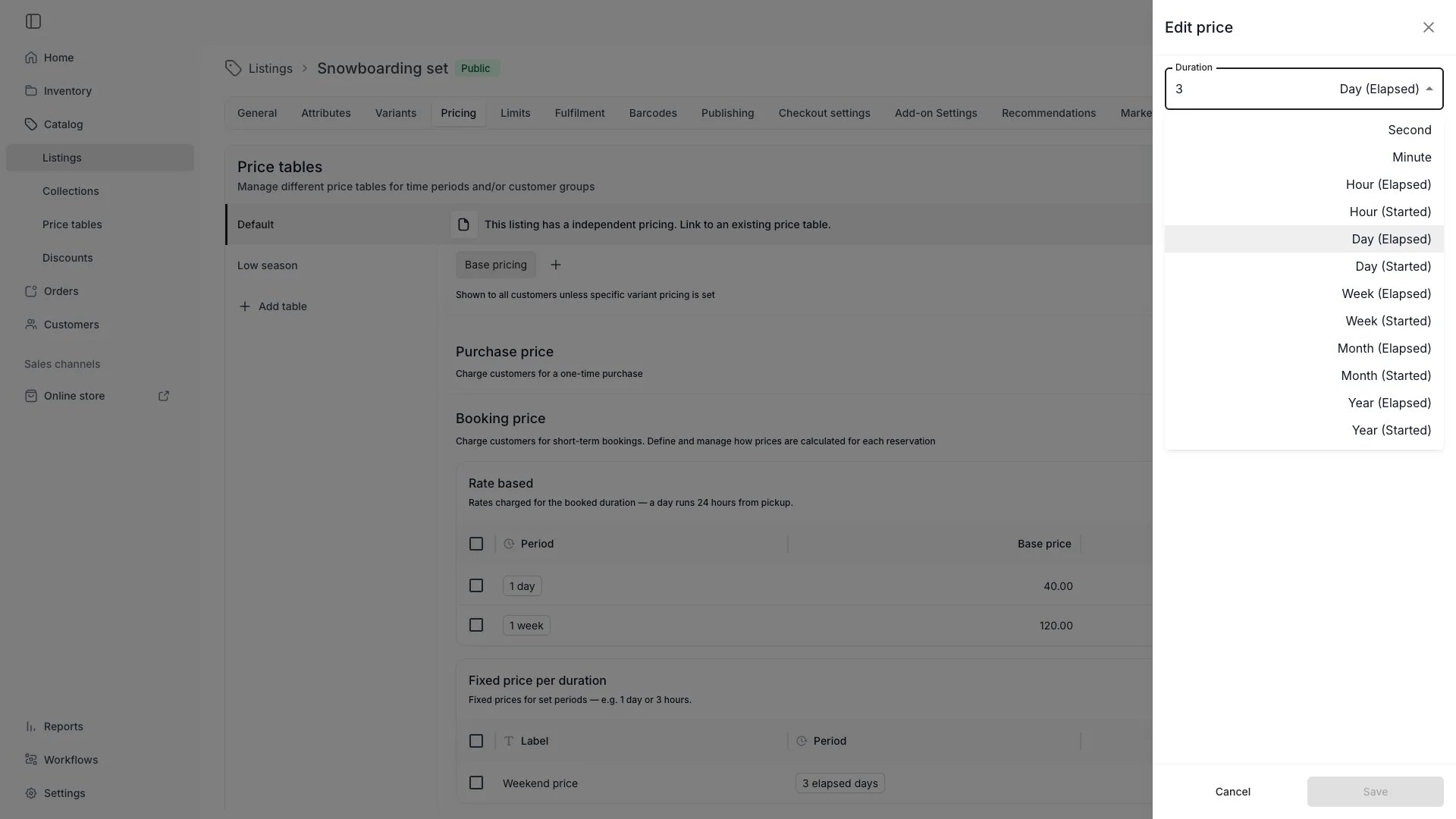
Every booking pricing row has a `timeBasis` field that controls how duration is counted for billing. Two modes exist:
| `timeBasis` | Label | Behavior |
| ------------------- | ---------------- | --------------------------------------------------------------------------------------------------------------------------------------------------- |
| `rolling` (default) | Elapsed duration | A "1 day" rate covers 24 elapsed hours from pickup. A booking from 23:00 to 01:00 is 2 hours — well within a single day unit |
| `capped` | Starting at | A "1 day" rate covers every **calendar day** the booking touches. A booking from 23:00 to 01:00 spans two calendar days and bills **two day units** |
### How "Starting at" billing works
The pricing engine identifies each calendar period the booking touches on the row's own grid. A day unit is always midnight to midnight, an hour unit is clock-hour to clock-hour, and a week unit starts on the tenant's configured first day of the week.
Each touched period is billed as one unit — unless a finer rate covers the booked portion of that period more cheaply. The engine picks the cheapest valid composition recursively.
**Example — day and week rates:**
A 10-day booking starting Thursday, with a day rate of €50 and a week rate of €250:
* Thursday through Sunday: 4 started days = €200
* Monday through the following Sunday: 1 started week = €250
* Total: **€450**
The week is calendar-aligned (Monday–Sunday with a Monday week start), not anchored at the pickup.
**Example — day and hour rates:**
Day rate €100, hour rate €20. A booking from Monday 09:00 to Tuesday 09:00:
* Monday: 1 started day = €100
* Tuesday: 1 started day = €100
* Total: **€200** (2 calendar days)
If the hour rate were €5 instead, the engine would bill 24 started hours = €120, because the finer composition is cheaper.
### "Starting at" for fixed-duration packages
Fixed-duration booking rows also support `timeBasis`. A capped fixed package anchors the return date to the calendar period rather than to the exact pickup time.
A "2 days" fixed package picked up on Monday at 14:00:
* **Elapsed** (`rolling`): return Wednesday at 14:00 — exactly 48 hours later
* **Started** (`capped`): return on **Tuesday** by the last available return time — the booking touches Monday and Tuesday, so two calendar days are covered
If the return day falls on a day the location is closed, the option is not offered for that pickup date.
### Constraints
* **Sub-hour units always bill rolling.** Rows using `seconds` or `minutes` are not affected by the `timeBasis` setting. They coexist freely in a "Starting at" table.
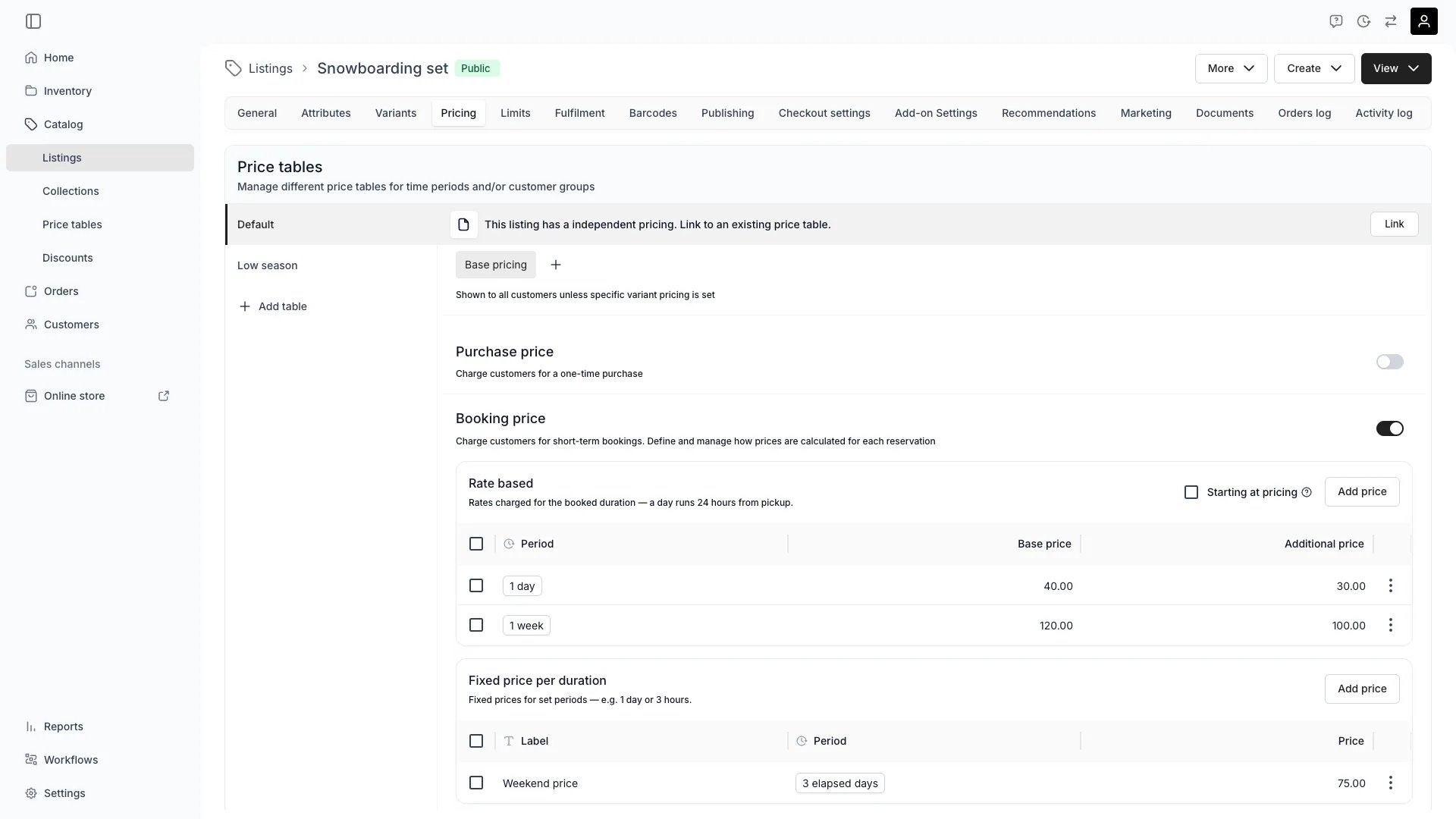
* **All rate-based rows on a table share one `timeBasis`.** The admin enforces this with a single "Starting at pricing" checkbox that applies to all eligible rate-based rows. Fixed-duration rows each have their own independent `timeBasis` setting.
* **Week rates use the tenant's week start day.** A Saturday–Sunday booking counts as one week with a Monday start (both days are in the same Mon–Sun week), but as two weeks with a Sunday start.
 ## Price resolution
`availabilityRange` controls **which tables are candidates** for a booking — it does **not** give a table priority. There is no per-table priority or override field. When a price is calculated:
All pricing calculations run in the **Location's timezone**. Day boundaries, week boundaries, `weekdays` constraints, and `timeOfDayRange` windows are evaluated against the location's local clock — not UTC or the customer's timezone. A booking near local midnight is matched to the correct local day, and DST transitions are handled by calendar arithmetic in the location zone.
1. **Collect the active tables.** A table is active when it has no `availabilityRange`, or its range overlaps the booking dates. The default table (no range) is therefore always active *alongside* any dated table whose window the booking falls in.
2. **Pool the rows.** Every enabled row from every active table is gathered into a single candidate pool. The engine does **not** first pick one "winning" table — rows from different tables compete directly.
3. **Select the row(s).**
* **Rate-based (dynamic) bookings** — the engine builds the cheapest valid coverage of the booking duration from the pool. For each segment it prefers the row with the **longest duration that still fits**, breaking ties by the **lowest price**, then fills any remainder with shorter rows and additional-time rules (weekday, time-of-day and `availabilityRange` constraints still apply per row). When rows use [Starting at pricing](#starting-at-pricing) (`timeBasis: capped`), the engine counts calendar periods touched instead of elapsed time, and picks the cheapest composition across granularities.
* **Fixed-price bookings** — the shopper selects a specific rate row (for example, `1 day @ €40`) and that row's price is used directly.
4. **Apply variant multipliers.** If a `CatalogItemVariantPricingTable` entry matches the selected variant value combination, multiply the row's contribution by the row-level multiplier (and the table-level `rateMultiplier`).
5. **Return totals.** The endpoints `…/rate-based-price` and `…/fixed-price` return a `priceBreakdown` plus `totalPrice`, with each contribution itemised for the storefront and order summary.
**A dated table does not override the default by date — it competes in the same pool.** For rate-based pricing, a dated row is used only when it is the row the engine selects (the cheapest one that covers the duration). So a **cheaper** promotional row wins inside its window, but a **higher** dated price (for example a holiday surcharge) is **not** applied while the default still has an equal-or-longer row covering the same duration at a lower price.
**Example.** Default table: `1 day @ €100` (no date range). Holiday table: `1 day @ €150` (24–31 Dec). A 24-hour rental on 25 Dec is priced at **€100** — both rows cover the day equally, so the cheaper one wins. To charge the €150 holiday rate, remove or disable the competing €100 row for that window (or set its `availabilityRange` to exclude the holiday dates) so only the €150 row covers it.
There is no per-customer-tag pricing in the Price Table model today — customer-segment pricing is not configurable on a Price Table. Promotions for specific customers are handled via [discount codes](/docs/concepts/catalog/discount-codes), not Price Tables.
## Applying tables to Listings and Collections
A shared Price Table is linked to a Listing through dedicated endpoints:
* `POST /pricing-tables/pricing-table/:pricingTableId/link-catalog-item` — link one Listing
* `DELETE /pricing-tables/pricing-table/:pricingTableId/unlink-catalog-items` — bulk unlink
* `POST /pricing-tables/add-pricing-table-to-catalog-item` — discriminated union for the four linking modes:
* `mode = 'link'` — link to an existing shared table
* `mode = 'create'` — create a new standalone table inline
* `mode = 'sharedToShared'` — replace one shared link with another
* `mode = 'sharedToStandalone'` — fork a shared table into a standalone one on the Listing
* `mode = 'standaloneToShared'` / `'standaloneUpdate'` — flip ownership or rename in place
Collections are not directly linkable to a Price Table. To re-price a Collection, iterate its `listCatalogItems` and link the table to each Listing.
## Key Properties (Price Table)
| Property | Type | Description |
| ------------------------- | ---------------------------------- | ------------------------------------------------------------------------------------------------------------------------------------------------------------------- |
| `id` | UUID | Server-generated |
| `label` | String | Human name shown in admin tabs and selectors |
| `catalogItemId` | UUID \| null | Set for standalone tables, null for shared |
| `isShared` | Boolean | Distinguishes shared vs. standalone |
| `isDefault` | Boolean | Marks the always-valid table (no `availabilityRange`) and controls which table is pre-selected in the editor UI. Plays no role in row selection at calculation time |
| `availabilityRange` | `{ start, end }` \| null | Validity window for the table |
| `bookingsEnabled` | Boolean | Whether booking rows are evaluated |
| `salesEnabled` | Boolean | Whether sales rows are evaluated |
| `subscriptionsEnabled` | Boolean | Whether subscription rows are evaluated |
| `bookingPricingRows` | `BookingPricingRow[]` | Rental rate rows |
| `salesPricingRows` | `SalesPricingRow[]` | Outright sale rows |
| `subscriptionPricingRows` | `SubscriptionPricingRow[]` | Subscription rows |
| `variants` | `CatalogItemVariantPricingTable[]` | Per-variant overrides |
| `linkedCatalogItemsCount` | Number | How many Listings reference this table |
## Relationships
A shared Price Table can be linked from many Listings. A standalone Price Table exists on a single Listing.
Each table is a container for the three orthogonal pricing modes. Toggle modes on/off without rebuilding the table.
Per-variant pricing entries reference variant values on the Listing — see the [Variant concept](/docs/concepts/catalog/variants).
The storefront and order builder pick the correct row by purchase mode (booking / sale / subscription) and call the `…/rate-based-price` or `…/fixed-price` endpoint to compute the total.
## Lifecycle
`POST /pricing-tables/` with `label` and (for shared tables) `isDefault: true`. New tables start with empty row arrays.
Use standalone when the pricing is unique to one Listing. Use shared when you want to re-use the same rate card across a category of Listings.
No. Only tables with `availabilityRange = null` can be `isDefault = true` (enforced by the admin UI; the model permits the flag but the link logic skips dated tables when resolving the default).
Add booking / sales / subscription rows via the per-row endpoints (`/pricing-table/:id/row`, `…/sales-row`, `…/subscription-row`). Add per-variant overrides via `/pricing-table/:id/variant-pricing-table`.
Use `add-pricing-table-to-catalog-item` with the right `mode`. The Pricing tab on a Listing shows linked tables in a sidebar and lets you create new ones inline.
Add a `CatalogItemVariantPricingTable` block for the variant values that need different pricing.
To roll out a price change without breaking active orders, add a new dated table for the window. Inside that window its rows compete with the default in the same pool — a **cheaper** row is selected automatically; to apply a **higher** rate, also remove or date-scope the competing default row (see [Price resolution](#price-resolution)). Existing orders keep the price they captured at checkout.
`DELETE /pricing-tables/delete-table/:pricingTableId`. Removing a shared table unlinks it from every Listing.
## Frequently Asked Questions
Yes. You can attach a default table plus any number of dated tables for promotions or seasonal windows. At order time, rows from every table active for the booking are pooled together and the engine selects from that pool — see [Price resolution](#price-resolution). `availabilityRange` decides which tables are candidates, not which one wins.
From the booking pricing row that best fits the requested duration. The system inspects each enabled row's `timeUnit` × `timeUnitAmount` and picks the closest fit, then applies any additional-time rules for the remainder.
Create a dated Price Table with `availabilityRange` covering the weekend, with rows priced 20 % **below** the default, and link it to the affected Listings. Because the promotional rows are cheaper and cover the same durations, the engine selects them inside the window and falls back to the default afterwards. This works precisely because the promo is **cheaper** — see the next question for higher/surcharge pricing.
Because the engine pools all active tables and picks the **cheapest** row that covers the duration — it does not prefer dated tables. A higher dated price isn't selected while the default still has an equal-or-longer row covering the same duration at a lower price. To apply a surcharge, remove or disable the competing default row for that window, or set the default row's `availabilityRange` to exclude those dates, so only the higher row covers them.
**Rolling** (default) counts elapsed time from pickup. A "day" is 24 hours. A booking from Monday 14:00 to Wednesday 14:00 bills exactly 2 days.
**Starting at** (`capped`) counts every calendar period the booking touches. A "day" is midnight to midnight. The same Monday 14:00 to Wednesday 14:00 booking touches Monday, Tuesday, and Wednesday — 3 started days.
Use "Starting at" when you charge per calendar day (like parking garages or hotel nights). Use rolling when you charge for exact elapsed time (like hourly equipment rental).
Not via Price Tables. The Price Table model has no customer-segment dimension today. Use [discount codes](/docs/concepts/catalog/discount-codes) for per-customer pricing.
The Location's timezone. Day and week boundaries, weekday restrictions, and time-of-day windows are resolved in the location's local clock. If no location timezone is set, the tenant-level timezone is used, with UTC as a last resort. The timezone is resolved from the selected pickup location (or, when no single location is selected, from the listing's primary linked location).
No. Orders capture the price contributions at checkout. Editing a Price Table affects future order totals only.
`priceContribution` is what one row added to the total; `totalPrice` is the sum across all rows the engine selected (base row + additional-time rows + variant multipliers).
## Developer Reference
Price tables are exposed as `pricing-tables` in the API.
Open the endpoint in the API reference.
## Related
What a Price Table is attached to
Per-variant pricing overrides
Group Listings before bulk-applying a shared table
Where Price Table totals are captured at checkout
## Price resolution
`availabilityRange` controls **which tables are candidates** for a booking — it does **not** give a table priority. There is no per-table priority or override field. When a price is calculated:
All pricing calculations run in the **Location's timezone**. Day boundaries, week boundaries, `weekdays` constraints, and `timeOfDayRange` windows are evaluated against the location's local clock — not UTC or the customer's timezone. A booking near local midnight is matched to the correct local day, and DST transitions are handled by calendar arithmetic in the location zone.
1. **Collect the active tables.** A table is active when it has no `availabilityRange`, or its range overlaps the booking dates. The default table (no range) is therefore always active *alongside* any dated table whose window the booking falls in.
2. **Pool the rows.** Every enabled row from every active table is gathered into a single candidate pool. The engine does **not** first pick one "winning" table — rows from different tables compete directly.
3. **Select the row(s).**
* **Rate-based (dynamic) bookings** — the engine builds the cheapest valid coverage of the booking duration from the pool. For each segment it prefers the row with the **longest duration that still fits**, breaking ties by the **lowest price**, then fills any remainder with shorter rows and additional-time rules (weekday, time-of-day and `availabilityRange` constraints still apply per row). When rows use [Starting at pricing](#starting-at-pricing) (`timeBasis: capped`), the engine counts calendar periods touched instead of elapsed time, and picks the cheapest composition across granularities.
* **Fixed-price bookings** — the shopper selects a specific rate row (for example, `1 day @ €40`) and that row's price is used directly.
4. **Apply variant multipliers.** If a `CatalogItemVariantPricingTable` entry matches the selected variant value combination, multiply the row's contribution by the row-level multiplier (and the table-level `rateMultiplier`).
5. **Return totals.** The endpoints `…/rate-based-price` and `…/fixed-price` return a `priceBreakdown` plus `totalPrice`, with each contribution itemised for the storefront and order summary.
**A dated table does not override the default by date — it competes in the same pool.** For rate-based pricing, a dated row is used only when it is the row the engine selects (the cheapest one that covers the duration). So a **cheaper** promotional row wins inside its window, but a **higher** dated price (for example a holiday surcharge) is **not** applied while the default still has an equal-or-longer row covering the same duration at a lower price.
**Example.** Default table: `1 day @ €100` (no date range). Holiday table: `1 day @ €150` (24–31 Dec). A 24-hour rental on 25 Dec is priced at **€100** — both rows cover the day equally, so the cheaper one wins. To charge the €150 holiday rate, remove or disable the competing €100 row for that window (or set its `availabilityRange` to exclude the holiday dates) so only the €150 row covers it.
There is no per-customer-tag pricing in the Price Table model today — customer-segment pricing is not configurable on a Price Table. Promotions for specific customers are handled via [discount codes](/docs/concepts/catalog/discount-codes), not Price Tables.
## Applying tables to Listings and Collections
A shared Price Table is linked to a Listing through dedicated endpoints:
* `POST /pricing-tables/pricing-table/:pricingTableId/link-catalog-item` — link one Listing
* `DELETE /pricing-tables/pricing-table/:pricingTableId/unlink-catalog-items` — bulk unlink
* `POST /pricing-tables/add-pricing-table-to-catalog-item` — discriminated union for the four linking modes:
* `mode = 'link'` — link to an existing shared table
* `mode = 'create'` — create a new standalone table inline
* `mode = 'sharedToShared'` — replace one shared link with another
* `mode = 'sharedToStandalone'` — fork a shared table into a standalone one on the Listing
* `mode = 'standaloneToShared'` / `'standaloneUpdate'` — flip ownership or rename in place
Collections are not directly linkable to a Price Table. To re-price a Collection, iterate its `listCatalogItems` and link the table to each Listing.
## Key Properties (Price Table)
| Property | Type | Description |
| ------------------------- | ---------------------------------- | ------------------------------------------------------------------------------------------------------------------------------------------------------------------- |
| `id` | UUID | Server-generated |
| `label` | String | Human name shown in admin tabs and selectors |
| `catalogItemId` | UUID \| null | Set for standalone tables, null for shared |
| `isShared` | Boolean | Distinguishes shared vs. standalone |
| `isDefault` | Boolean | Marks the always-valid table (no `availabilityRange`) and controls which table is pre-selected in the editor UI. Plays no role in row selection at calculation time |
| `availabilityRange` | `{ start, end }` \| null | Validity window for the table |
| `bookingsEnabled` | Boolean | Whether booking rows are evaluated |
| `salesEnabled` | Boolean | Whether sales rows are evaluated |
| `subscriptionsEnabled` | Boolean | Whether subscription rows are evaluated |
| `bookingPricingRows` | `BookingPricingRow[]` | Rental rate rows |
| `salesPricingRows` | `SalesPricingRow[]` | Outright sale rows |
| `subscriptionPricingRows` | `SubscriptionPricingRow[]` | Subscription rows |
| `variants` | `CatalogItemVariantPricingTable[]` | Per-variant overrides |
| `linkedCatalogItemsCount` | Number | How many Listings reference this table |
## Relationships
A shared Price Table can be linked from many Listings. A standalone Price Table exists on a single Listing.
Each table is a container for the three orthogonal pricing modes. Toggle modes on/off without rebuilding the table.
Per-variant pricing entries reference variant values on the Listing — see the [Variant concept](/docs/concepts/catalog/variants).
The storefront and order builder pick the correct row by purchase mode (booking / sale / subscription) and call the `…/rate-based-price` or `…/fixed-price` endpoint to compute the total.
## Lifecycle
`POST /pricing-tables/` with `label` and (for shared tables) `isDefault: true`. New tables start with empty row arrays.
Use standalone when the pricing is unique to one Listing. Use shared when you want to re-use the same rate card across a category of Listings.
No. Only tables with `availabilityRange = null` can be `isDefault = true` (enforced by the admin UI; the model permits the flag but the link logic skips dated tables when resolving the default).
Add booking / sales / subscription rows via the per-row endpoints (`/pricing-table/:id/row`, `…/sales-row`, `…/subscription-row`). Add per-variant overrides via `/pricing-table/:id/variant-pricing-table`.
Use `add-pricing-table-to-catalog-item` with the right `mode`. The Pricing tab on a Listing shows linked tables in a sidebar and lets you create new ones inline.
Add a `CatalogItemVariantPricingTable` block for the variant values that need different pricing.
To roll out a price change without breaking active orders, add a new dated table for the window. Inside that window its rows compete with the default in the same pool — a **cheaper** row is selected automatically; to apply a **higher** rate, also remove or date-scope the competing default row (see [Price resolution](#price-resolution)). Existing orders keep the price they captured at checkout.
`DELETE /pricing-tables/delete-table/:pricingTableId`. Removing a shared table unlinks it from every Listing.
## Frequently Asked Questions
Yes. You can attach a default table plus any number of dated tables for promotions or seasonal windows. At order time, rows from every table active for the booking are pooled together and the engine selects from that pool — see [Price resolution](#price-resolution). `availabilityRange` decides which tables are candidates, not which one wins.
From the booking pricing row that best fits the requested duration. The system inspects each enabled row's `timeUnit` × `timeUnitAmount` and picks the closest fit, then applies any additional-time rules for the remainder.
Create a dated Price Table with `availabilityRange` covering the weekend, with rows priced 20 % **below** the default, and link it to the affected Listings. Because the promotional rows are cheaper and cover the same durations, the engine selects them inside the window and falls back to the default afterwards. This works precisely because the promo is **cheaper** — see the next question for higher/surcharge pricing.
Because the engine pools all active tables and picks the **cheapest** row that covers the duration — it does not prefer dated tables. A higher dated price isn't selected while the default still has an equal-or-longer row covering the same duration at a lower price. To apply a surcharge, remove or disable the competing default row for that window, or set the default row's `availabilityRange` to exclude those dates, so only the higher row covers them.
**Rolling** (default) counts elapsed time from pickup. A "day" is 24 hours. A booking from Monday 14:00 to Wednesday 14:00 bills exactly 2 days.
**Starting at** (`capped`) counts every calendar period the booking touches. A "day" is midnight to midnight. The same Monday 14:00 to Wednesday 14:00 booking touches Monday, Tuesday, and Wednesday — 3 started days.
Use "Starting at" when you charge per calendar day (like parking garages or hotel nights). Use rolling when you charge for exact elapsed time (like hourly equipment rental).
Not via Price Tables. The Price Table model has no customer-segment dimension today. Use [discount codes](/docs/concepts/catalog/discount-codes) for per-customer pricing.
The Location's timezone. Day and week boundaries, weekday restrictions, and time-of-day windows are resolved in the location's local clock. If no location timezone is set, the tenant-level timezone is used, with UTC as a last resort. The timezone is resolved from the selected pickup location (or, when no single location is selected, from the listing's primary linked location).
No. Orders capture the price contributions at checkout. Editing a Price Table affects future order totals only.
`priceContribution` is what one row added to the total; `totalPrice` is the sum across all rows the engine selected (base row + additional-time rows + variant multipliers).
## Developer Reference
Price tables are exposed as `pricing-tables` in the API.
Open the endpoint in the API reference.
## Related
What a Price Table is attached to
Per-variant pricing overrides
Group Listings before bulk-applying a shared table
Where Price Table totals are captured at checkout