> ## Documentation Index
> Fetch the complete documentation index at: https://www.twicecommerce.com/docs/llms.txt
> Use this file to discover all available pages before exploring further.
# Listing
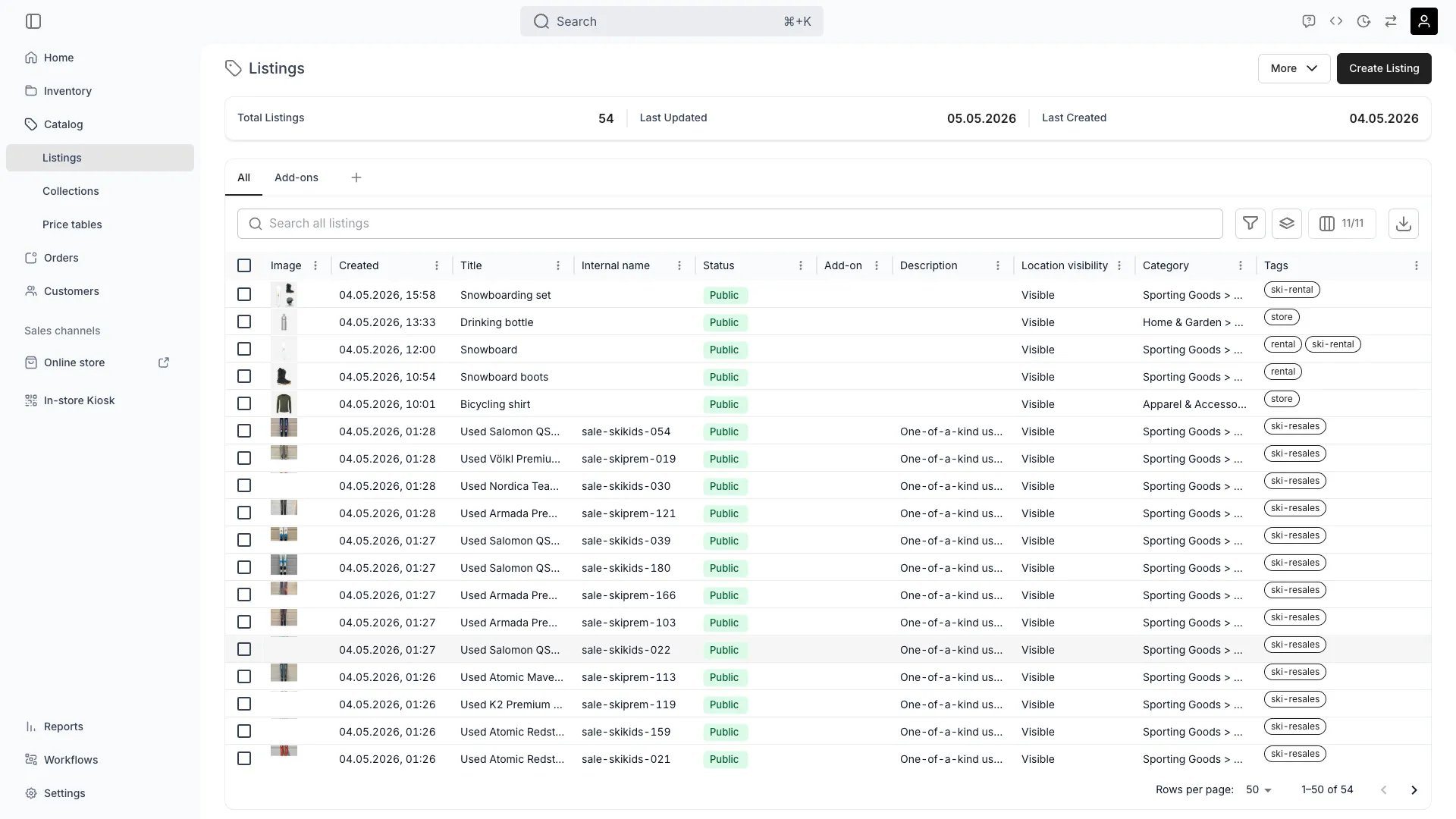
> A sellable product offering in your catalog that defines what customers can purchase or rent.
 ## Definition
**The Analogy:** A Listing is the store-window version of your product. SKUs and Stock Items describe what you own; the Listing describes what you sell — its name, photos, prices, durations, and where it appears.
**Special in TWICE:** A Listing is not stock. Availability is derived in real time from the Stock Items linked to it through fulfillment rules. Two Listings can resolve to the same physical units (for example, a daily rental Listing and a long-term subscription Listing of the same bike).
## Listing vs. SKU vs. Stock Item
| Concept | What it represents | Where it lives |
| ---------------------- | --------------------------------------------------------------------- | -------------- |
| Listing (Catalog Item) | Customer-facing offer: name, media, pricing, variants, sales channels | Catalog |
| SKU | Internal product definition: code, attributes, fulfilment template | Inventory |
| Stock Item | A physical unit (or pooled quantity) you can reserve | Inventory |
A Listing reaches inventory through **fulfilment rules**, not direct foreign keys. A rule says "to fulfil this Listing, reserve 1 unit matching `attribute:bike_size = M`". The rule resolves to matching Stock Items at order time, which is why one Listing can pull from many SKUs and many SKUs can power many Listings.
See also: [SKU](/docs/concepts/inventory/skus), [Stock Item](/docs/concepts/inventory/stock-items).
## Where do I use it?
* **Catalog management** — Create, organise and publish the products customers can order
* **Online Store** — Anything published to the online channel renders from a Listing
* **Order creation** — Admin order draft and storefront checkout start from a Listing
* **Pricing** — Attach one or more Price Tables to control rental, sale and subscription rates
* **Variants** — Offer size, colour, or other axes within a single Listing
* **Availability** — Compute real-time ATS by intersecting fulfilment rules with Stock Items
* **Collections** — Group Listings for storefront navigation and merchandising
* **Sales channels** — Control whether a Listing is visible in Admin and the Online Store
* **Add-ons** — Mark a Listing as add-on only or attach add-ons to other Listings
* **SEO and marketing** — URL handle, page title, meta description, OpenGraph image, `noindex`
## Key Properties
### Identity and content
| Property | Type | Description |
| -------------------- | ---------------------- | ------------------------------------------------------------- |
| `id` | UUID | Server-generated identifier |
| `name` | String | Customer-facing title |
| `internalName` | String \| null | Optional internal label shown only to staff |
| `description` | String \| null | Plain-text description. Deprecated — prefer `descriptionJson` |
| `descriptionJson` | JSON | Rich-text description used by the storefront |
| `sections` | `CatalogItemSection[]` | Ordered content sections (`heading`, `content`, `orderIndex`) |
| `taxonomyCategoryId` | String \| null | Link to a Category Taxonomy node |
| `tags` | `Tag[]` | Catalog-scope tags. Smart Collections match on these |
| `attributes` | `ResourceAttribute[]` | Custom attribute values for filtering and PDP rendering |
### Status and visibility
| Property | Type | Description |
| -------------------- | --------------------------------------- | -------------------------------------------- |
| `status` | Enum: `active` \| `draft` \| `template` | Publishing state. Admin UI shows two options |
| `salesChannelAdmin` | Boolean | Visible when creating orders in the admin |
| `salesChannelOnline` | Boolean | Visible on the Online Store |
The admin status selector exposes only **Public** (`active`) and **Draft** (`draft`). The `template` value is reserved for system templates and is not a user-facing publishing state. There is no "Archived" status — to remove a Listing from sale, set it to Draft or delete it.
### Pricing and tax
| Property | Type | Description |
| ---------------- | ------------------ | -------------------------------------------------------------------------------------------------------- |
| `pricingTables` | `PricingTable[]` | One or more Price Tables linked to the Listing. Tables can be standalone or shared |
| `taxes` | `CatalogItemTax[]` | Tax rates applied to the Listing, with optional per-location overrides |
| `bookingDeposit` | Int ≥ 0 \| null | Refundable security deposit (minor units) requested when this Listing is booked. `null` means no deposit |
Price is never stored directly on the Listing. All pricing lives in attached Price Tables (booking, sales, subscription rows). See the [Price Table concept](/docs/concepts/catalog/price-tables).
### Limits and booking behaviour
| Property | Type | Description |
| -------------------------- | ------------------------- | ---------------------------------------------------------------------------------------------------------------------------------------------------------------------------------------------------------------------------------------------------------------------- |
| `minBookingDuration` | `{ value, unit }` \| null | Shortest allowed rental period |
| `maxBookingDuration` | `{ value, unit }` \| null | Longest allowed rental period |
| `bookingDurationIncrement` | `{ value, unit }` \| null | Restricts rate-based bookings to whole multiples of this duration |
| `orderDeadline` | OrderDeadline \| null | Latest time an order can be placed relative to the booking start. Either `{ type: 'absolute', value, unit }` (a fixed offset before start; `unit` is `minutes`, `hours` or `days`) or `{ type: 'relative', daysBefore, time }` (a wall-clock cutoff on an earlier day) |
`unit` is one of `seconds`, `minutes`, `hours`, `days`, `weeks`, `months`.
### Inventory and fulfilment
| Property | Type | Description |
| -------------------------- | ---------------------------------- | ---------------------------------------------------------------------------------------------------------------------------------------------------- |
| `inventoryTrackingEnabled` | Boolean | Whether availability is tracked from Stock Items |
| `rules` | `CatalogItemRule[]` | Base fulfilment rules. Each rule defines `quantity` and `conditions` that match Stock Items by attribute, item code, SKU code, item name or SKU name |
| `rules[].variantRules` | `CatalogItemVariantRule[]` | Per-variant overrides of a base rule |
| `rules[].revenueSplitRate` | Number \| null | Optional split rate used by revenue-split reporting |
| `serviceLocationLinks` | `CatalogItemServiceLocationLink[]` | Locations from which this Listing can be fulfilled |
### Variants
| Property | Type | Description |
| ---------- | ---------------------- | -------------------------------------------------------------------------------------- |
| `variants` | `CatalogItemVariant[]` | One or more variant axes. Each has a `name` (for example, `Size`) and ordered `values` |
A Listing with no variants is treated as a single SKU offering. See the [Variant concept](/docs/concepts/catalog/variants).
### Media, documents, and SEO
| Property | Type | Description |
| --------------------------------------- | ------------------------- | ---------------------------------------------------------------------------------------------------------------------------------------------------------------------------------------------------------------------------------------- |
| `media` | `CatalogItemMediaLinks[]` | Ordered image/video files |
| `documents` | `CatalogItemDocument[]` | Attached files. Each can be flagged to attach to order confirmation or copy to the order |
| `slugs` | String\[] | Storefront URL slugs. The first entry is the primary (canonical) slug used in links and SEO tags. Additional entries are alternate slugs that also resolve to the listing. Auto-generated from the listing name on first save when empty |
| `pageTitle` | String \| null | SEO `` |
| `metaDescription` | String \| null | SEO meta description |
| `ogTitle` / `ogDescription` / `ogImage` | String / FileResource | OpenGraph metadata for social previews |
| `noindex` | Boolean | Prevent search-engine indexing |
### Add-ons and related listings
| Property | Type | Description |
| ---------------------- | ---------------------------- | ------------------------------------------------------------ |
| `addonOnly` | Boolean | When `true`, this Listing can only be purchased as an add-on |
| `addonPricingMode` | `standalone` \| `percentage` | How its price is computed when used as an add-on |
| `addonPricePercentage` | Integer 1–200 \| null | Required when `addonPricingMode = 'percentage'` |
| `relatedListingIds` | String\[] | Up to 100 Listings shown as recommendations |
### Checkout requirements
| Property | Type | Description |
| ---------------------- | ---------------------- | ----------------------------------------------------------------------------------- |
| `checkoutRequirements` | `CheckoutRequirements` | Per-Listing required customer fields and consent text. Falls back to store defaults |
## Relationships
<AccordionGroup>
<Accordion title="Belongs to a Catalog">
A Listing is one row in your Catalog. It is the unit of merchandising and is what gets ordered. Listings are listed, filtered and grouped in **Catalog > Listings**.
</Accordion>
<Accordion title="Resolves to SKUs and Stock Items via fulfilment rules">
A Listing does not point to a single SKU. Each fulfilment rule on the Listing matches one or more Stock Items by attribute, SKU code or other filters. Availability for the Listing is the intersection of those matches with calendar reservations.
</Accordion>
<Accordion title="Appears in Collections">
A Listing can appear in any number of Collections — either added manually (Manual collection) or matched by tag (Smart collection). See the [Collection concept](/docs/concepts/catalog/collections).
</Accordion>
<Accordion title="Published to Sales Channels">
Two boolean flags control where the Listing is offered: Admin and Online Store. Disabling both keeps the Listing in the Catalog but offline. See the [Online Store concept](/docs/concepts/sales-channels/online-store).
</Accordion>
<Accordion title="Linked to Service Locations">
Each `CatalogItemServiceLocationLink` declares a location from which the Listing can be fulfilled. Used by storefront availability filters and by the order router.
</Accordion>
<Accordion title="Priced through Price Tables">
All prices live on attached Price Tables. A Listing usually has a default (always-valid) Price Table and optional date-bound tables for promotions or seasonal pricing.
</Accordion>
</AccordionGroup>
```mermaid theme={null}
%%{init: {'flowchart': {'nodeSpacing': 20, 'rankSpacing': 30}}}%%
flowchart TB
subgraph CatalogBox[" "]
Collection["Collection"]
Listing["**Listing**"]
PriceTable["Price Table"]
Collection ~~~ Listing ~~~ PriceTable
end
Rules["Fulfilment Rules"]
SKU[SKU]
StockItems[Stock Items]
subgraph ChannelsBox[" "]
direction TB
Admin[Admin]
OnlineStore[Online Store]
Admin ~~~ OnlineStore
end
Listing -->|defines| Rules
Rules -->|match by attribute / SKU code| SKU
SKU -->|owns units of| StockItems
Listing -.->|published to| ChannelsBox
Listing -->|priced by| PriceTable
style CatalogBox fill:#0000000d,stroke:#888,stroke-width:2px
style Listing fill:#3b82f633,stroke:#3b82f6,stroke-width:3px,font-weight:bold
style Collection fill:#0000000a,stroke:#999,stroke-width:1px
style PriceTable fill:#0000000a,stroke:#999,stroke-width:1px
style Rules fill:#a78bfa33,stroke:#a78bfa,stroke-width:2px
style SKU fill:#10b98133,stroke:#10b981,stroke-width:2px
style StockItems fill:#10b98133,stroke:#10b981,stroke-width:2px
style ChannelsBox fill:#f59e0b1a,stroke:#f59e0b,stroke-width:2px
```
## Listing detail tabs
When you open a Listing in the admin, the resource page exposes the following tabs:
| Tab | What it configures |
| ----------------- | ---------------------------------------------------------------------------------------------------------------------- |
| General | Name, internal name, description, sections, media, taxonomy category, status, tags |
| Attributes | Custom attribute values (links to attribute groups) |
| Variants | Variant axes, values, and ordering |
| Pricing | One or more Price Tables (booking, sales, subscription rows; optional per-variant multipliers) and the booking deposit |
| Limits | `minBookingDuration`, `maxBookingDuration`, `bookingDurationIncrement`, `orderDeadline` |
| Fulfilment | Base fulfilment rules, variant rules, and revenue-split rates |
| Barcodes | Barcodes that resolve to this Listing at scan time |
| Publishing | Sales-channel toggles (Admin / Online Store) and Service Locations |
| Checkout settings | Per-Listing checkout requirements (required fields, consents) |
| Add-on Settings | How this Listing behaves as an add-on: add-on-only visibility and add-on pricing mode |
| Recommendations | Attach add-ons to this Listing and pick related Listings shown on the PDP |
| Marketing | SEO fields: URL handle, page title, meta description, OpenGraph |
| Documents | Files to attach to confirmations or copy to orders |
| Orders log | Orders that include this Listing |
| Activity log | Audit log for changes to this Listing |
## Availability calculation
Availability (ATS, Available-To-Sell) is **never stored** on the Listing. It is computed on demand by the catalog availability endpoints:
* `GET /catalog/:id/quantity` — total units available for the Listing across a date range and selected service locations
* `GET /catalog/:id/available-by-variant-value-groups` — breakdown by variant value combinations
The computation walks the Listing's fulfilment rules, resolves each rule's `conditions` against Stock Items, and subtracts existing reservations in the requested window. A Listing with `inventoryTrackingEnabled = false` is treated as infinitely available.
## Lifecycle
<Steps>
<Step title="Create">
Create a Listing from scratch, from a template, by duplicating an existing Listing, or directly from a SKU (`POST /catalog/from-article/:articleId`).
<AccordionGroup>
<Accordion title="What information is required at minimum?">
Only `name` is strictly required. To make a Listing buyable you also need at least one fulfilment rule (or `inventoryTrackingEnabled = false`), one Price Table, and at least one enabled sales channel.
</Accordion>
<Accordion title="What is the initial state?">
New Listings are created with `status = 'draft'`. They are invisible to customers until you switch to Public.
</Accordion>
<Accordion title="Can creation be automated?">
Yes. Use `POST /catalog/` for direct creation, `POST /catalog/many` for bulk import, or `POST /catalog/from-article/:articleId` to seed a Listing from an existing SKU.
</Accordion>
</AccordionGroup>
</Step>
<Step title="Publish">
Switch `status` to `active` and enable the sales channels you want the Listing to appear on.
<AccordionGroup>
<Accordion title="Where does a Public Listing appear?">
In the Online Store if `salesChannelOnline = true`, and in admin order draft if `salesChannelAdmin = true`.
</Accordion>
<Accordion title="What blocks publishing in practice?">
Nothing in the API. But a Listing with no fulfilment rule and `inventoryTrackingEnabled = true` will show 0 availability. A Listing with no Price Table cannot be priced at checkout.
</Accordion>
</AccordionGroup>
</Step>
<Step title="Update">
Most fields can be patched with `PUT /catalog/:id`. Rules, variants, pricing tables and barcodes have dedicated nested endpoints.
<AccordionGroup>
<Accordion title="What changes are safe on a Public Listing?">
Content fields (name, description, media, SEO) are safe. Rule changes affect future availability calculations only — existing orders preserve the Listing data they captured.
</Accordion>
<Accordion title="What about price changes?">
Add a new dated Price Table instead of editing the default one if you need pricing to apply only from a future date. Existing orders are not retro-priced.
</Accordion>
</AccordionGroup>
</Step>
<Step title="Retire">
Set `status = 'draft'` to take the Listing offline while keeping its history, or `DELETE /catalog/:id` to remove it. Listings referenced by orders are kept for historical reporting even after deletion.
</Step>
</Steps>
## Frequently Asked Questions
<AccordionGroup>
<Accordion title="What's the difference between a Listing and a SKU?">
A **SKU** is an inventory definition — a code that identifies a type of unit you own. A **Listing** is a sellable offer in your Catalog. One SKU can power many Listings (for example, daily rental, weekly rental, and outright sale of the same bike). One Listing can resolve to many SKUs through fulfilment rules.
</Accordion>
<Accordion title="Can I sell the same physical item at different prices?">
Yes. Create one Listing per offer and attach a different Price Table to each, or attach multiple Price Tables to one Listing with non-overlapping `availabilityRange` windows.
</Accordion>
<Accordion title="How does availability work with serialized inventory?">
Each fulfilment rule resolves to a set of candidate Stock Items by attribute or code match. ATS for a Listing at a given time window equals the count of candidate Stock Items minus units already reserved for that window.
</Accordion>
<Accordion title="What does `template` status mean?">
`template` is an internal status used by the system templates feature. It is not exposed in the admin status selector and is not a user-facing publishing state.
</Accordion>
<Accordion title="Can a Listing be both a rental and a sale?">
Yes. The Price Table model includes separate `bookingPricingRows`, `salesPricingRows` and `subscriptionPricingRows`. Toggle `bookingsEnabled`, `salesEnabled` and `subscriptionsEnabled` on the table to control which purchase modes are offered.
</Accordion>
<Accordion title="Why doesn't a Listing have a `price` field?">
All price logic lives on Price Tables so multiple rate cards, date-bound promotions and per-variant multipliers can coexist for one Listing. A Listing with no Price Table is unpriced.
</Accordion>
</AccordionGroup>
## Developer Reference
Listings are exposed as `catalog` items in the API.
<Card title="API: Catalog" icon="code" href="https://server.twicecommerce.com/api/internal">
Open the endpoint in the API reference.
</Card>
## Related
<CardGroup cols={2}>
<Card title="Variants" icon="layer-group" href="/docs/concepts/catalog/variants">
Size, colour and other axes within a Listing
</Card>
<Card title="Price Tables" icon="table" href="/docs/concepts/catalog/price-tables">
Reusable pricing structures attached to Listings
</Card>
<Card title="Collections" icon="folder" href="/docs/concepts/catalog/collections">
Manual and Smart groupings of Listings
</Card>
<Card title="SKU" icon="barcode" href="/docs/concepts/inventory/skus">
The inventory definition a Listing fulfils from
</Card>
<Card title="Stock Item" icon="box" href="/docs/concepts/inventory/stock-items">
Physical units reserved when a Listing is ordered
</Card>
<Card title="Online Store" icon="store" href="/docs/concepts/sales-channels/online-store">
Where Public Listings appear to customers
</Card>
</CardGroup>
## Definition
**The Analogy:** A Listing is the store-window version of your product. SKUs and Stock Items describe what you own; the Listing describes what you sell — its name, photos, prices, durations, and where it appears.
**Special in TWICE:** A Listing is not stock. Availability is derived in real time from the Stock Items linked to it through fulfillment rules. Two Listings can resolve to the same physical units (for example, a daily rental Listing and a long-term subscription Listing of the same bike).
## Listing vs. SKU vs. Stock Item
| Concept | What it represents | Where it lives |
| ---------------------- | --------------------------------------------------------------------- | -------------- |
| Listing (Catalog Item) | Customer-facing offer: name, media, pricing, variants, sales channels | Catalog |
| SKU | Internal product definition: code, attributes, fulfilment template | Inventory |
| Stock Item | A physical unit (or pooled quantity) you can reserve | Inventory |
A Listing reaches inventory through **fulfilment rules**, not direct foreign keys. A rule says "to fulfil this Listing, reserve 1 unit matching `attribute:bike_size = M`". The rule resolves to matching Stock Items at order time, which is why one Listing can pull from many SKUs and many SKUs can power many Listings.
See also: [SKU](/docs/concepts/inventory/skus), [Stock Item](/docs/concepts/inventory/stock-items).
## Where do I use it?
* **Catalog management** — Create, organise and publish the products customers can order
* **Online Store** — Anything published to the online channel renders from a Listing
* **Order creation** — Admin order draft and storefront checkout start from a Listing
* **Pricing** — Attach one or more Price Tables to control rental, sale and subscription rates
* **Variants** — Offer size, colour, or other axes within a single Listing
* **Availability** — Compute real-time ATS by intersecting fulfilment rules with Stock Items
* **Collections** — Group Listings for storefront navigation and merchandising
* **Sales channels** — Control whether a Listing is visible in Admin and the Online Store
* **Add-ons** — Mark a Listing as add-on only or attach add-ons to other Listings
* **SEO and marketing** — URL handle, page title, meta description, OpenGraph image, `noindex`
## Key Properties
### Identity and content
| Property | Type | Description |
| -------------------- | ---------------------- | ------------------------------------------------------------- |
| `id` | UUID | Server-generated identifier |
| `name` | String | Customer-facing title |
| `internalName` | String \| null | Optional internal label shown only to staff |
| `description` | String \| null | Plain-text description. Deprecated — prefer `descriptionJson` |
| `descriptionJson` | JSON | Rich-text description used by the storefront |
| `sections` | `CatalogItemSection[]` | Ordered content sections (`heading`, `content`, `orderIndex`) |
| `taxonomyCategoryId` | String \| null | Link to a Category Taxonomy node |
| `tags` | `Tag[]` | Catalog-scope tags. Smart Collections match on these |
| `attributes` | `ResourceAttribute[]` | Custom attribute values for filtering and PDP rendering |
### Status and visibility
| Property | Type | Description |
| -------------------- | --------------------------------------- | -------------------------------------------- |
| `status` | Enum: `active` \| `draft` \| `template` | Publishing state. Admin UI shows two options |
| `salesChannelAdmin` | Boolean | Visible when creating orders in the admin |
| `salesChannelOnline` | Boolean | Visible on the Online Store |
The admin status selector exposes only **Public** (`active`) and **Draft** (`draft`). The `template` value is reserved for system templates and is not a user-facing publishing state. There is no "Archived" status — to remove a Listing from sale, set it to Draft or delete it.
### Pricing and tax
| Property | Type | Description |
| ---------------- | ------------------ | -------------------------------------------------------------------------------------------------------- |
| `pricingTables` | `PricingTable[]` | One or more Price Tables linked to the Listing. Tables can be standalone or shared |
| `taxes` | `CatalogItemTax[]` | Tax rates applied to the Listing, with optional per-location overrides |
| `bookingDeposit` | Int ≥ 0 \| null | Refundable security deposit (minor units) requested when this Listing is booked. `null` means no deposit |
Price is never stored directly on the Listing. All pricing lives in attached Price Tables (booking, sales, subscription rows). See the [Price Table concept](/docs/concepts/catalog/price-tables).
### Limits and booking behaviour
| Property | Type | Description |
| -------------------------- | ------------------------- | ---------------------------------------------------------------------------------------------------------------------------------------------------------------------------------------------------------------------------------------------------------------------- |
| `minBookingDuration` | `{ value, unit }` \| null | Shortest allowed rental period |
| `maxBookingDuration` | `{ value, unit }` \| null | Longest allowed rental period |
| `bookingDurationIncrement` | `{ value, unit }` \| null | Restricts rate-based bookings to whole multiples of this duration |
| `orderDeadline` | OrderDeadline \| null | Latest time an order can be placed relative to the booking start. Either `{ type: 'absolute', value, unit }` (a fixed offset before start; `unit` is `minutes`, `hours` or `days`) or `{ type: 'relative', daysBefore, time }` (a wall-clock cutoff on an earlier day) |
`unit` is one of `seconds`, `minutes`, `hours`, `days`, `weeks`, `months`.
### Inventory and fulfilment
| Property | Type | Description |
| -------------------------- | ---------------------------------- | ---------------------------------------------------------------------------------------------------------------------------------------------------- |
| `inventoryTrackingEnabled` | Boolean | Whether availability is tracked from Stock Items |
| `rules` | `CatalogItemRule[]` | Base fulfilment rules. Each rule defines `quantity` and `conditions` that match Stock Items by attribute, item code, SKU code, item name or SKU name |
| `rules[].variantRules` | `CatalogItemVariantRule[]` | Per-variant overrides of a base rule |
| `rules[].revenueSplitRate` | Number \| null | Optional split rate used by revenue-split reporting |
| `serviceLocationLinks` | `CatalogItemServiceLocationLink[]` | Locations from which this Listing can be fulfilled |
### Variants
| Property | Type | Description |
| ---------- | ---------------------- | -------------------------------------------------------------------------------------- |
| `variants` | `CatalogItemVariant[]` | One or more variant axes. Each has a `name` (for example, `Size`) and ordered `values` |
A Listing with no variants is treated as a single SKU offering. See the [Variant concept](/docs/concepts/catalog/variants).
### Media, documents, and SEO
| Property | Type | Description |
| --------------------------------------- | ------------------------- | ---------------------------------------------------------------------------------------------------------------------------------------------------------------------------------------------------------------------------------------- |
| `media` | `CatalogItemMediaLinks[]` | Ordered image/video files |
| `documents` | `CatalogItemDocument[]` | Attached files. Each can be flagged to attach to order confirmation or copy to the order |
| `slugs` | String\[] | Storefront URL slugs. The first entry is the primary (canonical) slug used in links and SEO tags. Additional entries are alternate slugs that also resolve to the listing. Auto-generated from the listing name on first save when empty |
| `pageTitle` | String \| null | SEO `` |
| `metaDescription` | String \| null | SEO meta description |
| `ogTitle` / `ogDescription` / `ogImage` | String / FileResource | OpenGraph metadata for social previews |
| `noindex` | Boolean | Prevent search-engine indexing |
### Add-ons and related listings
| Property | Type | Description |
| ---------------------- | ---------------------------- | ------------------------------------------------------------ |
| `addonOnly` | Boolean | When `true`, this Listing can only be purchased as an add-on |
| `addonPricingMode` | `standalone` \| `percentage` | How its price is computed when used as an add-on |
| `addonPricePercentage` | Integer 1–200 \| null | Required when `addonPricingMode = 'percentage'` |
| `relatedListingIds` | String\[] | Up to 100 Listings shown as recommendations |
### Checkout requirements
| Property | Type | Description |
| ---------------------- | ---------------------- | ----------------------------------------------------------------------------------- |
| `checkoutRequirements` | `CheckoutRequirements` | Per-Listing required customer fields and consent text. Falls back to store defaults |
## Relationships
<AccordionGroup>
<Accordion title="Belongs to a Catalog">
A Listing is one row in your Catalog. It is the unit of merchandising and is what gets ordered. Listings are listed, filtered and grouped in **Catalog > Listings**.
</Accordion>
<Accordion title="Resolves to SKUs and Stock Items via fulfilment rules">
A Listing does not point to a single SKU. Each fulfilment rule on the Listing matches one or more Stock Items by attribute, SKU code or other filters. Availability for the Listing is the intersection of those matches with calendar reservations.
</Accordion>
<Accordion title="Appears in Collections">
A Listing can appear in any number of Collections — either added manually (Manual collection) or matched by tag (Smart collection). See the [Collection concept](/docs/concepts/catalog/collections).
</Accordion>
<Accordion title="Published to Sales Channels">
Two boolean flags control where the Listing is offered: Admin and Online Store. Disabling both keeps the Listing in the Catalog but offline. See the [Online Store concept](/docs/concepts/sales-channels/online-store).
</Accordion>
<Accordion title="Linked to Service Locations">
Each `CatalogItemServiceLocationLink` declares a location from which the Listing can be fulfilled. Used by storefront availability filters and by the order router.
</Accordion>
<Accordion title="Priced through Price Tables">
All prices live on attached Price Tables. A Listing usually has a default (always-valid) Price Table and optional date-bound tables for promotions or seasonal pricing.
</Accordion>
</AccordionGroup>
```mermaid theme={null}
%%{init: {'flowchart': {'nodeSpacing': 20, 'rankSpacing': 30}}}%%
flowchart TB
subgraph CatalogBox[" "]
Collection["Collection"]
Listing["**Listing**"]
PriceTable["Price Table"]
Collection ~~~ Listing ~~~ PriceTable
end
Rules["Fulfilment Rules"]
SKU[SKU]
StockItems[Stock Items]
subgraph ChannelsBox[" "]
direction TB
Admin[Admin]
OnlineStore[Online Store]
Admin ~~~ OnlineStore
end
Listing -->|defines| Rules
Rules -->|match by attribute / SKU code| SKU
SKU -->|owns units of| StockItems
Listing -.->|published to| ChannelsBox
Listing -->|priced by| PriceTable
style CatalogBox fill:#0000000d,stroke:#888,stroke-width:2px
style Listing fill:#3b82f633,stroke:#3b82f6,stroke-width:3px,font-weight:bold
style Collection fill:#0000000a,stroke:#999,stroke-width:1px
style PriceTable fill:#0000000a,stroke:#999,stroke-width:1px
style Rules fill:#a78bfa33,stroke:#a78bfa,stroke-width:2px
style SKU fill:#10b98133,stroke:#10b981,stroke-width:2px
style StockItems fill:#10b98133,stroke:#10b981,stroke-width:2px
style ChannelsBox fill:#f59e0b1a,stroke:#f59e0b,stroke-width:2px
```
## Listing detail tabs
When you open a Listing in the admin, the resource page exposes the following tabs:
| Tab | What it configures |
| ----------------- | ---------------------------------------------------------------------------------------------------------------------- |
| General | Name, internal name, description, sections, media, taxonomy category, status, tags |
| Attributes | Custom attribute values (links to attribute groups) |
| Variants | Variant axes, values, and ordering |
| Pricing | One or more Price Tables (booking, sales, subscription rows; optional per-variant multipliers) and the booking deposit |
| Limits | `minBookingDuration`, `maxBookingDuration`, `bookingDurationIncrement`, `orderDeadline` |
| Fulfilment | Base fulfilment rules, variant rules, and revenue-split rates |
| Barcodes | Barcodes that resolve to this Listing at scan time |
| Publishing | Sales-channel toggles (Admin / Online Store) and Service Locations |
| Checkout settings | Per-Listing checkout requirements (required fields, consents) |
| Add-on Settings | How this Listing behaves as an add-on: add-on-only visibility and add-on pricing mode |
| Recommendations | Attach add-ons to this Listing and pick related Listings shown on the PDP |
| Marketing | SEO fields: URL handle, page title, meta description, OpenGraph |
| Documents | Files to attach to confirmations or copy to orders |
| Orders log | Orders that include this Listing |
| Activity log | Audit log for changes to this Listing |
## Availability calculation
Availability (ATS, Available-To-Sell) is **never stored** on the Listing. It is computed on demand by the catalog availability endpoints:
* `GET /catalog/:id/quantity` — total units available for the Listing across a date range and selected service locations
* `GET /catalog/:id/available-by-variant-value-groups` — breakdown by variant value combinations
The computation walks the Listing's fulfilment rules, resolves each rule's `conditions` against Stock Items, and subtracts existing reservations in the requested window. A Listing with `inventoryTrackingEnabled = false` is treated as infinitely available.
## Lifecycle
<Steps>
<Step title="Create">
Create a Listing from scratch, from a template, by duplicating an existing Listing, or directly from a SKU (`POST /catalog/from-article/:articleId`).
<AccordionGroup>
<Accordion title="What information is required at minimum?">
Only `name` is strictly required. To make a Listing buyable you also need at least one fulfilment rule (or `inventoryTrackingEnabled = false`), one Price Table, and at least one enabled sales channel.
</Accordion>
<Accordion title="What is the initial state?">
New Listings are created with `status = 'draft'`. They are invisible to customers until you switch to Public.
</Accordion>
<Accordion title="Can creation be automated?">
Yes. Use `POST /catalog/` for direct creation, `POST /catalog/many` for bulk import, or `POST /catalog/from-article/:articleId` to seed a Listing from an existing SKU.
</Accordion>
</AccordionGroup>
</Step>
<Step title="Publish">
Switch `status` to `active` and enable the sales channels you want the Listing to appear on.
<AccordionGroup>
<Accordion title="Where does a Public Listing appear?">
In the Online Store if `salesChannelOnline = true`, and in admin order draft if `salesChannelAdmin = true`.
</Accordion>
<Accordion title="What blocks publishing in practice?">
Nothing in the API. But a Listing with no fulfilment rule and `inventoryTrackingEnabled = true` will show 0 availability. A Listing with no Price Table cannot be priced at checkout.
</Accordion>
</AccordionGroup>
</Step>
<Step title="Update">
Most fields can be patched with `PUT /catalog/:id`. Rules, variants, pricing tables and barcodes have dedicated nested endpoints.
<AccordionGroup>
<Accordion title="What changes are safe on a Public Listing?">
Content fields (name, description, media, SEO) are safe. Rule changes affect future availability calculations only — existing orders preserve the Listing data they captured.
</Accordion>
<Accordion title="What about price changes?">
Add a new dated Price Table instead of editing the default one if you need pricing to apply only from a future date. Existing orders are not retro-priced.
</Accordion>
</AccordionGroup>
</Step>
<Step title="Retire">
Set `status = 'draft'` to take the Listing offline while keeping its history, or `DELETE /catalog/:id` to remove it. Listings referenced by orders are kept for historical reporting even after deletion.
</Step>
</Steps>
## Frequently Asked Questions
<AccordionGroup>
<Accordion title="What's the difference between a Listing and a SKU?">
A **SKU** is an inventory definition — a code that identifies a type of unit you own. A **Listing** is a sellable offer in your Catalog. One SKU can power many Listings (for example, daily rental, weekly rental, and outright sale of the same bike). One Listing can resolve to many SKUs through fulfilment rules.
</Accordion>
<Accordion title="Can I sell the same physical item at different prices?">
Yes. Create one Listing per offer and attach a different Price Table to each, or attach multiple Price Tables to one Listing with non-overlapping `availabilityRange` windows.
</Accordion>
<Accordion title="How does availability work with serialized inventory?">
Each fulfilment rule resolves to a set of candidate Stock Items by attribute or code match. ATS for a Listing at a given time window equals the count of candidate Stock Items minus units already reserved for that window.
</Accordion>
<Accordion title="What does `template` status mean?">
`template` is an internal status used by the system templates feature. It is not exposed in the admin status selector and is not a user-facing publishing state.
</Accordion>
<Accordion title="Can a Listing be both a rental and a sale?">
Yes. The Price Table model includes separate `bookingPricingRows`, `salesPricingRows` and `subscriptionPricingRows`. Toggle `bookingsEnabled`, `salesEnabled` and `subscriptionsEnabled` on the table to control which purchase modes are offered.
</Accordion>
<Accordion title="Why doesn't a Listing have a `price` field?">
All price logic lives on Price Tables so multiple rate cards, date-bound promotions and per-variant multipliers can coexist for one Listing. A Listing with no Price Table is unpriced.
</Accordion>
</AccordionGroup>
## Developer Reference
Listings are exposed as `catalog` items in the API.
<Card title="API: Catalog" icon="code" href="https://server.twicecommerce.com/api/internal">
Open the endpoint in the API reference.
</Card>
## Related
<CardGroup cols={2}>
<Card title="Variants" icon="layer-group" href="/docs/concepts/catalog/variants">
Size, colour and other axes within a Listing
</Card>
<Card title="Price Tables" icon="table" href="/docs/concepts/catalog/price-tables">
Reusable pricing structures attached to Listings
</Card>
<Card title="Collections" icon="folder" href="/docs/concepts/catalog/collections">
Manual and Smart groupings of Listings
</Card>
<Card title="SKU" icon="barcode" href="/docs/concepts/inventory/skus">
The inventory definition a Listing fulfils from
</Card>
<Card title="Stock Item" icon="box" href="/docs/concepts/inventory/stock-items">
Physical units reserved when a Listing is ordered
</Card>
<Card title="Online Store" icon="store" href="/docs/concepts/sales-channels/online-store">
Where Public Listings appear to customers
</Card>
</CardGroup>