> ## Documentation Index
> Fetch the complete documentation index at: https://www.twicecommerce.com/docs/llms.txt
> Use this file to discover all available pages before exploring further.
# Collection
> A curated group of listings organized for merchandising and navigation purposes.
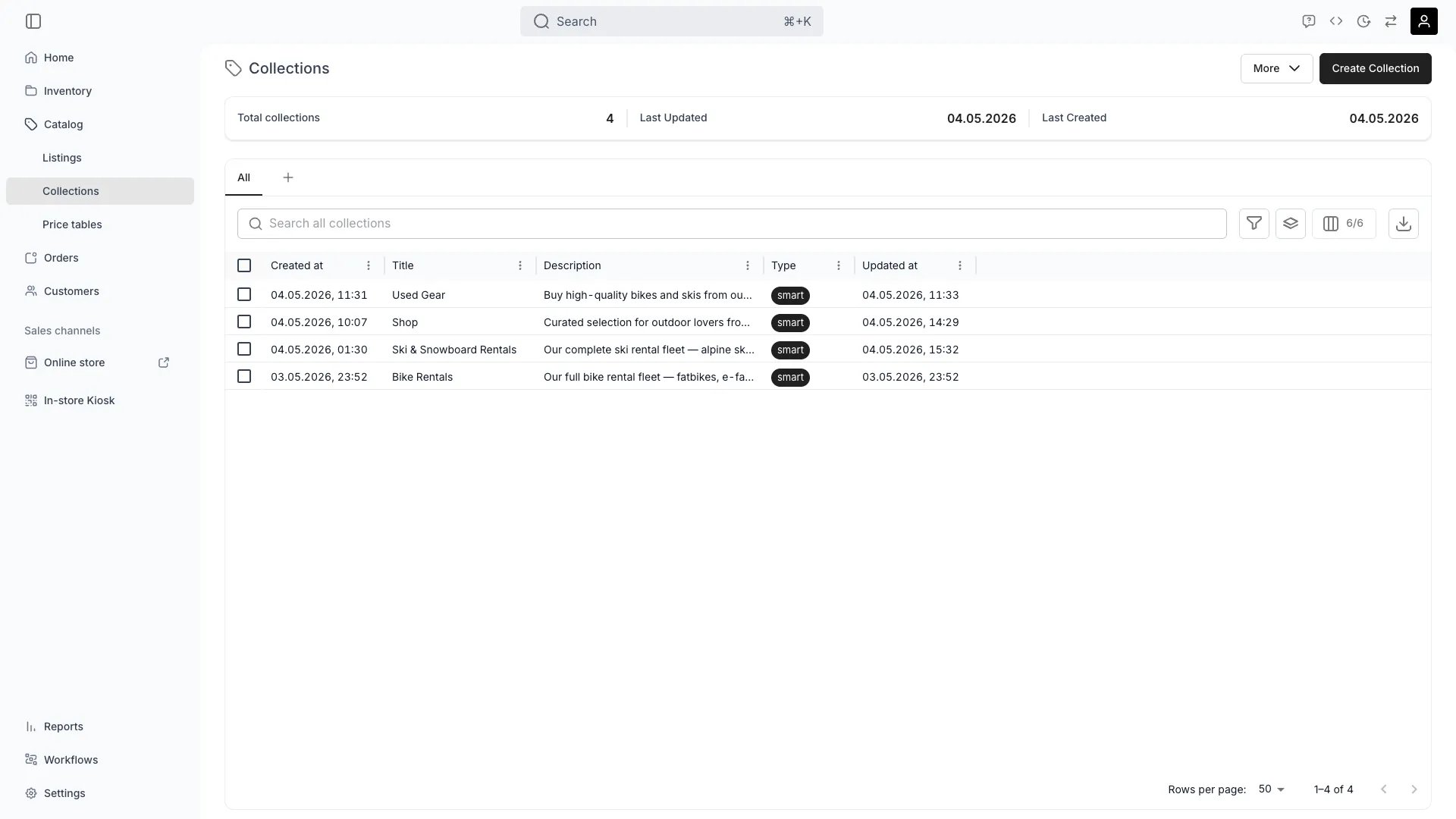 ## Definition
**The Analogy:** A Collection is a playlist. It groups Listings into a themed unit so customers can browse, filter, and land on a category page on the Online Store.
**Special in TWICE:** Collections are either **Manual** (you pick the Listings) or **Smart** (Listings are matched automatically by catalog-scope Tags). Both types live in the same model and expose the same storefront surface.
## Where do I use it?
* **Online Store navigation** — Each Collection renders a category page at `/collections/{slug}`
* **Storefront merchandising** — Promote a seasonal or themed set on the home page
* **Filtered browsing** — Customers shop a curated slice of the Catalog instead of the full inventory
* **Tag-driven automation** — A Smart Collection stays in sync as Listings get re-tagged
* **SEO entry points** — Each Collection has its own page title, meta description and OpenGraph metadata
* **Bulk operations** — Use a Collection as the selection set for Price-Table linking or bulk edits
## Manual vs. Smart
The `type` field is the discriminator between the two membership models.
| Behaviour | Manual | Smart |
| --------------------- | ----------------------------------------------- | ----------------------------------------------------------------------- |
| Membership source | `catalogItems[]` rows added explicitly | `smartConditions[]` matched against Listing tags |
| Add a Listing | `POST /collections/:id/items` | Tag the Listing with a tag the Collection references |
| Remove a Listing | `DELETE /collections/:id/items?catalogItemId=…` | Untag the Listing or remove the smart condition |
| Order of Listings | Manually controllable | Determined by the Listing list ordering, not by the order of conditions |
| Reacts to tag changes | No | Yes — membership recalculates as tags change |
| Best for | Hand-picked storefront features | Stable categories like "Bikes", "On sale", "New arrivals" |
A Collection's `type` cannot be flipped after creation — pick the right type up front. Smart Collections match against **catalog**-scope Tags only (the only scope shown in the admin's smart-rule picker).
## Smart Collection conditions
A Smart Collection holds an array of `smartConditions`. Each condition is a reference to one Tag.
A `CollectionSmartCondition` has the following fields:
| Field | Type | Description |
| -------------- | ------ | ----------------------------------------------- |
| `id` | String | Server-generated identifier |
| `collectionId` | String | The Smart Collection this condition belongs to |
| `tagId` | String | The catalog-scope Tag this condition matches on |
| `tag` | Tag | The resolved Tag object, when expanded |
There is no operator field on a condition — the predicate is always **"Listing has this tag"**. Operators like `not equals`, `contains` or attribute comparisons are not part of the model today.
The combinator between conditions is set on the Collection itself via `tagMatchType`:
| `tagMatchType` | Meaning |
| --------------- | ------------------------------------------------------------------------------------- |
| `any` (default) | A Listing belongs to the Collection if it has **at least one** of the configured tags |
| `all` | A Listing belongs to the Collection only if it has **every** configured tag |
`tagMatchType` is editable any time; membership recomputes on the next read.
Because Smart Collections match on tags only, plan your tag taxonomy before scaling Collections. A `bikes` tag, a `road-bikes` tag and a `discounted` tag let you build "All bikes", "Road bikes" and "Discounted road bikes" (with `tagMatchType = 'all'`) without duplicate management.
## Key Properties
| Property | Type | Description |
| ----------------- | ---------------------------- | ------------------------------------------------------------------------------------------------------------------------------------------------------------- |
| `id` | UUID | Server-generated identifier |
| `title` | String | Customer-facing collection name |
| `description` | String \| null | Optional long description shown on the category page |
| `type` | `manual` \| `smart` | Membership model. Fixed at creation |
| `tagMatchType` | `any` \| `all` | Predicate combinator for Smart Collections |
| `catalogItems` | `CollectionCatalogItem[]` | Manual membership rows |
| `smartConditions` | `CollectionSmartCondition[]` | Tag references used by Smart Collections |
| `media` | `CollectionMediaLinks[]` | Ordered hero / banner images for the Collection page |
| `slugs` | String\[] | Storefront URL slugs. The first entry is the primary (canonical) slug; additional entries are alternate slugs. Falls back to the Collection's `id` when empty |
| `pageTitle` | String \| null | SEO `` (max 70 chars in admin) |
| `metaDescription` | String \| null | SEO meta description (max 160 chars in admin) |
| `ogTitle` | String \| null | OpenGraph title for social shares |
| `ogDescription` | String \| null | OpenGraph description |
| `ogImage` | FileResource \| null | OpenGraph image |
| `noindex` | Boolean | When `true`, asks search engines not to index this Collection page |
| `aggregateData` | Object | Counts and other derived fields returned by list endpoints |
## Relationships
<AccordionGroup>
<Accordion title="Contains Listings">
A Collection groups [Listings](/docs/concepts/catalog/listings). A single Listing can belong to any number of Collections — there is no cardinality constraint.
</Accordion>
<Accordion title="Uses catalog-scope Tags">
Smart Collections reference `Tag` rows with `scope = 'catalog'`. Tags are shared across Listings and Collections, so adding a tag to a new Listing instantly affects every Smart Collection that references it.
</Accordion>
<Accordion title="Surfaces on Sales Channels">
Collections render on the Online Store at `/collections/{urlHandle}`. Whether each member Listing appears depends on that Listing's own sales-channel flags. See the [Online Store concept](/docs/concepts/sales-channels/online-store).
</Accordion>
<Accordion title="Linked to Media files">
Each `CollectionMediaLinks` row attaches a `FileResource` (hero image, banner) ordered by `orderIndex`. The first image is used as a fallback for the social-share preview.
</Accordion>
</AccordionGroup>
## Collection detail tabs
When you open a Collection in the admin:
| Tab | What it configures |
| --------- | -------------------------------------------------------------------------------------------------------------------------------------------- |
| General | Title, description, hero media, type-specific membership (manual picker or smart rules + match type) |
| Listings | The current set of Listings in the Collection (read-only for Smart, editable for Manual) |
| Marketing | Search-engine listing (page title, meta description, URL handle), search-engine indexing toggle, social share (OG title, description, image) |
## Performance considerations
* **Smart Collections recompute on read.** The current implementation resolves membership at query time by joining Listing tags to Collection conditions. There is no materialised "membership" table to keep in sync.
* **Cross-Collection membership is free.** A Listing can be in any number of Collections without storage overhead, because Manual rows are simple join records and Smart matches are computed.
* **Tag operations cascade.** Renaming or deleting a Tag affects every Smart Collection that references it. Renames are safe; deletes will silently shrink Collection membership.
* **Pagination matters for large Collections.** Use the `listCatalogItems` endpoint per Collection to retrieve members in pages rather than reading the entire Collection object.
## Lifecycle
<Steps>
<Step title="Create">
`POST /collections` with `title`, `type`, and (for Smart) an initial `tagMatchType`.
<AccordionGroup>
<Accordion title="Can I change a Manual collection to a Smart collection later?">
No. `type` is fixed at creation. To convert, create a new Collection of the desired type and migrate.
</Accordion>
<Accordion title="Do I need any tags before creating a Smart collection?">
No — you can create the Smart Collection first and add conditions afterwards. Until conditions exist, the Collection has zero members.
</Accordion>
</AccordionGroup>
</Step>
<Step title="Populate">
For Manual: add Listings with `POST /collections/:id/items`. For Smart: add tags with `POST /collections/:id/conditions` and set `tagMatchType`.
</Step>
<Step title="Publish on the Online Store">
Collections render automatically on the Online Store once they have a `urlHandle` (or by ID if no handle is set). There is no separate "publish" toggle.
</Step>
<Step title="Maintain">
For Manual: add and remove items as merchandising changes. For Smart: maintain the underlying Tag taxonomy — the Collection follows automatically.
</Step>
<Step title="Retire">
`DELETE /collections/:id` removes the Collection. Member Listings are not affected — only the Collection rows.
</Step>
</Steps>
## Frequently Asked Questions
<AccordionGroup>
<Accordion title="Can a Listing belong to multiple Collections?">
Yes, any number. There is no cap and no exclusivity rule.
</Accordion>
<Accordion title="What's the difference between a Collection and a Category Taxonomy?">
Categories are a structural classification of what a Listing **is** (a single canonical tree). Collections are a merchandising overlay of how Listings are **grouped for sale**. A Listing has one taxonomy category but can be in many Collections.
</Accordion>
<Accordion title="Do Smart Collections support `not contains` or attribute matching?">
Not today. Conditions are positive tag matches only, combined by `any` or `all`.
</Accordion>
<Accordion title="What happens when I delete a Tag used by a Smart Collection?">
The corresponding `smartConditions` row is removed, and Listings previously matched only by that tag fall out of the Collection on the next read.
</Accordion>
<Accordion title="How is sort order controlled inside a Collection?">
Manual Collections are ordered by `orderIndex` on each membership row. Smart Collections derive their order from the listing query, not from the order in which conditions are added.
</Accordion>
</AccordionGroup>
## Developer Reference
Collections are exposed as `collections` in the API.
<Card title="API: Collections" icon="code" href="https://server.twicecommerce.com/api/internal">
Open the endpoint in the API reference.
</Card>
## Related
<CardGroup cols={2}>
<Card title="Listings" icon="list" href="/docs/concepts/catalog/listings">
The Catalog rows a Collection groups
</Card>
<Card title="Online Store" icon="store" href="/docs/concepts/sales-channels/online-store">
Where Collection pages render
</Card>
<Card title="Category Taxonomy" icon="sitemap" href="/docs/concepts/admin/category-taxonomy">
Structural classification, complementary to Collections
</Card>
<Card title="Price Tables" icon="table" href="/docs/concepts/catalog/price-tables">
Apply a shared Price Table to every Listing in a Collection
</Card>
</CardGroup>
## Definition
**The Analogy:** A Collection is a playlist. It groups Listings into a themed unit so customers can browse, filter, and land on a category page on the Online Store.
**Special in TWICE:** Collections are either **Manual** (you pick the Listings) or **Smart** (Listings are matched automatically by catalog-scope Tags). Both types live in the same model and expose the same storefront surface.
## Where do I use it?
* **Online Store navigation** — Each Collection renders a category page at `/collections/{slug}`
* **Storefront merchandising** — Promote a seasonal or themed set on the home page
* **Filtered browsing** — Customers shop a curated slice of the Catalog instead of the full inventory
* **Tag-driven automation** — A Smart Collection stays in sync as Listings get re-tagged
* **SEO entry points** — Each Collection has its own page title, meta description and OpenGraph metadata
* **Bulk operations** — Use a Collection as the selection set for Price-Table linking or bulk edits
## Manual vs. Smart
The `type` field is the discriminator between the two membership models.
| Behaviour | Manual | Smart |
| --------------------- | ----------------------------------------------- | ----------------------------------------------------------------------- |
| Membership source | `catalogItems[]` rows added explicitly | `smartConditions[]` matched against Listing tags |
| Add a Listing | `POST /collections/:id/items` | Tag the Listing with a tag the Collection references |
| Remove a Listing | `DELETE /collections/:id/items?catalogItemId=…` | Untag the Listing or remove the smart condition |
| Order of Listings | Manually controllable | Determined by the Listing list ordering, not by the order of conditions |
| Reacts to tag changes | No | Yes — membership recalculates as tags change |
| Best for | Hand-picked storefront features | Stable categories like "Bikes", "On sale", "New arrivals" |
A Collection's `type` cannot be flipped after creation — pick the right type up front. Smart Collections match against **catalog**-scope Tags only (the only scope shown in the admin's smart-rule picker).
## Smart Collection conditions
A Smart Collection holds an array of `smartConditions`. Each condition is a reference to one Tag.
A `CollectionSmartCondition` has the following fields:
| Field | Type | Description |
| -------------- | ------ | ----------------------------------------------- |
| `id` | String | Server-generated identifier |
| `collectionId` | String | The Smart Collection this condition belongs to |
| `tagId` | String | The catalog-scope Tag this condition matches on |
| `tag` | Tag | The resolved Tag object, when expanded |
There is no operator field on a condition — the predicate is always **"Listing has this tag"**. Operators like `not equals`, `contains` or attribute comparisons are not part of the model today.
The combinator between conditions is set on the Collection itself via `tagMatchType`:
| `tagMatchType` | Meaning |
| --------------- | ------------------------------------------------------------------------------------- |
| `any` (default) | A Listing belongs to the Collection if it has **at least one** of the configured tags |
| `all` | A Listing belongs to the Collection only if it has **every** configured tag |
`tagMatchType` is editable any time; membership recomputes on the next read.
Because Smart Collections match on tags only, plan your tag taxonomy before scaling Collections. A `bikes` tag, a `road-bikes` tag and a `discounted` tag let you build "All bikes", "Road bikes" and "Discounted road bikes" (with `tagMatchType = 'all'`) without duplicate management.
## Key Properties
| Property | Type | Description |
| ----------------- | ---------------------------- | ------------------------------------------------------------------------------------------------------------------------------------------------------------- |
| `id` | UUID | Server-generated identifier |
| `title` | String | Customer-facing collection name |
| `description` | String \| null | Optional long description shown on the category page |
| `type` | `manual` \| `smart` | Membership model. Fixed at creation |
| `tagMatchType` | `any` \| `all` | Predicate combinator for Smart Collections |
| `catalogItems` | `CollectionCatalogItem[]` | Manual membership rows |
| `smartConditions` | `CollectionSmartCondition[]` | Tag references used by Smart Collections |
| `media` | `CollectionMediaLinks[]` | Ordered hero / banner images for the Collection page |
| `slugs` | String\[] | Storefront URL slugs. The first entry is the primary (canonical) slug; additional entries are alternate slugs. Falls back to the Collection's `id` when empty |
| `pageTitle` | String \| null | SEO `` (max 70 chars in admin) |
| `metaDescription` | String \| null | SEO meta description (max 160 chars in admin) |
| `ogTitle` | String \| null | OpenGraph title for social shares |
| `ogDescription` | String \| null | OpenGraph description |
| `ogImage` | FileResource \| null | OpenGraph image |
| `noindex` | Boolean | When `true`, asks search engines not to index this Collection page |
| `aggregateData` | Object | Counts and other derived fields returned by list endpoints |
## Relationships
<AccordionGroup>
<Accordion title="Contains Listings">
A Collection groups [Listings](/docs/concepts/catalog/listings). A single Listing can belong to any number of Collections — there is no cardinality constraint.
</Accordion>
<Accordion title="Uses catalog-scope Tags">
Smart Collections reference `Tag` rows with `scope = 'catalog'`. Tags are shared across Listings and Collections, so adding a tag to a new Listing instantly affects every Smart Collection that references it.
</Accordion>
<Accordion title="Surfaces on Sales Channels">
Collections render on the Online Store at `/collections/{urlHandle}`. Whether each member Listing appears depends on that Listing's own sales-channel flags. See the [Online Store concept](/docs/concepts/sales-channels/online-store).
</Accordion>
<Accordion title="Linked to Media files">
Each `CollectionMediaLinks` row attaches a `FileResource` (hero image, banner) ordered by `orderIndex`. The first image is used as a fallback for the social-share preview.
</Accordion>
</AccordionGroup>
## Collection detail tabs
When you open a Collection in the admin:
| Tab | What it configures |
| --------- | -------------------------------------------------------------------------------------------------------------------------------------------- |
| General | Title, description, hero media, type-specific membership (manual picker or smart rules + match type) |
| Listings | The current set of Listings in the Collection (read-only for Smart, editable for Manual) |
| Marketing | Search-engine listing (page title, meta description, URL handle), search-engine indexing toggle, social share (OG title, description, image) |
## Performance considerations
* **Smart Collections recompute on read.** The current implementation resolves membership at query time by joining Listing tags to Collection conditions. There is no materialised "membership" table to keep in sync.
* **Cross-Collection membership is free.** A Listing can be in any number of Collections without storage overhead, because Manual rows are simple join records and Smart matches are computed.
* **Tag operations cascade.** Renaming or deleting a Tag affects every Smart Collection that references it. Renames are safe; deletes will silently shrink Collection membership.
* **Pagination matters for large Collections.** Use the `listCatalogItems` endpoint per Collection to retrieve members in pages rather than reading the entire Collection object.
## Lifecycle
<Steps>
<Step title="Create">
`POST /collections` with `title`, `type`, and (for Smart) an initial `tagMatchType`.
<AccordionGroup>
<Accordion title="Can I change a Manual collection to a Smart collection later?">
No. `type` is fixed at creation. To convert, create a new Collection of the desired type and migrate.
</Accordion>
<Accordion title="Do I need any tags before creating a Smart collection?">
No — you can create the Smart Collection first and add conditions afterwards. Until conditions exist, the Collection has zero members.
</Accordion>
</AccordionGroup>
</Step>
<Step title="Populate">
For Manual: add Listings with `POST /collections/:id/items`. For Smart: add tags with `POST /collections/:id/conditions` and set `tagMatchType`.
</Step>
<Step title="Publish on the Online Store">
Collections render automatically on the Online Store once they have a `urlHandle` (or by ID if no handle is set). There is no separate "publish" toggle.
</Step>
<Step title="Maintain">
For Manual: add and remove items as merchandising changes. For Smart: maintain the underlying Tag taxonomy — the Collection follows automatically.
</Step>
<Step title="Retire">
`DELETE /collections/:id` removes the Collection. Member Listings are not affected — only the Collection rows.
</Step>
</Steps>
## Frequently Asked Questions
<AccordionGroup>
<Accordion title="Can a Listing belong to multiple Collections?">
Yes, any number. There is no cap and no exclusivity rule.
</Accordion>
<Accordion title="What's the difference between a Collection and a Category Taxonomy?">
Categories are a structural classification of what a Listing **is** (a single canonical tree). Collections are a merchandising overlay of how Listings are **grouped for sale**. A Listing has one taxonomy category but can be in many Collections.
</Accordion>
<Accordion title="Do Smart Collections support `not contains` or attribute matching?">
Not today. Conditions are positive tag matches only, combined by `any` or `all`.
</Accordion>
<Accordion title="What happens when I delete a Tag used by a Smart Collection?">
The corresponding `smartConditions` row is removed, and Listings previously matched only by that tag fall out of the Collection on the next read.
</Accordion>
<Accordion title="How is sort order controlled inside a Collection?">
Manual Collections are ordered by `orderIndex` on each membership row. Smart Collections derive their order from the listing query, not from the order in which conditions are added.
</Accordion>
</AccordionGroup>
## Developer Reference
Collections are exposed as `collections` in the API.
<Card title="API: Collections" icon="code" href="https://server.twicecommerce.com/api/internal">
Open the endpoint in the API reference.
</Card>
## Related
<CardGroup cols={2}>
<Card title="Listings" icon="list" href="/docs/concepts/catalog/listings">
The Catalog rows a Collection groups
</Card>
<Card title="Online Store" icon="store" href="/docs/concepts/sales-channels/online-store">
Where Collection pages render
</Card>
<Card title="Category Taxonomy" icon="sitemap" href="/docs/concepts/admin/category-taxonomy">
Structural classification, complementary to Collections
</Card>
<Card title="Price Tables" icon="table" href="/docs/concepts/catalog/price-tables">
Apply a shared Price Table to every Listing in a Collection
</Card>
</CardGroup>