> ## Documentation Index
> Fetch the complete documentation index at: https://www.twicecommerce.com/docs/llms.txt
> Use this file to discover all available pages before exploring further.
# Locations in TWICE Commerce
> Locations represent the physical or logical places where you sell, fulfill, and accept returns. Each location has its own address, hours, channels, and fulfillment rules.
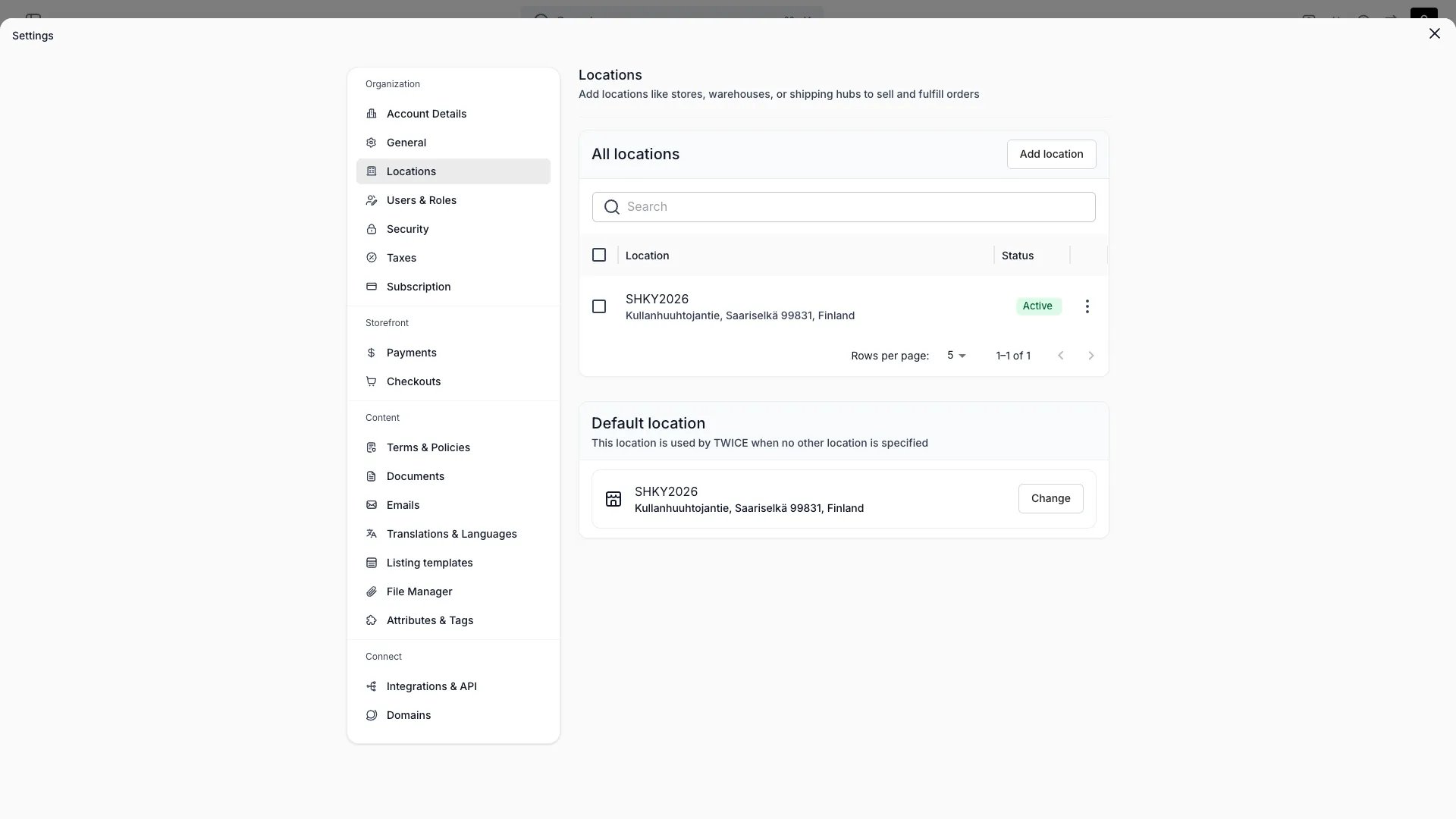 In TWICE, a **Location** (sometimes referred to internally as a *service location*) is any physical or logical place where commerce happens — a store, a warehouse, a fulfillment hub, a pickup point, or a service center. Every Stock Item belongs to a Location, every Order is fulfilled from a Location, and every Sales Channel can be enabled or disabled per Location.
You manage Locations under **Settings > Locations**.
## What a Location is
A Location is the unit TWICE uses to scope physical operations. It carries:
| Field | Description |
| :--------------------- | :----------------------------------------------------------------------------------------------------------------------------------------------------------------------- |
| Name | Internal name used in the admin |
| Public name | Optional customer-facing name (defaults to Name) |
| Active | Whether the Location is currently operational |
| Default | One Location per account is marked the default — used as the fallback when no specific Location is selected |
| Address | Country, state, city, street, zip code |
| Contact | Email and phone for this Location |
| Time zone | IANA time zone — drives opening hours and order timing |
| Opening hours | Regular weekly schedule, plus seasonal and exception overrides |
| Fulfillment hours | Separate pickup and return schedules — can follow opening hours, offset by a buffer, or use a fully custom schedule |
| Sales channels | Which channels are enabled at this Location |
| Fulfillment rules | Which fulfillment and return methods are offered, per purchase type |
| Auto-assign | Whether the allocation engine can automatically pick this Location for new orders |
| Checkout configuration | Optional per-location checkout override — when a customer selects this Location, the storefront uses the assigned [checkout](/docs/settings/checkouts) instead of the default |
A Location does not directly hold inventory itself — Stock Items reference a Location, and the Location's settings determine how that inventory can be sold and fulfilled.
## Per-Location settings
### Contact and address
Each Location has its own postal address, email, and phone number. These appear on customer-facing communication (order confirmations, receipts) and on the storefront when a Location's public name is shown.
### Time zone
A Location's time zone drives:
* How opening hours are interpreted (`09:00` at a London Location is different from `09:00` at a New York Location)
* How order timestamps and rental periods display when staff view orders bound to that Location
### Opening hours
Opening hours come in three flavors:
| Type | Use case |
| :------------ | :-------------------------------------------------------------------------- |
| **Regular** | The default weekly schedule — Mon-Sun, with one or more time ranges per day |
| **Seasonal** | Overrides for a date range (e.g. summer season hours) |
| **Exception** | One-off overrides for specific dates (public holidays, closures) |
Closed days are marked explicitly rather than left empty. The storefront and checkout use opening hours to decide which pickup, return, and start times are selectable.
### Sales channels
For each Location you toggle which sales channels are enabled:
| Channel | Field | What it means |
| :--------------- | :------------------- | :-------------------------------------------------------- |
| **Online store** | `salesChannelOnline` | Listings tied to this Location appear on the online store |
In TWICE, a **Location** (sometimes referred to internally as a *service location*) is any physical or logical place where commerce happens — a store, a warehouse, a fulfillment hub, a pickup point, or a service center. Every Stock Item belongs to a Location, every Order is fulfilled from a Location, and every Sales Channel can be enabled or disabled per Location.
You manage Locations under **Settings > Locations**.
## What a Location is
A Location is the unit TWICE uses to scope physical operations. It carries:
| Field | Description |
| :--------------------- | :----------------------------------------------------------------------------------------------------------------------------------------------------------------------- |
| Name | Internal name used in the admin |
| Public name | Optional customer-facing name (defaults to Name) |
| Active | Whether the Location is currently operational |
| Default | One Location per account is marked the default — used as the fallback when no specific Location is selected |
| Address | Country, state, city, street, zip code |
| Contact | Email and phone for this Location |
| Time zone | IANA time zone — drives opening hours and order timing |
| Opening hours | Regular weekly schedule, plus seasonal and exception overrides |
| Fulfillment hours | Separate pickup and return schedules — can follow opening hours, offset by a buffer, or use a fully custom schedule |
| Sales channels | Which channels are enabled at this Location |
| Fulfillment rules | Which fulfillment and return methods are offered, per purchase type |
| Auto-assign | Whether the allocation engine can automatically pick this Location for new orders |
| Checkout configuration | Optional per-location checkout override — when a customer selects this Location, the storefront uses the assigned [checkout](/docs/settings/checkouts) instead of the default |
A Location does not directly hold inventory itself — Stock Items reference a Location, and the Location's settings determine how that inventory can be sold and fulfilled.
## Per-Location settings
### Contact and address
Each Location has its own postal address, email, and phone number. These appear on customer-facing communication (order confirmations, receipts) and on the storefront when a Location's public name is shown.
### Time zone
A Location's time zone drives:
* How opening hours are interpreted (`09:00` at a London Location is different from `09:00` at a New York Location)
* How order timestamps and rental periods display when staff view orders bound to that Location
### Opening hours
Opening hours come in three flavors:
| Type | Use case |
| :------------ | :-------------------------------------------------------------------------- |
| **Regular** | The default weekly schedule — Mon-Sun, with one or more time ranges per day |
| **Seasonal** | Overrides for a date range (e.g. summer season hours) |
| **Exception** | One-off overrides for specific dates (public holidays, closures) |
Closed days are marked explicitly rather than left empty. The storefront and checkout use opening hours to decide which pickup, return, and start times are selectable.
### Sales channels
For each Location you toggle which sales channels are enabled:
| Channel | Field | What it means |
| :--------------- | :------------------- | :-------------------------------------------------------- |
| **Online store** | `salesChannelOnline` | Listings tied to this Location appear on the online store |
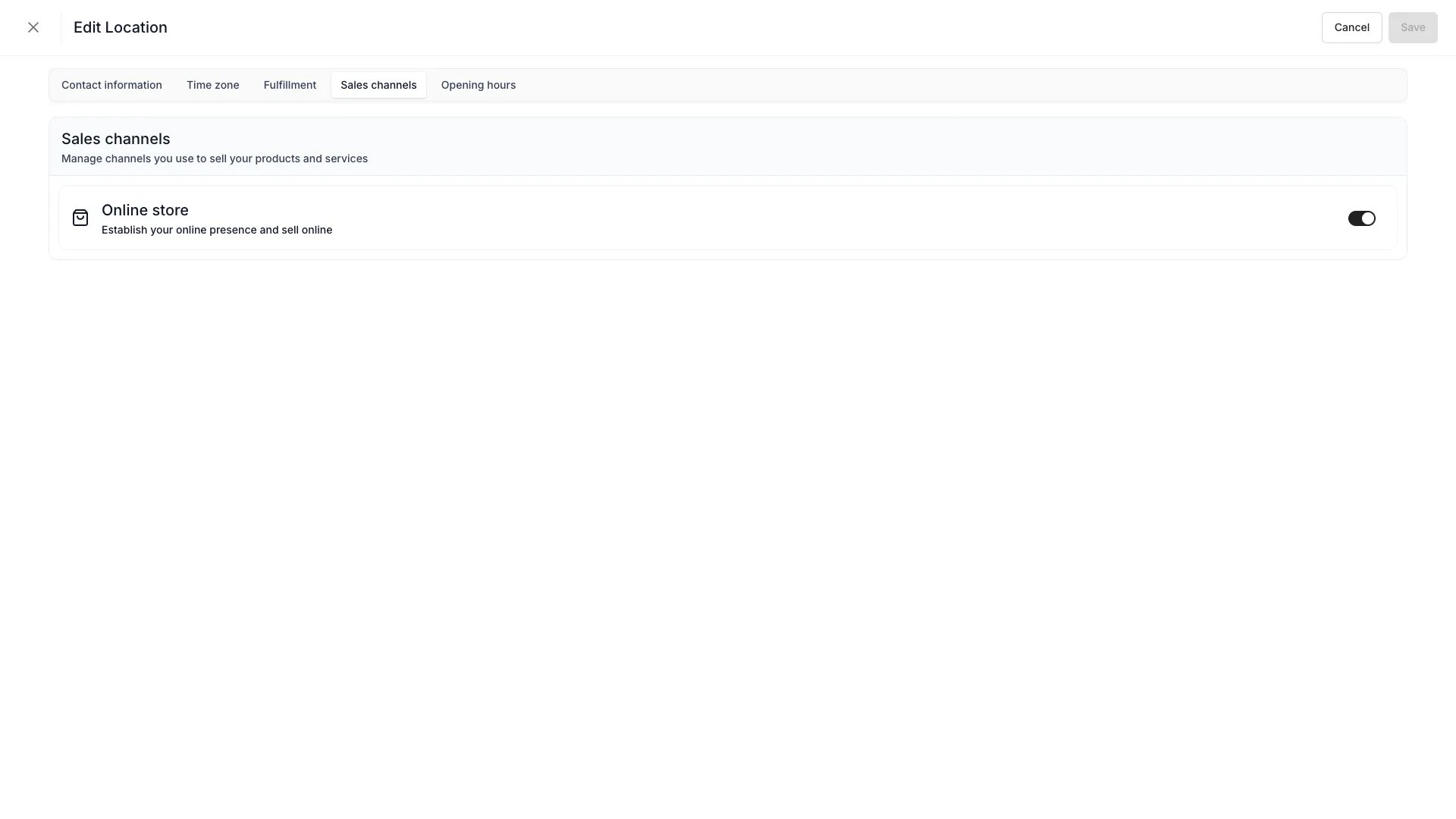 Disabling a channel on a Location hides its inventory and Listings from that channel, even if the Location is otherwise active. Staff can always create orders against any active Location from the admin — admin order creation is not gated by a channel toggle.
Read more: [Sales channels overview](/docs/concepts/integrations/overview)
### Fulfillment rules
Each Location has two independent rule blocks:
* **Order fulfillment** — how orders leave the Location
* **Order returns** — how orders come back to the Location
Both can be enabled or disabled independently. When enabled, each rule block can use a shared configuration across all purchase types, or it can vary per purchase type. The purchase types are:
| Purchase type | Description |
| :--------------- | :------------------------------------------ |
| **Booking** | Rentals and time-bounded reservations |
| **Sale** | Outright purchases |
| **Subscription** | Recurring rentals or memberships |
| **Buyback** | Items the merchant buys back from customers |
For each purchase type and rule block, three methods can be toggled:
| Method | Fulfillment direction | Return direction |
| :----------------- | :------------------------------------------- | :-------------------------------------------- |
| **In-store** | Customer picks up at the Location | Customer drops off at the Location |
| **Shipping** | Order ships from the Location via a carrier | Customer ships the order back to the Location |
| **Local delivery** | Order is delivered locally from the Location | Returns are picked up from the customer |
Read more: [Fulfillment](/docs/concepts/orders/order-lifecycle)
### Fulfillment hours
Fulfillment hours let you set separate **pickup hours** and **return hours** per Location, independent of opening hours. The storefront uses these as boundaries for booking start and end times — a customer cannot select a pickup time outside pickup hours, or a return time outside return hours.
Each schedule (pickup and return) has three source modes:
| Source | Behavior |
| :---------------------------- | :-------------------------------------------------------------------------------------------------------------------------------------------------------------------------------------------------------------------------------------------------------- |
| **Follow opening hours** | Uses the Location's opening hours as-is. This is the default — Locations without custom fulfillment hours fall back to opening hours. |
| **Offset from opening hours** | Applies a buffer to the opening hours. A start buffer delays the earliest pickup/return time; an end buffer brings forward the latest time. For example, a 30-minute start buffer on a Location that opens at 09:00 means the first pickup slot is 09:30. |
| **Custom schedule** | A fully independent schedule with its own regular weekly hours, seasonal overrides, and exception dates — the same three tiers as opening hours, but maintained separately. |
Pickup hours and return hours are configured independently. A Location can follow opening hours for pickups while using a custom schedule for returns, or apply different offset buffers to each.
Fulfillment hours apply to the **storefront only**. Admin users can select any pickup and return time when creating or editing order line items — only stock availability is enforced.
### Auto-assign
The `useAutoAssign` toggle controls whether the allocation engine can automatically route new orders to this Location. With auto-assign off, the Location only fulfills orders that explicitly target it.
## Stock Items and Locations
Every Stock Item belongs to one Location at a time. When a Stock Item moves — through a transfer, a return at a different Location, or a manual reassignment — its Location field updates and that change is captured in the Stock Item's [Activity Log](/docs/concepts/admin/activity-logs).
Inventory tables can be filtered by Location, and pickers in checkout will only show inventory the customer can actually receive at their chosen pickup or shipping location.
## Multi-Location operations
A typical multi-Location setup looks like this:
| Scenario | Setup |
| :---------------------- | :---------------------------------------------------------------------------------------------------------------------------------- |
| Single flagship store | One Location with the Online channel and all fulfillment methods enabled |
| Warehouse + storefronts | Warehouse Location with `Online` channel and `Shipping` enabled; storefront Locations with `In-store` fulfillment |
| Dark store network | Multiple Locations with only `Online` channel and `Shipping` enabled, no walk-in access |
| Rental + service split | Rental Locations with `Booking` fulfillment; a service Location with no customer-facing channels — used purely for maintenance work |
The auto-assign and fulfillment rules together determine which Location is picked for any given order — staff can always override during order creation.
## Channel availability per Location
The Online store toggle and the active state together determine where each Location appears:
| Active | Online | Outcome |
| :----: | :----: | :-------------------------------------------------------------------------------------------------------- |
| Yes | Yes | Available on the online store |
| Yes | No | Admin-only — staff create orders from the admin, but the Location is hidden from customer-facing channels |
| No | — | Not selectable anywhere; existing orders unaffected |
Inactive Locations are hidden from new order creation but remain available for historical reporting. Their Stock Items can be transferred elsewhere before deactivation.
## Transfers between Locations
Moving inventory between Locations is captured against each Stock Item with both source and destination IDs, and any transfer reservations show up on the Stock Item's Activity Log. Native transfer workflows in **Settings > Locations** are evolving — until they ship, staff perform transfers by reassigning the Stock Item's Location field directly.
Read more: [Common workflows — Inventory transfers](/docs/concepts/repeating-patterns/common-workflows#inventory-transfers)
## Relationships
```mermaid theme={null}
%%{init: {'flowchart': {'nodeSpacing': 20, 'rankSpacing': 30}}}%%
flowchart TB
subgraph ConceptBox["Admin & Settings"]
direction TB
Location["**Location**"]
OpeningHours["Opening hours"]
FulfillmentHours["Fulfillment hours"]
FulfillmentRules["Fulfillment rules"]
Location ~~~ OpeningHours ~~~ FulfillmentHours ~~~ FulfillmentRules
end
StockItem["Stock Item"]
Order["Order"]
SalesChannel["Sales channel"]
Location -->|holds| StockItem
Location -->|fulfills| Order
Location -->|enables| SalesChannel
style ConceptBox fill:#0000000d,stroke:#888,stroke-width:2px
style Location fill:#3b82f633,stroke:#3b82f6,stroke-width:3px,font-weight:bold
style OpeningHours fill:#0000000a,stroke:#999,stroke-width:1px
style FulfillmentHours fill:#0000000a,stroke:#999,stroke-width:1px
style FulfillmentRules fill:#0000000a,stroke:#999,stroke-width:1px
style StockItem fill:#10b98133,stroke:#10b981,stroke-width:2px
style Order fill:#10b98133,stroke:#10b981,stroke-width:2px
style SalesChannel fill:#10b98133,stroke:#10b981,stroke-width:2px
```
## Developer Reference
Locations are exposed as `service-locations` in the API.
Open the endpoint in the API reference.
## Related
Configure Locations under Settings
How Locations participate in fulfillment
Channels that Locations can be enabled for
Track Location changes and inventory movements
Disabling a channel on a Location hides its inventory and Listings from that channel, even if the Location is otherwise active. Staff can always create orders against any active Location from the admin — admin order creation is not gated by a channel toggle.
Read more: [Sales channels overview](/docs/concepts/integrations/overview)
### Fulfillment rules
Each Location has two independent rule blocks:
* **Order fulfillment** — how orders leave the Location
* **Order returns** — how orders come back to the Location
Both can be enabled or disabled independently. When enabled, each rule block can use a shared configuration across all purchase types, or it can vary per purchase type. The purchase types are:
| Purchase type | Description |
| :--------------- | :------------------------------------------ |
| **Booking** | Rentals and time-bounded reservations |
| **Sale** | Outright purchases |
| **Subscription** | Recurring rentals or memberships |
| **Buyback** | Items the merchant buys back from customers |
For each purchase type and rule block, three methods can be toggled:
| Method | Fulfillment direction | Return direction |
| :----------------- | :------------------------------------------- | :-------------------------------------------- |
| **In-store** | Customer picks up at the Location | Customer drops off at the Location |
| **Shipping** | Order ships from the Location via a carrier | Customer ships the order back to the Location |
| **Local delivery** | Order is delivered locally from the Location | Returns are picked up from the customer |
Read more: [Fulfillment](/docs/concepts/orders/order-lifecycle)
### Fulfillment hours
Fulfillment hours let you set separate **pickup hours** and **return hours** per Location, independent of opening hours. The storefront uses these as boundaries for booking start and end times — a customer cannot select a pickup time outside pickup hours, or a return time outside return hours.
Each schedule (pickup and return) has three source modes:
| Source | Behavior |
| :---------------------------- | :-------------------------------------------------------------------------------------------------------------------------------------------------------------------------------------------------------------------------------------------------------- |
| **Follow opening hours** | Uses the Location's opening hours as-is. This is the default — Locations without custom fulfillment hours fall back to opening hours. |
| **Offset from opening hours** | Applies a buffer to the opening hours. A start buffer delays the earliest pickup/return time; an end buffer brings forward the latest time. For example, a 30-minute start buffer on a Location that opens at 09:00 means the first pickup slot is 09:30. |
| **Custom schedule** | A fully independent schedule with its own regular weekly hours, seasonal overrides, and exception dates — the same three tiers as opening hours, but maintained separately. |
Pickup hours and return hours are configured independently. A Location can follow opening hours for pickups while using a custom schedule for returns, or apply different offset buffers to each.
Fulfillment hours apply to the **storefront only**. Admin users can select any pickup and return time when creating or editing order line items — only stock availability is enforced.
### Auto-assign
The `useAutoAssign` toggle controls whether the allocation engine can automatically route new orders to this Location. With auto-assign off, the Location only fulfills orders that explicitly target it.
## Stock Items and Locations
Every Stock Item belongs to one Location at a time. When a Stock Item moves — through a transfer, a return at a different Location, or a manual reassignment — its Location field updates and that change is captured in the Stock Item's [Activity Log](/docs/concepts/admin/activity-logs).
Inventory tables can be filtered by Location, and pickers in checkout will only show inventory the customer can actually receive at their chosen pickup or shipping location.
## Multi-Location operations
A typical multi-Location setup looks like this:
| Scenario | Setup |
| :---------------------- | :---------------------------------------------------------------------------------------------------------------------------------- |
| Single flagship store | One Location with the Online channel and all fulfillment methods enabled |
| Warehouse + storefronts | Warehouse Location with `Online` channel and `Shipping` enabled; storefront Locations with `In-store` fulfillment |
| Dark store network | Multiple Locations with only `Online` channel and `Shipping` enabled, no walk-in access |
| Rental + service split | Rental Locations with `Booking` fulfillment; a service Location with no customer-facing channels — used purely for maintenance work |
The auto-assign and fulfillment rules together determine which Location is picked for any given order — staff can always override during order creation.
## Channel availability per Location
The Online store toggle and the active state together determine where each Location appears:
| Active | Online | Outcome |
| :----: | :----: | :-------------------------------------------------------------------------------------------------------- |
| Yes | Yes | Available on the online store |
| Yes | No | Admin-only — staff create orders from the admin, but the Location is hidden from customer-facing channels |
| No | — | Not selectable anywhere; existing orders unaffected |
Inactive Locations are hidden from new order creation but remain available for historical reporting. Their Stock Items can be transferred elsewhere before deactivation.
## Transfers between Locations
Moving inventory between Locations is captured against each Stock Item with both source and destination IDs, and any transfer reservations show up on the Stock Item's Activity Log. Native transfer workflows in **Settings > Locations** are evolving — until they ship, staff perform transfers by reassigning the Stock Item's Location field directly.
Read more: [Common workflows — Inventory transfers](/docs/concepts/repeating-patterns/common-workflows#inventory-transfers)
## Relationships
```mermaid theme={null}
%%{init: {'flowchart': {'nodeSpacing': 20, 'rankSpacing': 30}}}%%
flowchart TB
subgraph ConceptBox["Admin & Settings"]
direction TB
Location["**Location**"]
OpeningHours["Opening hours"]
FulfillmentHours["Fulfillment hours"]
FulfillmentRules["Fulfillment rules"]
Location ~~~ OpeningHours ~~~ FulfillmentHours ~~~ FulfillmentRules
end
StockItem["Stock Item"]
Order["Order"]
SalesChannel["Sales channel"]
Location -->|holds| StockItem
Location -->|fulfills| Order
Location -->|enables| SalesChannel
style ConceptBox fill:#0000000d,stroke:#888,stroke-width:2px
style Location fill:#3b82f633,stroke:#3b82f6,stroke-width:3px,font-weight:bold
style OpeningHours fill:#0000000a,stroke:#999,stroke-width:1px
style FulfillmentHours fill:#0000000a,stroke:#999,stroke-width:1px
style FulfillmentRules fill:#0000000a,stroke:#999,stroke-width:1px
style StockItem fill:#10b98133,stroke:#10b981,stroke-width:2px
style Order fill:#10b98133,stroke:#10b981,stroke-width:2px
style SalesChannel fill:#10b98133,stroke:#10b981,stroke-width:2px
```
## Developer Reference
Locations are exposed as `service-locations` in the API.
Open the endpoint in the API reference.
## Related
Configure Locations under Settings
How Locations participate in fulfillment
Channels that Locations can be enabled for
Track Location changes and inventory movements