> ## Documentation Index
> Fetch the complete documentation index at: https://www.twicecommerce.com/docs/llms.txt
> Use this file to discover all available pages before exploring further.
# Attributes
> Custom fields you define on inventory, catalog, customers, and orders — eight data formats including formulas — to extend the data model without writing code.
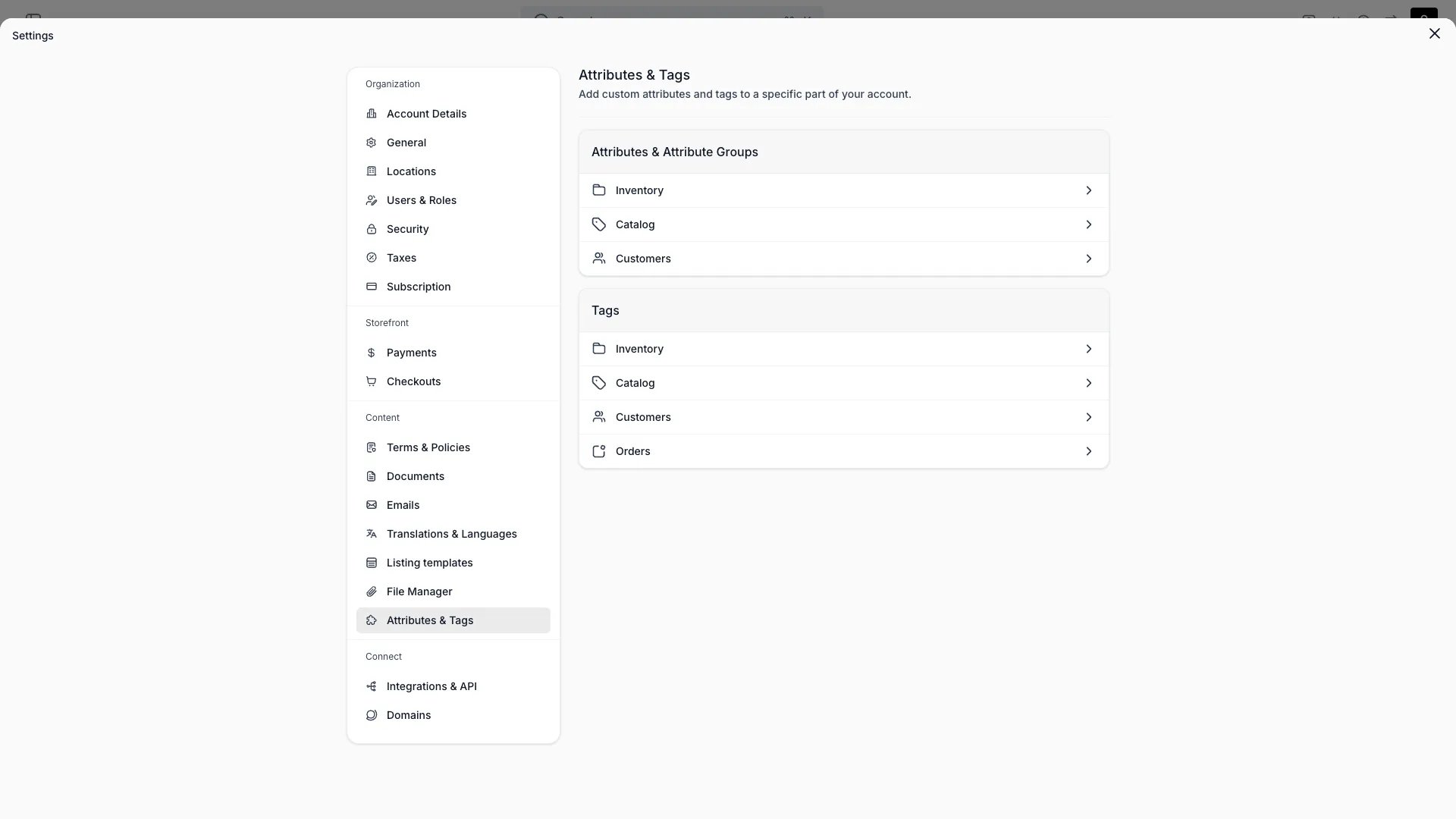 ## Definition
Attributes are the configurable column system underlying every table and detail view in TWICE. Whatever your business needs to track that isn't in the core data model — condition grade, serial number, warranty start date, custom delivery instructions — you express as Attributes.
**The analogy:** Attributes behave like custom columns in a spreadsheet — you define them once and they appear in tables, forms, filters, and exports.
## Where Attributes apply
Every Attribute is scoped to exactly one **resource**:
| Resource | Applies to |
| :---------- | :--------------------------------------- |
| `inventory` | Stock Items and the SKUs they roll up to |
| `catalog` | Listings |
| `customers` | Customer profiles |
| `orders` | Orders |
You cannot reuse the same Attribute across resources — if you need similar fields on both Customers and Orders, you define them separately. This keeps each resource's schema clean and avoids cross-resource leakage.
Inventory Attributes can have one of two **origins**:
* `sku` — the attribute is defined at the SKU level and inherited by every Stock Item under that SKU
* `article` — the attribute is defined at the Stock Item level only (Stock Items are also called Articles internally)
This split lets you express "Brand" once on the SKU and "Serial number" individually per Stock Item, without duplicating fields.
## Attribute formats
TWICE supports eight Attribute formats:
| Format | Use case | Stored as |
| :------------ | :------------------------------------------------------- | :-------------------------- |
| `text` | Short labels, identifiers, notes | String |
| `number` | Measurable values — weight, dimensions, capacity | Number |
| `boolean` | Yes / No flags | Boolean |
| `date` | Calendar dates with no time component | ISO 8601 date |
| `datetime` | Precise timestamps | ISO 8601 datetime |
| `select` | Single choice from a defined option list | String (the option's `key`) |
| `multiselect` | Multiple choices from an option list | Array of strings |
| `formula` | Value calculated from other Attributes and system fields | String expression |
There is no separate `currency`, `percent`, `email`, `url`, `phone`, `file`, `relation`, or `external` format — use `number` for currency and percent values, `text` with validation for emails and URLs, and Documents for file attachments.
### Select and Multiselect options
Each option in a select or multiselect Attribute is a `{ key, label }` pair:
```json theme={null}
[
{ "key": "good", "label": "Good" },
{ "key": "fair", "label": "Fair" },
{ "key": "needs-repair", "label": "Needs repair" }
]
```
The `key` is the immutable identifier stored on records. The `label` is what users see and can be edited freely without breaking historical data. Both have a 255-character cap.
### Formula attributes
Formula Attributes compute their value from other fields on the same resource. Each resource exposes a different set of system fields formulas can reference:
| Resource | System fields available in formulas |
| :-------- | :----------------------------------------------------------------------------------------- |
| Customer | `created_at`, `first_name`, `last_name`, `phone`, `email`, `marketing_consent`, `language` |
| Inventory | `created_at`, `name`, `code`, `item_costs`, `item_income` |
| Catalog | `created_at`, `name`, `status`, `description` |
A typical formula uses these system fields plus other Attributes — for example, a Stock Item formula `item_income - item_costs` yields the running profit. The formula re-evaluates whenever its inputs change.
Read more: [Formulas](/docs/admin/formulas)
## Key properties
An Attribute definition carries:
| Property | Type | Description |
| :------------- | :------ | :------------------------------------------------------------------------------------ |
| `id` | UUID | Stable identifier |
| `key` | String | Machine-readable identifier used in API and exports |
| `name` | String | Display name (e.g. "Condition") |
| `description` | String | Optional help text shown in forms |
| `format` | Enum | One of the eight formats above |
| `valueOptions` | Array | `{ key, label }` pairs for select/multiselect; otherwise `null` |
| `formula` | String | Expression for formula Attributes |
| `resource` | Enum | `inventory`, `catalog`, `customers`, `orders` |
| `groupId` | UUID | Optional [Attribute Group](/docs/concepts/admin/attribute-groups) the Attribute belongs to |
| `systemGroup` | Enum | `system` (customer) for system-managed groups |
| `sortOrder` | Number | Position within its group |
| `global` | Boolean | Whether the Attribute is system-defined (true) or tenant-defined (false) |
System groups are reserved categories — `system` for customer — that hold attributes TWICE manages on your behalf.
## Inheritance: SKU > Stock Item
For inventory Attributes specifically:
* An attribute with `origin: sku` is defined on the SKU and read on each Stock Item that rolls up to that SKU
* An attribute with `origin: article` is defined directly on the Stock Item and not shared with siblings
* Editing a SKU-origin attribute on one Stock Item is not allowed — you edit it on the SKU and the change propagates
This means a SKU's attributes act as the "template" for its Stock Items, and each Stock Item only stores the values that vary unit-to-unit (serial number, condition, location, purchase date).
## Order attributes
Attributes scoped to `orders` attach custom data to individual orders rather than to inventory, catalog, or customer records. Common examples: cost centre, gift message, PO number, or special delivery instructions.
### Checkout capture
Add an attribute field to your [checkout contact form](/docs/settings/checkouts/steps#contact) and bind it to an attribute. At checkout, the system routes the captured value by the attribute's resource:
* `orders` — saved to the order's attribute values
* `customers` — saved to the customer profile
This means the same checkout form can collect both order-specific and customer-profile data in one step.
### Confirmation email
Captured order attribute values render automatically in the order confirmation email:
* **Global** order attributes always appear — with a dash (—) placeholder when no value was captured
* **Non-global** order attributes appear only when a value exists
Values are formatted per your tenant locale: dates use your configured date format, select attributes show the option label, booleans render as Yes/No, and multiselect values are comma-separated.
### Admin
Order attribute values appear on the [order detail page](/docs/orders/order-tabs/attributes) under a dedicated attributes card. You can add, edit, and remove values directly. Order attributes also surface as filterable, sortable columns in the orders table.
## Filtering and search
Once an Attribute exists, it surfaces automatically in the table for its resource:
| Behavior | Detail |
| :--------- | :-------------------------------------------------------------------------------------------------------- |
| **Column** | New column in the resource's table, hidden by default — show via column controls |
| **Filter** | Filter operator depends on format — `equals`, `contains`, `is any of`, `before`, `after`, `is null`, etc. |
| **Sort** | All non-formula formats are sortable |
| **Group** | Boolean, select, and date Attributes group rows in the table |
| **Search** | Text and number Attributes are matched by the toolbar search |
| **Export** | Visible Attribute columns are included in CSV export |
Search is full-text and runs against all string-castable Attribute values — so the toolbar search finds matches even in hidden columns.
## API access
Attributes appear on every API response for the resource they apply to. They're keyed by `id` and surfaced as a typed value record.
A typical inventory response includes:
```json theme={null}
{
"id": "stk_abc123",
"skuId": "sku_xyz789",
"attributes": {
"attr_color": "Navy",
"attr_condition": "good",
"attr_serialNumber": "BK-2024-0011",
"attr_purchasePrice": 89.00
}
}
```
Values for select Attributes are the option's `key`, not the user-facing `label`.
## Lifecycle
### Creating
1. Open **Settings > Attributes & tags**
2. Pick the resource the Attribute applies to (Inventory, Catalog, Customer, Order)
3. Set name, description, and format
4. For `select` / `multiselect`, define the option list
5. For `formula`, write the expression and pick the result format
6. Optionally assign to a Group and a sort order
### Updating
* Name, description, sort order, and group can change freely
* Adding more options to a select/multiselect is safe
* Renaming option `labels` is safe — the underlying `key` is what's stored
* Removing an option breaks any record that referenced it — TWICE warns before allowing this
* Changing format is restricted because conversion may lose data; the safer pattern is to create a new Attribute and migrate values
### Archiving and deletion
* Archiving hides the Attribute from new entry but preserves historical values
* Deletion removes the Attribute definition and all stored values for it across every record; this can't be undone
* Use archive in nearly all cases; reserve delete for cleanup of mistakenly-created Attributes
## Relationships
```mermaid theme={null}
%%{init: {'flowchart': {'nodeSpacing': 20, 'rankSpacing': 30}}}%%
flowchart TB
subgraph ConceptBox["Data Model"]
direction TB
AttributeGroups["Attribute Groups"]
Concept["**Attribute**"]
AttributeGroups ~~~ Concept
end
SKU["SKU"]
StockItem["Stock Item"]
Listing["Listing"]
Customer["Customer"]
Order["Order"]
subgraph RelatedBox["Powers"]
direction TB
Filtering["Filtering & search"]
Reporting["Reporting"]
Workflows["Workflows"]
Filtering ~~~ Reporting ~~~ Workflows
end
Concept -->|enriches| SKU
Concept -->|enriches| StockItem
Concept -->|enriches| Listing
Concept -->|enriches| Customer
Concept -->|enriches| Order
SKU -.->|inherits to| StockItem
Concept -.->|powers| RelatedBox
style ConceptBox fill:#0000000d,stroke:#888,stroke-width:2px
style Concept fill:#3b82f633,stroke:#3b82f6,stroke-width:3px,font-weight:bold
style AttributeGroups fill:#0000000a,stroke:#999,stroke-width:1px
style SKU fill:#10b98133,stroke:#10b981,stroke-width:2px
style StockItem fill:#10b98133,stroke:#10b981,stroke-width:2px
style Listing fill:#10b98133,stroke:#10b981,stroke-width:2px
style Customer fill:#10b98133,stroke:#10b981,stroke-width:2px
style Order fill:#10b98133,stroke:#10b981,stroke-width:2px
style RelatedBox fill:#f59e0b1a,stroke:#f59e0b,stroke-width:2px
style Filtering fill:#f59e0b1a,stroke:#f59e0b,stroke-width:1px
style Reporting fill:#f59e0b1a,stroke:#f59e0b,stroke-width:1px
style Workflows fill:#f59e0b1a,stroke:#f59e0b,stroke-width:1px
```
## FAQs
No — each Attribute is scoped to one resource. Create matching Attributes on each resource if you need parallel fields.
SKU-origin attributes are defined once on the SKU and read on every Stock Item under it (think: Brand). Stock Item-origin attributes are unique to a single physical unit (think: Serial number). Choose origin based on whether the value varies unit-to-unit.
Adding options is safe. Renaming an option's user-facing `label` is safe — the underlying `key` stays put. Deleting an option breaks any record that referenced it, so TWICE warns before allowing this.
Formulas re-evaluate whenever their input fields change — no manual refresh needed. The result is read-only.
By default no. Whether an Attribute appears on the storefront depends on your storefront theme configuration — themes opt in to which Attributes they render on Listing pages.
Yes. Select rows in any table, choose **Bulk edit**, and set new values for any visible attribute column.
## Developer Reference
Attributes are exposed as `attributes` in the API.
Open the endpoint in the API reference.
## Related
Group related Attributes for cleaner forms
Write expressions for calculated Attributes
Categories suggest attributes — they work together
Where Attributes surface as filterable columns
## Definition
Attributes are the configurable column system underlying every table and detail view in TWICE. Whatever your business needs to track that isn't in the core data model — condition grade, serial number, warranty start date, custom delivery instructions — you express as Attributes.
**The analogy:** Attributes behave like custom columns in a spreadsheet — you define them once and they appear in tables, forms, filters, and exports.
## Where Attributes apply
Every Attribute is scoped to exactly one **resource**:
| Resource | Applies to |
| :---------- | :--------------------------------------- |
| `inventory` | Stock Items and the SKUs they roll up to |
| `catalog` | Listings |
| `customers` | Customer profiles |
| `orders` | Orders |
You cannot reuse the same Attribute across resources — if you need similar fields on both Customers and Orders, you define them separately. This keeps each resource's schema clean and avoids cross-resource leakage.
Inventory Attributes can have one of two **origins**:
* `sku` — the attribute is defined at the SKU level and inherited by every Stock Item under that SKU
* `article` — the attribute is defined at the Stock Item level only (Stock Items are also called Articles internally)
This split lets you express "Brand" once on the SKU and "Serial number" individually per Stock Item, without duplicating fields.
## Attribute formats
TWICE supports eight Attribute formats:
| Format | Use case | Stored as |
| :------------ | :------------------------------------------------------- | :-------------------------- |
| `text` | Short labels, identifiers, notes | String |
| `number` | Measurable values — weight, dimensions, capacity | Number |
| `boolean` | Yes / No flags | Boolean |
| `date` | Calendar dates with no time component | ISO 8601 date |
| `datetime` | Precise timestamps | ISO 8601 datetime |
| `select` | Single choice from a defined option list | String (the option's `key`) |
| `multiselect` | Multiple choices from an option list | Array of strings |
| `formula` | Value calculated from other Attributes and system fields | String expression |
There is no separate `currency`, `percent`, `email`, `url`, `phone`, `file`, `relation`, or `external` format — use `number` for currency and percent values, `text` with validation for emails and URLs, and Documents for file attachments.
### Select and Multiselect options
Each option in a select or multiselect Attribute is a `{ key, label }` pair:
```json theme={null}
[
{ "key": "good", "label": "Good" },
{ "key": "fair", "label": "Fair" },
{ "key": "needs-repair", "label": "Needs repair" }
]
```
The `key` is the immutable identifier stored on records. The `label` is what users see and can be edited freely without breaking historical data. Both have a 255-character cap.
### Formula attributes
Formula Attributes compute their value from other fields on the same resource. Each resource exposes a different set of system fields formulas can reference:
| Resource | System fields available in formulas |
| :-------- | :----------------------------------------------------------------------------------------- |
| Customer | `created_at`, `first_name`, `last_name`, `phone`, `email`, `marketing_consent`, `language` |
| Inventory | `created_at`, `name`, `code`, `item_costs`, `item_income` |
| Catalog | `created_at`, `name`, `status`, `description` |
A typical formula uses these system fields plus other Attributes — for example, a Stock Item formula `item_income - item_costs` yields the running profit. The formula re-evaluates whenever its inputs change.
Read more: [Formulas](/docs/admin/formulas)
## Key properties
An Attribute definition carries:
| Property | Type | Description |
| :------------- | :------ | :------------------------------------------------------------------------------------ |
| `id` | UUID | Stable identifier |
| `key` | String | Machine-readable identifier used in API and exports |
| `name` | String | Display name (e.g. "Condition") |
| `description` | String | Optional help text shown in forms |
| `format` | Enum | One of the eight formats above |
| `valueOptions` | Array | `{ key, label }` pairs for select/multiselect; otherwise `null` |
| `formula` | String | Expression for formula Attributes |
| `resource` | Enum | `inventory`, `catalog`, `customers`, `orders` |
| `groupId` | UUID | Optional [Attribute Group](/docs/concepts/admin/attribute-groups) the Attribute belongs to |
| `systemGroup` | Enum | `system` (customer) for system-managed groups |
| `sortOrder` | Number | Position within its group |
| `global` | Boolean | Whether the Attribute is system-defined (true) or tenant-defined (false) |
System groups are reserved categories — `system` for customer — that hold attributes TWICE manages on your behalf.
## Inheritance: SKU > Stock Item
For inventory Attributes specifically:
* An attribute with `origin: sku` is defined on the SKU and read on each Stock Item that rolls up to that SKU
* An attribute with `origin: article` is defined directly on the Stock Item and not shared with siblings
* Editing a SKU-origin attribute on one Stock Item is not allowed — you edit it on the SKU and the change propagates
This means a SKU's attributes act as the "template" for its Stock Items, and each Stock Item only stores the values that vary unit-to-unit (serial number, condition, location, purchase date).
## Order attributes
Attributes scoped to `orders` attach custom data to individual orders rather than to inventory, catalog, or customer records. Common examples: cost centre, gift message, PO number, or special delivery instructions.
### Checkout capture
Add an attribute field to your [checkout contact form](/docs/settings/checkouts/steps#contact) and bind it to an attribute. At checkout, the system routes the captured value by the attribute's resource:
* `orders` — saved to the order's attribute values
* `customers` — saved to the customer profile
This means the same checkout form can collect both order-specific and customer-profile data in one step.
### Confirmation email
Captured order attribute values render automatically in the order confirmation email:
* **Global** order attributes always appear — with a dash (—) placeholder when no value was captured
* **Non-global** order attributes appear only when a value exists
Values are formatted per your tenant locale: dates use your configured date format, select attributes show the option label, booleans render as Yes/No, and multiselect values are comma-separated.
### Admin
Order attribute values appear on the [order detail page](/docs/orders/order-tabs/attributes) under a dedicated attributes card. You can add, edit, and remove values directly. Order attributes also surface as filterable, sortable columns in the orders table.
## Filtering and search
Once an Attribute exists, it surfaces automatically in the table for its resource:
| Behavior | Detail |
| :--------- | :-------------------------------------------------------------------------------------------------------- |
| **Column** | New column in the resource's table, hidden by default — show via column controls |
| **Filter** | Filter operator depends on format — `equals`, `contains`, `is any of`, `before`, `after`, `is null`, etc. |
| **Sort** | All non-formula formats are sortable |
| **Group** | Boolean, select, and date Attributes group rows in the table |
| **Search** | Text and number Attributes are matched by the toolbar search |
| **Export** | Visible Attribute columns are included in CSV export |
Search is full-text and runs against all string-castable Attribute values — so the toolbar search finds matches even in hidden columns.
## API access
Attributes appear on every API response for the resource they apply to. They're keyed by `id` and surfaced as a typed value record.
A typical inventory response includes:
```json theme={null}
{
"id": "stk_abc123",
"skuId": "sku_xyz789",
"attributes": {
"attr_color": "Navy",
"attr_condition": "good",
"attr_serialNumber": "BK-2024-0011",
"attr_purchasePrice": 89.00
}
}
```
Values for select Attributes are the option's `key`, not the user-facing `label`.
## Lifecycle
### Creating
1. Open **Settings > Attributes & tags**
2. Pick the resource the Attribute applies to (Inventory, Catalog, Customer, Order)
3. Set name, description, and format
4. For `select` / `multiselect`, define the option list
5. For `formula`, write the expression and pick the result format
6. Optionally assign to a Group and a sort order
### Updating
* Name, description, sort order, and group can change freely
* Adding more options to a select/multiselect is safe
* Renaming option `labels` is safe — the underlying `key` is what's stored
* Removing an option breaks any record that referenced it — TWICE warns before allowing this
* Changing format is restricted because conversion may lose data; the safer pattern is to create a new Attribute and migrate values
### Archiving and deletion
* Archiving hides the Attribute from new entry but preserves historical values
* Deletion removes the Attribute definition and all stored values for it across every record; this can't be undone
* Use archive in nearly all cases; reserve delete for cleanup of mistakenly-created Attributes
## Relationships
```mermaid theme={null}
%%{init: {'flowchart': {'nodeSpacing': 20, 'rankSpacing': 30}}}%%
flowchart TB
subgraph ConceptBox["Data Model"]
direction TB
AttributeGroups["Attribute Groups"]
Concept["**Attribute**"]
AttributeGroups ~~~ Concept
end
SKU["SKU"]
StockItem["Stock Item"]
Listing["Listing"]
Customer["Customer"]
Order["Order"]
subgraph RelatedBox["Powers"]
direction TB
Filtering["Filtering & search"]
Reporting["Reporting"]
Workflows["Workflows"]
Filtering ~~~ Reporting ~~~ Workflows
end
Concept -->|enriches| SKU
Concept -->|enriches| StockItem
Concept -->|enriches| Listing
Concept -->|enriches| Customer
Concept -->|enriches| Order
SKU -.->|inherits to| StockItem
Concept -.->|powers| RelatedBox
style ConceptBox fill:#0000000d,stroke:#888,stroke-width:2px
style Concept fill:#3b82f633,stroke:#3b82f6,stroke-width:3px,font-weight:bold
style AttributeGroups fill:#0000000a,stroke:#999,stroke-width:1px
style SKU fill:#10b98133,stroke:#10b981,stroke-width:2px
style StockItem fill:#10b98133,stroke:#10b981,stroke-width:2px
style Listing fill:#10b98133,stroke:#10b981,stroke-width:2px
style Customer fill:#10b98133,stroke:#10b981,stroke-width:2px
style Order fill:#10b98133,stroke:#10b981,stroke-width:2px
style RelatedBox fill:#f59e0b1a,stroke:#f59e0b,stroke-width:2px
style Filtering fill:#f59e0b1a,stroke:#f59e0b,stroke-width:1px
style Reporting fill:#f59e0b1a,stroke:#f59e0b,stroke-width:1px
style Workflows fill:#f59e0b1a,stroke:#f59e0b,stroke-width:1px
```
## FAQs
No — each Attribute is scoped to one resource. Create matching Attributes on each resource if you need parallel fields.
SKU-origin attributes are defined once on the SKU and read on every Stock Item under it (think: Brand). Stock Item-origin attributes are unique to a single physical unit (think: Serial number). Choose origin based on whether the value varies unit-to-unit.
Adding options is safe. Renaming an option's user-facing `label` is safe — the underlying `key` stays put. Deleting an option breaks any record that referenced it, so TWICE warns before allowing this.
Formulas re-evaluate whenever their input fields change — no manual refresh needed. The result is read-only.
By default no. Whether an Attribute appears on the storefront depends on your storefront theme configuration — themes opt in to which Attributes they render on Listing pages.
Yes. Select rows in any table, choose **Bulk edit**, and set new values for any visible attribute column.
## Developer Reference
Attributes are exposed as `attributes` in the API.
Open the endpoint in the API reference.
## Related
Group related Attributes for cleaner forms
Write expressions for calculated Attributes
Categories suggest attributes — they work together
Where Attributes surface as filterable columns