> ## Documentation Index
> Fetch the complete documentation index at: https://www.twicecommerce.com/docs/llms.txt
> Use this file to discover all available pages before exploring further.
# Listing variants
> Variants bring structure and precision to a listing without fragmenting it into multiple products.
 ## Why variants matter
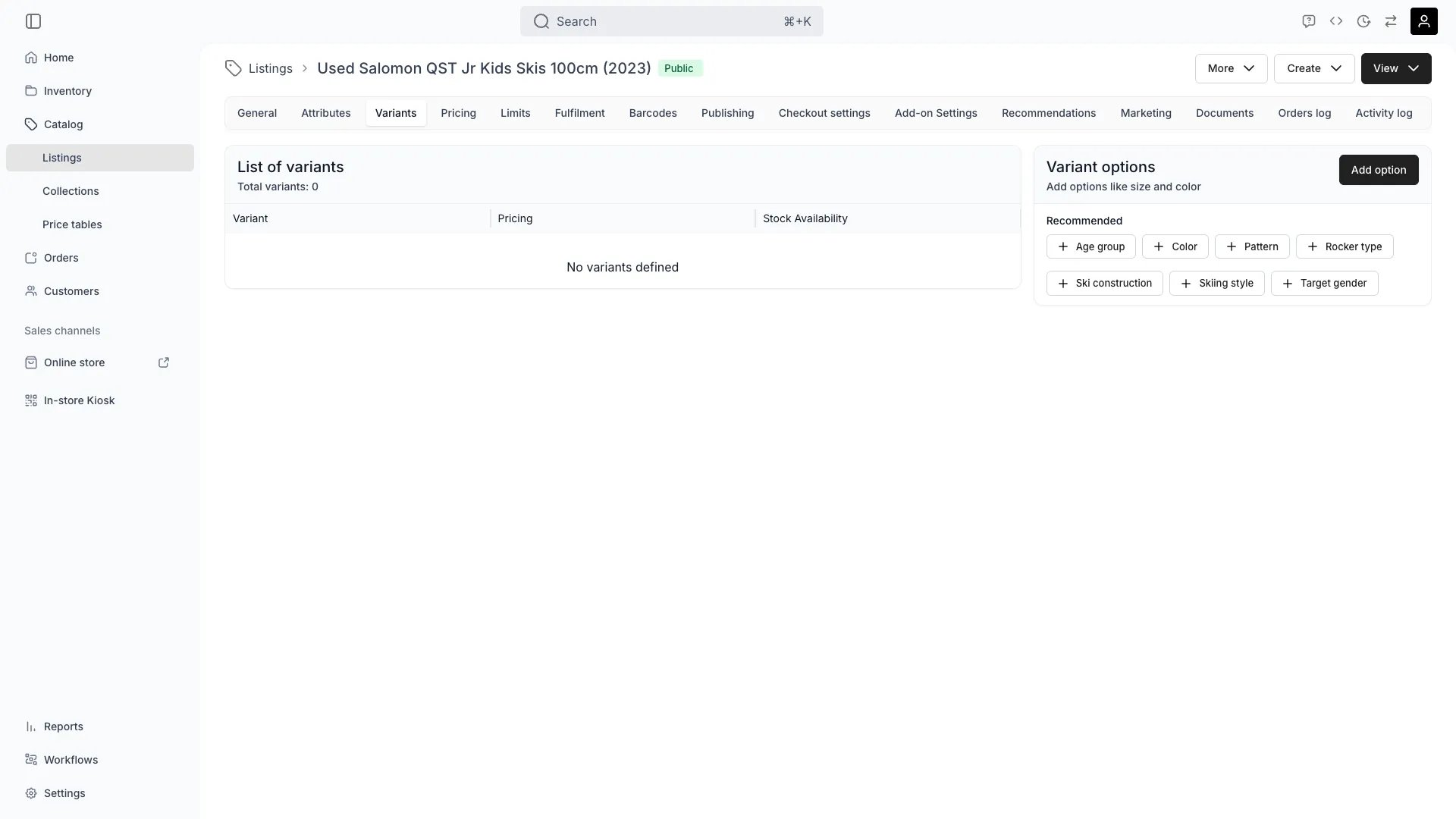
Most listings have variations — like size, color, or material. Variants let you group those together under one product while still managing unique pricing, availability, or fulfillment rules per option.
They give you **granularity inside a single listing** — for pricing, availability, and customer experience — while keeping your catalog clean and consistent.
## How variants are created
Variants are automatically suggested based on the **category (taxonomy)** you’ve assigned to your listing.
For example, if the category is *Apparel*, TWICE Commerce might propose **Size** and **Color** as variant options.
You can always **define your own key–value pairs** (like “Material: Linen” or “Edition: Limited”) for full control.
**Variants power:**
* **More accurate pricing** — define pricing rules for each variant (e.g. “XL” costs more)
* **Smarter fulfillment** — connect specific variant combinations to inventory articles under *Fulfillment settings*
* **Cleaner listings** — one listing, many options, no duplication
## Variant options
Each variant option represents a **dimension of choice** — e.g. "Size" or "Color." You can add, rename, or remove options as needed.
TWICE Commerce uses the options you define to automatically generate all valid variant combinations.
Example:
| **Option** | **Values** |
| ---------- | -------------------- |
| Size | Small, Medium, Large |
| Color | Blue, Black |
Results in 6 variants:
Small / Blue, Small / Black, Medium / Blue, etc.
## Controlling hierarchy
Variant hierarchy defines how options are displayed and ordered — for example, “Color” first, then “Size.”
The order you set here controls how variants appear both in your admin and your storefront.
## Fulfillment and inventory
Once variants are defined, you can **connect them to inventory articles** under *Fulfillment settings*.
This allows real-time control of stock levels per variant (e.g. “Medium / Black” might be available in one store, but not another).
## Pricing per variant
In [pricing settings](/docs/catalog/listings/pricing#variant-pricing), you can define variant-level prices and rules — for example:
* Base price adjustments (“XL” +€5)
* Conditional pricing (different currencies, locations, or channels)
This flexibility helps you manage complex pricing without duplicating listings.
## Why variants matter
Most listings have variations — like size, color, or material. Variants let you group those together under one product while still managing unique pricing, availability, or fulfillment rules per option.
They give you **granularity inside a single listing** — for pricing, availability, and customer experience — while keeping your catalog clean and consistent.
## How variants are created
Variants are automatically suggested based on the **category (taxonomy)** you’ve assigned to your listing.
For example, if the category is *Apparel*, TWICE Commerce might propose **Size** and **Color** as variant options.
You can always **define your own key–value pairs** (like “Material: Linen” or “Edition: Limited”) for full control.
**Variants power:**
* **More accurate pricing** — define pricing rules for each variant (e.g. “XL” costs more)
* **Smarter fulfillment** — connect specific variant combinations to inventory articles under *Fulfillment settings*
* **Cleaner listings** — one listing, many options, no duplication
## Variant options
Each variant option represents a **dimension of choice** — e.g. "Size" or "Color." You can add, rename, or remove options as needed.
TWICE Commerce uses the options you define to automatically generate all valid variant combinations.
Example:
| **Option** | **Values** |
| ---------- | -------------------- |
| Size | Small, Medium, Large |
| Color | Blue, Black |
Results in 6 variants:
Small / Blue, Small / Black, Medium / Blue, etc.
## Controlling hierarchy
Variant hierarchy defines how options are displayed and ordered — for example, “Color” first, then “Size.”
The order you set here controls how variants appear both in your admin and your storefront.
## Fulfillment and inventory
Once variants are defined, you can **connect them to inventory articles** under *Fulfillment settings*.
This allows real-time control of stock levels per variant (e.g. “Medium / Black” might be available in one store, but not another).
## Pricing per variant
In [pricing settings](/docs/catalog/listings/pricing#variant-pricing), you can define variant-level prices and rules — for example:
* Base price adjustments (“XL” +€5)
* Conditional pricing (different currencies, locations, or channels)
This flexibility helps you manage complex pricing without duplicating listings.