> ## Documentation Index
> Fetch the complete documentation index at: https://www.twicecommerce.com/docs/llms.txt
> Use this file to discover all available pages before exploring further.
# Listings
> Browse, search, and manage every sellable product offering in your catalog
export const userRoleDefinition = "What a user can see and do. Each user has one built-in system role — Owner, Admin, Manager, or Member — and can also be assigned any number of custom roles you create with specific permissions. Effective access is the combination of all their roles.";
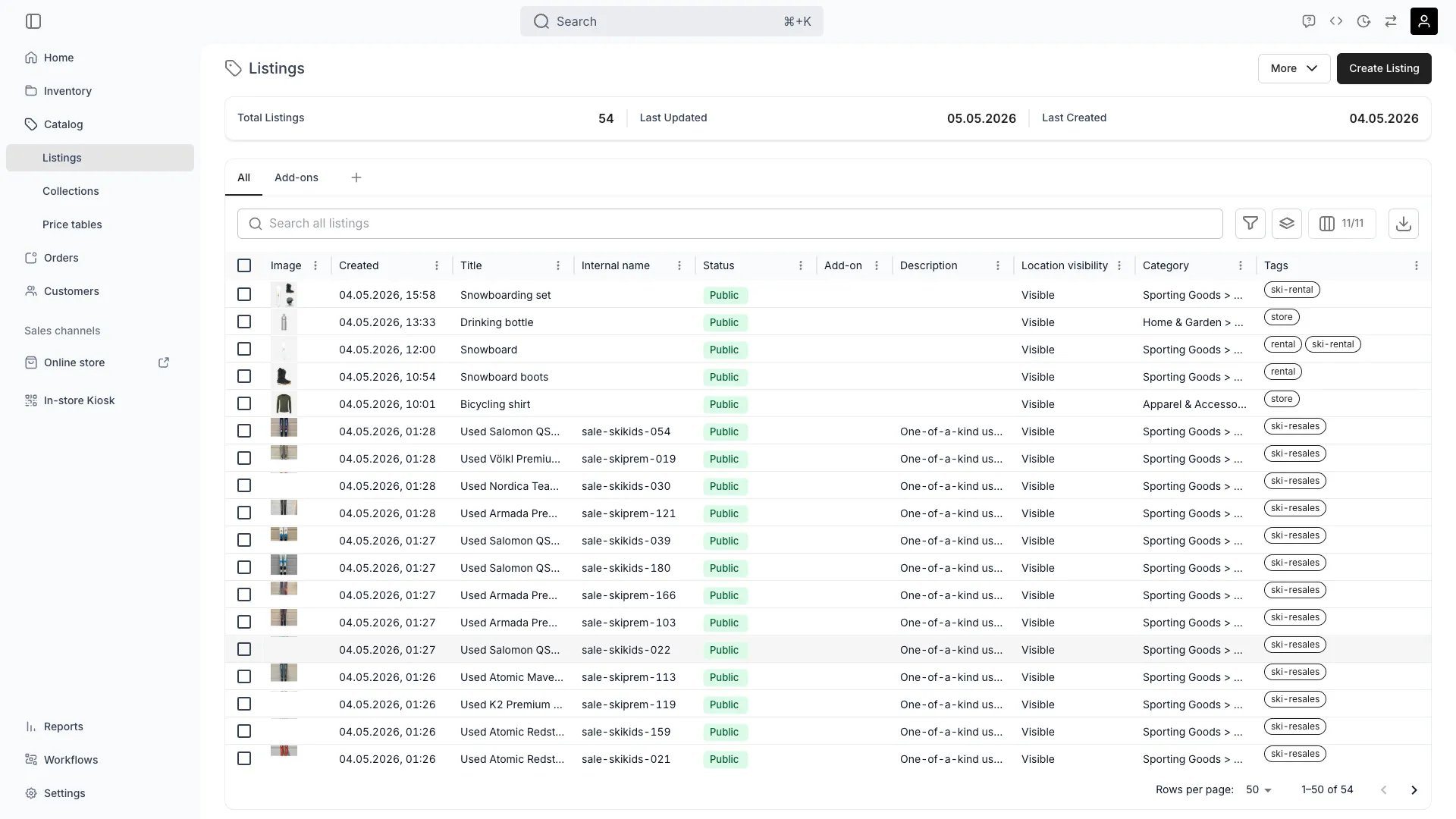 This view can look different dependent on your user role.
See [Visibility & Permissions](#visibility-and-permissions) for details.
catalog/listings
## Primary Purpose
The Listings view is the table of every listing in your catalog — the customer-facing product offerings. From here you can browse, search, filter, create, and manage listings.
Start from scratch, duplicate an existing listing, or use a [listing template](/docs/settings/listing-templates).
Select multiple listings to publish, archive, change collections, or update pricing in bulk.
Search across listing names, SKUs, and attributes. Filter by collection, status, sales channel, or any custom attribute.
Save column layouts, filters, and sort orders as named views for quick switching between common workflows.
## Related Concepts
A [Listing](/docs/concepts/catalog/listings) is the customer-facing product offering. A [SKU](/docs/concepts/inventory/skus) is the internal product definition. One SKU can power multiple listings (e.g. a rental version and a resale version of the same product).
Group listings using manual or smart [Collections](/docs/catalog/collections/overview) for storefront navigation and merchandising.
Configure base pricing per listing, or apply shared pricing logic via [Price Tables](/docs/catalog/price-tables).
## Visibility and Permissions
Access to this view is controlled by your user role.
| Feature | Admin | Manager | Member |
| --------------- | :---: | :-----: | :----: |
| View listings | ✓ | ✓ | ✓ |
| Create listings | ✓ | ✓ | ✗ |
| Bulk actions | ✓ | ✓ | ✗ |
| Resource | Admin | Manager | Member |
| ------------------- | ------ | ------- | ------ |
| Listings management | Manage | Edit | View |