> ## Documentation Index
> Fetch the complete documentation index at: https://www.twicecommerce.com/docs/llms.txt
> Use this file to discover all available pages before exploring further.
# Listing marketing and SEO settings
> Marketing settings help you make your listings more discoverable and engaging
## Search engine listing
Use these fields to optimize how your listing appears in search results.
| **Field** | **Description** |
| --------------------------- | -------------------------------------------------------------------------------------------------------------------------------------------------------------------------------------------------------------------------------------------------------------------------------- |
| Page title | The main title shown in browser tabs and search results. Keep it short and descriptive. |
| Meta description | A short summary (around 150–160 characters) explaining what the product is and why it matters. |
| URL slugs | One or more URL slugs for this listing. The first slug is the **primary** — used in storefront links and search-engine canonical tags. Additional slugs also resolve to the listing and point search engines to the primary. Auto-generated from the listing name on first save. |
| Alt text for product images | Helps search engines understand your images. Describe the product shown (e.g. “Blue atomic skis for rental”). |
| Keywords | Add 3–5 relevant keywords that describe the listing. These are used for search optimization and AI discovery. |
Focus your SEO around intent-based phrases — how people search (“ski rentals in Denver”) rather than just product names (“Pro Skis”).
### Canonical URLs
The storefront automatically generates `` and `og:url` meta tags for each listing page. If you have a [primary custom domain](/docs/settings/domains) configured, canonical URLs point to that domain. When a listing is reachable at an alternate slug or the TWICE subdomain, the canonical tag directs search engines to the primary URL, preventing duplicate-content issues.
### URL slugs
Each listing can have multiple URL slugs. The first slug is the **primary** slug — the canonical URL for the listing on the storefront (e.g. `/products/blue-alpine-skis`). Any additional slugs are **alternates** that also open the listing but carry a `rel=canonical` tag pointing search engines to the primary.
Slugs are normalized automatically: lowercased, Latin accents folded to ASCII (e.g. `ä` becomes `a`), whitespace replaced with hyphens, and capped at 120 characters. Non-Latin scripts (e.g. Chinese, Cyrillic) pass through unchanged. UUID-shaped values are rejected because they would conflict with internal resource IDs.
When you create a listing without a slug, one is auto-generated from the listing name. If the generated slug is already taken by another listing in the same workspace, a short random suffix is appended.
A listing without any slugs uses its UUID in the storefront URL. Adding a slug gives you a human-readable, shareable URL.
## Social share
Control how your listing appears when shared on social platforms.
These settings define the title, description, and preview image used in link previews.
| **Field** | **Description** |
| ----------------- | --------------------------------------------------------------------------------------------------- |
| Share title | The headline shown when someone shares the link. Often matches the product name or a short tagline. |
| Share description | A short, engaging line that encourages clicks. Think of it as a micro-pitch. |
| Share image | The preview image used in the social post. Choose something visual and high contrast. |
Social share content is automatically used when links are shared to platforms like Facebook, X, or LinkedIn.
## Agentic Commerce optimization
Agentic Commerce means making your listings **readable and actionable for AI systems** — enabling agents to understand what’s offered and when it’s available.
Here’s how to optimize for that:
* **Keep attributes structured.** Use clear naming for specifications, variants, and price details so agents can interpret them correctly.
* **Describe value in plain language.** Meta descriptions and titles should clearly explain what the product or service is.
* **Use relevant keywords.** These improve both human and AI search performance.
* **Maintain accurate inventory and pricing.** Agents rely on real-time availability and consistent data structure to make recommendations or transactions.
Well-structured listings are easier for search engines and AI agents to index, recommend, and sell automatically.
## Summary
Marketing settings define how your listing is seen by both **people and machines**.
They help your products:
* Rank higher in search results.
* Look better when shared socially.
* Stay discoverable and actionable in AI-powered commerce.
Together, these tools make your listings more visible, appealing, and future-ready.
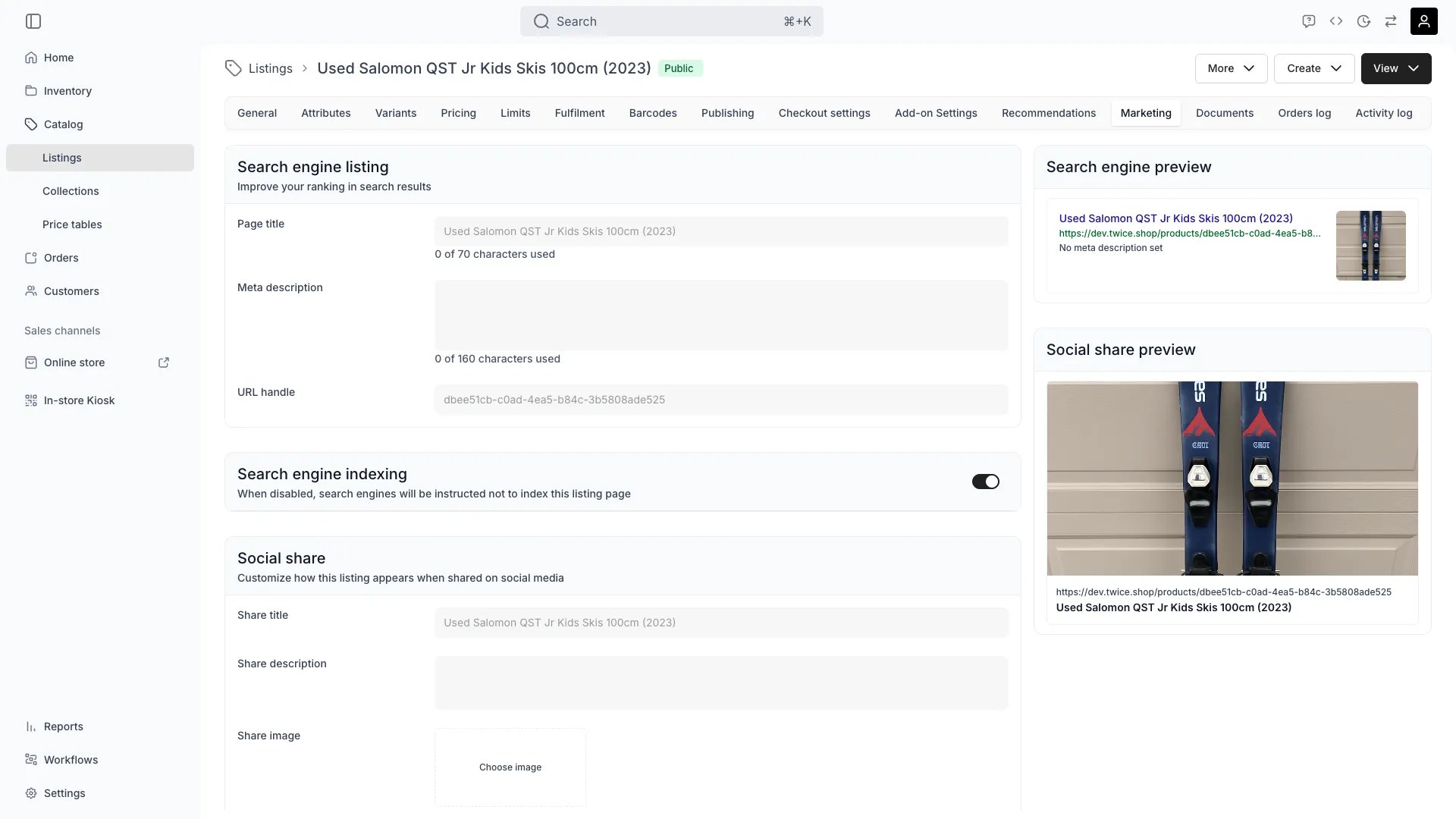 ## Search engine listing
Use these fields to optimize how your listing appears in search results.
| **Field** | **Description** |
| --------------------------- | -------------------------------------------------------------------------------------------------------------------------------------------------------------------------------------------------------------------------------------------------------------------------------- |
| Page title | The main title shown in browser tabs and search results. Keep it short and descriptive. |
| Meta description | A short summary (around 150–160 characters) explaining what the product is and why it matters. |
| URL slugs | One or more URL slugs for this listing. The first slug is the **primary** — used in storefront links and search-engine canonical tags. Additional slugs also resolve to the listing and point search engines to the primary. Auto-generated from the listing name on first save. |
| Alt text for product images | Helps search engines understand your images. Describe the product shown (e.g. “Blue atomic skis for rental”). |
| Keywords | Add 3–5 relevant keywords that describe the listing. These are used for search optimization and AI discovery. |
## Search engine listing
Use these fields to optimize how your listing appears in search results.
| **Field** | **Description** |
| --------------------------- | -------------------------------------------------------------------------------------------------------------------------------------------------------------------------------------------------------------------------------------------------------------------------------- |
| Page title | The main title shown in browser tabs and search results. Keep it short and descriptive. |
| Meta description | A short summary (around 150–160 characters) explaining what the product is and why it matters. |
| URL slugs | One or more URL slugs for this listing. The first slug is the **primary** — used in storefront links and search-engine canonical tags. Additional slugs also resolve to the listing and point search engines to the primary. Auto-generated from the listing name on first save. |
| Alt text for product images | Helps search engines understand your images. Describe the product shown (e.g. “Blue atomic skis for rental”). |
| Keywords | Add 3–5 relevant keywords that describe the listing. These are used for search optimization and AI discovery. |