> ## Documentation Index
> Fetch the complete documentation index at: https://www.twicecommerce.com/docs/llms.txt
> Use this file to discover all available pages before exploring further.
# Listing - Limits
> Set minimum and maximum booking durations, the duration increment, and the order deadline for a listing
export const userRoleDefinition = "What a user can see and do. Each user has one built-in system role — Owner, Admin, Manager, or Member — and can also be assigned any number of custom roles you create with specific permissions. Effective access is the combination of all their roles.";
 This view can look different dependent on your user role.
See [Visibility & Permissions](#visibility-and-permissions) for details.
## Primary Purpose
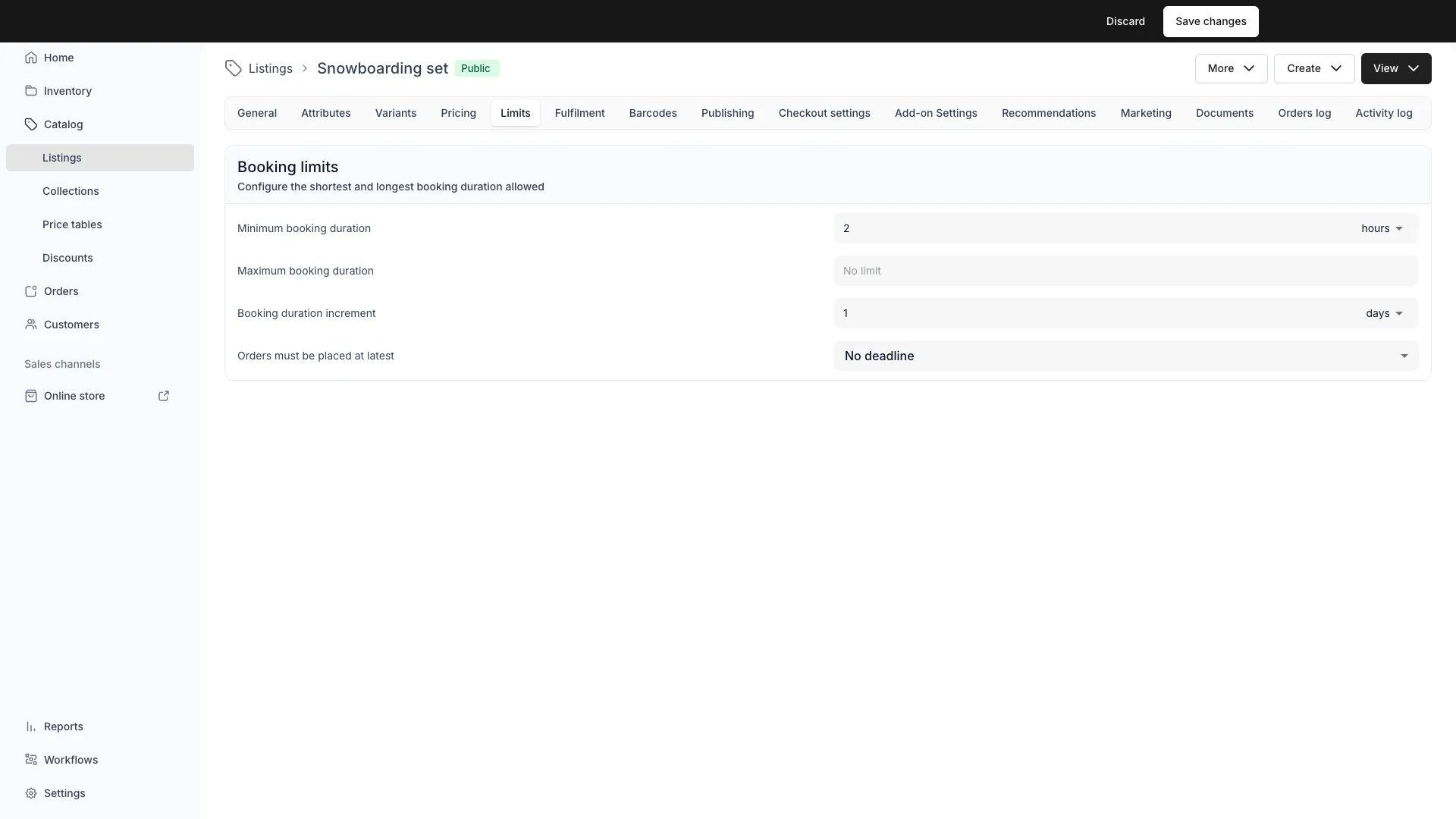
The Limits tab controls the booking constraints for this listing. Four settings are available: minimum booking duration (`minBookingDuration`), maximum booking duration (`maxBookingDuration`), booking duration increment (`bookingDurationIncrement`), and order deadline (`orderDeadline`).
Restrict how short or long a rental can be — for example, 1 day minimum, 30 days maximum.
On the storefront, duration options that fall outside the configured minimum or maximum are hidden — customers only see durations they can book. The displayed "from" price reflects the cheapest bookable duration within the allowed range, not the cheapest duration on the price table overall.
Duration limits apply to fixed booking durations (e.g. "1 day", "1 week"). Rate-based (dynamic) pricing rows are unaffected by duration limits — they price any span the customer selects, and the checkout enforces the min/max at the time of purchase.
Constrain selectable booking durations to whole multiples of a chosen unit. For example, a 1-week increment with a weekly rate means customers can book 1, 2, 3 whole weeks — never a partial week.
Applies to **rate-based (dynamic) bookings only**. Fixed-duration pricing rows derive their duration from the row itself, so the increment has no effect on them.
The increment composes independently with min/max duration — selectable durations are those that are both a whole multiple of the increment **and** within the configured min/max range.
On the storefront, the return-date and return-time pickers only offer increment-aligned options. On the server, the selected duration is validated at both cart-add and order creation — a duration that is not a whole multiple of the increment returns a 400 error.
Set a cutoff for when customers must place an order relative to the booking start time. Two modes are available:
**A set time before** — a fixed offset before the booking starts. For example, "2 hours before start" means a booking starting at 14:00 must be ordered by 12:00. Configure a value and unit (minutes, hours, or days).
**By time of day** — a wall-clock cutoff on an earlier day. For example, "1 day before, by 18:00" means a booking starting on Wednesday must be ordered by 18:00 on Tuesday. The cutoff resolves in the service location's timezone.
After the deadline passes, the storefront marks those start times as unavailable. Customers with the item already in their cart see a notice that the order deadline has passed. Admin users are exempt — staff can create orders past the deadline.
Order deadlines apply to bookings and subscriptions only. Sale purchases have no start time, so the deadline does not apply.
## Related Concepts
Limits interact with [Pricing](/docs/catalog/listings/pricing) — duration limits and the increment constrain which price-table durations customers can select.
See [Checkout Settings](/docs/catalog/listings/checkout-settings) for what's enforced at the moment of purchase.
Order deadlines feed into the [availability](/docs/concepts/catalog/availability) evaluation — start times past the deadline are marked unavailable on the storefront calendar and rejected at checkout.
## Visibility and Permissions
Access to this view is controlled by your user role.
| Feature | Admin | Manager | Member |
| ----------- | :---: | :-----: | :----: |
| View Limits | ✓ | ✓ | ✓ |
| Edit Limits | ✓ | ✓ | ✗ |