> ## Documentation Index
> Fetch the complete documentation index at: https://www.twicecommerce.com/docs/llms.txt
> Use this file to discover all available pages before exploring further.
# Fulfillment
> Fulfillment settings define what stock items need to be reserved or collected when this listing is sold or booked.
Fulfillment settings define what stock items need to be **reserved** or **collected** when this listing is sold or booked.
If the listing doesn't use inventory (like a service, tour, or digital product), you can simply **leave these settings empty**.
If the listing does use inventory, this is where you **connect the listing to the physical stock** it depends on.
## **Stock items**
Under **Stock items**, you define what physical items are connected to this listing.
You can:
* Select items directly by **searching for them by name**, or
* **Describe them using matching rules** — for example, find items by SKU, brand, or other attributes.
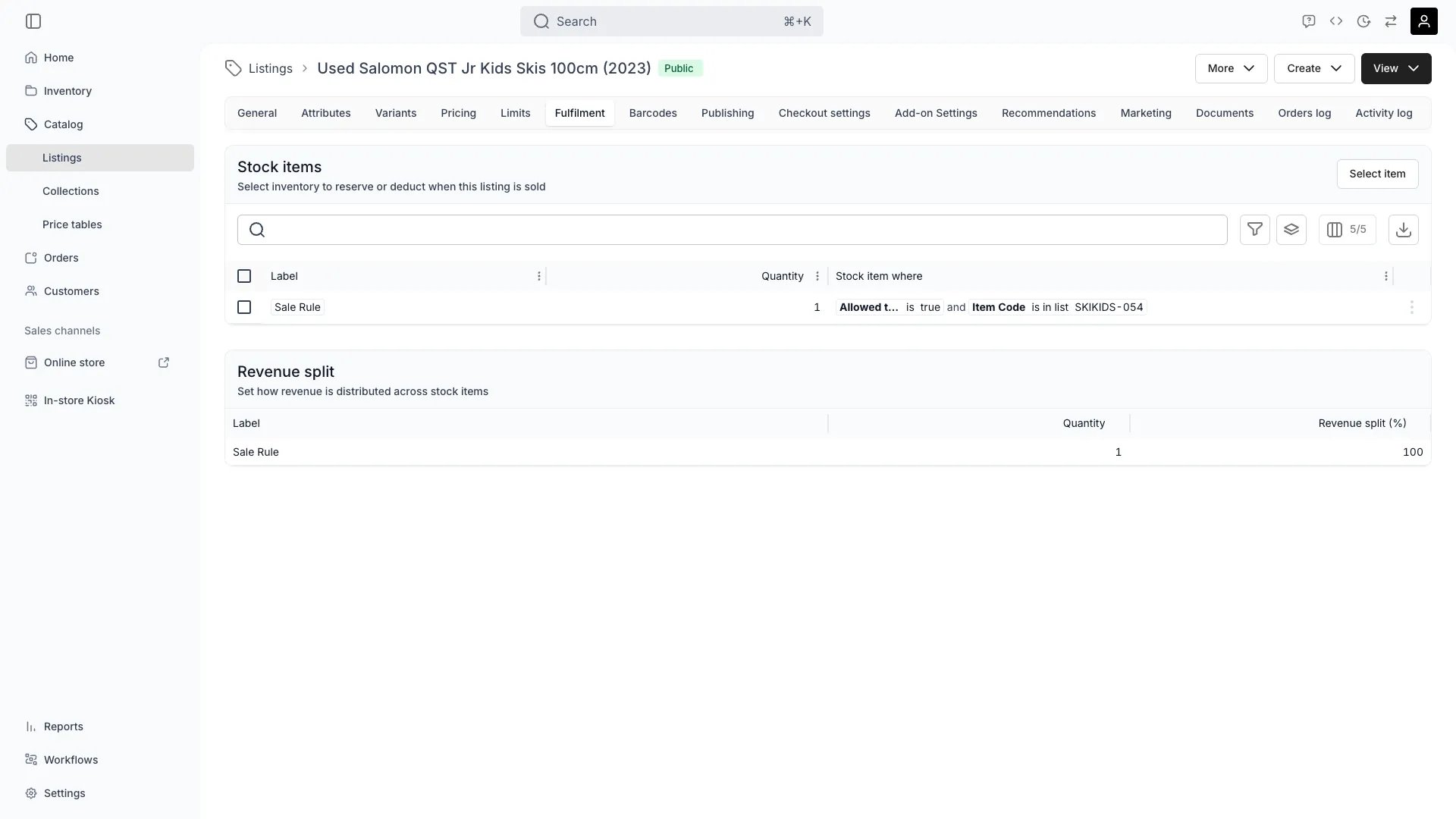 Your fulfillment configuration can also easily define:
* Multiple units of the same article (e.g. *6 chairs*), and
* Combine several items (e.g. *6 chairs + 1 table*).
This ensures your available stock updates automatically whenever the listing is booked or purchased.
## **Variant-specific rules**
If your listing has variants, you can define **extra inventory rules** for each variant.
Each variant starts with the same base stock item(s), but you can add **specific conditions** — for example, linking *Size M* to one stock item and *Size L* to another.
This helps you handle variant-level stock tracking without creating separate listings or complex rules.
## **Inventory attributes as fulfillment references**
When defining the matching conditions for stock items, **all attributes from your inventory are available for filtering** — including both your own custom fields and system-generated ones such as *age*, *usage times*, *costs*, or *income*.
This gives you flexibility when matching listings to the right inventory items, allowing precise control over which stock is used during fulfillment.
**Example: Prioritizing items that have reached a certain lifecycle or profitability threshold**
```
A stock item where...
SKU is ABC123
and
Age is greater than 6 months
and
(Income - Expenses) is greater than 0
```
This rule ensures that only items with the SKU ABC123 that are **at least six months old** and have **positive net income** are considered for fulfillment.
## **Summary**
Fulfillment settings let you define **what inventory items are used** when a listing is sold or booked.
Leave it empty for non-stock listings, or link it to your inventory for automatic stock tracking and variant-level control.
Your fulfillment configuration can also easily define:
* Multiple units of the same article (e.g. *6 chairs*), and
* Combine several items (e.g. *6 chairs + 1 table*).
This ensures your available stock updates automatically whenever the listing is booked or purchased.
## **Variant-specific rules**
If your listing has variants, you can define **extra inventory rules** for each variant.
Each variant starts with the same base stock item(s), but you can add **specific conditions** — for example, linking *Size M* to one stock item and *Size L* to another.
This helps you handle variant-level stock tracking without creating separate listings or complex rules.
## **Inventory attributes as fulfillment references**
When defining the matching conditions for stock items, **all attributes from your inventory are available for filtering** — including both your own custom fields and system-generated ones such as *age*, *usage times*, *costs*, or *income*.
This gives you flexibility when matching listings to the right inventory items, allowing precise control over which stock is used during fulfillment.
**Example: Prioritizing items that have reached a certain lifecycle or profitability threshold**
```
A stock item where...
SKU is ABC123
and
Age is greater than 6 months
and
(Income - Expenses) is greater than 0
```
This rule ensures that only items with the SKU ABC123 that are **at least six months old** and have **positive net income** are considered for fulfillment.
## **Summary**
Fulfillment settings let you define **what inventory items are used** when a listing is sold or booked.
Leave it empty for non-stock listings, or link it to your inventory for automatic stock tracking and variant-level control.