> ## Documentation Index
> Fetch the complete documentation index at: https://www.twicecommerce.com/docs/llms.txt
> Use this file to discover all available pages before exploring further.
# Discount Codes
> Create and manage discount codes that customers redeem at checkout or operators apply to orders.
export const userRoleDefinition = "What a user can see and do. Each user has one built-in system role — Owner, Admin, Manager, or Member — and can also be assigned any number of custom roles you create with specific permissions. Effective access is the combination of all their roles.";
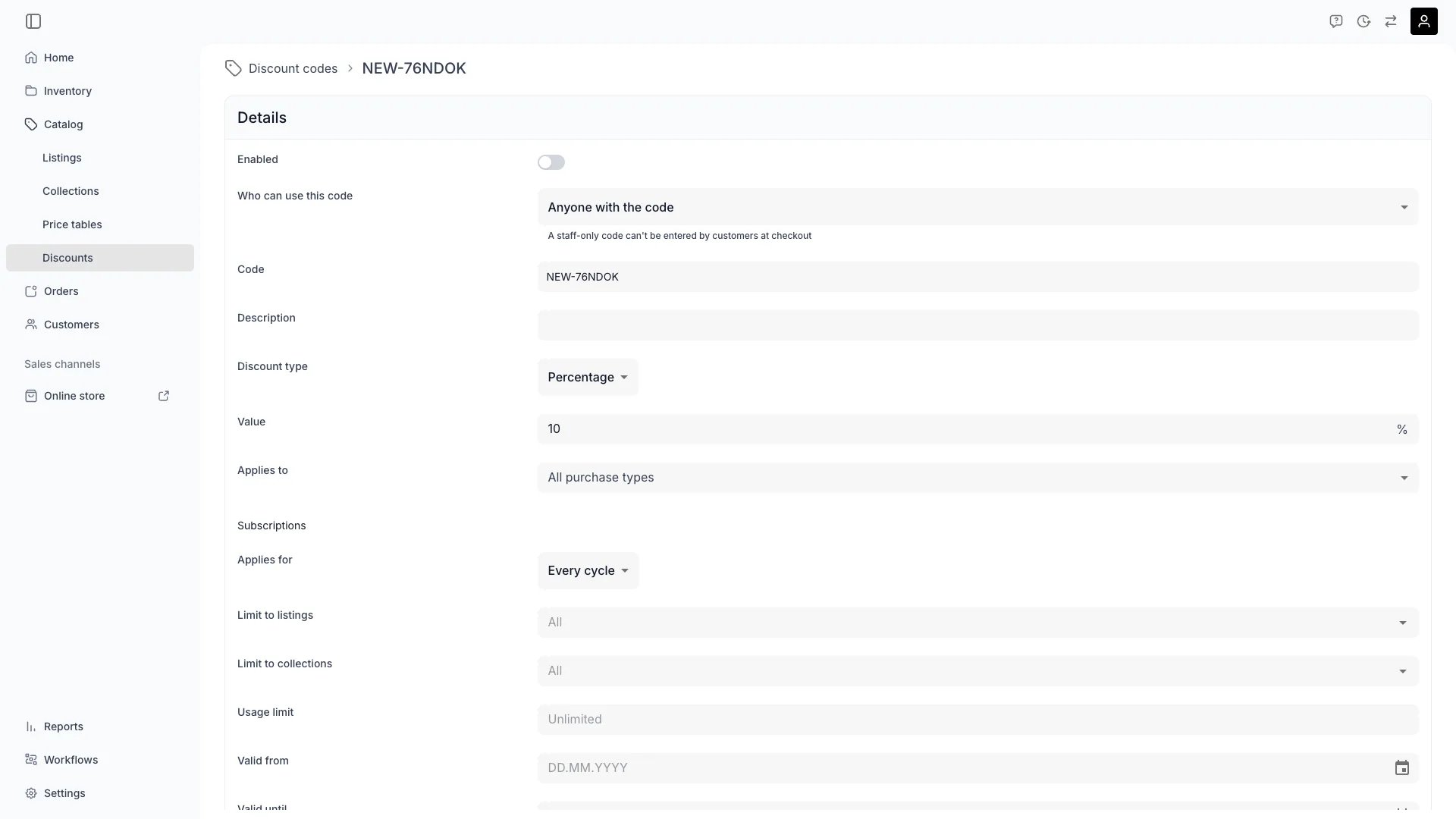 Catalog → Discount Codes
## Primary Purpose
The Discount Codes view lists all codes in your workspace. From here you create, edit, enable, disable, and delete codes.
Click **Create discount code** to add a new code. The code opens in the editor where you configure its type, value, restrictions, and validity.
The table shows each code's usage count against its limit (or unlimited). Click a code to see its full configuration.
Toggle a code's **Enabled** status from the detail view. Disabled codes are rejected at checkout.
Search by code name, or filter by enabled status, discount type, validity dates, and usage count. Sort by code, value, usage count, valid-to date, or creation date.
Delete a code from the detail view or select multiple codes in the table and delete in bulk. Deleting a code does not affect orders that already used it — the code string and allocations are snapshotted on the order.
## Discount code settings
Configure these fields when creating or editing a discount code.
| Setting | Description |
| -------------------------------------- | ---------------------------------------------------------------------------------------------------------------------------------------------------------------------------------------------------------------------------------------------------------------------------------------------------------------------- |
| **Code** | The string customers enter. Letters (including accented and non-Latin characters), digits, dashes, and underscores only (1–64 characters). Case-insensitive — stored as uppercase. |
| **Description** | Optional internal notes about the code's purpose. Not visible to customers. |
| **Enabled** | Whether the code is active. Disabled codes are rejected at checkout and cannot be applied to orders. |
| **Access** | Who can use this code. **Anyone with the code** (default) — customers, staff, and integrations can all redeem it. **Only staff and integrations** — customers who enter the code at checkout are rejected; staff and integrations can still apply it. Internal codes are marked with a "Staff only" chip in the table. |
| **Discount type** | **Percentage** (0–100 %), **Fixed per order** (flat amount spread across eligible items), or **Fixed per item** (flat amount off each eligible item). |
| **Value** | The discount amount — a whole percentage or a currency amount depending on the type. |
| **Applies to** | Restrict to specific purchase types: bookings, sales, subscriptions. Leave empty to apply to all. |
| **Limit to listings** | Restrict to specific listings. Leave empty to apply to all. |
| **Limit to collections** | Restrict to items in specific collections. Leave empty to apply to all. |
| **Usage limit** | Maximum number of times the code can be used. Leave empty for unlimited. |
| **Valid from / Valid until** | Date window when the code is redeemable. Outside this window the code is rejected. |
| **Start date from / Start date until** | Restrict to items whose start date (booking start, subscription start) falls within this window. |
## Creating a discount code
1. Navigate to **Catalog → Discount Codes**.
2. Click **Create discount code**.
3. Set the **Code** string — pick something memorable for customers.
4. Choose the **Discount type** and enter the **Value**.
5. Optionally add restrictions (purchase types, listings, collections) and validity windows.
6. Set a **Usage limit** if the code should expire after a number of uses.
7. Toggle **Enabled** on when the code is ready for customers.
8. Save.
## Related Concepts
Discount codes reduce the price of eligible items after the base price is calculated from Price Tables. Codes can be restricted by purchase type, listing, collection, and date windows.
Read more: [Discount Codes concept](/docs/concepts/catalog/discount-codes)
Price Tables define the base price for a listing. Discount codes apply on top of Price Table pricing.
Read more: [Price Tables](/docs/concepts/catalog/price-tables)
Applied codes appear on the order with their per-item allocations. Operators can add or remove codes from the order detail page.
Read more: [Order Line Items](/docs/orders/order-tabs/line-items)
## Visibility and Permissions
Access to this view is controlled by your user role.
| Feature | Admin | Manager | Member |
| ---------------------- | :---: | :-----: | :----: |
| View discount codes | ✓ | ✓ | ✓ |
| Create / edit / delete | ✓ | ✓ | ✗ |
Catalog → Discount Codes
## Primary Purpose
The Discount Codes view lists all codes in your workspace. From here you create, edit, enable, disable, and delete codes.
Click **Create discount code** to add a new code. The code opens in the editor where you configure its type, value, restrictions, and validity.
The table shows each code's usage count against its limit (or unlimited). Click a code to see its full configuration.
Toggle a code's **Enabled** status from the detail view. Disabled codes are rejected at checkout.
Search by code name, or filter by enabled status, discount type, validity dates, and usage count. Sort by code, value, usage count, valid-to date, or creation date.
Delete a code from the detail view or select multiple codes in the table and delete in bulk. Deleting a code does not affect orders that already used it — the code string and allocations are snapshotted on the order.
## Discount code settings
Configure these fields when creating or editing a discount code.
| Setting | Description |
| -------------------------------------- | ---------------------------------------------------------------------------------------------------------------------------------------------------------------------------------------------------------------------------------------------------------------------------------------------------------------------- |
| **Code** | The string customers enter. Letters (including accented and non-Latin characters), digits, dashes, and underscores only (1–64 characters). Case-insensitive — stored as uppercase. |
| **Description** | Optional internal notes about the code's purpose. Not visible to customers. |
| **Enabled** | Whether the code is active. Disabled codes are rejected at checkout and cannot be applied to orders. |
| **Access** | Who can use this code. **Anyone with the code** (default) — customers, staff, and integrations can all redeem it. **Only staff and integrations** — customers who enter the code at checkout are rejected; staff and integrations can still apply it. Internal codes are marked with a "Staff only" chip in the table. |
| **Discount type** | **Percentage** (0–100 %), **Fixed per order** (flat amount spread across eligible items), or **Fixed per item** (flat amount off each eligible item). |
| **Value** | The discount amount — a whole percentage or a currency amount depending on the type. |
| **Applies to** | Restrict to specific purchase types: bookings, sales, subscriptions. Leave empty to apply to all. |
| **Limit to listings** | Restrict to specific listings. Leave empty to apply to all. |
| **Limit to collections** | Restrict to items in specific collections. Leave empty to apply to all. |
| **Usage limit** | Maximum number of times the code can be used. Leave empty for unlimited. |
| **Valid from / Valid until** | Date window when the code is redeemable. Outside this window the code is rejected. |
| **Start date from / Start date until** | Restrict to items whose start date (booking start, subscription start) falls within this window. |
## Creating a discount code
1. Navigate to **Catalog → Discount Codes**.
2. Click **Create discount code**.
3. Set the **Code** string — pick something memorable for customers.
4. Choose the **Discount type** and enter the **Value**.
5. Optionally add restrictions (purchase types, listings, collections) and validity windows.
6. Set a **Usage limit** if the code should expire after a number of uses.
7. Toggle **Enabled** on when the code is ready for customers.
8. Save.
## Related Concepts
Discount codes reduce the price of eligible items after the base price is calculated from Price Tables. Codes can be restricted by purchase type, listing, collection, and date windows.
Read more: [Discount Codes concept](/docs/concepts/catalog/discount-codes)
Price Tables define the base price for a listing. Discount codes apply on top of Price Table pricing.
Read more: [Price Tables](/docs/concepts/catalog/price-tables)
Applied codes appear on the order with their per-item allocations. Operators can add or remove codes from the order detail page.
Read more: [Order Line Items](/docs/orders/order-tabs/line-items)
## Visibility and Permissions
Access to this view is controlled by your user role.
| Feature | Admin | Manager | Member |
| ---------------------- | :---: | :-----: | :----: |
| View discount codes | ✓ | ✓ | ✓ |
| Create / edit / delete | ✓ | ✓ | ✗ |