> ## Documentation Index
> Fetch the complete documentation index at: https://www.twicecommerce.com/docs/llms.txt
> Use this file to discover all available pages before exploring further.
# Collection - Publishing
> Choose which sales channels show this collection — the admin order browser, the online store, both, or neither
export const viewAccessDefinition = "The view operation: read a record without changing it.";
export const manageAccessDefinition = "The manage operation: update an existing record. Creating and deleting are separate operations.";
export const deleteAccessDefinition = "The delete operation: remove a record. Most areas archive instead of deleting.";
export const createAccessDefinition = "The create operation: add a new record. Updating an existing one is the manage operation.";
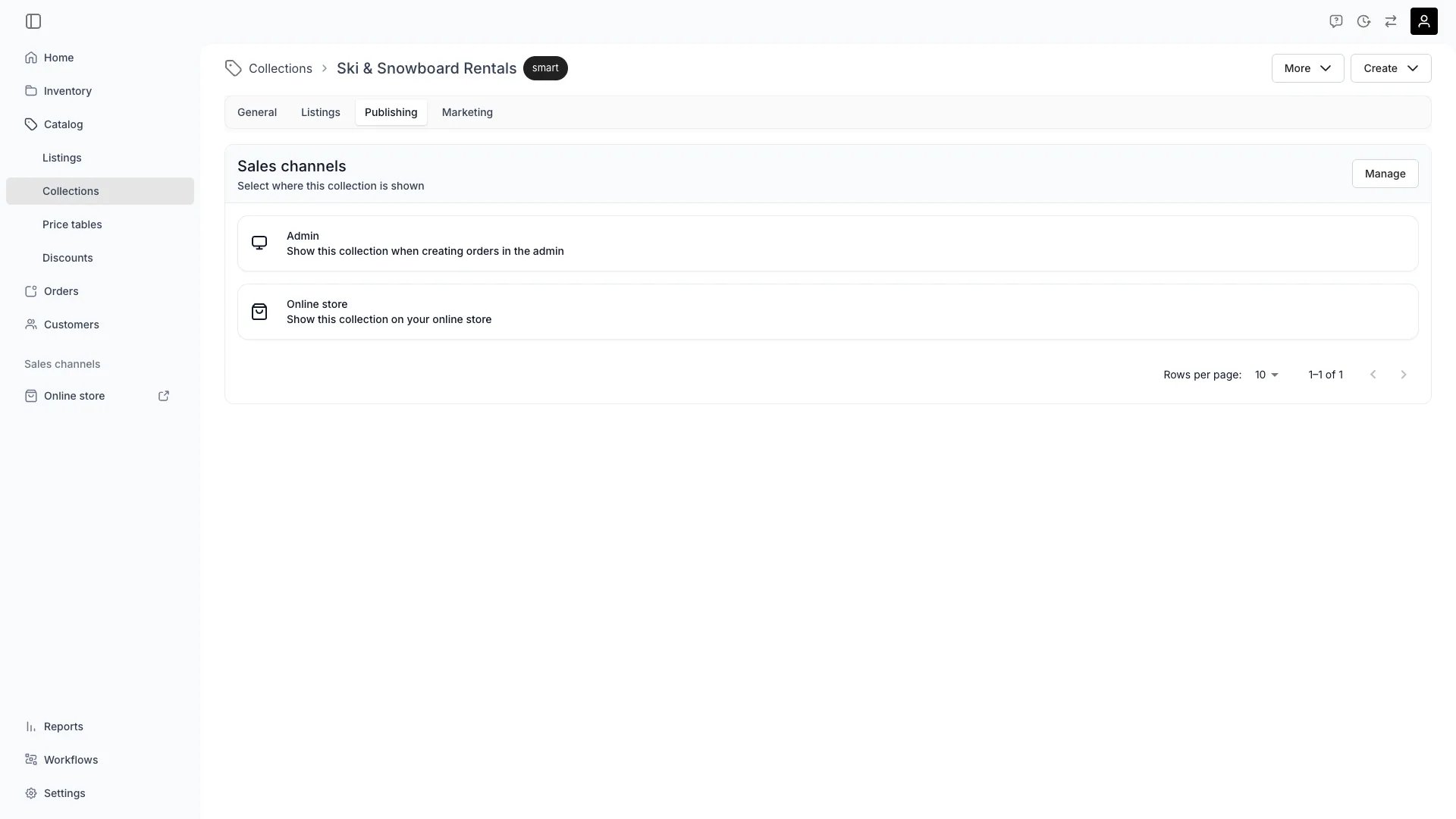 The Publishing tab decides **where a collection is shown**: in the admin when you create orders, on your online store, both, or neither. A new collection is published to both channels.
Unpublishing takes the collection off a channel and changes nothing else. The collection keeps its listings, stays editable in the admin, and returns to the channel the moment you switch it back on — so a seasonal collection goes off the online store for the off-season instead of being archived.
## Sales channels
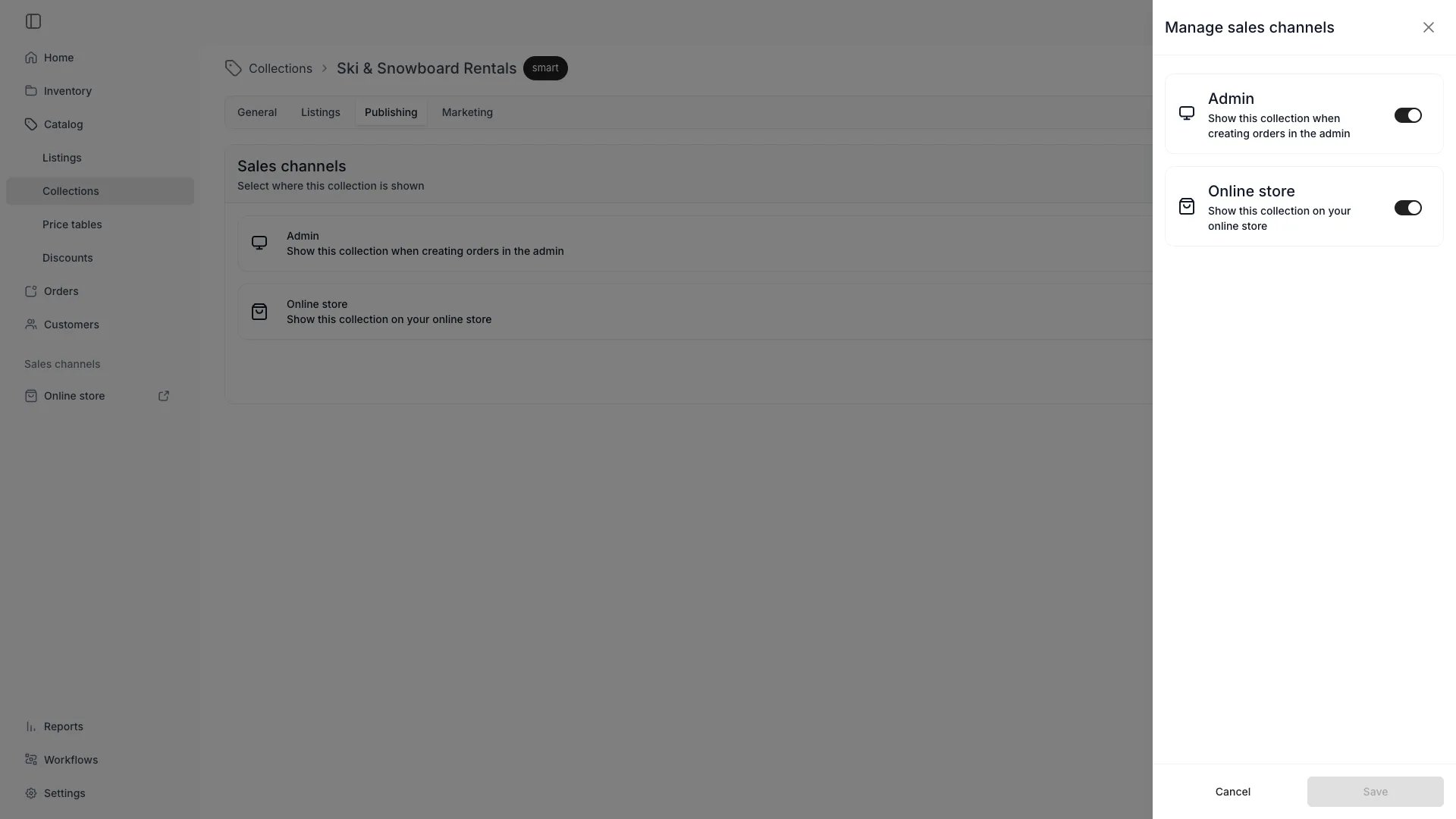
The **Sales channels** card lists the channels the collection is currently shown on. Select **Manage** to open the drawer, switch each channel on or off, and **Save**.
| Channel | Field | What it controls |
| ---------------- | -------------------- | --------------------------------------------------------------------- |
| **Admin** | `salesChannelAdmin` | Whether the collection is offered when you create orders in the admin |
| **Online store** | `salesChannelOnline` | Whether the collection is shown on your online store |
Both fields are `true` on a collection you create, in the admin and over the API alike, so a collection is published everywhere until you decide otherwise.
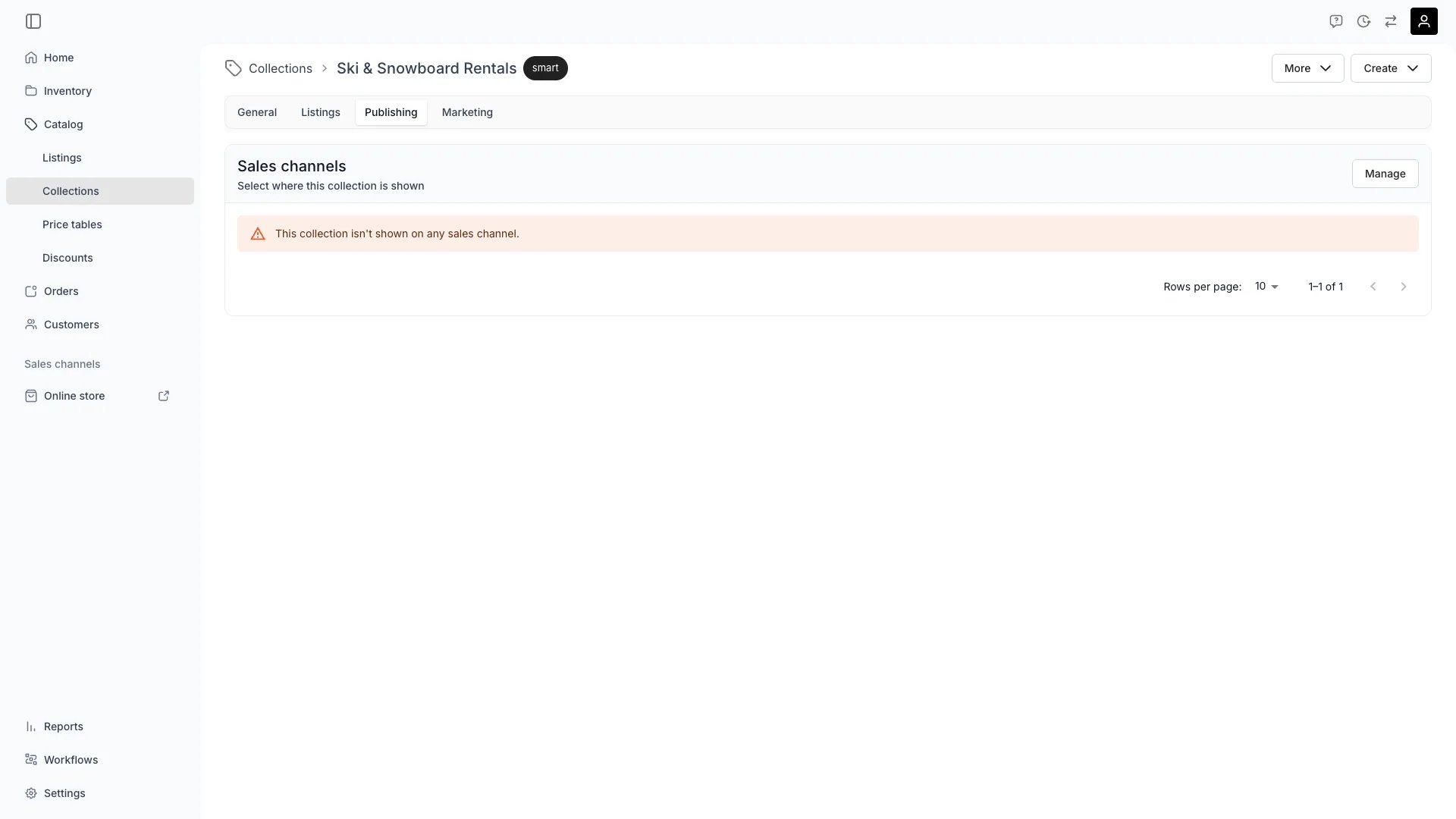
The card lists only the channels that are on. Switch both off and it shows a warning in their place: "This collection isn't shown on any sales channel."
The Publishing tab decides **where a collection is shown**: in the admin when you create orders, on your online store, both, or neither. A new collection is published to both channels.
Unpublishing takes the collection off a channel and changes nothing else. The collection keeps its listings, stays editable in the admin, and returns to the channel the moment you switch it back on — so a seasonal collection goes off the online store for the off-season instead of being archived.
## Sales channels
The **Sales channels** card lists the channels the collection is currently shown on. Select **Manage** to open the drawer, switch each channel on or off, and **Save**.
| Channel | Field | What it controls |
| ---------------- | -------------------- | --------------------------------------------------------------------- |
| **Admin** | `salesChannelAdmin` | Whether the collection is offered when you create orders in the admin |
| **Online store** | `salesChannelOnline` | Whether the collection is shown on your online store |
Both fields are `true` on a collection you create, in the admin and over the API alike, so a collection is published everywhere until you decide otherwise.
The card lists only the channels that are on. Switch both off and it shows a warning in their place: "This collection isn't shown on any sales channel."
 Collections carry these two channels only. There is no in-store channel for a collection, unlike a listing, which also sells through check-in.
## What unpublishing hides
Unpublishing hides **the collection, not its listings**. Every listing keeps its own status and its own sales channels, stays orderable, and still appears in the storefront's full listing grid — customers reach it by browsing or searching instead of through the collection.
Off the **online store**, the collection disappears from:
* the collections list and its own collection page, which returns a `404`
* the header navigation, the home page's collection list, the featured collection block, and the footer
* the collection dropdown in the storefront search bar
* listings-by-collection queries — asking for the listings of an unpublished collection returns an empty result
Off the **admin**, the collection disappears from the **Add listing** browser in the order drawer. The collections table and the collection page still show it, so it stays editable while it is off the channel.
The storefront editor is the deliberate exception: its collection pickers keep offering every collection, and the online store leaves an unpublished one out when the page renders. A collection you unpublish while it is selected in a home page block stays selected and stops rendering.
## Unpublishing is not archiving
The two are separate axes and both are reversible, but they answer different questions.
| | Unpublish a channel | Archive |
| --------------- | ----------------------------- | ----------------------------------------- |
| Scope | One channel at a time | Every channel and the admin lists at once |
| In the admin | Still listed and editable | Hidden from the collections table |
| Reverse it with | Switching the channel back on | Unarchive |
Take a collection off the online store for a season by unpublishing it from that channel. Archive it when you are done with it altogether. Read more: [Archiving and deletion](/docs/concepts/repeating-patterns/archiving-and-deletion).
## Via the API
Collections are the `collections` resource. Authenticate with the `X-API-KEY` header (see [API Keys](/docs/concepts/integrations/api-keys)) and call:
* `GET /v1/admin/collections` — list collections, each carrying `salesChannelAdmin` and `salesChannelOnline`
* `PATCH /v1/admin/collections/{id}` — update a collection, including the two sales-channel fields
```bash cURL theme={null}
curl -X PATCH "https://server.twicecommerce.com/v1/admin/collections/9c1f7b60-3d2a-4a51-8e4c-1b7d5a0f6e23" \
-H "X-API-KEY: {key}" \
-H "Content-Type: application/json" \
-d '{"salesChannelOnline": false}'
```
```json Response theme={null}
{
"id": "9c1f7b60-3d2a-4a51-8e4c-1b7d5a0f6e23",
"title": "Winter gear",
"description": "Boots, jackets and skis for the cold months",
"type": "manual",
"tagMatchType": "any",
"slug": "winter-gear",
"noindex": false,
"archivedAt": null,
"salesChannelAdmin": true,
"salesChannelOnline": false
}
```
Both fields are optional on create and on update: omit one and it keeps its current value, omit both on create and the collection is published to both channels.
`/internal/collections` URLs still resolve for existing integrations. New integrations use the `/v1/admin` paths above.
See the [API reference](https://server.twicecommerce.com/api) for the full request and response schemas — it is generated from the live API, so it always reflects the current fields.
## Visibility and Permissions
This tab is gated by `catalog:collection`, in the four operations — view, create, manage and delete.
All four system roles — Owner, Admin, Manager and Member — hold every operation on this.
Publishing has no permission of its own: it sits under the same gate as the General tab, so a custom role that can edit a collection can also publish it. A role without `catalog:collection:view` sees no Publishing tab, and an update to the sales-channel fields from a role without `catalog:collection:manage` is refused with a `403`.
For what each operation means and the full role matrix, see [Users & Roles](/docs/settings/users-roles).
## Summary
* **Two channels** — Admin and Online store, both on when a collection is created.
* **The collection is what hides**, never its listings, and never the collection's own admin pages.
* **Both off** shows a warning, and the collection is shown nowhere.
* **Unpublishing is reversible and channel-by-channel** — archiving is the wider, all-at-once state.
## Related articles
The concept behind the tab — membership, channels and the collection page.
The same two channels on a listing, plus its store locations.
The other way to take a collection out of use, and how to undo it.
Where a published collection renders.
Collections carry these two channels only. There is no in-store channel for a collection, unlike a listing, which also sells through check-in.
## What unpublishing hides
Unpublishing hides **the collection, not its listings**. Every listing keeps its own status and its own sales channels, stays orderable, and still appears in the storefront's full listing grid — customers reach it by browsing or searching instead of through the collection.
Off the **online store**, the collection disappears from:
* the collections list and its own collection page, which returns a `404`
* the header navigation, the home page's collection list, the featured collection block, and the footer
* the collection dropdown in the storefront search bar
* listings-by-collection queries — asking for the listings of an unpublished collection returns an empty result
Off the **admin**, the collection disappears from the **Add listing** browser in the order drawer. The collections table and the collection page still show it, so it stays editable while it is off the channel.
The storefront editor is the deliberate exception: its collection pickers keep offering every collection, and the online store leaves an unpublished one out when the page renders. A collection you unpublish while it is selected in a home page block stays selected and stops rendering.
## Unpublishing is not archiving
The two are separate axes and both are reversible, but they answer different questions.
| | Unpublish a channel | Archive |
| --------------- | ----------------------------- | ----------------------------------------- |
| Scope | One channel at a time | Every channel and the admin lists at once |
| In the admin | Still listed and editable | Hidden from the collections table |
| Reverse it with | Switching the channel back on | Unarchive |
Take a collection off the online store for a season by unpublishing it from that channel. Archive it when you are done with it altogether. Read more: [Archiving and deletion](/docs/concepts/repeating-patterns/archiving-and-deletion).
## Via the API
Collections are the `collections` resource. Authenticate with the `X-API-KEY` header (see [API Keys](/docs/concepts/integrations/api-keys)) and call:
* `GET /v1/admin/collections` — list collections, each carrying `salesChannelAdmin` and `salesChannelOnline`
* `PATCH /v1/admin/collections/{id}` — update a collection, including the two sales-channel fields
```bash cURL theme={null}
curl -X PATCH "https://server.twicecommerce.com/v1/admin/collections/9c1f7b60-3d2a-4a51-8e4c-1b7d5a0f6e23" \
-H "X-API-KEY: {key}" \
-H "Content-Type: application/json" \
-d '{"salesChannelOnline": false}'
```
```json Response theme={null}
{
"id": "9c1f7b60-3d2a-4a51-8e4c-1b7d5a0f6e23",
"title": "Winter gear",
"description": "Boots, jackets and skis for the cold months",
"type": "manual",
"tagMatchType": "any",
"slug": "winter-gear",
"noindex": false,
"archivedAt": null,
"salesChannelAdmin": true,
"salesChannelOnline": false
}
```
Both fields are optional on create and on update: omit one and it keeps its current value, omit both on create and the collection is published to both channels.
`/internal/collections` URLs still resolve for existing integrations. New integrations use the `/v1/admin` paths above.
See the [API reference](https://server.twicecommerce.com/api) for the full request and response schemas — it is generated from the live API, so it always reflects the current fields.
## Visibility and Permissions
This tab is gated by `catalog:collection`, in the four operations — view, create, manage and delete.
All four system roles — Owner, Admin, Manager and Member — hold every operation on this.
Publishing has no permission of its own: it sits under the same gate as the General tab, so a custom role that can edit a collection can also publish it. A role without `catalog:collection:view` sees no Publishing tab, and an update to the sales-channel fields from a role without `catalog:collection:manage` is refused with a `403`.
For what each operation means and the full role matrix, see [Users & Roles](/docs/settings/users-roles).
## Summary
* **Two channels** — Admin and Online store, both on when a collection is created.
* **The collection is what hides**, never its listings, and never the collection's own admin pages.
* **Both off** shows a warning, and the collection is shown nowhere.
* **Unpublishing is reversible and channel-by-channel** — archiving is the wider, all-at-once state.
## Related articles
The concept behind the tab — membership, channels and the collection page.
The same two channels on a listing, plus its store locations.
The other way to take a collection out of use, and how to undo it.
Where a published collection renders.